
This scenario plays out daily at service businesses that still rely on scattered notes or paper forms. Field service reports solve it by creating one standardized record for every job visit — what was done, what it took, and who approved it.
This guide covers what belongs in a field service report, how to write and submit one, and why more growing service businesses are ditching paper for mobile-based reporting.
KEY TAKEAWAYS
- A field report captures work performed, parts used, and customer sign-off.
- Complete reports include job info, work performed, materials, follow-ups, and sign-off.
- Mobile reporting speeds invoicing, letting billing start the moment a job closes.
- HVAC, plumbing, landscaping, cleaning, and contracting crews all rely on these reports for accountability.
- A report completed on site is more accurate than one written from memory hours later.
What Is a Field Service Report?
A field service report is the documentation a technician or crew member completes during or after a site visit. It covers the work performed, materials used, and anything that still needs attention.
ServicePower's guide to field service reporting describes it as a record built around the visit date, customer details, service description, parts used, follow-up actions, and sign-offs. That's the same backbone nearly every version of this document shares.
Think of it as proof of service for two audiences at once. The business uses it to bill accurately and track history. The customer uses it as confirmation that agreed-upon work actually happened.
Why Field Service Reports Matter
Consistent reporting does three things well:
- Reduces billing disputes by tying every invoice line to a documented action, not a technician's memory.
- Creates an audit trail that protects the business if a customer challenges a charge months later.
- Surfaces patterns, such as equipment that keeps failing or a customer site with recurring issues, that would otherwise go unnoticed.
None of this requires fancy software. It requires a habit of writing things down the same way, every time.
Who Relies on These Reports
The same document serves three groups differently:
- Field technicians complete it, often while still standing in front of the customer.
- Office staff and dispatchers review it to generate invoices and schedule follow-up work.
- Customers keep it as proof of what they paid for, especially useful for warranty claims or insurance purposes.
When any one of these groups doesn't get a clean copy, the whole chain breaks down.
Examples of Field Services & Industries That Use Reports
Reports show up wherever crews leave the office to do the work. Common job types include:
- Installations (new equipment, systems, fixtures)
- Repairs and diagnostics
- Inspections
- Preventive maintenance visits
Industries that depend on this documentation daily include plumbing, electrical, landscaping, general contracting, excavation, environmental services, and commercial cleaning. Some of these trades face regulatory pressure to keep records: technicians working on covered stationary refrigeration equipment, for instance, must retain service and disposal records under EPA Section 608. Others do it purely for operational reasons: protecting against disputes and keeping billing accurate.
Key Elements of a Field Service Report
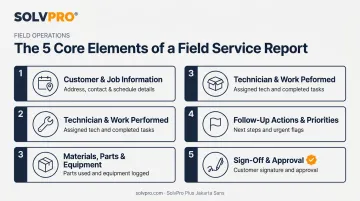
Formats differ by trade, but nearly every effective report contains the same five building blocks. Skip one, and something eventually slips through the cracks.
Customer & Job Information
This is the who, where, and when. It should always include:
- Customer name and site address
- Date and time of service
- Job or work order number
Without a work order number tied to the visit, matching a report to an invoice later becomes guesswork.
Technician & Work Performed
This section carries the narrative. It should name the technician(s) on-site and describe, in plain language, what actually happened: the diagnostics run, the repair made, the installation completed. Photos of before-and-after conditions add weight here: they turn a written claim into visual proof, which matters if a customer later disputes what was done.
Materials, Parts & Equipment Used
Every part consumed on a job needs to be logged. This isn't just billing hygiene:
- Accurate invoicing depends on knowing exactly what was used.
- Inventory management relies on this data to reorder before stock runs out.
- Warranty tracking requires proof of which part, and often which batch, went into a job.
Miss this step, and the business either underbills the customer or loses track of what's in the truck.
Follow-Up Actions & Priorities
Not every job finishes in one visit. Technicians should flag incomplete work, parts on backorder, or recommended future service directly in the report. Assign it to a specific person or team. A follow-up item that lives only in a technician's head rarely gets scheduled.
Sign-Off & Approval
A customer and technician signature (digital or physical) confirms the job is done and the customer is satisfied. This matters for both operational and legal reasons.
Federal E-SIGN law confirms that an electronic signature can't be denied legal effect just because it's electronic, making digital sign-off just as usable as pen-and-paper. It won't replace a formal contract, but it stands as solid supporting evidence if a dispute comes up later.
How to Write and Submit a Field Service Report
A good report follows a consistent sequence, whether it's filled out on paper or a phone screen.
- Capture customer and job details first. Get the name, address, and work order number logged before touching a single tool.
- Document the issue and the actions taken. Note what was tested, what was found, and what was done, including before-and-after photos wherever possible.
- Log parts, materials, and time. Every item used and every hour spent needs to be on the record for billing to be accurate.
- Record follow-up tasks. Flag anything incomplete and assign it to the right person, not just a general note.
- Collect signatures and submit. Get sign-off from both customer and technician, then submit directly from a mobile device such as SolvPro's field app. The report syncs to the office in real time — no waiting for paper to physically make its way back to the shop.
That last step is where most of the delay in traditional paper workflows disappears. A form sitting in a truck cab for three days doesn't help anyone get paid faster.
Benefits of Field Service Reports for Your Business
Done consistently, field service reports pay off in ways beyond just "having a record."
Accountability improves across the board. Crews know their work is documented. Office staff can see exactly what happened without playing phone tag. Customers get transparency into what they paid for.
Invoicing speeds up. Field Service News profiled Celvac, a 70-employee industrial cleaning company that switched from weekly paper submissions to real-time digital job confirmation. The office could then invoice immediately after job completion instead of waiting for paperwork to arrive.
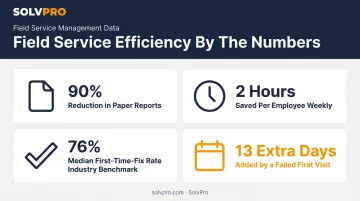
The same case reported the company eliminated 90% of its paper reports and saved field employees roughly two hours a week previously spent on paperwork.
Report data reveals patterns. Aggregated over time, reports show which technicians need more training, which equipment fails repeatedly, and where first-time fix rates are lagging.
That last metric matters more than it sounds: Aquant's 2024 analysis of 24 million work orders found a 76% median first-time-fix rate across the industry, with top performers reaching well above that.
A failed first visit adds an average of 13 extra days to resolution, a cost that clean, complete reporting helps avoid by giving the next technician full context instead of starting from scratch.
Going Digital: Field Service Report Software
Paper-based reporting has real limits. Forms get lost in truck cabs, handwriting turns illegible, and information sits for days before it reaches the office. That lag isn't a minor annoyance — Salesforce's 2025 State of Service survey of 6,500 service professionals found mobile workers estimate 18% of their workweek, or 7.27 hours, is wasted on low-value administrative tasks like filling out forms.
What to Look for in Field Service Report Software
Not all platforms solve the same problems. Look for:
- Mobile accessibility so reports can be completed on-site, not back at a desk
- E-signature capture for customer and technician sign-off
- Offline functionality for job sites with weak connectivity
- Automatic sync with accounting systems so invoices don't require re-entry
Where SolvPro Fits in
SolvPro is an all-in-one field service management platform built by a team with 50+ years of combined experience running construction and service businesses. That background shapes every feature toward what crews actually need on the job.
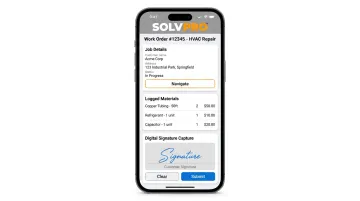
Its mobile work orders let field crews view job scope, log materials, capture photos, and get customer sign-off directly from a phone. The office isn't waiting on paperwork to trickle back in.
Job and crew time tracking records time entries against the job, photos, and notes the moment they're created. This gives office staff a location-verified record of when and where work actually happened, adding a layer of accountability to every job.
For businesses that quote larger jobs, SolvPro's digital estimates generate a polished, customer-facing PDF the client can sign digitally. Once approved, it converts straight into an active job, with no re-entering data.
On the back end, QuickBooks Online sync moves labor hours, job costing, and invoicing data over automatically, so a completed field service report can turn into a synced invoice without a second data entry pass. The entire platform runs in a bilingual English/Spanish interface, so language isn't a barrier between office staff and field crews trying to get the same job done right.
Conclusion
Run a profitable shop, not just a busy one.
Seeing what a job is costing while it is still open gives you a chance to act on it. SolvPro connects scheduling, work orders, time, job costing and invoicing so that information is in one place. When you want to see it on your kind of work, Book a Demo.
Run the Job. Protect the Profit.
Frequently Asked Questions
What Is a Field Service Report?
A field technician completes a field service report to summarize the work performed, parts used, and customer sign-off during a service visit. It serves as proof of service for both the business and the customer.
How Do You Submit a Field Service Report?
Technicians can submit reports via a mobile app in real time or through traditional paper or PDF forms. Digital submission syncs instantly to office systems, while paper often takes days to arrive.
What Are Examples of Field Services?
Common examples include HVAC repair, plumbing installation, electrical maintenance, landscaping visits, and commercial cleaning jobs. Inspections and preventive maintenance also generate reports regularly.
What Should Be Included in a Field Service Report?
Every strong report covers five core elements: customer and job information, work performed, materials used, follow-up items, and sign-off. Missing any one of these creates gaps in billing or accountability.
How Often Should Field Service Reports Be Completed?
Technicians should complete a report after every service visit, not just periodically. Skipping reports, even for "quick" jobs, creates blind spots in billing and history.
Can Field Service Reports Be Paperless?
Yes. Modern field service software supports fully digital, paperless reporting with e-signatures and automatic syncing to office and accounting systems, eliminating lost forms entirely.