
Double-booked jobs. Crews calling the office for information that should have been with them when they left. Invoices sitting for a week because no one has a clear picture of what's been completed. According to Software Advice's 2026 Field Service Buyer Insights Report, 52% of field service businesses cite operational inefficiency as their top pain point — and that number climbs sharply as team size grows.
The problem isn't growth. The problem is managing 10 technicians the same way you managed 3.
This article covers 8 practical strategies for electrical, plumbing, HVAC, landscaping, general contracting, and other field service businesses actively scaling their crews. Each one is designed to give your growing team structure, accountability, and the visibility you need to stay profitable as you grow.
Key Takeaways
- Scaling requires systems, not just more people — without structure, growth creates chaos faster than revenue
- Scheduling, work orders, and routing form the operational foundation — get these right first
- Real-time communication and field accountability tools separate organized teams from ones that drop jobs
- Training and retention directly reduce the cost of constant re-hiring
- The right KPIs give managers clear visibility into what's actually profitable
The Growing Pains of a Scaling Field Service Team
There's a specific inflection point that catches most field service owners off guard. At 3 technicians, you can manage through memory and phone calls. You know who's where, what they're working on, and roughly when they'll finish. At 8 or 10 technicians, that system collapses.
The symptoms are predictable:
- Crews arrive without context — wrong address, missing scope notes, no special instructions
- Managers spend hours on the phone coordinating basics that should already be in writing
- Jobs slip through when a text goes unread or a scheduling conflict isn't caught
- Invoicing falls behind because no one has a clear record of what's been completed and when
The frustrating part is that these failures aren't caused by bad employees. They're caused by the absence of structure. SolvPro was built by people who lived this exact chaos: double-booked jobs, paperwork lost in the shuffle, and invoices going out weeks late.
The 8 strategies below are about building that structure before the chaos becomes permanent.
Strategies 1–3: Get Your Field Operations in Order
Strategy 1: Standardize Your Scheduling and Dispatching Process
Ad-hoc scheduling — built on phone calls, text threads, and personal calendars — works at small scale because one person holds the whole picture in their head. Add five more technicians and that picture falls apart. Double-bookings happen, and jobs get assigned to whoever picks up the phone first — not whoever is closest or most qualified.
A standardized dispatching process looks different:
- All job requests flow into one system, not five different inboxes
- Crews are assigned based on availability, location, and job requirements — visible at a glance
- Changes are communicated immediately through the platform, not through a chain of calls
Practical tip: Assign jobs the night before or at the start of each morning, with all job details attached — customer name, address, scope of work, special notes. When crews have everything they need before they leave, the office stops getting calls for information that should have already been there.
SolvPro's drag-and-drop scheduling calendar gives dispatchers day, week, and crew views so availability conflicts are impossible to miss. Jobs can be assigned in seconds and adjusted just as fast when things change.
Strategy 2: Centralize All Work Orders in One Place
When jobs live in email, text messages, notepads, and three different apps, managers can't see what's open, in progress, or done. Billing falls behind because no one knows when a job actually finished — and that gap costs real money.
Salesforce's 2024 State of Service Report puts numbers to this: 58% of agents at underperforming organizations toggle between multiple screens to find job information, compared to just 36% at high-performing ones. That gap is the operational cost of fragmentation.
A centralized work order system should cover:
- Job creation with scope notes, photos, materials, and customer details
- Assignment tied directly to the scheduling calendar
- Real-time status updates from the field as work progresses
- Automatic invoicing trigger when a crew marks a job complete
When SolvPro's crew members update job status from the field, the office knows immediately — no end-of-day calls, no paperwork chase. The invoice can go out the same day the job is done.
Strategy 3: Optimize Crew Routing to Eliminate Wasted Drive Time
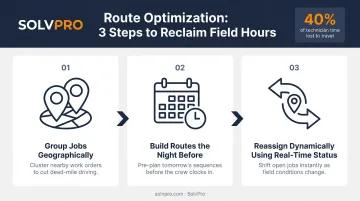
Centralized job data does more than keep the office organized — it also gives you the visibility to fix one of the most common profit drains in field service: wasted drive time. Industry data consistently shows that field service technicians can lose more than 40% of their day to travel. At small team sizes, this is manageable. As you add crews and jobs, unoptimized routes compound fast — fewer jobs completed per day, higher fuel spend, more technician hours burned.
Basic routing principles that make an immediate difference:
- Group jobs geographically — assign nearby jobs to the same crew on the same day
- Build routes the night before — dispatchers have time to optimize without morning pressure
- Use real-time job status to reassign dynamically — when a job finishes early or a cancellation opens a slot, the nearest available crew gets the next job
SolvPro includes multi-crew route optimization across all pricing tiers, with GPS-tracked crew dispatch giving dispatchers the location context they need to make smarter assignments throughout the day.
Strategies 4–5: Close the Communication Gap Between Office and Field
Strategy 4: Build a Real-Time Communication System
Most field service failures at scale trace back to one root cause: the office and the field are running on different information. The symptoms show up fast:
- Crews arrive on site without context or updated instructions
- Customers receive wrong arrival windows
- Managers dispatch based on job statuses that are hours out of date
Real-time communication means job updates flow back to the office as work progresses — not at the end of the day.
Reactive communication means the crew calls when something goes wrong. Proactive communication means the system keeps both sides updated automatically — no constant check-in calls required. That shift alone cuts interruptions for everyone.
For businesses with bilingual crews, the communication system itself matters as much as the process. Tools that support both English and Spanish eliminate a persistent source of on-site miscommunication. SolvPro is the only field service management platform with a fully bilingual English/Spanish interface: the mobile app, job details, and scheduling tools work entirely in Spanish for crew members who prefer it, at no additional cost.

Strategy 5: Create Accountability Through Check-In and Location Tracking
As a team grows, managers lose the ability to physically see what crews are doing. Without an accountability layer, late arrivals, extended job times, and disputed completions become harder to catch.
Event-based check-ins solve this without micromanaging. When a crew arrives on site and logs a time entry or uploads a photo, that action gets geo-stamped automatically — creating a timestamped record of when and where work happened.
This protects both the business and the crew. When a customer disputes a job completion time, a geo-stamped record resolves the question immediately. For crews doing solid work, that record is their best defense — it confirms what happened, when, and where.
SolvPro's Smart Activity Tracking creates these geo-stamped records automatically as crews update job status, log time, and submit photos. Managers see which jobs are active, delayed, or complete in real time — without requiring constant calls back to the office.
Strategies 6–7: Build a Team That Actually Wants to Stay
Strategy 6: Train Technicians Continuously, Not Just at Onboarding
One-time onboarding isn't enough for a growing team. As businesses expand into new job types, bring on less experienced hires to fill gaps, or add new tools and software, ongoing training becomes a direct competitive advantage.
The data supports this. According to Field Service News/Aquant's Service Intelligence Benchmark Report, the industry-wide first-time fix rate has held at roughly 75% for more than a decade. When a problem isn't resolved on the first visit, it takes an average of 2.5 additional visits to close — and mean time to resolution stretches to 20 days. Closing that gap starts with training — every callback avoided is a job that was profitable the first time.
Practical approaches that work for field service businesses:
- Pair new hires with experienced technicians on complex jobs before sending them out solo
- Hold regular skill-share sessions where techs walk through a recent tough job — what they tried, what worked, what didn't
- Require digital tool proficiency before independent deployment: scheduling, job updates, and mobile time tracking all need to be second nature on day one
Strategy 7: Recognize, Reward, and Actively Retain Your Best People
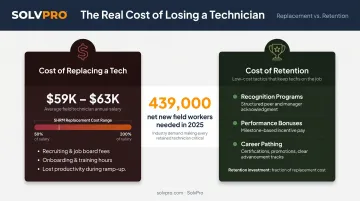
Field service technicians are often underrecognized — despite being the ones whose work directly drives revenue. Retention isn't just a culture issue. It's a cost issue.
BLS data shows median annual wages of $62,970 for plumbers, $62,350 for electricians, and $59,810 for HVAC technicians. With SHRM estimating replacement costs at 50% to 200% of annual salary, losing one experienced tech is a serious financial hit — not just an operational headache.
The hiring market makes this worse. The construction sector needed to attract 439,000 net new workers in 2025 alone, per the Associated Builders and Contractors. Experienced replacements are scarce and expensive.
Low-cost, high-impact retention tactics:
- Call out strong performance publicly — on team calls, in group chats, in front of peers
- Tie spot bonuses to specific outcomes: first-time fix rate, customer review scores, zero callbacks
- Show technicians what advancement looks like — people stay when they can see a path forward
- Ask for field feedback and act on it; employees who feel heard aren't the ones quietly updating their résumés
Strategy 8: Track the KPIs That Reveal Performance and Profitability
Managing a growing team without tracking data is managing by gut feeling. That works at small scale. It fails at large scale, and the failure often shows up in the margin, not the revenue.
A 2023 Field Service News survey found 27% of field service leaders struggle to pull and analyze performance data, and 25% struggle to identify where to cut costs or improve efficiency. The problem isn't collecting data — it's knowing which numbers matter and what to do with them.
Core KPIs worth tracking:
| KPI | What It Reveals |
|---|---|
| First-time fix rate | Training gaps and job preparation quality |
| Job completion rate vs. scheduled | Scheduling accuracy and crew capacity |
| Average time on site vs. estimated | Job costing accuracy and efficiency |
| Revenue per technician | Productivity and crew utilization |
| Customer satisfaction scores | Service quality and repeat business risk |
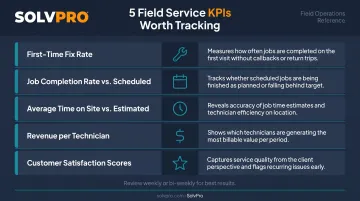
The real value isn't in collecting these numbers — it's in reviewing them weekly or bi-weekly and acting on what they show. If one job type consistently runs over estimated time, that's a pricing problem, a training gap, or a scoping issue. Data tells you which.
Profitability visibility matters here too. Total revenue can grow while margins shrink if no one is tracking which jobs cost more than expected to complete.
SolvPro's Job Costing & Analytics module shows real-time profitability at the job level, comparing actual labor and material costs against estimates. That means managers can catch over-budget jobs while there's still time to course-correct, not after the invoice is already sent.
Putting It All Together: The Role of Field Service Management Software
The 8 strategies above are practical and achievable. They also become much harder to sustain when you're managing them across spreadsheets, text threads, and four separate apps. That fragmentation reintroduces the same problems the strategies are designed to eliminate.
When evaluating FSM software for a growing SMB team, look for:
- Setup that takes hours, not weeks — slow onboarding kills adoption before it starts
- Mobile-first design so crews have full functionality from any device in the field
- Real-time job status visible to the office as work happens
- QuickBooks Online integration — invoicing delays directly hurt cash flow, and 56% of US small businesses are currently owed money from unpaid invoices, averaging $17,500, per QuickBooks' 2025 Late Payments Report
If those criteria matter to your business, SolvPro is worth a look. It was built for growing service teams that need scheduling, work order management, crew tracking, and fast invoicing — without the complexity or cost of an enterprise platform. Setup takes under 10 minutes. Live onboarding support is included for every user, not just premium tiers. QuickBooks Online sync and a fully bilingual English/Spanish interface are standard across all plans. No long-term contract required.
Frequently Asked Questions
How do I manage and develop a growing field service team?
The key transition is moving from personal oversight to systems-based management. Standardize scheduling, centralize work orders, build in accountability through check-ins, and invest in regular training. Systems then handle the coordination work that used to live in one person's head.
What are the key elements of field service management?
The core components are scheduling, work order management, field-to-office communication, crew accountability, job tracking, invoicing, and performance metrics — all in one workflow. When these run in separate tools, the gaps between them create the operational problems most field service businesses struggle with.
How do you keep field technicians accountable when you're not on site?
Event-based check-ins and geo-stamped tracking are the practical accountability layer. Crews log time, upload photos, and update job status from the field — each action creates a timestamped, location-verified record that protects both the business and the crew when disputes arise. Managers get job visibility without constant phone calls.
What KPIs should a field service manager track as the team grows?
Focus on first-time fix rate, job completion rate vs. scheduled, average time on site vs. estimated, revenue per technician, and customer satisfaction scores. Review them weekly or bi-weekly — the patterns tell you where to adjust scheduling, training, and crew assignments.
How do you improve scheduling efficiency for a growing field service crew?
Group jobs geographically, assign all job details before the day starts, and use real-time job status to make dynamic reassignments when capacity opens up. Moving away from phone and text-based coordination into a centralized scheduling system eliminates the double-bookings and missed updates that manual scheduling inevitably produces.