Crews track time on paper, or by memory, or not at all. Payroll gets processed on estimates. Invoices go out late because the office is waiting on job sheets that never arrived. And when margins shrink, there's no job-level data to explain why.
Time tracking gets dismissed as administrative overhead. In workforce management software built for field service teams, it's the opposite — it's the data layer that connects labor hours to job costs, invoices, and payroll. Without it, the entire operation runs on guesswork.
This article explains why time tracking matters in practice for service businesses dispatching crews, what goes wrong without it, and what to look for in a platform that does it right.
KEY TAKEAWAYS
- Time tracking ties crew hours directly to job costs and invoices — removing guesswork from billing and payroll.
- Without tracked hours per job, margin erosion is invisible until the damage is already done.
- Location-verified clock-ins create crew accountability without requiring a manager on every job site.
- One time entry feeds both invoicing and payroll — cutting admin work and eliminating disputes.
- Time tracking works best inside one platform alongside scheduling, work orders, and payments.
What Is Time Tracking in Workforce Management Software?
In a field service context, time tracking means the digital recording of when workers start and stop specific jobs — tied to work orders, crew assignments, and service calls, not just general shift hours.
Generic time tracking tells you an employee worked eight hours. Job-level time tracking tells you three hours went to the Henderson account, two went to the Morrison job, and the remaining three are unaccounted for. The first number is useful for payroll. The second is what you need to run a profitable service business.
Time tracking in workforce management software functions as a data layer that connects field activity to business outcomes:
- Labor hours attach to specific work orders, enabling real cost calculations per job
- Clock-in location and timing create a verifiable record of field presence
- Actual hours feed into invoicing, eliminating the wait for paper timesheets
- Payroll runs off verified time records instead of self-reported hours
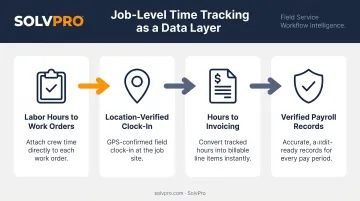
When this is built into the core workflow — as SolvPro does through Smart Activity Tracking — every hour logged carries both a job context and a location marker. A standalone time clock app gives you hours. Job-attributed, job-linked time tracking gives you the data to actually manage field costs.
Key Advantages of Time Tracking for Field Service Teams
The advantages below are operational, not theoretical. They apply specifically to businesses dispatching crews to multiple job sites, running several jobs simultaneously, and needing labor data that connects directly to cost and billing.
Each advantage compounds when time tracking is part of the same platform used for scheduling, work orders, and invoicing — not a separate app creating another data silo.
Advantage 1: Crew Accountability Without Constant Supervision
Crew accountability in field service comes down to one question: did the right people show up at the right place at the right time, and work the hours assigned? A manager can't be at every job site. Time tracking with location verification answers that question — no manager required.
When crews clock in through a platform with job and crew time tracking — like SolvPro's time entries recorded against the job — each clock-in captures both the timestamp and the location. The office gets a verifiable record tied to the specific work order. No phone calls, no manual check-ins, no guessing.
This matters because the alternative is expensive. According to QuickBooks, 16% of US employees who track time admit to buddy punching, with the practice estimated to cost US employers at least $373 million annually. For field service businesses running hourly crews across multiple sites, unverified hours create two problems simultaneously: payroll errors and unbillable gaps.
KPIs this affects:
- Labor hours per job
- Crew on-site time vs. scheduled time
- Overtime frequency
- Cost variance per job
Accountability through time tracking is most critical for businesses running three or more simultaneous jobs. Once you're past that threshold, the operational math changes — you can no longer personally verify field activity, and without a system doing it for you, the gaps multiply.
Advantage 2: Accurate Job Costing and Knowing What Each Job Made
Job costing is simple in concept: take the actual hours worked, multiply by crew rates, add materials, and compare against what you quoted. The problem is that many service businesses do not have actual hours per job. They have estimates, memory, and a general sense of how things went.
When time is tracked at the job level, the math works automatically. The platform calculates real labor cost per job and surfaces it against what was billed or estimated. Owners can see which jobs made money and which didn't — while work is still happening, not weeks later when the damage is irreversible.
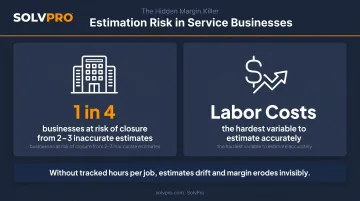
The stakes are real. QuickBooks research on construction businesses found that 1 in 4 surveyed would be at risk of closure from just 2 or 3 inaccurate estimates — and identified labor costs as the hardest and most expensive variable to estimate accurately. Service businesses outside construction face the same dynamic: when labor hours aren't tracked per job, estimates drift, margin erodes, and there's no data to explain the pattern.
SolvPro's Job Costing & Analytics module tracks and displays real-time labor and material costs per job, with crew performance metrics and profitability data that sync directly to QuickBooks. Owners can see exactly what each job cost in labor — not at month-end, but as work progresses.
KPIs this affects:
- Actual labor cost per job
- Estimated vs. actual hours
- Gross margin per job type
- Overhead recovery rate
This advantage becomes critical past the 3–5 crew threshold. At that scale, estimating errors compound across dozens of jobs per month, and small per-job losses accumulate into significant financial damage before anyone notices.
Advantage 3: Faster, More Accurate Invoicing and Payroll
Invoice delays in field service have one root cause: the office doesn't have the data it needs when the job ends. Someone has to track down a crew member, find a paper timesheet, or wait for end-of-week reconciliation before billing can happen.
When time tracking is integrated with job management, that gap closes. The crew clocks out, the hours are captured against the work order, and the data needed to generate an invoice is ready — no paperwork chase required. SolvPro is designed specifically for this: the office can invoice immediately after job completion rather than waiting on paper documentation, and field crews can generate invoices directly from the job site.
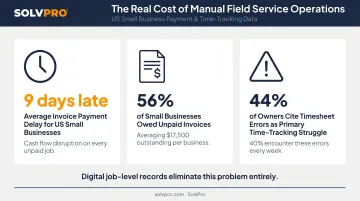
This has direct cash flow implications. Xero's small business data shows US small business invoices are paid 9 days late on average — a number that gets worse when invoicing itself is delayed.
QuickBooks research from 2025 found 56% of US small businesses were owed money from unpaid invoices, averaging $17,500 per business. Delayed invoicing adds avoidable days to an already slow payment cycle.
Payroll runs on the same verified data. The time records that feed invoicing also feed payroll calculations, replacing manual timesheet entry with data that's already been captured and tied to specific jobs.
QuickBooks time tracking data shows 44% of small business owners cite timesheet errors as their primary time-tracking struggle, with 40% encountering errors weekly. Digital job-level records eliminate that category of problem entirely.
KPIs this affects:
- Days to invoice after job completion
- Accounts receivable aging
- Payroll processing time
- Payroll error rate
This advantage has the highest impact for businesses billing time-and-materials jobs, where the final invoice amount depends entirely on hours actually worked.
What Happens When Time Tracking Is Missing
This is worth stating plainly. Without time tracking in a field service operation:
- Invoices are built on estimates, not actuals — under-billing cuts into revenue, and over-billing triggers client disputes that eat up management time
- Payroll errors compound — self-reported hours invite mistakes and buddy punching that add up every single pay period
- Job-level profitability stays invisible, so owners react to shrinking margins without knowing which jobs, crews, or clients are actually the problem
- Growth makes it worse — every new crew or client added without a time tracking foundation multiplies the gaps, not just adds to them
The businesses most at risk are those between 5 and 15 employees: large enough that the owner can't personally oversee every job, but not yet operating with systems designed to replace that oversight.
How to Get the Most Value from Time Tracking
A few practical principles separate businesses that get real value from time tracking and those that treat it as an afterthought:
Keep It in One Platform
Time tracking delivers the most value when it lives inside the same system as scheduling, work orders, and invoicing. Hours re-entered between separate tools create extra admin work — and extra opportunities for errors that throw off your payroll and job costs.
Make Clock-In Part of the Job, Not a Reminder
A time tracking system is only as good as its data. If crews can skip clock-ins, the reports that depend on that data become unreliable — and so do the profitability numbers tied to them. Clock-in needs to be as automatic as showing up to the job.
Check Hours Between Payroll Cycles
Payroll forces a weekly or biweekly review, but the real value of time tracking is operational. Managers who compare actual vs. estimated hours mid-project can catch cost overruns early, adjust crew allocation, and build more accurate estimates for the next job.
SolvPro is built for exactly this workflow: setup takes under 10 minutes, time tracking is included on every plan, and live onboarding support is available no matter which tier you're on.
Conclusion
Time tracking in workforce management software gives you the data that actually runs a business: accurate hours for payroll, real costs per job, and a clear answer to whether each job made money.
Businesses that build time tracking into their daily field workflow accumulate job cost data over time, sharpen their estimates, cut payroll admin, and gain visibility that supports better decisions at every level of the operation. Those benefits grow together — which is why time tracking belongs inside the same platform as scheduling, crew management, work orders, and invoicing, not pulled from a separate app that doesn't talk to the rest of your workflow.
Field service software helps you manage the work. SolvPro helps you make sure the work makes money.
The right tool depends on your trade, crew size, job mix and the systems you already run. Test it on real jobs before you commit, and check that crews will actually enter what the office needs. When you want to see it on your kind of work, Book a Demo.
Run the Job. Protect the Profit.
Frequently Asked Questions
What Is the Difference Between Time Tracking and Employee Monitoring in Workforce Management Software?
Time tracking records when and where work happened relative to specific jobs — it's strictly about labor cost and job accuracy, not surveillance. Employee monitoring refers to tools like screenshot capture or app usage logging. SolvPro uses job-level clock-in/out with location verification only; no device monitoring involved.
How Does Time Tracking in Workforce Management Software Improve Payroll Accuracy?
Digital clock-ins tied to specific jobs replace self-reported hours, eliminating the manual reconciliation that produces errors. Payroll is processed from verified time records rather than paper timesheets — reducing disputes and cutting the admin time required each pay period.
Can Time Tracking Software Help Service Businesses Know If a Job Was Profitable?
Yes. When hours are tracked per job and tied to crew labor rates, the platform calculates actual labor cost against estimated or billed amounts. Owners get job-level profitability data — not just overall revenue — making it easy to spot which jobs, clients, or crew configurations are eroding margin.
How Does GPS or Location-Based Time Tracking Work for Field Crews?
Job and crew time tracking captures the crew's location at clock-in and clock-out, tying that timestamp to the specific job or work order. Managers verify field presence without continuous GPS tracking — accountability comes from the time entry itself, not constant monitoring.
Does Time Tracking in Workforce Management Software Make Invoicing Faster?
When crew hours are captured digitally and linked to work orders in the same platform, invoice data is ready the moment a job closes. No waiting on paper timesheets or manually compiling hours — the office can bill immediately rather than days later.
Is Time Tracking in Workforce Management Software Difficult to Set up for a Small Service Business?
Modern field service platforms are designed for quick deployment. SolvPro, for example, is set up in under 10 minutes with live team support available from day one — no IT expertise required and no long-term contracts. Crews can be actively tracking time on their first jobs the same day the account is created.