The phone never stops. Office staff are always chasing updates. Jobs get double-booked, materials aren't ready when the crew arrives, and instead of growing the business, you're spending your day babysitting it. The revenue potential is there — the systems to capture it aren't.
This article is for contractors in electrical, HVAC, plumbing, landscaping, or general construction who are managing 2+ crews across multiple active jobs and feeling the operational strain. What follows covers the systems, scheduling strategies, communication habits, and technology that make multi-crew management work — without burning out the contractor running it.
Key Takeaways
- Appoint a crew leader for each team so every question doesn't funnel back to you
- Standardize job workflows with checklists so every crew operates consistently, regardless of who's watching
- Schedule around real availability data to eliminate double-booking and idle time
- Close the communication gap so field updates reach the office automatically
- Consolidate scheduling, work orders, tracking, and invoicing into one platform instead of five separate tools
Build Systems and Delegate Before You Scale
Most contractors hit a wall at two crews — not because the work isn't there, but because the business was built around the owner being everywhere at once. That model works with one crew. It collapses with two.
The shift from hands-on operator to systems-driven manager is the prerequisite to scaling. Without it, adding crews just adds chaos.
Appoint and Empower Crew Leaders
Every crew needs a designated leader who owns daily execution on-site. Their job: communicate job status back to the office, manage the team, and flag issues before they become delays. Without this layer, every question and decision flows back to the contractor — and that's the bottleneck.
When choosing a crew leader, look for:
- Shows up consistently, follows through, and works without hand-holding
- Sends clear updates back to the office without being asked
- Has enough field experience to make judgment calls on-site
What to formally hand over to a crew leader:
- Daily on-site execution and task sequencing
- Status updates back to the office
- Crew coordination and issue flagging
- Basic quality checks before job sign-off
What stays at the owner level: hiring decisions, contract changes, customer escalations, and financial approvals.
Standardize Job Workflows
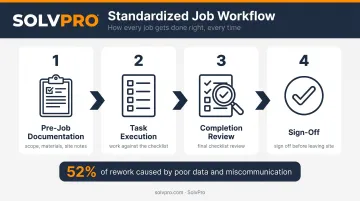
Standardized checklists and job procedures ensure consistency across crews — even when you're not on-site. Every job should follow the same sequence:
Standardized checklists and job procedures ensure consistency across crews — even when you're not on-site. Every job should follow the same sequence:
- Pre-job documentation (scope, materials, site notes)
- Task execution against the checklist
- Completion checklist review
- Final sign-off before leaving the site
A 2018 survey of 599 construction industry leaders by PlanGrid and FMI found that 52% of rework is caused by poor project data and miscommunication — not skill gaps or bad materials. When different crews handle the same job type differently, errors multiply and rework costs pile up fast.
A standard workflow doesn't slow anyone down. It eliminates the mistakes that happen when each crew invents their own process.
Schedule and Dispatch Multiple Crews Without the Chaos
Scheduling based on gut feel or memory works until it doesn't. When you're running multiple crews, the moment you're wrong about availability or job readiness, you've got an idle crew burning time or a second team showing up to a site that isn't ready.
Assign Jobs Based on Real Availability and Skills
Schedule around actual crew availability — not assumed availability. A plumbing crew shouldn't be cross-dispatched into an excavation job because they happened to be free. Wrong crew for the work creates safety issues, quality problems, and longer job times.
A centralized, visual schedule — accessible to both office staff and crew leaders — eliminates conflicts before they happen. Knowing current field status before you make the call means you're dispatching proactively, not scrambling to fix a problem that's already in motion.
SolvPro's visual drag-and-drop calendar gives office teams day, week, and crew views so open slots and crew availability are immediately clear. Jobs can be assigned in seconds, and the platform's double-booking prevention catches conflicts before they slip through.
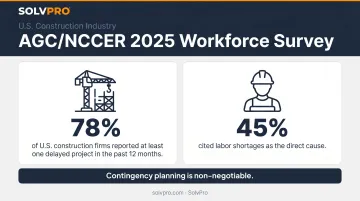
Contingency planning is non-negotiable. According to the AGC and NCCER's 2025 Workforce Survey, 78% of U.S. construction firms reported at least one delayed project in the past 12 months, with 45% citing labor shortages as the direct cause. Weather, callouts, and jobs that run long are inevitable — having a backup dispatch plan means one disruption doesn't cascade into three.
Use Geolocation Data to Dispatch Smarter
Real-time location awareness eliminates the phone calls. When dispatchers can see where crews are — without calling to ask — they can respond faster to last-minute changes and make better decisions about who to send where.
SolvPro's event-based geolocation tracking logs crew location at key activity moments:
- When time is clocked in or out
- When photos are uploaded from the job site
- When job status is updated by the crew
Managers get a verifiable, timestamped record of field activity without requiring a constant GPS feed.
This also solves the job handoff problem. When one crew finishes a phase and the next crew needs to start, real-time completion updates prevent the scenario where a second team shows up to a job site that isn't ready — a direct hit to schedule and labor costs.
Keep Communication Clear Between Office and Field
The office is always a step behind. Work gets done, but by the time the contractor finds out, they've already dispatched based on yesterday's information, ordered materials that aren't needed yet, or quoted a timeline that no longer reflects reality. That gap costs money and erodes customer trust.
Effective multi-crew communication means moving from reactive — waiting for someone to call in — to proactive: crews log status updates as they work, and the office sees them in real time. The goal is zero phone tag.
Information that needs to flow from field to office:
- Job status (started, in progress, complete)
- Issues or scope changes as they happen
- Time logs and materials used
- Photos and proof of work
Information that needs to flow from office to field:
- Job details and work orders before crews arrive
- Schedule changes and new assignments
- Customer notes and site-specific instructions
When both sides operate from the same platform, that flow is automatic — not a scramble of catch-up calls after hours.
Bridging Language Barriers in the Field
On diverse field teams, language differences between office staff and crew members create a different kind of communication breakdown. Crew members who aren't fully fluent in English may miss critical job details, hesitate to flag issues, or interpret instructions differently than intended — and that doesn't show up as a language problem. It shows up as rework or a missed deadline.
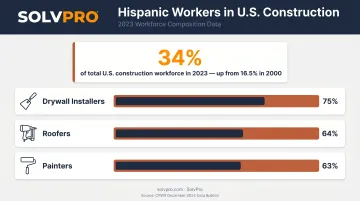
According to CPWR's December 2024 Data Bulletin, Hispanic workers made up 34% of the U.S. construction workforce in 2023 — up from 16.5% in 2000. In specific trades, that share is far higher: 75% of drywall installers, 64% of roofers, and 63% of painters are Hispanic.
Bilingual tools aren't a nice-to-have for many contractor operations — they're a functional requirement. SolvPro's fully bilingual English/Spanish interface lets Spanish-speaking crew leaders receive job details, work orders, and schedule updates in Spanish, while the office continues working in English. No one has to translate, adjust their workflow, or bridge a gap that shouldn't exist in the first place.
Track Crew Performance and Accountability
Accountability across multiple crews requires visibility — not constant check-ins. When a contractor can see which crews are on-site, which jobs are in progress, and which tasks are complete, the data does the work.
Track these metrics across your crews:
- Arrival and departure times by job
- Actual time on-site versus estimated time
- Job completion rates against schedule
- Issues or change orders logged per job
- Labor costs per job versus projected costs
SolvPro's time tracking and job costing tools capture labor by individual crew member and job, with all activity geo-stamped automatically. Report exports are built into the dashboard, so managers can pull the numbers they need without digging through spreadsheets or chasing down updates.
Performance tracking works best when it's used to recognize high-performing crews and flag training opportunities — not just to catch problems. A crew that consistently finishes on time and under budget should know that's noticed.
A crew that's slower than estimated on certain job types might need better tooling or a different workflow, not a warning. The data is a management tool, not a surveillance system.
Use the Right Software to Manage Multiple Crews in One Place
Here's what managing multiple crews looks like without the right platform: scheduling lives in a spreadsheet. Work orders go out by text. Updates come in by phone call, time gets logged on paper, and invoices go out late because no one knew the job was done. Every piece of the operation is a separate system — and none of them talk to each other.
The fix is consolidating tools.
SolvPro is a field service management platform built specifically for service businesses running crews in the field. It brings scheduling, work orders, crew tracking, and invoicing into a single platform — with QuickBooks Online sync built in so job costs and payments stay connected to your accounting without manual data entry.
What it handles in one place:
- Scheduling — visual drag-and-drop calendar with double-booking prevention
- Work orders — crews access, update, and close jobs from any mobile device
- Geolocation tracking — event-based location logs tied to real field activity
- Time tracking — by job and by crew member, with multiple capture methods
- Invoicing — office can invoice immediately when job status updates to complete
- Payments — digital invoice collection via NMI, with real-time payment status sync
- Bilingual interface — full English/Spanish support for office and field, at no extra cost
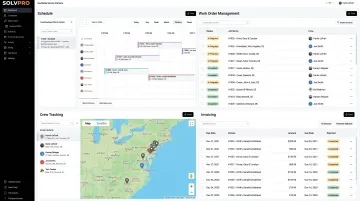
Setup takes under 10 minutes — account creation, crew and job entry, first dispatch — with free onboarding support included. No long-term contracts, no feature gating between tiers. The Starter plan at $179/month covers up to 3 users; the Growth plan starts at $228/month for 4 users with $49 per additional user as the team grows.
When everything runs through one platform, the busywork disappears — and the office stops chasing the field to find out what's done.
Frequently Asked Questions
How do contractors manage multiple crews efficiently?
Efficient multi-crew management requires three things working together: clear systems and delegation (crew leaders, standardized workflows), real-time scheduling and communication tools, and a single platform to track jobs from dispatch through invoicing. Get those three right, and the contractor stops being the daily bottleneck.
What is the biggest challenge of running multiple field crews?
The communication gap between office and field is the root of most multi-crew problems. When the office doesn't know what's actually happening in the field, scheduling, dispatching, and invoicing all break down — often simultaneously.
How do you keep crews accountable without micromanaging?
Accountability comes from visibility, not constant check-ins. When crews log job status and completions in real time through a mobile app, managers can see what's happening without interrupting the work or making the tenth phone call of the day.
How can contractors track crew locations across multiple job sites?
Event-based geolocation tools log crew location at key moments — when time is recorded, photos are uploaded, or job status changes — without continuous GPS tracking or manual check-ins. Dispatchers get real-time data to make fast decisions, no constant field reporting required.
What should a crew leader be responsible for?
Daily on-site execution, communicating job status updates back to the office, keeping the crew on task, and flagging issues before they become delays. Crew leaders handle the field; contractors handle the business decisions that depend on what's happening there.
When does a contractor need field service management software?
The tipping point is typically 2+ crews or 5+ active jobs running simultaneously. That's when phone calls and spreadsheets can't keep up with overlapping jobs, crew changes, and last-minute dispatching — and when scheduling conflicts start costing real money.