The shift makes sense. A missed appointment or a lost work order costs real money when your admin team is one person answering phones between jobs. The right FSM tool tightens scheduling accuracy, keeps crews accountable in the field, and gets invoices out the door faster.
The field service management market hit $5.10 billion in 2025 and is projected to reach $9.17 billion by 2030, according to MarketsandMarkets. Small and mid-sized businesses are driving much of that growth, thanks to affordable cloud-based platforms that no longer require enterprise budgets.
SolvPro, Jobber, Housecall Pro, Workiz, ServiceM8, and FieldPulse are the platforms small teams most often shortlist, and each targets a different crew size.
KEY TAKEAWAYS
- FSM software centralizes scheduling, dispatch, invoicing, and crew tracking in one platform
- Small businesses need fast setup and transparent pricing, not enterprise complexity
- SolvPro, Jobber, and Housecall Pro lead the pack for ease of use and onboarding
- QuickBooks integration and mobile access matter more than flashy add-ons
- Pricing ranges from free entry tiers to $250+ per month depending on features and users
What Is Field Service Management Software?
FSM software connects office scheduling, technician dispatch, job tracking, and invoicing into a single system built for mobile crews. Instead of juggling a paper calendar, a separate invoicing app, and a group text for dispatch updates, everything lives in one place.
According to TechTarget's definition of field service management, FSM is a system for managing off-site workers and the resources they need: service requests, scheduling, workforce optimization, and field communications, all handled through one tool.
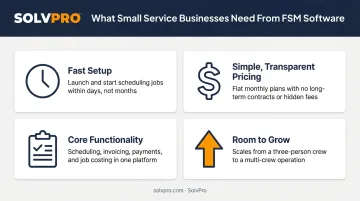
Small business needs look different from enterprise needs, though. A five-person plumbing crew doesn't need the customization layers built for a 500-technician utility company. What matters instead:
- Fast setup: operational in minutes, not weeks
- Simple, transparent pricing: no hidden per-feature charges
- Core functionality: scheduling, invoicing, mobile access, payments
- Room to grow: without forcing a platform switch as headcount grows
The following section breaks down the platforms best suited for small service businesses right now.
Top Field Service Management Software for Small Businesses
Selection here comes down to four things: pricing transparency, setup speed, mobile usability, and features that actually match how small crews work day to day.
SolvPro
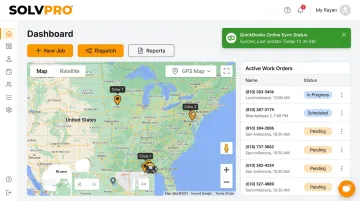
SolvPro is an all-in-one FSM platform built by a team with over 50 years of combined experience in construction, field service, estimating, and project management. It serves general contractors, electrical, plumbing, landscaping, excavation, and commercial cleaning crews.
What sets it apart:
- Fully bilingual English/Spanish interface for both office staff and field crews, including a Spanish-language mobile app
- Job and crew time tracking that records time entries against the job, photos, and status updates for verifiable crew accountability
- Digital estimates with customer-facing PDF proposals and milestone payment schedules
- Setup in under 10 minutes, with a live team walking new users through onboarding at no extra cost
| Category | Details |
|---|---|
| Key Features | Scheduling, work orders, crew tracking, invoicing, QuickBooks Online sync, native credit-card and ACH payments (credit card, ACH) |
| Best For | Multi-crew field service teams wanting bilingual support and real onboarding assistance without enterprise complexity |
SolvPro includes crew dispatch and QuickBooks Online sync on its single core plan, with no upgrade required to unlock them.
Jobber
Jobber is one of the most widely used FSM tools for home service businesses, organizing its platform around job management, customer service, and business operations.
The interface is clean, the quote-to-job workflow is quick, and its Client Hub lets customers approve quotes and pay invoices without a phone call. That combination makes it a strong fit for solo operators and small teams still building their systems, though multi-crew scheduling feels limited compared to tools built for larger crews.
| Category | Details |
|---|---|
| Key Features | Scheduling, invoicing, client hub, online booking, mobile app |
| Best For | Small service businesses wanting simple scheduling and customer communication tools |
Housecall Pro
Housecall Pro focuses on scheduling, dispatching, invoicing, and payments for residential service businesses, including HVAC, plumbing, electrical, cleaning, and appliance repair.
Onboarding is approachable, and built-in payment workflows help teams moving off paper processes get comfortable fast, though costs can climb once add-ons and extra users enter the mix.
| Category | Details |
|---|---|
| Key Features | Dispatching, estimates, QuickBooks integration, online booking, card payments |
| Best For | Small to mid-sized residential service teams wanting an easy-to-adopt tool |
Workiz
Workiz covers scheduling, lead management, dispatching, and GPS tracking, with a clear focus on HVAC, plumbing, electrical, and locksmith trades.
Its current plans (Standard, Pro, Ultimate) are quote-based, with a 7-day free trial and no credit card required to test the platform, though the lack of published pricing means an extra sales call before you can compare costs.
| Category | Details |
|---|---|
| Key Features | Scheduling, automations, invoicing, online payments, mobile app |
| Best For | Home-service teams wanting a trade-specific tool with room to scale |
ServiceM8
ServiceM8 takes a mobile-first approach to job management, covering everything from first call through invoicing and payment.
The interface stays lightweight, and its accounting sync (QuickBooks Online, Xero, and MYOB) makes it a solid fit for very small teams that need clean books without a bookkeeper on staff.
| Category | Details |
|---|---|
| Key Features | Job management, quotes, invoices, mobile app, accounting sync |
| Best For | Solo operators and small teams wanting simple mobile job tracking |
FieldPulse
FieldPulse covers scheduling, estimates, invoicing, and customizable workflows for residential and commercial service businesses.
Its configurable forms and pricebook tools stand out, along with a seat-based pricing model that separates full-access office seats from lower-cost field-only seats.
| Category | Details |
|---|---|
| Key Features | Scheduling, dispatching, estimates, invoicing, reporting, mobile access |
| Best For | Growing residential and commercial service businesses needing configurable workflows |
What to Look for in FSM Software
The most common mistake small businesses make? Picking software based on brand recognition or a long feature list instead of actual day-to-day workflow fit and total cost of ownership.
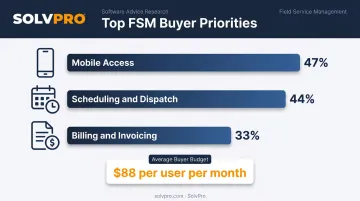
Software Advice's field service research backs this up. Prospective buyers most frequently ask for mobile access (47%), scheduling and dispatch (44%), and billing/invoicing (33%) (Software Advice's field service buyer report). The same research puts the average buyer budget at $88 per user per month, with plumbing and HVAC buyers often spending more.
These are the points of difference:
- Pricing transparency: no surprise per-feature charges
- Setup and onboarding time: how fast a team gets operational
- Core feature coverage, including scheduling, invoicing, and mobile access
- Integration support for QuickBooks and payment processing
- Scalability: room to grow without a forced platform switch
These criteria matter because most buyers aren't comparing polished systems to each other; they're upgrading from something far messier. Roughly a third of prospective buyers are still using spreadsheets or no system at all. Any of these platforms is a meaningful upgrade from that starting point.
Conclusion
The best FSM platform for your business is the one that matches your crew size, your trade's complexity, and how much admin bandwidth you have.
Before committing to any platform:
- Test the free trial or book a demo
- Verify QuickBooks or payment integration compatibility
- Confirm pricing has no hidden add-ons or upgrade-to-unlock features
If bilingual support and fast onboarding matter to your team, SolvPro's platform sets up in under 10 minutes with live human support included. It's a low-risk way to see if it fits before you commit to anything.
Field service software helps you manage the work. SolvPro helps you make sure the work makes money.
The right tool depends on your trade, crew size, job mix and the systems you already run. Test it on real jobs before you commit, and check that crews will actually enter what the office needs. When you want to see it on your kind of work, Book a Demo.
Run the Job. Protect the Profit.
Frequently Asked Questions
What's the Difference Between CRM and FSM?
CRM manages customer relationships, sales pipelines, and communication history. FSM manages the operational side: dispatching technicians, scheduling jobs, tracking crews, and invoicing completed field work.
What Is the Best Field Service Management Software for Small Businesses?
It depends on your trade and team size. Platforms like SolvPro, Jobber, and Housecall Pro are built specifically for small service teams needing fast setup and core features without enterprise complexity.
How Much Does Field Service Management Software Typically Cost?
Pricing ranges from free entry tiers to $450+/month for premium plans, according to Capterra's field service software pricing data. Most small businesses land between $30 and $230 per month depending on team size.
Is There Free Field Service Management Software Available?
Some vendors offer free tiers or trials with usage limits, like ServiceM8's free plan capped at 30 jobs per month. Most growing businesses eventually need a paid plan for full feature access.
What Features Should a Small Business Look for in FSM Software?
Prioritize scheduling and dispatch, mobile access, invoicing and payments, QuickBooks integration, and crew tracking. These cover the core daily workflow for most service teams.
How Long Does It Take to Set up Field Service Management Software?
Modern SMB-focused platforms prioritize quick onboarding. Some, like SolvPro, complete setup in under 10 minutes, compared to weeks for enterprise-grade systems.