Jobs get double-booked. Crews call the office for information they should already have. Invoices sit on someone's desk for days after the work is done. According to QuickBooks' 2025 Small Business Late Payments Report, 56% of small businesses are owed money from unpaid invoices, with the average outstanding balance sitting at $17,500 — and nearly half of those invoices are overdue by 30 days or more.
That's not a billing problem. It's an operations problem.
Plumbing companies that use purpose-built software to connect their office and field operations close more jobs, invoice faster, and get paid sooner. This article breaks down exactly how — from scheduling and dispatch to crew accountability, invoicing, and reporting.
KEY TAKEAWAYS
- Plumbing software centralizes scheduling, dispatch, estimating, invoicing, and crew tracking into one system
- Digital invoicing and on-site payment collection close the gap between job completion and getting paid
- Event-based crew tracking keeps field teams accountable without constant calls back to the office
- Customer history and job costing data reveal which service types are profitable and which are priced too low
- The right platform gets your crew up and running quickly, with no weeks-long implementation dragging down your start
The Real Cost of Running a Plumbing Business Without Software
Plumbing businesses rarely fail because the work is bad. They struggle because the back-office systems are barely holding together: spreadsheets for scheduling, text messages for dispatch, paper invoices mailed after the fact, and an accounting tool nobody touches until month-end.
Each handoff point is a place where something goes wrong.
According to Software Advice's Field Service Buyer Insights Report, 35% of field service businesses still use manual methods like spreadsheets or paper, and 52% cite inefficiency as their primary pain point. That inefficiency compounds fast.
Where the Money Disappears
When operations are disconnected, the visible problems are frustrating. The invisible ones are expensive:
- Scheduling errors lead to double-booked crews, missed service windows, and rescheduled jobs — pure labor cost with nothing billed
- Slow invoicing stretches the gap between completing work and collecting payment, squeezing cash flow on growing businesses
- Unclear job assignments send crews out unprepared, adding extra trips and inflating labor costs per job
- Paper records get lost or delayed, and when a customer disputes a charge, there's nothing reliable to fall back on
The Xero data tells the story clearly: North American small businesses waited an average of 28.5 days to be paid in the March 2024 quarter, running 9.8 days past due on average. For a plumbing company with four or five crews running multiple jobs a day, that lag adds up quickly.
An integrated software platform closes these gaps by keeping all job data, from the first call to final payment, connected and visible to both office staff and field crews in real time.
How Software Streamlines Scheduling and Dispatch
Manual scheduling breaks down fast when a plumbing company runs more than a couple of crews. Coordinating jobs through phone calls, shared spreadsheets, and whiteboards creates constant conditions for error.
Someone takes a call and pencils in a job without checking who's already booked. A priority job comes in mid-morning and there's no easy way to see who can take it without calling every crew lead individually.
Digital scheduling replaces that chaos with a centralized, real-time view of every crew and every job.
What a Modern Dispatch System Looks Like
SolvPro's visual, drag-and-drop scheduling calendar lets dispatchers assign jobs in seconds. Toggle between day, week, and crew views to see exactly where every team is at any given moment. Crew availability updates in real time, so double-booking becomes a thing of the past.
When a job is assigned, the relevant details push directly to the technician's mobile device — job address, customer notes, scope of work, special access instructions, and any site-specific requirements. No more calls to the office asking for information that should have arrived before the crew left the yard.
The Real-Time Advantage for Dispatchers
Real-time job status visibility gives dispatch teams a concrete edge:
- See which crews are en route, actively on-site, or wrapping up at any moment
- Reassign urgent or emergency calls to the nearest available crew without guessing
- Catch delays before they cascade into missed afternoon appointments
- Make same-day scheduling decisions based on actual data, not hopeful estimates
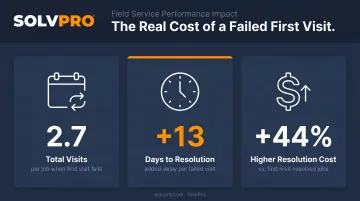
Field service research from Aquant found that a failed first visit results in an average of 2.7 total visits, adds 13 days to total resolution time, and raises resolution cost by 44%. Getting crews to the right job with the right information the first time cuts costs, protects margins, and keeps customers from calling back.
Estimating, Invoicing, and Getting Paid Faster
The gap between completing a job and getting paid for it is one of the clearest profit leaks in field service. For many plumbing companies, that gap exists because the invoicing process requires paperwork to travel from the field back to the office before anything can be billed — a process that can stretch from hours to days. Software closes that gap entirely.
From Estimate to Invoice Without the Delay
SolvPro's estimating tool lets office staff or field crews build professional, itemized proposals on the spot — with itemised line-item costs. A customer-facing PDF goes out immediately, looking polished and detailed before the job even starts. Once approved, the estimate converts directly into a scheduled job with no duplicate data entry.
When the work is done, the technician closes out the job from their phone:
- Update job status to mark work complete
- Add photos and notes for documentation
- Capture customer sign-off as proof of completion
- Generate and send the invoice from the job site
- Collect payment on-site via credit card or ACH before leaving the property
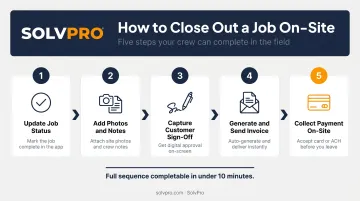
That full sequence — from job completion to payment collected — can happen in under ten minutes without the crew ever returning to the office.
Why Accounting Integration Matters
On-site invoicing only works if it connects cleanly to the back office. SolvPro includes QuickBooks Online sync and credit-card and ACH payments as core platform features — not add-ons that require an upgrade. Invoices, payments, and job costs flow automatically into QuickBooks, eliminating double entry and keeping financials accurate without extra admin work.
Job costing takes it a step further. When actual labor hours, materials, and overhead are tracked against the original estimate, owners can see exactly which service types are genuinely profitable and which are priced too low — information many plumbing businesses do not have because the data is scattered across too many systems to pull together.
Keeping Field Crews Accountable and Connected
When a plumbing company grows beyond two or three crews, accountability becomes harder to maintain without the right infrastructure. Disputes over hours, questions about which jobs were completed when, and mid-job calls asking for information that should have been in the work order — these are symptoms of a system that isn't built to support field teams at scale.
Event-Based Tracking Without Micromanaging
SolvPro records time by job and by crew member. Whenever a crew member performs a trackable action — logging time, uploading a photo, updating job status, or recording a note — the system records against the job that entry with a location and timestamp.
The result is a clear, verifiable record of crew activity tied to real job events, not a surveillance feed that creates friction without adding value. Office managers can see which jobs are active, delayed, or complete without calling every crew lead for an update.
49% of active field service software users identify mobile access as the most critical feature for daily operations, according to Software Advice. Crews that can access complete job information from their phone are more prepared, make fewer errors, and require less hand-holding from the office. That's exactly what mobile work orders are designed to deliver.
Mobile Work Orders That Actually Help in the Field
Before arriving on-site, technicians can review:
- Full job history and prior service notes for that customer
- Required materials and any scope-specific instructions
- Customer notes and location-specific access details
- Change orders or scope updates since the last visit
This preparation directly affects first-visit fix rates. When a technician walks in knowing what they're dealing with, they're far less likely to discover a missing part, a misunderstood scope, or a condition that requires an unplanned return trip.
Breaking Down Language Barriers
For plumbing companies with bilingual crews, SolvPro operates fully in both English and Spanish — the entire platform, including the mobile app. This isn't a translated subset of features; it's the complete interface available in either language.
When job details, instructions, and status updates reach crew members in the language they actually work in, misunderstood assignments drop. So do callbacks, missed steps, and the kind of avoidable errors that quietly eat into job margins.
Customer Management and Business Reporting
Centralized Customer Records
Every customer interaction, service visit, invoice and site-specific note lives in one place. When a customer calls to ask about their last service, office staff can pull the complete history instantly — no digging through email chains or paper folders. When a technician heads to a job, they can review everything relevant to that site before they arrive.
SolvPro keeps customer details and job history in one record, so the office can see where each job stands without piling more manual work onto an already-busy day.
According to Software Advice, 94% of prospective field service software buyers prioritize contact management during the purchase process — which tells you how central this capability is to how these businesses actually operate.
Reporting That Replaces Gut Feel
SolvPro's analytics dashboard provides the ability to see:
- Actual job profitability versus estimated cost
- Labor and material spend tracked against the original quote
- Crew performance compared across jobs and time periods
- Operational trends to sharpen pricing and resource decisions

For owners who want to grow beyond owner-operator status, this kind of data is what makes that possible. You can't identify which service types to expand, which crews to invest in, or where margin is quietly disappearing when the numbers are scattered across spreadsheets and paper records. Centralizing it changes what decisions you're able to make.
What to Look for When Choosing Plumbing Software
Not all field service platforms are built for small plumbing businesses. Many are designed for enterprise contractors with dedicated IT teams and months to spend on implementation. Here's what actually matters for a growing plumbing company:
Practical Evaluation Criteria
- Setup speed — SolvPro gets you from signup to first dispatched job in under 10 minutes, with live onboarding support included at no extra cost. No weeks-long implementation required.
- Mobile usability — Test it on a phone before committing. A platform built around desktop workflows will slow your techs down, not support them
- Core features in the base plan — Scheduling, invoicing, and payment processing should come standard. SolvPro includes QuickBooks Online sync and credit-card and ACH payments on its core plan — no premium add-ons required
Integration and Pricing Transparency
Confirm accounting software compatibility before committing. If the platform doesn't sync with QuickBooks Online, every invoice and payment will require manual reconciliation — adding back the exact admin work you were trying to eliminate.
For pricing, look for transparent, SMB-friendly rates with no long-term contract requirements. SolvPro operates on no-contract, cancel-anytime terms — flexibility that matters most when you're adopting software for the first time and need room to confirm it actually fits your operation.
Conclusion
Field service software helps you manage the work. SolvPro helps you make sure the work makes money.
The right tool depends on your trade, crew size, job mix and the systems you already run. Test it on real jobs before you commit, and check that crews will actually enter what the office needs. When you want to see it on your kind of work, Book a Demo.
Run the Job. Protect the Profit.
Frequently Asked Questions
What Software Do Plumbing Contractors Use?
Plumbing contractors typically use field service management, scheduling, invoicing, and CRM tools. Many growing companies are consolidating onto all-in-one platforms that handle all of these functions in a single system — reducing data entry, eliminating software sprawl, and keeping office and field teams on the same page.
What Is Field Service Management Software for Plumbing?
Field service management software connects office operations and field crews in one platform — covering job scheduling, dispatch, work orders, invoicing, and payments. Everything from the first call to the final payment lives in one place, so nothing gets lost between the office and the field.
How Does Plumbing Software Help with Scheduling and Dispatch?
Digital scheduling gives dispatchers a live view of crew availability and job status, replacing phone calls and spreadsheets with a centralized board. Job details push automatically to technicians' mobile devices at dispatch, so crews arrive prepared without back-and-forth calls before every job.
Can Plumbing Software Integrate with QuickBooks?
Yes — many field service platforms offer QuickBooks Online sync, which automatically transfers invoice and payment data into accounting without manual entry. SolvPro includes this integration in the core plan at no additional cost, keeping financial records accurate as jobs close out in the field.
Is Plumbing Software Difficult to Set up and Learn?
SolvPro is built for quick setup, with signup to first dispatched job in under 10 minutes. Live onboarding support is included, so you're not left to figure it out on your own.
What Features Should Plumbing Businesses Prioritize When Choosing Software?
Focus on scheduling and dispatch, mobile access for field crews, digital invoicing, on-site payment collection, and QuickBooks integration. The right platform fits how your business actually operates — a long feature list means nothing if the workflow doesn't match how your crews and office run day to day.