QuickBooks Online does include native time tracking. For a solo bookkeeper or a two-person office, it might be enough. But once you've got multiple crews spread across job sites, native QBO tools start showing their limits fast.
This guide breaks down what QuickBooks Online offers out of the box, what field service businesses should actually look for in a time tracking tool, and how the top QBO-connected options stack up against each other.
KEY TAKEAWAYS
- QuickBooks Online's native time tracking often falls short for multi-crew teams
- The right tool ties time tracking to job costing and invoicing, not just logged hours
- Options range from QuickBooks Time to apps like Clockify, Hubstaff, and Buddy Punch
- All-in-one platforms like SolvPro combine time tracking, scheduling, and QBO sync in one system
- Confirm whether the sync writes time to QuickBooks one way or both ways, because that changes how corrections are handled at payroll
Does QuickBooks Online Have Built-In Time Tracking?
Yes. QBO includes two native time entry formats:
- Single time activity: records or edits one day or event, with start/end times or total hours
- Weekly timesheet: logs hours across a full week by customer or project
One catch worth knowing: weekly timesheets are non-posting. They won't show up on your Profit and Loss report until they're tied to an invoice or expense.
QuickBooks Time and the Workforce App
For deeper functionality, Intuit offers QuickBooks Time (accessed through the Workforce mobile app). Crew members can clock in against a specific job, switch between jobs mid-shift, take breaks, and submit their week for approval, all from a phone.
QuickBooks Time was formerly called TSheets. Intuit acquired it in December 2017, and the product is now fully folded into the QuickBooks family under the QuickBooks Time name.
As of the latest published pricing, here's what QuickBooks Time costs:
| Tier | Base Fee | Per-User Fee |
|---|---|---|
| Time Premium | $20/month | $10/user/month |
| Time Elite | $40/month | $12/user/month |
Both tiers require an active QuickBooks Online subscription to activate. This isn't a standalone product.
GPS, Geofencing, and Site Verification
Field crews get some genuinely useful tools here:
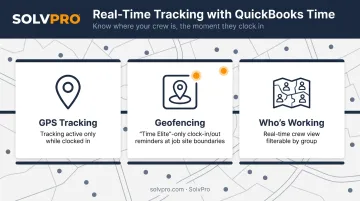
- GPS tracking while clocked in (not while off the clock)
- Geofencing (Time Elite only) that reminds workers to clock in or out when entering or leaving a job site boundary
- Who's Working: a real-time view of who's clocked in, filterable by crew or group, with location shown on a map
Where Native Tracking Falls Short
For a business running one crew out of one office, this covers the basics. But once you're dispatching multiple crews to multiple sites, gaps show up:
- Scheduling recurring shifts is capped at one year or 365 shifts
- There's no built-in work order or dispatch system tying time to a specific job's scope
- Weekly timesheets need manual linking before they affect job profitability reporting
That last point matters more than it sounds. If your time data doesn't automatically flow into job costing, someone's still doing manual reconciliation every week.
What to Look for in Time Tracking Software for Your QuickBooks Online Business
Not every "QuickBooks-compatible" tool works the same way under the hood. Before you pick one, check these five things.
Sync Direction Matters More than "Integration"
Plenty of tools advertise a QuickBooks integration. Fewer explain whether it's a two-way sync or a one-time export. Clockify is a good example: its QBO connection sends time entries once, marks them as sent, and won't resend them. Later edits in Clockify simply don't update QuickBooks.
If your team edits time after the fact (and they will), a one-way push creates a reconciliation gap every single pay period.
Mobile-First Clock-In with GPS
If your crews aren't sitting at a desk, your time tracker shouldn't assume they are. Look for:
- Clock-in/clock-out from a phone, not just a browser
- GPS or geolocation confirmation tied to the job site
- Offline capability that syncs once connectivity returns
Time Tied to Jobs, Not Just Totals
A tool that logs "8 hours" tells you nothing about whether that job was profitable. You need time attributed to a specific customer or job so office staff can see labor cost against the job budget, not just payroll totals at the end of the week.
Setup Simplicity over Enterprise Complexity
Most time tracking software is built for large HR departments running complex approval chains. A five-person plumbing crew doesn't need that. A low learning curve beats feature depth for small teams trying to get crews onboarded in a day, not a month.
Bilingual Support Is Frequently Overlooked
If your crews include Spanish-speaking workers, check whether the app's mobile interface, not just the marketing site, actually supports Spanish. Most time tracking tools don't, which becomes a real adoption barrier when half your field team can't confidently use the clock-in screen.
Top Time Tracking Tools That Integrate with QuickBooks Online
Here's how the main options compare on QBO connectivity and field-readiness.
| Tool | QBO Connection | Best Fit |
|---|---|---|
| QuickBooks Time | Native | Businesses fully in the QBO ecosystem |
| SolvPro | Built-in core sync | Multi-crew field service businesses |
| Clockify | Paid, one-way export | Small teams, budget-conscious |
| Hubstaff | Hourly vendor sync | Remote/distributed teams |
| Buddy Punch | Time-clock alternative | Strict attendance verification |
QuickBooks Time (Formerly TSheets)
This is Intuit's own product, so the connection to QBO is as native as it gets. It holds a solid 4.5/5 rating on G2 across nearly 1,500 reviews. It's a reasonable choice if you're already deep in the QuickBooks ecosystem and mainly need basic mobile clock-in with payroll sync. Remember, it requires an active QBO subscription to activate at all.
SolvPro
SolvPro is built specifically for multi-crew field service businesses — general contractors, HVAC, plumbing, electrical, landscaping, and commercial cleaning crews that need more than a standalone clock. Time tracking is built directly into the same platform that handles scheduling, work orders, and crew dispatch, rather than added on as a separate module.
A few things set it apart:
- Job and crew time tracking that records time entries, photo uploads and activity logs against the job, creating a documented record tied to actual work events
- QuickBooks Online sync built into the core platform on the core plan, with no add-on fees
- Setup in under 10 minutes, with live onboarding support instead of a chatbot or knowledge base
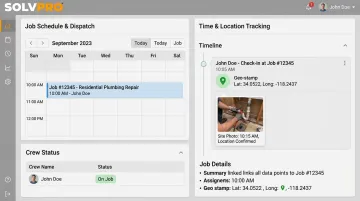
Because time entries are logged by job and crew member from the start, office staff see labor cost against each job in real time, without manually cross-referencing two systems afterward.
Clockify
Clockify is a solid budget option, with a free plan supporting up to five users and unlimited time tracking. The catch: QuickBooks connectivity requires a paid Standard, Pro, or Enterprise plan, and the sync only pushes data one direction — from Clockify into QBO. Once an entry is sent, edits made afterward don't update QuickBooks automatically.
Hubstaff
Hubstaff holds a strong 4.4/5 rating on G2 from over 2,000 reviews and syncs tracked time to QuickBooks roughly every hour. It layers in activity monitoring (mouse and keyboard activity, optional screenshots) on top of GPS geofencing, making it a fit for distributed teams. Reviewer feedback on the depth of its QBO integration specifically is thin, so it's worth testing against your own reconciliation workflow before committing.
Buddy Punch
Buddy Punch rates highest of the group at 4.8/5 on G2. Its standout features are geofencing (with a configurable 50 to 1,500-meter radius) and Face ID-based facial recognition for punch verification. It's a strong pick if attendance fraud or buddy-punching is a specific concern, though its QuickBooks connection is more limited than SolvPro's or QuickBooks Time's native paths.
Most standalone tools here only push hours into QuickBooks in one direction. All-in-one platforms that build QBO sync into the core system move jobs, crews, and invoice data more completely, because the time was never sitting in a separate silo to begin with.
Why Growing Service Businesses Choose an All-In-One Platform Like SolvPro
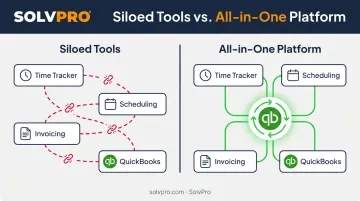
Stack a time tracker on top of separate scheduling software, invoicing tools, and QuickBooks, and you've created four places where data can go stale. Someone updates a job in one app and forgets to update it in the other three.
This isn't a hypothetical scenario. It's the default state for a lot of growing service businesses.
SolvPro's approach is to build QuickBooks Online sync and credit-card and ACH payments directly into the core platform, not as bolted-on integrations that need separate logins and separate monthly fees.
What that actually changes for the office:
- Fewer missed or delayed jobs, because scheduling and dispatch sit in the same system as time tracking
- Faster invoicing, since field crews can generate and collect payment on-site
- Clearer the ability to see what each job made, as labor costs sync automatically instead of being reconciled by hand
- Less admin time overall, since the office isn't juggling five logins to answer one question
Pricing is transparent and SMB-friendly: the core plan, with no long-term contracts. That makes it a low-risk option to try alongside whatever you're currently running.
Tips to Get the Most Out of Time Tracking with QuickBooks Online
A few practical steps make the difference between a smooth rollout and a messy one:
- Map job and customer codes in QuickBooks first. Do this before activating SolvPro's time tracking sync. Mismatched codes at launch mean mismatched job costing for weeks afterward.
- Train crews on mobile clock-in during onboarding, not after the first payroll cycle. Late or missed entries almost always trace back to skipped training in week one.
- Review your time-to-invoice turnaround after 30 days. If the integration is working, invoices should be going out faster. If they're not, that's your signal something in the setup needs a second look.
Conclusion
Field service software helps you manage the work. SolvPro helps you make sure the work makes money.
The right tool depends on your trade, crew size, job mix and the systems you already run. Test it on real jobs before you commit, and check that crews will actually enter what the office needs. When you want to see it on your kind of work, Book a Demo.
Run the Job. Protect the Profit.
Frequently Asked Questions
Does QuickBooks Allow Time Tracking?
Yes. QuickBooks Online includes native time entry features, and deeper functionality is available through QuickBooks Time/Workforce. It may not cover every scheduling need for field service crews, though.
How Much Is a QuickBooks Time Tracker?
QuickBooks Time Premium runs $20/month plus $10 per user, while Time Elite runs $40/month plus $12 per user. Pricing changes periodically, and an active QBO subscription is required either way.
Is TSheets Owned by QuickBooks?
Yes. Intuit acquired TSheets in 2017 and later rebranded it as QuickBooks Time. It's now fully part of the QuickBooks product family, not a separate third-party tool.
Can I Use a Time Tracking App with QuickBooks Online If I Have Multiple Crews at Different Job Sites?
Absolutely. Mobile clock-in is available across these platforms; SolvPro records time by job and by crew member, which is built for tracking crews across multiple locations.
Do I Need a Separate Time Tracking App If I Already Use QuickBooks Payroll?
Likely yes. QuickBooks Payroll processes wages but doesn't provide job-level time tracking or crew scheduling. Most field service businesses still need a dedicated tool for that layer.
What's the Best Time Tracking Software for QuickBooks Online for Contractors and Field Service Businesses?
QuickBooks Time covers basic needs well. For multi-crew operations that need scheduling and job costing bundled in, all-in-one platforms like SolvPro tend to fit better.