This guide covers the five best scheduling software options for cleaning businesses in 2026 — what each does well, what it doesn't, and which type of operation each one actually fits.
KEY TAKEAWAYS
- SolvPro suits multi-crew commercial cleaning and janitorial operations that need scheduling, crew tracking, and billing together.
- Jobber fits cleaning companies that also run carpet cleaning, pressure washing, or window cleaning work.
- ZenMaid is built specifically for recurring residential maid services rather than commercial contracts.
- Connecteam offers a free tier for small cleaning crews under ten people that mainly need GPS shift tracking.
- When I Work suits commercial janitorial teams running fixed nightly shift routes across several sites.
Why Cleaning Businesses Need Dedicated Scheduling Software
Generic Schedulers vs. Field Service Management Platforms
Not all scheduling tools are built the same. A generic shift scheduler tells you who works when. A field service management (FSM) platform connects scheduling to job costing, invoicing, and crew accountability — and that's a different tool entirely.
For a cleaning business with multiple crews across multiple sites, the difference matters. If you can't tie labor hours on a specific account back to what you billed, you're guessing on profitability. Many owners find out too late that a "good client" has been running at a loss for months.
The right platform answers three questions at once:
- Where are my crews right now, and are they on the right job?
- Is the work getting done — and can I prove it to the client?
- Am I making money on this account after labor?
Language Accessibility Matters for Cleaning Operations
BLS data shows that 49.8% of maids and housekeeping cleaners identify as Hispanic or Latino, and 35.6% of janitors and building cleaners share that background. For crews that primarily speak Spanish, an English-only platform doesn't stay in use for long.
The field-level impact shows up fast:
- Missed job instructions when workers can't read the work order
- Scheduling confusion from notifications they can't parse
- Slower adoption — or outright abandonment — of the tool
A bilingual interface isn't a feature upgrade. It's the difference between software your whole crew actually uses and software that only works for the office.
Best Scheduling Software for Cleaning Businesses in 2026
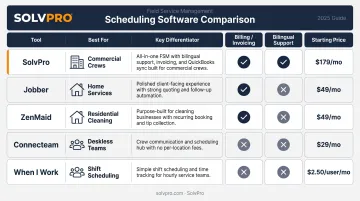
The right tool depends on your business model — recurring residential accounts, commercial contracts, or a mix of both. The five options below cover the full range, from free crew-scheduling tools to full FSM platforms, each matched to a specific use case.
SolvPro
Best for: Multi-crew commercial cleaning and janitorial operations
SolvPro is an all-in-one FSM platform built for growing service businesses with crews in the field, including commercial cleaners and janitorial companies. The team brings 50+ years of combined experience in field service, construction, and project management. It was designed by people who've worked from truck beds and job sites — not a generic software team.
What sets it apart for cleaning operations:
- Job-level time tracking — time entries, photo uploads and status updates are recorded against the specific job. You see not just where a crew was, but what they were doing there.
- Fully bilingual English/Spanish interface — covers the mobile crew app, web dashboard, scheduling, and customer-facing documents. SolvPro includes a dedicated Spanish-language translator on staff, and bilingual support is included on every plan at no extra cost.
- Native QuickBooks Online sync — built into the platform, not a third-party connector. Financial data flows between SolvPro and QuickBooks without manual export.
- credit-card and ACH payments — crews can invoice and collect payment the same day a job closes, including credit card and ACH.
- Recurring job management — nightly, weekly, biweekly, and custom cadences are all supported, built specifically for contract-based cleaning accounts.
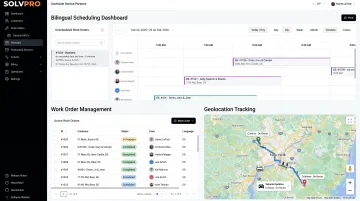
Setup takes under 10 minutes, live onboarding support is included on all plans, and there are no long-term contracts.
| Key Features | Job scheduling, work orders, job and crew time tracking, QuickBooks Online sync, credit-card and ACH payments, bilingual English/Spanish interface, digital estimates with customer-facing PDF proposals, recurring job management |
| Best For | Multi-crew commercial cleaning, janitorial companies, and growing service businesses needing field accountability and integrated payments |
Jobber
Best for: Multi-service cleaning companies
Jobber is a widely used FSM platform covering 50+ home service categories. For cleaning businesses that also offer carpet cleaning, window cleaning, or pressure washing under the same company, that breadth is useful — one platform can manage the full service menu.
Standout features include a polished drag-and-drop scheduling calendar, a solid client-facing booking portal, and GPS tracking available across plans. QuickBooks Online sync is included on Connect and higher plans.
The trade-off: per-user pricing adds up as teams grow past 5–8 cleaners, and the platform is English-only with no bilingual crew app.
| Key Features | Drag-and-drop scheduling, GPS dispatch, recurring job templates, client hub portal, invoicing and online payments, route optimization |
| Best For | Multi-service cleaning companies expanding into adjacent home services |
ZenMaid
Best for: Residential maid services with recurring weekly/biweekly accounts
ZenMaid was built by former maid service operators — co-founder Amar Ghose started a maid service in 2012 before launching ZenMaid in 2013. The entire feature set is organized around the recurring residential clean.
What works well: automated SMS reminders that reduce no-shows, recurring appointment templates that generate weeks of bookings automatically, and cleaning-specific checklists for move-in/move-out and deep cleans. GPS clock-in is available on Pro and above.
What to know: route optimization is map-view-based rather than full automated routing, and the feature set is narrower than a full FSM platform. As teams grow past 6–8 cleaners or start taking commercial contracts, the limitations become more apparent.
| Key Features | Recurring schedule automation, GPS clock-in, automated SMS/email reminders, cleaning-specific digital checklists, mobile app for cleaners, invoicing via Stripe/Square (QuickBooks on Pro) |
| Best For | Residential maid service businesses built around weekly and biweekly recurring cleans |
Connecteam
Best for: Small cleaning crews under 10 needing free GPS shift tracking
Connecteam is a mobile-first workforce management platform with a genuinely free plan for teams up to 10 users. For a small cleaning crew that needs GPS time tracking and shift scheduling before committing to a full FSM platform, it's the most accessible entry point available.
One limitation to understand upfront: Connecteam handles scheduling and time tracking but does not include invoicing, CRM, or quoting. Any cleaning business using it still needs a separate billing tool, which adds reconciliation overhead as the team grows.
The free plan caps at 10 users. Hit 11, and you're on a paid plan with additional restrictions.
| Key Features | GPS geofenced clock-in, shift scheduling, team messaging, task checklists, mobile-first design |
| Best For | Small cleaning crews (under 10) needing shift scheduling and GPS accountability without a full FSM platform |
When I Work
Best for: Commercial janitorial teams on fixed nightly shift rotations
When I Work is a shift-based scheduling tool designed for hourly workforces. For commercial janitorial operations running crews through fixed nightly routes across multiple buildings, the shift-rotation model fits naturally. Scheduling works like crew assignment to sites rather than individual job dispatch.
At $2.50–$8/user/month, per-user cost is low enough for large teams. Crews without smartphones can receive schedules by SMS, which matters for janitorial operations where device access varies.
The same limitation applies as Connecteam: no invoicing, CRM, or quoting. Commercial cleaning contracts require a separate billing system running alongside it.
| Key Features | Shift templates, geofenced time clock, self-service shift swaps, overtime alerts, SMS schedule delivery |
| Best For | Commercial janitorial companies managing fixed nightly shift rotations across multiple buildings |
How to Choose the Right Tool for Your Cleaning Business
Three Questions Worth Asking before You Commit
Most owners make two common mistakes when evaluating scheduling software: choosing based on brand name recognition, or picking the cheapest option without checking whether it fits their actual business model.
The sharper questions to ask:
- Does scheduling connect to invoicing? Platforms that track time but don't link it to billing leave owners guessing on margin. For any cleaning business that invoices clients, this connection matters.
- Does the mobile app work for your crew? A tool no one on the crew adopts has zero value regardless of features. Mobile-first design and bilingual support directly affect real-world adoption.
- What's the actual cost as you grow? Per-user pricing models that start cheap can become expensive fast once a team exceeds 8–10 cleaners.
Those three criteria map directly to the type of cleaning business you run. Here's how the match breaks down.
Match the Tool to Your Operation
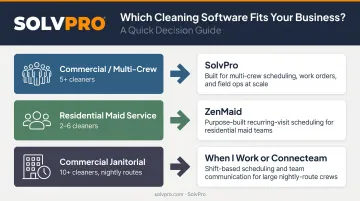
Commercial or multi-crew cleaning (5+ cleaners, mixed accounts): The must-haves are job-level time tracking tied to invoicing, and prompt dispatch. SolvPro covers all of this — field accountability, bilingual support, QuickBooks Online sync, and payments on one platform with no long-term contract.
Residential maid service (2–6 cleaners, weekly/biweekly accounts): The primary pain points are no-shows, reminder automation, and recurring schedule management. ZenMaid handles this natively. Once the team grows past 6–8 cleaners or starts adding commercial accounts, a full FSM platform typically becomes more cost-effective.
Commercial janitorial (10+ cleaners, fixed nightly routes, contract billing): Scheduling here looks like shift rotation, not job dispatch. When I Work fits if per-user cost is the top priority; Connecteam if you also want team communication and HR tools in the same app.
Conclusion
Field service software helps you manage the work. SolvPro helps you make sure the work makes money.
The right tool depends on your trade, crew size, job mix and the systems you already run. Test it on real jobs before you commit, and check that crews will actually enter what the office needs. When you want to see it on your kind of work, Book a Demo.
Run the Job. Protect the Profit.
Frequently Asked Questions
What Is the Best Scheduling App for Cleaners?
It depends on your business type. SolvPro is the strongest fit for multi-crew commercial or mixed operations needing scheduling, job tracking, and billing in one bilingual platform. ZenMaid works best for recurring residential maid services, and Connecteam is the practical choice for small crews needing free GPS shift tracking.
What Features Should I Look for in Scheduling Software for a Cleaning Business?
Focus on five things: GPS or geolocation clock-in at client locations, recurring job automation for weekly and biweekly accounts, a mobile app your field crew can use without training, real-time dispatch and reassignment for last-minute callouts, and QuickBooks integration to connect labor time to billing. Any platform missing more than one of these creates workflow gaps.
Is There Free Scheduling Software for Cleaning Businesses?
Connecteam offers a genuinely free plan for up to 10 users with GPS clock-in and shift scheduling. When I Work offers a 14-day free trial but no permanent free tier. Neither includes invoicing — cleaning businesses that need billing connected to scheduling will need a paid FSM platform.
How Does Scheduling Software Help Reduce No-Shows for Cleaning Crews?
Automated job reminders sent via SMS or push notification before a shift reduce casual no-shows. GPS clock-in accountability discourages lateness. When someone does call out, fast in-app reassignment lets managers cover the job in minutes rather than spending 30–45 minutes on the phone working through a contact list.
Can Scheduling Software for Cleaning Businesses Integrate with QuickBooks?
Yes. SolvPro includes QuickBooks Online sync as a native core feature across all plans, including the core plan. Jobber also offers QuickBooks integration starting at the Connect tier, eliminating manual data entry between scheduling and accounting.
What Is the Most Widely Used Scheduling System?
Jobber and Connecteam have broad adoption across home service businesses. In cleaning-specific operations, ZenMaid leads in residential maid services, while SolvPro is the go-to for commercial cleaning and janitorial companies needing scheduling, field accountability, and billing in one bilingual platform.
The Bottom Line
How to Choose the Right Tool for Your Cleaning Business
The best scheduling software for a cleaning business is not the most popular tool or the least expensive — it's the one that matches how your operation actually runs. A few questions narrow it down fast:
- What type of cleaning do you do — commercial, residential, or both?
- How many crews are you dispatching and tracking?
- Does billing need to connect directly to hours logged in the field?
For growing operations managing crews across commercial accounts, SolvPro combines scheduling, job and crew time tracking, recurring jobs, and bilingual support in one platform, with QuickBooks Online sync and in-app payments. There's no long-term contract, and the onboarding team walks you through setup from day one. If that matches how your business runs, explore SolvPro at solvpro.com or start a free trial — no credit card required.