Growing multi-crew companies in commercial cleaning, excavation, landscaping, septic services, and general contracting often find that Jobber's plan structure, feature gating, and pricing model create friction as they scale. This guide is for those businesses.
Three reasons owners start looking:
- Plan-gated features — QuickBooks Online sync, time tracking, and job costing are not available on Jobber's entry plan
- Team-size and plan pricing — the total monthly cost can increase as a business adds users or needs features available on higher plans
- Industry-specific gaps — workflows built primarily around residential home service may not match multi-crew commercial or specialty trade operations
Ten alternatives are in common use, and they separate on pricing transparency, job costing and profitability tools, multi-crew scheduling, and bilingual access for mixed English/Spanish teams.
KEY TAKEAWAYS
- Jobber has four tiers: Core, Connect, Grow, and Plus. Job costing and two-way SMS are available on Grow and Plus. QuickBooks Online sync and time/expense tracking begin on Connect.
- SolvPro is designed for growing multi-crew businesses that want scheduling, work orders, time tracking, job costing, bilingual access, invoicing, and QuickBooks Online sync within one core plan.
- The right alternative depends on team size, industry, budget, and which features your operations actually require.
- Pricing model matters as much as feature set, because per-user plans and tiered plans diverge sharply as a crew grows.
- Migrating customer, job, and invoice history is usually the slowest part of a switch, so ask what the vendor imports before committing.
Why Field Service Businesses Look for Jobber Alternatives
Jobber offers solid core functionality: scheduling, invoicing, quoting, and a customer hub. Its four plan tiers give businesses a clear upgrade path. Here is how those tiers are structured (prices as published on Jobber's pricing page in 2026 - verify current pricing directly):
- Core - entry plan with basic scheduling and invoicing; QuickBooks Online sync and time/expense tracking are not included
- Connect - adds QuickBooks Online sync, time and expense tracking, job checklists, automated client reminders, automatic payment collection, and quote and invoice follow-ups
- Grow - adds job costing, two-way SMS, automated quote follow-ups, and sales pipeline tools
- Plus - adds automated job costing and profitability tracking, centralized job files and media, teammate tagging in job notes, Pipeline, Marketing Suite, AI Receptionist, dedicated onboarding, and Premium Support
Jobber does include job costing and profitability reporting - they are available on Grow and Plus. What varies is when those features become accessible based on which plan a business is on, and what the monthly cost looks like as the team grows.
Jobber's total cost depends on the selected plan, billing term, included user count, and team size. Growing businesses should compare the cost of the plan containing the features they need at both their current and projected headcount rather than relying only on the lowest advertised starting price.
Beyond pricing structure, some businesses find that Jobber's workflows are optimized around residential home service. Companies running multi-day commercial jobs, coordinating several crews simultaneously, managing labor and material costs per job, or needing a fully bilingual platform may find other tools fit better.
Platform Comparison at a Glance
Pricing and product details here come from publicly available vendor documentation as of 2026. Verify current details directly with each vendor before making a decision.
| Platform | Best For | Included Users | Job Costing | Bilingual EN/ES |
|---|---|---|---|---|
| Jobber | Home-service businesses from solo operators to multi-crew teams | Varies by plan and selected team size | Grow and Plus | Partial; Spanish access varies by user role |
| SolvPro | Growing multi-crew, commercial | Up to 3 | Included in the core plan | Yes |
| Housecall Pro | Small home service teams | 1 | Included on Basic | Spanish app and support available |
| ServiceTitan | Large HVAC, plumbing, electrical | Custom | Yes | Not clearly published |
| Workiz | Call-heavy trades | Custom | Available; confirm plan | Not clearly published |
| Contractor Plus | Independent contractors and small service teams | 1 on Pro; first 2 on Pro Team | Automated tracking on Pro Team | Not clearly published |
| Markate | Home service, solo operators and small teams | Base owner account | Yes | Not clearly published |
| FieldPulse | Custom workflow needs | Custom | Yes | Not clearly published |
| Service Fusion | Small to mid-sized, scheduling focus | Unlimited | Add-on on Starter; included on Plus and Pro | Not clearly published |
| ServiceM8 | Very small teams, budget-conscious | Unlimited | Included on all plans | Not clearly published |
| Procore | Construction PM, mid to large | Custom | Yes | Not clearly published |
Note: Annual vs. monthly pricing can differ significantly. Verify billing terms and included users directly with each vendor.
Top 10 Jobber Alternatives for Field Service Businesses
1. SolvPro
SolvPro is designed primarily for growing multi-crew businesses, including commercial cleaning, excavation, landscaping, septic and wastewater, environmental services, general contracting, and specialty field-service operations. It can also support plumbing, electrical, and other service companies whose needs extend beyond basic scheduling and invoicing.
What the platform includes:
- Drag-and-drop scheduling with day, week, and crew calendar views
- Work orders with notes, photos, materials tracking, and change-order documentation
- Time tracking via manual entries or live timers, tracked by job and crew member
- Job costing and profit-per-job reporting — compare actual labor and material costs against what you billed
- Estimates, digital proposals, and signature/approval tracking
- Invoicing with credit card and ACH payment collection
- QuickBooks Online sync included in the core platform
- English and Spanish interfaces for both office staff and field crews
- Customer portal and SMS, iOS and Android access
Pricing is not published; confirm it directly with SolvPro. For teams with more than 10 users, or businesses with unusual requirements, contact SolvPro directly. SolvPro uses one core plan, and its main operational features are not divided across multiple subscription tiers. Month-to-month billing, 14-day free trial, no credit card required to start, no implementation fee. Migration assistance is available for existing customer and job data. Usage-based charges may apply to SMS messaging, card payments, ACH transactions, and AI features.
Jobber and SolvPro use different pricing structures, so a fair cost comparison must use the same team size, required features, billing term, and contract conditions. Jobber's price varies by plan and included user count. SolvPro does not publish pricing; confirm current pricing directly with SolvPro. Businesses should calculate both platforms at their current team size and projected team size before deciding.
SolvPro vs. Jobber - key differences:
Jobber offers lower-cost entry options and a broad set of home-service features across several plans. SolvPro is designed for growing multi-crew businesses that want scheduling, work orders, time tracking, job costing, bilingual access, invoicing, and QuickBooks Online sync within one core plan.
Industry examples:
A commercial cleaning company with fixed-price contracts can use SolvPro's job costing to compare actual crew hours and labor costs against the contracted amount, identifying which accounts are profitable and which are not.
An excavation business running multi-day jobs can track labor and materials as work progresses, reviewing cost-to-date against the estimate before the final invoice goes out.
A landscaping company managing recurring properties can assign crews to specific accounts, track time per crew member per job, and review labor cost across the week.
A septic service company can document additional work completed on-site - extra materials used, unexpected scope - before generating the invoice, so the record is accurate and the customer has documentation.
A team with mixed English and Spanish speakers can use the same platform without parallel translation workarounds - both the office interface and the field crew app are available in either language.
Review SolvPro's features and current pricing, or start a 14-day free trial with no credit card required.
2. Housecall Pro
Housecall Pro is a direct Jobber competitor built around home service businesses: HVAC, plumbing, electrical, cleaning, and similar residential trades. Its customer-facing tools - online booking, review requests, and automated follow-ups - are a strong point.
QuickBooks Online sync is not included on its entry plan. Employee GPS tracking and some reporting features require a higher tier. Pricing starts around $59/month (annual) for one user, with per-user fees on top at higher team sizes.
Best for small home-service teams that prioritize customer communication tools.
3. ServiceTitan
ServiceTitan is an enterprise-grade platform for large, multi-location HVAC, plumbing, and electrical businesses. It includes deep CRM, dispatch, marketing, and reporting tools, plus flat-rate pricebook functionality that residential trade companies often need.
There is no published pricing; implementation requires a dedicated onboarding process with ServiceTitan's team and monthly costs are custom-quoted per technician.
Best for businesses that have already outgrown SMB-level tools and need enterprise-depth functionality. Not suited for companies still evaluating their first real platform.
4. Workiz
Workiz is focused on call-heavy trades: locksmith, appliance repair, garage door, and similar businesses where inbound phone calls drive most of the job volume. Its built-in phone system, call recording, and AI call answering are its core differentiators.
Pricing is quote-based across Standard, Pro, and Ultimate tiers. The Workiz Phone communication suite is a separate add-on from the base scheduling and dispatch platform.
Best for small to mid-sized businesses where phone-to-job conversion is the main operational bottleneck.
5. Contractor Plus
Contractor Plus is aimed at independent contractors and small service companies that need estimating, job management, invoicing, scheduling, and client-management tools without enterprise-level complexity.
Contractor Plus offers a free plan. Its paid Pro plan starts at $49 per month for one user, while Pro Team starts at $58 per month for the first two users, with additional-user charges applying as the team grows. Automated job-costing and profitability tools are available on Pro Team.
Best for independent contractors and small teams seeking an accessible job-management platform, especially when advanced multi-crew profitability reporting is not the primary requirement.
6. Markate
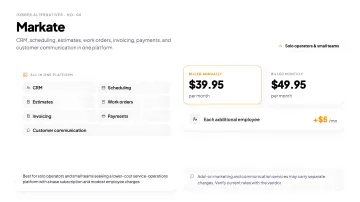
Markate targets solo operators and small home-service teams that need CRM, scheduling, estimates, work orders, invoicing, payments, and customer communication in one platform.
Markate currently costs $39.95 per month when billed annually or $49.95 on monthly billing, with each additional employee costing $5 per month. Add-on marketing and communication services may carry separate charges.
Best for solo operators and small teams seeking a lower-cost service-operations platform with a base subscription and modest employee charges.
7. FieldPulse
FieldPulse appeals to teams that need custom job workflows, custom fields, and forms rather than fixed job stages. It is useful for businesses whose jobs do not fit a standard template, and it includes job costing functionality.
Pricing is per-seat and quote-based. Setup requires more configuration time than simpler tools, and the onboarding process reflects that. Best for teams that have genuinely outgrown a rigid workflow and are willing to invest time in configuration.
8. Service Fusion
Service Fusion covers scheduling, dispatch, invoicing, and QuickBooks integration for small to mid-sized businesses. Its standout feature is flat, unlimited-user pricing: Starter runs around $245/month with no per-seat charges.
That structure makes monthly costs predictable regardless of headcount, which appeals to businesses that want to hire without watching their software bill climb.
Best for small to mid-sized businesses focused on scheduling and dispatch where predictable pricing is the priority.
9. ServiceM8
ServiceM8 offers a free tier for very small teams (1 user, up to 30 jobs per month), with paid tiers running from $29 to $349/month. All paid tiers include unlimited users, with job volume caps determining the plan level rather than headcount.
Feature depth is lighter than mid-market platforms, and customization options are limited. It is a reasonable starting point for very small teams that need core scheduling and invoicing at low cost.
Best for very small teams that are not yet ready to commit to a paid platform.
10. Procore
Procore is a construction project management platform rather than a direct Jobber replacement. It is built for mid-to-large general contractors and construction companies that need document management, subcontractor coordination, RFIs, submittals, budget tracking, and project-level reporting.
There is no published per-seat pricing; contracts are custom-quoted based on project volume and company size.
Best for companies that have grown beyond field service management and need full construction project management capability. Not suited for businesses primarily managing service calls or smaller recurring jobs.
How to Choose the Right Jobber Alternative
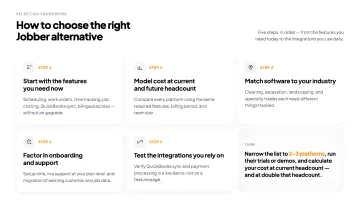
Start with the features you actually need right now. It is easy to be sold on a platform's full capability list. Focus on what your operations require today: scheduling and work orders, time tracking and labor costs, job costing and profitability, QuickBooks sync, bilingual access. If those are your priorities, filter the list above to field service management tools that include them without requiring an upgrade.
Model your cost at current and future headcount. Software prices can rise because of team-size bands, additional users, higher feature tiers, usage charges, or contract terms. Compare every platform using the same required features, billing period, and team size. SolvPro does not publish pricing; confirm current pricing directly with SolvPro. Calculate the total at your current team size and at your expected future headcount before deciding.
Match software to your industry. Field service platforms have different strengths:
- Commercial cleaning companies need recurring job management, crew scheduling by account, and labor cost tracking against fixed-price contracts
- Excavation and earthwork businesses need daily job tracking, multi-crew coordination, and material cost reporting
- Landscaping companies managing recurring properties need flexible scheduling and per-crew time visibility
- Specialty contractors and general service businesses need estimates, change-order tracking, and job-level profitability
Factor in onboarding and support. A platform with a short setup time and accessible live support reduces real cost beyond the subscription fee. Ask:
- How long does initial setup typically take?
- Is live support included at your plan level, or reserved for higher tiers?
- What migration support is offered for existing customer, job, and invoice data?
Test the integrations you rely on. QuickBooks sync and payment processing are used daily. Request a live demo and verify these connections work as described rather than trusting a feature page.
Conclusion
Jobber is a solid tool for many home-service businesses. It is not the right fit for every growing crew-based operation.
The right alternative depends on your team size, your industry, the features your jobs actually need, and what the monthly cost looks like as you hire.
Narrow the list to 2-3 platforms, run their trials or demos, and calculate your cost at current headcount and at double that headcount. The second number usually matters more.
If your business has moved beyond basic scheduling and now needs to compare labor and material costs with job profitability, coordinate multiple crews, support English and Spanish users, and keep work orders, time tracking, invoicing, and QuickBooks Online sync within one core platform, SolvPro is a strong option to include in your shortlist.
Review SolvPro's field-service features and current pricing, or book a demo to compare the platform with the requirements of your crews and jobs.
Run a profitable shop, not just a busy one.
Seeing what a job is costing while it is still open gives you a chance to act on it. SolvPro connects scheduling, work orders, time, job costing and invoicing so that information is in one place. When you want to see it on your kind of work, Book a Demo.
Run the Job. Protect the Profit.
Frequently Asked Questions
What Are the Biggest Limitations of Jobber for Growing Businesses?
Jobber places several capabilities on higher plan tiers. QuickBooks Online sync and time and expense tracking begin on Connect, while job costing and two-way SMS are available on Grow and Plus. Its total price also depends on the chosen plan, billing term, and selected team size. Growing businesses should calculate the cost of the plan containing their required features at both their current and projected headcount.
Is There a Free Field Service App for Small Teams?
ServiceM8 offers a limited free tier for very small teams (1 user, 30 jobs/month). Markate has a low-cost entry option. Most other alternatives, including SolvPro, offer free trials rather than permanent free plans.
What Should I Look for in a Jobber Alternative?
Start with the features your operations actually require: scheduling and work orders, time and labor tracking, job costing and profit per job, QuickBooks sync, payment processing, and - if relevant - bilingual access. Then compare pricing models at your current and projected team size. Test the tools that make it to your shortlist rather than relying on marketing pages.
Which Jobber Alternative Is Best for Bilingual Crews?
SolvPro provides English and Spanish interfaces for both office staff and field crews within the same platform. Some competitors also offer Spanish-language applications or support, but the scope may vary by user role, plan, or product area. Businesses with mixed-language teams should confirm whether Spanish access covers both office administrators and field employees rather than only one side of the operation. According to CPWR, Hispanic representation in construction trades reached 34% by 2023, which underscores the practical value of bilingual field software for many service businesses.
Can I Switch from Jobber Without Losing My Customer and Job Data?
Many field-service platforms provide migration assistance, but the records that can be imported vary by vendor. SolvPro includes assistance with importing existing customer and job data. Businesses should confirm the available migration process, required file formats, and any limitations before switching platforms.
How Much Do Jobber Alternatives Typically Cost?
Pricing ranges from limited free options to approximately $29-$60 per month for entry-level small-team products, around -$245 per month for platforms aimed at growing crews, and custom quotes for enterprise systems such as ServiceTitan and Procore. Pricing models include tiered plans, team-size bands, seat-based pricing, unlimited-user subscriptions, and a base price plus additional users. Always confirm current prices, included users, billing terms, and required feature tiers directly with the vendor.