
Contractor scheduling software addresses these problems directly, not in theory but in the daily operational decisions that determine whether a job runs smoothly or falls apart. This article breaks down the specific, measurable ways scheduling software improves how technicians perform in the field.
Key Takeaways
- Smart job assignment and route optimization means technicians complete more jobs per day with less drive time
- Real-time mobile communication keeps technicians informed before they arrive — no back-and-forth calls, no surprises on-site
- Digital work orders reduce paperwork so technicians focus on skilled work, not admin
- Connecting job completion to invoicing closes the billing cycle faster and improves cash flow
- Scheduling software gives managers clear visibility into job profitability — something spreadsheets can't match
What Is Contractor Scheduling Software?
Contractor scheduling software is a digital platform that manages how jobs are assigned, sequenced, and communicated to field technicians — replacing scattered spreadsheets, phone calls, and disconnected apps with one coordinated system.
It's built for service-based businesses with crews in the field — any operation where multiple technicians are handling multiple jobs across different locations each day:
- HVAC and plumbing companies
- Electrical contractors
- Landscaping and lawn care crews
- Janitorial and commercial cleaning operations
- General contractors managing multi-trade jobs
The purpose isn't just to build a schedule. It's to ensure every technician knows exactly where to be, what to do, and has the information needed to complete the job correctly the first time.
Key Advantages of Contractor Scheduling Software for Technician Efficiency
The advantages below connect to outcomes contractors actually track: jobs completed per day, drive time per job, invoice cycle time, first-time fix rate, and field accountability.
Advantage 1: Smarter Job Assignment and Route Optimization
Scheduling software matches jobs to technicians based on availability and location, then sequences those jobs to minimize total drive time across the day — rather than assigning work in a first-in, first-out order or leaving it to manual judgment.
In practice, dispatchers work from a shared schedule view, drag and drop assignments across technicians, and the system prevents double-booking automatically. Route optimization logic reduces unnecessary back-and-forth across service areas.
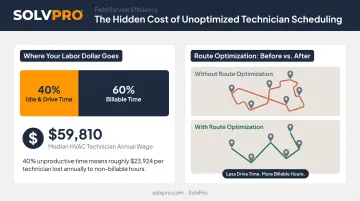
Why this matters financially: According to a 2016 Field Technologies report on field service KPIs, average technician idle time "may be as high as 40%." The U.S. Bureau of Labor Statistics reports a median annual wage for HVAC mechanics and installers of $59,810 as of May 2024. When a significant share of that compensation covers unproductive drive time rather than billable work, the cost across a crew of five or ten technicians adds up quickly.
Double-booking prevention also matters from a quality standpoint. A technician who is overbooked or running late will rush, make more errors, and risk customer dissatisfaction — compounding the original scheduling failure.
KPIs impacted:
- Jobs completed per day
- Average drive time per job
- Scheduling conflict rate
- First-time fix rate
When this matters most: Businesses managing three or more technicians across different service zones, or those handling high job volumes where small routing inefficiencies multiply across the week.
SolvPro, for example, includes a visual drag-and-drop scheduling calendar with day, week, and crew views alongside multi-crew route optimization in all pricing tiers — not as a paid add-on.
Advantage 2: Real-Time Communication and Field Visibility
Scheduling software creates a live connection between the office and field. Technicians receive job details, updates, and changes directly to their mobile device. The office can see job status without calling anyone.
Technicians start their day with every job detail already in hand — customer address, scope of work, notes from previous visits. When a job is added, updated, or canceled, the notification reaches the technician immediately. Event-based geolocation tracking logs when technicians arrive at and leave job sites, creating an accountable record without invasive monitoring.
The cost of communication gaps: Aberdeen Group research found that service calls not resolved on the first visit required an average of 1.6 additional dispatches, each costing $200–$300 per truck roll. Many of those failures trace back to technicians arriving without the right information. The same research found Best-in-Class field service organizations achieved a first-time fix rate of 89%, compared to 71% for others — a gap that directly reflects the quality of pre-job communication.
Field visibility benefits managers just as much as technicians. Real-time job status means faster response to delays, the ability to reassign urgent work, and the data needed to address recurring performance issues.
KPIs impacted:
- Technician utilization rate
- On-time arrival rate
- Customer satisfaction scores
- Missed appointment rate
When this matters most: Operations where technicians work independently across wide service areas, where same-day job additions are common, or where field accountability has been an ongoing management challenge.
SolvPro delivers this through a mobile app available in both English and Spanish — technicians access job assignments, instructions, and site notes directly on any device, with geo-stamped time entries and photo uploads creating a verifiable activity record.
Advantage 3: Reduced Admin Burden, Faster Invoicing, and Job Profitability Visibility
When scheduling, work orders, and invoicing are connected in one system, technicians spend less time on paperwork and more time on skilled work. The business closes the billing cycle faster because job completion feeds directly into the invoice workflow.
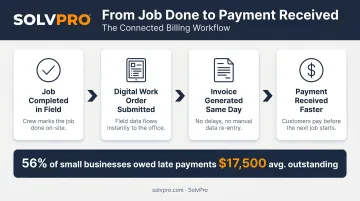
Instead of paper work orders that get lost in trucks or transcribed manually back at the office, technicians complete digital job records in the field. Those records tie directly to invoicing — completed jobs can be billed the same day. Managers can see labor and material costs against each job to understand actual profitability.
The cash flow impact: A 2025 QuickBooks survey of over 2,000 U.S. small businesses found that 56% were owed money in late payments, with the average amount owed reaching $17,500. Businesses dealing with late payments were 1.3x more likely to struggle hiring skilled workers. For contractors, billing delays are rarely caused by clients refusing to pay — they're caused by invoice cycles that start too late because the office is still waiting on paperwork from the field.
Many contractors have no reliable way to know whether individual jobs are actually profitable. Without job cost data tied to real-time field records, that gap compounds quietly — and shows up in the financials long after the work is done.
SolvPro connects scheduling, work orders, and invoicing in one workflow. Field crews generate invoices on-site the moment a job is marked complete, the office bills immediately, and job cost data syncs with QuickBooks Online at no additional cost.
KPIs impacted:
- Invoice cycle time
- Days to payment
- Admin hours per week
- Job profitability per technician
When this matters most: Contractor businesses handling high job volumes, businesses experiencing cash flow delays, and office teams spending significant time re-entering information from paper work orders into billing systems.
What Happens When Scheduling Software Is Missing
As a contractor business grows beyond a few technicians, spreadsheets and phone calls break down. Jobs get double-booked, technicians arrive without the right information, and the office spends more time firefighting than planning.
The costs compound:
- Wasted drive time — unoptimized routes mean technicians spend more of their shift in a truck than on a job
- Billing delays — paper work orders take days to reach the office, pushing invoices out and slowing cash flow
- Missed jobs — without real-time visibility, schedule conflicts and miscommunications go undetected until a customer calls
- No profitability data — owners make pricing and staffing decisions without knowing which jobs actually made money
There's also a growth ceiling. Manual coordination works for two or three technicians — but each new hire multiplies the complexity. Software Advice data from field service management buyers found efficiency ranked as the top pain point at 52% — ahead of every other concern.
Without scheduling data, owners are making capacity and staffing decisions blind. There's no reliable way to know which jobs are profitable, which technicians are underutilized, or where the bottlenecks actually are.
Those operational gaps show up in customer experience too. Delayed technicians and missed appointments erode trust — and in service contracting, repeat business and referrals drive most new revenue.
How to Get the Most Value from Contractor Scheduling Software
Efficiency gains compound when the platform is used consistently across the whole team — as the single operating layer connecting scheduling, field communication, work orders, and billing.
Getting full value also means acting on the data the software surfaces:
- Review job completion rates regularly, not just at month-end
- Identify recurring delays and trace them to their source — routing, technician, or job type
- Adjust assignments based on performance trends, not just availability
- Use job profitability data to make informed pricing decisions
What to Look for When Choosing a Platform
- Ease of setup — adoption determines results; a system no one uses won't move the needle
- Mobile accessibility — field crews need full job details on-site, not a stripped-down app missing half the information
- Accounting integration — direct QuickBooks sync removes the manual handoff that delays invoicing
- Bilingual support — for mixed English- and Spanish-speaking crews, this is an operational necessity, not a bonus feature
SolvPro checks all four of those boxes. Teams get up and running in under 10 minutes, the platform runs fully in English and Spanish for both office staff and field crews, and QuickBooks Online sync is included in every pricing tier — no add-on fees.
Conclusion
Contractor scheduling software doesn't just organize a calendar — it removes the friction that keeps technicians from doing their best work. Smarter job assignment, real-time communication, and reduced admin load each contribute to measurable improvements in how many jobs get done, how accurately, and how quickly the business gets paid.
The efficiency gains grow over time. As managers gain visibility into job data and technician performance, they make better decisions about staffing, pricing, and capacity. Businesses that treat scheduling as a strategic function tend to scale more predictably — adding crews and jobs without the chaos that usually comes with growth. For field service teams ready to make that shift, the right platform makes the difference between managing the business reactively and running it with intention.
Frequently Asked Questions
How does contractor scheduling software improve technician efficiency?
Scheduling software reduces wasted drive time, eliminates communication gaps, and ensures technicians arrive with the right information. The result: more jobs completed per day, fewer errors, and less time lost to back-and-forth calls.
What is contractor scheduling software used for?
It's used to assign and manage jobs for field technicians, optimize routes, track job status in real time, and connect scheduling to work orders and invoicing — replacing manual tools like spreadsheets, whiteboards, and phone calls.
Can small contractor businesses benefit from scheduling software?
Small and growing businesses often benefit most. Even 3–5 technicians working from uncoordinated schedules lose significant time to double-booking, phone tag, and manual paperwork — problems that software eliminates quickly without complex setup.
How does scheduling software reduce wasted drive time for technicians?
Scheduling software sequences jobs by location so technicians take efficient routes instead of crisscrossing service areas — keeping them on billable work throughout the day.
What happens when contractors rely on manual scheduling instead of software?
Manual scheduling leads to double-bookings, missed jobs, billing delays, and no visibility into which jobs are profitable — problems that get worse as the team grows, not better.
How long does it take to set up contractor scheduling software?
Modern platforms are built for fast setup. SolvPro, for example, gets teams operational in under 10 minutes with no credit card required.