A crew shows up late. Nobody flags it until the customer calls to complain. A job runs over budget, but the office doesn't find out until the invoice gets written weeks later. These aren't planning failures. They're visibility failures.
The cost is real. Poor project data and miscommunication were tied to 48% of U.S. construction rework in 2018, adding up to $31.3 billion in wasted labor and materials that year alone, according to the FMI and PlanGrid "Construction Disconnected" report.
This guide breaks down what real-time progress tracking actually means, why it matters just as much for a five-crew electrical company as it does for a major GC, and how to pick a system that fits your business instead of overwhelming it.
KEY TAKEAWAYS
- Real-time tracking replaces end-of-day paperwork with live, accurate job status
- Tracking progress as it happens boosts crew accountability and job profitability
- Most growing trade businesses see real value without drones or BIM software
- The best systems connect field activity directly to scheduling, invoicing, and payments
- Progress recorded during the day gives the office a basis for billing and forecasting that end-of-week paperwork cannot match
What Is Real-Time Construction Progress Tracking?
Real-time progress tracking means capturing job status, crew location, and task completion as work happens, not at the end of the day or during a Friday-afternoon phone call. The office sees what's happening now, not what happened yesterday.
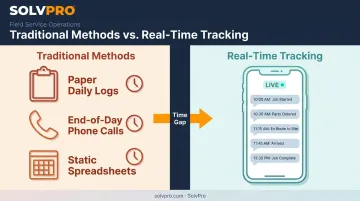
Compare that to how most trade businesses still operate:
- Paper daily logs that sit in a truck until someone remembers to turn them in
- End-of-day phone calls that depend on a crew lead actually calling
- Static spreadsheets updated once, then never touched again
Each of these creates a lag between what's actually happening on the job and what the office believes is happening. That gap is where missed jobs, billing errors, and unhappy customers come from.
A Spectrum, Not a Single Tool
Real-time tracking spans a wide category of tools, from enterprise-grade jobsite cameras and BIM-linked platforms on large commercial builds to lightweight mobile apps that electrical, plumbing, septic, and landscaping crews use on everyday jobs.
A $50 million commercial project might justify drone flyovers and 3D model overlays. A four-crew plumbing company doesn't need any of that. It needs to know whether the 9 a.m. job started, whether materials showed up, and whether the customer signed off.
Why Real-Time Progress Tracking Matters for Growing Service Businesses
Most articles on progress tracking talk about enterprise general contractors managing $100 million projects with dedicated project controls teams. That's not who's reading this.
Multi-crew trade businesses face the same core problem, just at a smaller scale: missed jobs, no-shows, and job status nobody can confirm without a phone call. The stakes are different, but the blind spots are identical.
Catching Problems before They Become Expensive
When office staff can see job status in real time, they catch delays, no-shows, and incomplete work the same day instead of discovering it during invoicing three weeks later.
This matters because rework and cost overruns tend to compound. The Construction Industry Institute's Field Rework Index reflects a pattern seen across the industry: problems that surface during construction usually trace back to planning or communication gaps that formed much earlier.
Catching a mismatch on day one is a completely different problem than catching it after three crews have already worked around a bad assumption.
Seeing the numbers early doesn't remove every problem. But it shrinks the window between "something went wrong" and "someone noticed," which is where most of the cost gets added.
Accountability and Client Trust
Time-stamped, documented progress protects your business in two directions.
When a customer disputes whether work was completed, or when it was completed, you have a record:
- Crew arrival and departure times
- Photos taken on-site
- Task completion logged in real time
Event-driven tracking ties location data to specific field events, like clock-in, clock-out, or a photo upload. This gives owners proof of work performed without needing to be on-site or make a call to check.
A documented record answers the question before it becomes an argument, without turning routine tracking into surveillance.
Faster Invoicing and Cash Flow
Progress tracking that's disconnected from invoicing doesn't fix cash flow. Progress tracking that feeds directly into job costing and billing does.
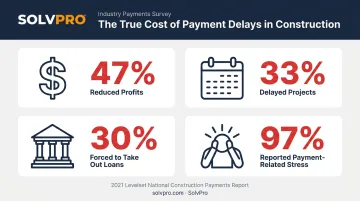
Cash flow pressure is already a documented problem for contractors. In a survey of 764 construction professionals, cash-flow issues reduced profits for 47%, delayed projects for 33%, and forced 30% to take out loans, according to the 2021 Levelset National Construction Payments Report. Nearly all respondents, 97%, reported stress directly related to slow payments.
Much of that delay traces back to the gap between "job finished" and "invoice sent." If progress data and job costs are already captured when the crew wraps up, there's no reason invoicing has to wait for someone to reconstruct what happened.
Key Features of an Effective Real-Time Tracking System
What you actually need depends heavily on the size of your operation. Enterprise platforms lean on BIM models and drone imagery. Growing service businesses need something more practical: tools your crews will actually use without a training manual.
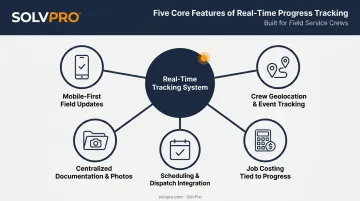
Mobile-First Field Updates
Crews should be able to log progress, upload photos, and add notes directly from a phone on the job site. Good systems sync automatically once the crew is back in cell range, so nothing gets lost if a jobsite has poor connectivity.
If your team can't update a job status without opening a laptop, it won't happen consistently. The tool has to fit into the truck, not the office.
Crew Geolocation and Event-Based Tracking
GPS or event-based tracking, meaning location data tied to specific actions like arrival, departure, or task start and stop, creates an accountability trail without turning into micromanagement.
SolvPro's job and crew time tracking works this way: it records time entries, photo uploads and activity logs against the job as crews complete tasks. This gives office staff and owners visibility into on-site activity without constant check-in calls. The location data ties to what's actually happening, not a passive tracker running all day.
Job Costing Tied to Progress
Linking real labor hours and material costs to job phases as work happens gives a far clearer profitability picture than reconciling everything after the job is done.
Multi-stage tracking matters here. A job broken into phases, like site prep, install, and finish, lets you see where money is going at each stage. That way, you're not discovering at the end that the whole job ran over budget.
Scheduling and Dispatch Integration
Progress data is only useful if it connects back to the schedule. When office staff can see a job is running behind in real time, they can:
- Rebook or reassign crews before the next job is affected
- Alert the customer about a delay before they call asking
- Adjust the day's schedule based on what's actually happening, not what was planned that morning
Centralized Documentation and Photos
Every job should have one searchable record, not photos scattered across text threads, emails, and paper logs that live in someone's truck. A centralized digital work order with notes, photos, and status updates means office staff can pull up job history in seconds instead of calling three people to piece it together.
How to Implement Real-Time Progress Tracking in Your Business
Rolling out a new tracking system doesn't require a company-wide overhaul on day one.
- Pick one pain point first. Crew accountability, invoicing delays, or missed jobs. Solve one problem before trying to fix everything at once.
- Get crew buy-in early. Choose a tool simple enough to use without extensive training. If the field doesn't adopt it, you're not capturing real-time data. You're capturing nothing.
- Connect it to existing workflows. Tracking data should flow into scheduling and invoicing automatically, not require duplicate entry in three different systems. SolvPro's built-in QuickBooks Online sync handles this by turning field updates into invoices without manual re-entry.
- Review the data on a regular cadence. Daily huddles or weekly reviews turn tracking into decisions, not just data.
Skipping straight to a complex, feature-heavy platform is a common mistake. Start narrow, prove the value, then expand.
Choosing the Right Tool for Your Business
Enterprise tools like jobsite cameras, drones, and BIM-linked platforms make sense for large commercial projects with dedicated project controls teams and budgets to match. If you're running a $200 million build, that infrastructure earns its cost.
Most growing trade businesses aren't in that category. They typically need something simpler: one platform that handles scheduling, crew tracking, job costing, and invoicing without enterprise complexity or a long-term contract attached.
This segment includes:
- General contractors
- Electrical and plumbing companies
- Landscaping crews
- Multi-crew service teams
Pricing across this category varies widely, according to Capterra's field service management category data:
- Entry-level plans start around $100 per month
- Advanced tiers can reach $450 or more
- Cost depends heavily on user count and feature depth
That range makes it worth comparing what's actually included before committing.
SolvPro fits this segment specifically. It combines event-based geolocation tracking, phase-based estimating, and native QuickBooks Online and payment processing integration in one platform, with plans. Setup takes under 10 minutes with live onboarding support, and there's no long-term contract required to try it.
Conclusion
Field service software helps you manage the work. SolvPro helps you make sure the work makes money.
The right tool depends on your trade, crew size, job mix and the systems you already run. Test it on real jobs before you commit, and check that crews will actually enter what the office needs. When you want to see it on your kind of work, Book a Demo.
Run the Job. Protect the Profit.
Frequently Asked Questions
What Is the Most Effective Way to Track Construction Progress in Real Time?
Pair field-level data capture, like crew updates and photos, plus GPS location data, with a system that ties that data directly to schedules and job costs. Relying on end-of-day reporting alone always introduces a lag.
Can Small Construction or Service Businesses Afford Real-Time Tracking Software?
Yes. Many SMB-focused platforms price transparently and scale with crew size, making real-time tracking accessible without an enterprise-level budget or commitment.
How Does GPS or Geolocation Tracking Improve Crew Accountability?
Job and crew time tracking creates a timestamped record of arrivals and departures, plus on-site task activity. That record gives owners visibility and reduces disputes without requiring constant check-in calls.
What's the Difference Between Construction Progress Tracking and General Project Management Software?
Progress tracking focuses on real-time field status and documentation. Project management software typically handles broader planning and budgeting, plus multi-party coordination on top of that.
Do I Need Drones or Cameras to Track Construction Progress in Real Time?
Not for most small-to-mid-sized trade businesses. Drones and cameras add value on large, complex sites, but mobile check-ins and crew tracking deliver similar visibility at a fraction of the cost.
How Quickly Can a Small Business Set up a Real-Time Tracking System?
Lightweight platforms built for service businesses can often be configured in minutes. Enterprise systems, by contrast, may require months of implementation, integration, training, and change management.