That gap adds avoidable delay to an industry where businesses already wait a long time for payment. The Construction Financial Management Association reports that average subcontractor days sales outstanding reached 96 days. DSO measures how long invoiced receivables remain outstanding, rather than the exact period between completing a job and receiving payment.
Separately, Rabbet's 2025 Construction Payments Report estimates that slow and inconsistent payments cost the U.S. construction industry $299 billion in 2025, equivalent to approximately 14% of project costs. These figures do not mean late invoice preparation caused the entire amount. They show why service businesses should avoid adding preventable billing delays to an already slow collection cycle.
For deeper dives by trade, see how these same criteria play out for contractors billing from the truck, landscaping crews syncing with QuickBooks, and janitorial teams billing recurring contracts.
KEY TAKEAWAYS
- Invoicing is the last step in a chain: labor hours, materials, change orders, and approvals all have to be captured before a bill is accurate.
- Standalone invoicing and accounting tools such as Wave and QuickBooks Online handle billing well but do not track crew activity or job costs.
- General field service platforms such as Jobber and Housecall Pro speed up scheduling and billing but differ in how far invoicing connects to job profitability.
- Platforms that connect invoicing with job costing, such as SolvPro, target growing multi-crew businesses that need to see whether a job made money.
- Business fit, job-costing visibility, QuickBooks integration, pricing structure, and implementation effort matter more than the sticker price.
What "Invoicing" Actually Means for Multi-Crew Businesses
Sending a bill is the easy part. The harder part is everything that has to happen before that bill is accurate: every crew member's hours logged against the right job (see how workforce management software handles this), every bag of fertilizer or length of pipe added to the job cost, every change order or extra service documented and approved, and the final invoice checked against what the job actually cost to run.
Skip any one of those steps and the invoice is wrong. Miss a technician's overtime hours on a septic pump-out, forget to bill for the extra mulch a landscaping crew used, or fail to invoice a change order on an excavation job, and the business eats that cost quietly. 56% of surveyed U.S. small businesses reported outstanding invoices in Intuit's 2025 Small Business Late Payments Report, with those affected owed an average of $17.5K. Businesses hit hardest by late payments were 1.4 times more likely to report cash-flow problems.
A faster invoicing app doesn't fix this by itself. If the office still has to call a crew lead to ask how many hours a job took, or dig through a text thread to find out what materials went into a job, speeding up the "send" button just gets an inaccurate bill out the door faster.
Best Invoicing Apps for Home Service Businesses in 2026
These platforms differ on business fit, invoicing and payment capabilities, scheduling and crew management, job-costing and knowing what each job made, the estimate-to-invoice workflow, QuickBooks integration, English/Spanish availability, pricing structure, and implementation complexity. Pricing and features below were checked against each vendor's official site in 2026; always confirm current rates before committing, since SaaS pricing changes often.
SolvPro
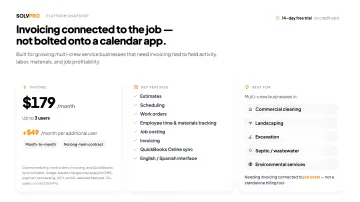
SolvPro is an all-in-one field service and job management platform, not a standalone invoicing tool. It's built to connect the estimate, the scheduled work order, employee time, materials, and approvals to the final invoice, so office staff aren't rebuilding the job from scratch before they can bill it.
For a multi-crew landscaping company, labor, materials, notes, and job details can be kept within the same job-management workflow used for invoicing. For a septic or wastewater service business, field notes and documented additional work can remain attached to the relevant work order instead of being reconstructed after the crew leaves.
The same principle applies to commercial cleaning and janitorial companies managing recurring contracts and excavation companies monitoring labor and material costs by job: the invoice is more reliable when the underlying job record is complete before billing begins.
Capabilities include:
- Scheduling, dispatch, and work orders tied to a single job record
- Employee time tracking and materials logging against the job
- Online estimates and digital proposals, including digital signatures, approval tracking, and conversion from an approved estimate into an active job
- Job costing and profitability reporting, so labor and material costs are visible against the invoice
- QuickBooks Online sync for financial data
- An English/Spanish interface for office staff and field crews
SolvPro is best suited to growing multi-crew service businesses that need to connect invoicing with field activity, labor, materials, and job profitability, rather than treat invoicing as a separate administrative task bolted onto a calendar app.
| Key Features | Estimates, scheduling, work orders, employee time and materials tracking, job costing, invoicing, QuickBooks Online sync, English/Spanish interface |
| Best For | Multi-crew commercial cleaning, landscaping, excavation, septic/wastewater, and environmental service businesses that need invoicing connected to job costs, not a standalone billing tool |
Housecall Pro
Housecall Pro is a widely used field service management platform covering plumbing, electrical, cleaning, and other trades. Its invoicing strength is automation: one-click digital invoices, automatic payment reminders, saved cards, and consumer financing that lets customers pay over time while the business collects in full upfront.
| Key Features | Invoice customization, automated reminders, payment processing, consumer financing, review management |
| Best For | Established home service businesses that want an all-in-one suite with built-in marketing and financing add-ons |
Jobber
Jobber is known for scheduling, dispatch, and its Client Hub, a portal where customers can approve quotes, view appointments, and pay invoices online. Its one-way QuickBooks Online sync covers customers, timesheets, and payment data, and the quote-to-invoice workflow is generally smooth for teams juggling multiple crews and job types.
| Key Features | Client Hub, scheduling and dispatch, invoicing, one-way QuickBooks integration |
| Best For | Home service businesses with growing teams that need strong dispatch and client-facing communication |
QuickBooks Online
QuickBooks Online is an accounting platform first, and invoicing is one piece of a larger bookkeeping engine that also handles bank reconciliation, tax prep, and profit-and-loss reporting most standalone field service tools don't attempt to match.
The tradeoff: QuickBooks Online has no native crew scheduling or job dispatch. Intuit sells a separate add-on, Intuit Field Service Management powered by Corrigo, for that layer, which means a multi-crew business typically pairs QuickBooks Online with another tool for scheduling and field job tracking.
| Key Features | Invoicing, automatic reminders, bank reconciliation, tax and P&L reporting |
| Best For | Businesses prioritizing full accounting alongside invoicing, usually paired with a separate field service or job costing tool |
Wave
Wave is a free invoicing and bookkeeping tool that fits a solo operator well: a one-truck landscaper or a single septic technician handling their own books at night. There's no monthly fee for the core plan, but Wave doesn't do scheduling, job tracking, or crew management. It's a billing tool for a business that doesn't yet need to manage a crew.
| Key Features | Unlimited invoices, expense tracking, recurring billing |
| Best For | Solo home service operators who only need billing and handle scheduling separately |
This isn't a knock on Wave or QuickBooks Online for lacking field service features; they weren't built to schedule crews. The distinction matters because a business with three crews and rotating job sites has different needs than a solo operator, and the wrong tool for the wrong stage of growth creates real admin overhead either way.
How to Choose the Right Invoicing App for Your Crews
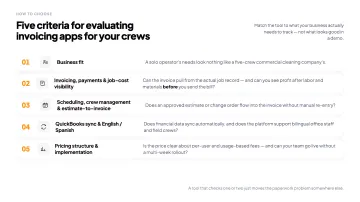
Match the tool to what your business actually needs to track, not just what looks good in a demo. Five factors separate these platforms:
- Business fit — a solo operator's needs (Wave) look nothing like a five-crew commercial cleaning company's needs (a platform with job costing).
- Invoicing, payments, and job-level cost reporting — can the invoice pull from the actual job record, and can you see whether the job was profitable after labor and materials, before you send the bill?
- Scheduling, crew management, and estimate-to-invoice workflow — does the platform know which crew worked which job, and does an approved estimate or change order flow into the invoice without manual re-entry?
- QuickBooks integration and English/Spanish availability — does financial data sync automatically, and does the platform support bilingual office staff and field crews where relevant?
- Pricing structure and implementation complexity — is the price clear about per-user costs and usage-based fees, and can your office team get the system running without a multi-week rollout?
A tool that checks these boxes reduces missed billable hours and gets accurate invoices out faster. A tool that only checks one or two just moves the paperwork problem somewhere else in the business.
Conclusion
Before picking any invoicing app, get honest about what's actually happening between a completed job and a collected payment in your business today. If crews are logging hours on paper, materials aren't making it onto the job record, and change orders get approved over a phone call that never gets documented, a faster "send invoice" button won't fix the underlying visibility problem; it will just get an incomplete bill out the door sooner.
If you're running multiple crews across commercial cleaning, landscaping, excavation, septic, wastewater, or environmental service work and want invoicing connected to labor, materials, and job costs instead of bolted on as a separate task, see what SolvPro includes and check current pricing. A 14-day trial with no credit card required is one way to see whether a job actually stayed profitable before you send the next invoice, not after.
Your crews are busy. So why isn't there more money in the bank?
When the office can see labor, materials and documented changes against the job while the work is still open, the numbers at the end stop being a surprise. SolvPro keeps scheduling, work orders, time, job costing and invoicing on one record. When you want to see it on your kind of work, Book a Demo.
Run the Job. Protect the Profit.
Frequently Asked Questions
What Is the Best Invoicing App for Home Service Businesses in 2026?
It depends on how your business operates. Solo operators may do fine with free tools like Wave. Businesses running several crews typically need a platform that connects invoicing to scheduling, labor hours, and job costs, like SolvPro, Jobber, or Housecall Pro, rather than a standalone billing app.
Do Invoicing Apps for Home Service Businesses Track Job Costs and Profitability?
Not all of them. Standalone tools such as Wave primarily focus on invoicing and accounting workflows. Field-service platforms may also include scheduling, work orders, time tracking, materials, and job costing. SolvPro keeps these operational and financial records within one platform so owners can review labor and material costs alongside job profitability before completing the billing process.
Is QuickBooks Online Enough for a Multi-Crew Service Business?
QuickBooks Online is strong on accounting, tax prep, and reporting, but it doesn't include native crew scheduling or job dispatch. Most multi-crew businesses pair it with a separate field service platform, or move to a platform with QuickBooks Online sync built in.
How Much Does SolvPro Cost?
SolvPro does not publish pricing. Businesses with more than 10 users, or with specific requirements, can contact SolvPro directly for a quote. Plans are month-to-month with a 14-day free trial and no credit card required to start; usage-based charges may apply for services like SMS, payments, and ACH.
Can Invoicing Software Catch Missed Billable Hours or Unapproved Change Orders before an Invoice Goes Out?
Software that connects work orders, employee time, materials, approvals, job costing, and invoicing gives the office a better opportunity to review whether recorded work has been included before sending the invoice. It does not automatically guarantee that every missed hour, material, or unapproved change will be detected. The business still needs a consistent review and approval process.
What Should Septic, Excavation, or Commercial Cleaning Businesses Look for in Invoicing Software?
Look for a platform that ties invoicing to the job record: crew hours, materials, approved change orders, and job costing, plus QuickBooks integration and, where relevant, an English/Spanish interface for office staff and field crews. Avoid tools that only speed up sending a bill without connecting it to what the crew actually did on-site.