Introduction
Picture Monday morning at a busy service company: two crews dispatched to the same address, a third calling the office because nobody sent the job details, and four invoices from last week still sitting in a draft folder. That's not a bad week — that's what happens when scheduling, work orders, crew tracking, and billing live in five separate places.
The scale of the problem shows up in the numbers. According to Grand View Research, the global FSM market was valued at $6.1 billion in 2025 and is projected to reach $13.8 billion by 2033 — driven largely by contractors moving away from manual processes.
Yet Software Advice's 2026 Field Service Software Buyer Insights Report found that 35% of buyers still relied on spreadsheets or paper before switching.
The right platform closes the gap between office and field, speeds up payment collection, and gives owners a clear picture of job profitability. This guide breaks down the best options for growing service businesses in 2026 — what they do well, where they fall short, and which fits your operation.
Key Takeaways
- Business software for service contractors centralizes scheduling, dispatching, work orders, crew tracking, estimates, and payments in one platform
- Top tools are evaluated on field usability, mobile access, QuickBooks integration, pricing transparency, and ease of setup
- SolvPro is the top pick for growing service businesses managing field crews
- Jobber suits solo operators; Housecall Pro fits small residential teams; ServiceTitan fits large established operations; BuildOps fits commercial contractors
- Match the software to your service type, crew size, and growth stage before committing
What Is Business Software for Service Contractors?
Business software for service contractors is an all-in-one digital platform that replaces disconnected spreadsheets, paper work orders, and separate apps. Instead of juggling a scheduling tool, a separate invoicing system, and phone-based crew updates, everything — scheduling, dispatching, estimating, invoicing, crew tracking, and customer communication — lives in one system.
The business outcomes are direct:
- Fewer missed or delayed jobs through centralized scheduling and real-time dispatch
- Faster payment collection by invoicing from the field the moment a job closes
- Less admin overhead when work orders, estimates, and invoices connect automatically
- Better field accountability through crew tracking tied to actual job activity
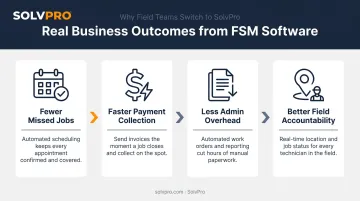
The adoption gap is real. According to Software Advice, 52% of buyers switched software specifically because of inefficiency — not price, not missing features. Staying on manual processes isn't free; it quietly drains hours, delays invoices, and leaves money sitting uncollected.
Best Business Software for Service Contractors in 2026
These five platforms were selected based on field usability, scheduling depth, payment and accounting integration, pricing transparency, and fit for service businesses managing crews.
SolvPro
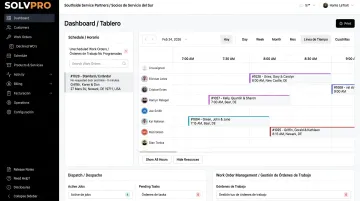
SolvPro is an all-in-one field service management platform built specifically for growing service businesses — general contractors, HVAC, plumbing, electrical, landscaping, janitorial, and multi-crew field teams. The team behind it brings over 50 years of combined experience in construction, field service, estimating, and project management.
Kai Stanton, Technical Sales Specialist, spent 17 years in the construction industry as a project manager, estimator, salesperson, and installations expert before joining SolvPro — that background shapes how the platform actually works.
What sets SolvPro apart from the competition:
- Fully bilingual English/Spanish interface — both the web dashboard and the mobile app, for office staff and field crews, included at every pricing tier at no extra cost
- Event-based geolocation tracking — location is geo-stamped at meaningful moments (time entries, photo uploads) rather than tracking crew movement continuously, creating verifiable proof of work without passive surveillance
- Phase-based estimating with customer-facing PDF proposals — structure quotes by project phase with milestone payment schedules and digital signature approval; converts to a live job instantly upon approval
- QuickBooks Online sync and NMI payment processing — both are core platform features, not add-ons; field crews can collect credit card or ACH payments on-site
- Setup in under 10 minutes — three-step onboarding with live team support, no credit card required to start
- No long-term contracts — cancel anytime
| Category | Details |
|---|---|
| Key Features | Scheduling and dispatch, work order management, event-based geolocation tracking, phase-based estimating with PDF proposals, QuickBooks Online sync, NMI payment processing, bilingual English/Spanish interface, mobile time tracking, job costing and analytics |
| Best For | Growing service businesses with field crews — HVAC, plumbing, electrical, landscaping, general contractors, commercial cleaning, excavation |
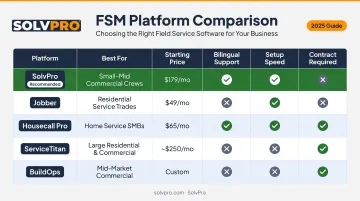
| Pricing | Starter: $179/month (up to 3 users, all core features included); Growth: $228/month (4 users, +$49/user); Scale: custom pricing for larger operations. No long-term contracts. |
Jobber
Jobber is a widely used field service platform for solo operators and small service teams. It handles quoting, scheduling, dispatching, invoicing, and customer communication without complex setup — making it a fast entry point for contractors managing short-cycle jobs like landscaping maintenance, roofing repair, or handyman work.
For teams that need to grow beyond a few users, Jobber's limitations become more apparent. GPS crew dispatch is a paid add-on rather than a standard feature, bilingual support is limited (Spanish is available for field-facing team members but not administrators), and phase-based estimating is not available.
| Category | Details |
|---|---|
| Key Features | Quotes and estimates, job scheduling, dispatching, customer management, online booking, invoicing, payment collection, mobile app |
| Best For | Solo operators and small service teams with 1–5 users focused on residential service calls |
| Pricing | Core: $49/month (1 user, monthly billing) or $29/month (annual); Connect: $139/month monthly or $99/month annual (5 users); Grow: $399/month monthly or $299/month annual (10 users); additional users at $29/month each |
Housecall Pro
Housecall Pro is built for small residential service businesses — HVAC, plumbing, electrical — with strong customer communication tools including automated SMS confirmations and online booking. It works well for 1–7 truck operations focused on residential service calls.
The platform becomes limiting for businesses managing multi-crew commercial work, field crews with non-English-speaking staff, or operations that need construction-grade work order structures and phase-based estimating.
| Category | Details |
|---|---|
| Key Features | Advanced scheduling and dispatch, employee GPS tracking (Essentials and above), automated customer messaging, CRM, invoicing, payment processing, mobile app (English and Spanish) |
| Best For | Small to mid-sized residential service businesses; 1–7 truck operations |
| Pricing | Basic: $59/month annual or $79/month monthly (1 user); Essentials: $149/month annual or $189/month monthly (up to 5 users, includes employee GPS); MAX: $299/month annual or $329/month monthly (up to 8 users, +$35/user after); vehicle GPS tracking available as add-on at $20/vehicle/month |
ServiceTitan
ServiceTitan is a large-scale field service platform designed for established residential and commercial service companies — HVAC, plumbing, electrical — with deep reporting dashboards, in-app pricebooks, call recording, and sales conversion tools. Its capabilities are suited for high-revenue operations with multiple technicians and a dedicated implementation team.
The tradeoff is complexity and cost. ServiceTitan does not publish fixed pricing — the platform uses a demo-first, custom-quote process, with pricing based on number of users, product mix, and Gross Transaction Volume per SEC filings. Implementation involves structured onboarding that takes time, not minutes. For growing contractors who need fast setup and transparent pricing, that overhead rarely makes sense.
| Category | Details |
|---|---|
| Key Features | Drag-and-drop scheduling, customer notifications, call recording and sales conversion tools, Pricebook Pro, reporting dashboards, marketing automation, mobile estimate approvals and payments, Fleet Pro |
| Best For | HVAC, plumbing, and electrical companies with larger teams and established revenue, needing deep reporting and sales workflow tools |
| Pricing | Custom pricing via demo request; pricing is tiered and based on users, product mix, and Gross Transaction Volume (per SEC 10-K filing). No published flat rates. |
BuildOps
BuildOps is a commercial-focused field service platform that unifies estimating, scheduling, dispatching, job costing, time tracking, and billing for contractors doing commercial HVAC, plumbing, mechanical, and electrical work.
Its CRM includes visual pipeline boards, quote-to-contract workflows, and real-time profitability monitoring — a strong fit for contractors running project-service hybrid operations at commercial volume.
Like ServiceTitan, BuildOps uses custom enterprise pricing based on crew size, trades, and modules — there are no published flat rates. For service businesses that primarily need streamlined crew management, fast invoicing, and accessible field tools, BuildOps carries more infrastructure than most growing contractors need.
| Category | Details |
|---|---|
| Key Features | Job cost tracking, real-time profitability monitoring, CRM with visual pipeline, proposal creation, visual scheduling, field-ready mobile app, accounting integrations |
| Best For | Commercial HVAC, mechanical, plumbing, and electrical contractors mixing project work with service |
| Pricing | Custom pricing based on crew size, trades, and modules; calculated per field and office user; requires a demo to scope. No published flat rates. |
How We Chose the Best Business Software for Service Contractors
The selection focused on software that solves real operational pain points — not software with the longest feature list or the best-known brand name. Contractors commonly make two mistakes when evaluating tools: choosing based on brand recognition, or selecting the cheapest option without accounting for field usability, setup complexity, and total cost of ownership.
Evaluation Criteria
Each platform was assessed on:
- Scheduling and dispatch — Can dispatchers see crew availability at a glance and assign jobs without double-booking?
- Mobile field access — 90% of field service users consider mobile access critical for real-time updates. Poor mobile usability means crews revert to paper and phone calls.
- Accounting and payment integration — QuickBooks connectivity and in-platform payment processing are essential for contractors who invoice after every job. Businesses that accept online payments get paid up to 4x faster than those relying on checks.
- Pricing transparency — Hidden add-ons and forced annual contracts inflate true cost of ownership. SMB-friendly pricing means all core features included in the base price.
- Ease of setup — A lengthy implementation timeline delays ROI. Platforms requiring weeks of onboarding are poorly matched for small crews.
- Crew tracking and accountability — Event-based geolocation, photo documentation, and real-time job status updates keep field teams accountable without constant phone calls.
- Bilingual support — BLS data shows 41.7% of construction and extraction workers are Hispanic or Latino. Platforms without Spanish-language support create real communication gaps across a significant share of field teams.
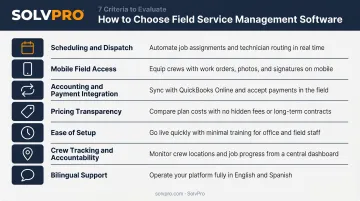
Every criterion here ties to a direct business outcome. Missing payment integration delays cash flow. A platform field crews find unusable gets abandoned within weeks — leaving operations more fragmented than before.
Conclusion
The best business software for service contractors in 2026 is the platform that matches your actual daily workflow — how jobs are sold, scheduled, executed, invoiced, and closed. Not the one with the most features, and not the biggest brand name.
Before committing, shortlist 2–3 tools, test real job workflows end-to-end, and confirm that your field crew will actually adopt it. Adoption is the only metric that matters once you've signed up.
If you're running field crews and want one platform that handles everything without a lengthy setup or locked-in contract, SolvPro is worth a close look. It's built specifically for growing service businesses and includes:
- All-in-one scheduling, work orders, invoicing, and payments
- Fully bilingual English/Spanish support for office staff and crews
- QuickBooks Online sync and built-in NMI payment processing
- Event-based crew accountability with geolocation tracking
- Live onboarding support — with setup in under 10 minutes, no long-term contract required
Try SolvPro or learn more at solvpro.com
Frequently Asked Questions
What software do commercial service contractors use?
Commercial service contractors commonly use platforms like SolvPro, BuildOps, ServiceTitan, Jobber, and Housecall Pro. The right fit depends on business size and work type, but most contractors need scheduling, dispatch, work order management, crew tracking, and invoicing in one system.
What is the best CRM for commercial service contractors?
Most dedicated FSM platforms include built-in CRM functionality covering customer history, job records, and communication. BuildOps and ServiceTitan offer deeper CRM modules suited for large commercial operations, while SolvPro and Jobber cover CRM needs for growing service businesses without the enterprise complexity.
What is the best ERP software for commercial service contractors?
Most small-to-mid-sized contractors don't need a full ERP — an all-in-one FSM platform with QuickBooks integration covers most operational and financial needs. Full ERP platforms like Microsoft Dynamics 365 are better suited for large-scale commercial operations requiring deep accounting integration.
What features should business software for service contractors have?
At minimum: scheduling and dispatch, mobile access for field crews, work order management, estimating and quoting, invoicing and payment collection, crew tracking, QuickBooks integration, and customer communication tools. Bilingual support is an increasingly important requirement for teams with diverse crews.
How much does business software for service contractors cost?
Entry-level platforms start around $29–$49/month for a single user, while mid-market tools run $100–$300/month for multi-user teams. Enterprise platforms like ServiceTitan and BuildOps use custom pricing. Factor in setup, onboarding, and integrations — not just the base subscription.
Is field service management software worth it for small service contractors?
For most contractors, the time and revenue lost to missed jobs, manual invoicing delays, and poor crew communication costs more than the software. Platforms with fast setup and no long-term contracts — like SolvPro — make it easy to get started and see the return quickly without heavy upfront commitment.