The challenge is keeping every invoice aligned with the agreed scope and the work actually delivered. But accurate billing is only half the picture. If a site consistently takes more crew hours or supplies than expected, the contract can keep generating revenue while becoming less profitable. Without visibility into costs at the site level, these changes can go unnoticed.
The right janitorial software should therefore do more than manage schedules and generate invoices. It should help businesses manage recurring contracts, account for completed work, track operating costs, and understand which client relationships are contributing to the bottom line. This guide compares five janitorial software options, their billing capabilities, and the types of cleaning businesses they suit.
KEY TAKEAWAYS
- Match billing to the contract: fixed monthly fees, per-visit charges, or separately approved additional services.
- Keep completed service records and documented extras available when preparing invoices to reduce missed charges and billing discrepancies.
- Compare estimated and actual labor and material costs to spot jobs that are taking more resources than planned.
- Evaluate service documentation, payment collection, and recurring billing workflows according to the way your business operates.
- Check which accounting records sync, in which direction, and on which subscription plan. Compare the total cost at your actual team size.
Why Janitorial Businesses Need Dedicated Billing Software
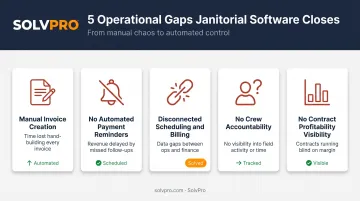
A cleaning business can lose money in two different ways. An approved deep clean might not make it onto the invoice, reducing revenue. Or a fixed-price contract might be billed correctly every month, but the crews spend more time and supplies than the original price allowed. The second problem is easy to overlook when invoices are paid on time.
Suppose you charge $5,000 per month for a cleaning contract. You budget $3,000 for direct labor and $500 for supplies, leaving $1,500 before overhead. If actual labor rises to $3,600 and supplies to $650, just $750 remains before overhead, even though your customer pays the full $5,000. The contribution has fallen by half. This is an illustrative example, not an industry benchmark.
You shouldn't have to wait until the job is over to find out whether you made money. To keep billing and job costs under control, look for software that supports the following:
- Contract and billing arrangements: Record agreed service schedules, scopes, billing frequencies, and prices. Evaluate recurring invoices or batch billing if your contracts require them.
- Multi-location scheduling: Coordinate cleaning schedules, work orders, and service records across client sites.
- Service documentation: Give crews a way to record completed work, photos, and notes for supervisors and office staff to review.
- Additional service tracking: Document approved extras and changes so the office can account for billable work when preparing invoices.
- Job costing: Compare estimated and actual labor and material costs while jobs are active. Where a contract covers multiple jobs, check how you can review those costs together.
Some platforms emphasize recurring billing and payment collection, while others connect those financial tasks with the work your crews perform. The best fit depends on how you bill and which problems you need to solve.
Best Janitorial Software with Billing & Invoicing: Top Picks
The five options below cover commercial cleaning software, residential cleaning tools, and broader field service management. Compare their billing capabilities and business fit against your own contracts. Published US starting prices are shown where available, before promotions and applicable fees. The order is not a quality ranking.
| Software | Best for | Billing capabilities | Starting price (USD) |
|---|---|---|---|
| Jobber | Recurring service coordination and customer billing | Batch and recurring billing, payment follow-ups, Client Hub | $29/mo annually; 1 user |
| SolvPro | Multi-crew cleaning businesses connecting job costs with billing | Field invoicing, payments, time and material costs, job costing | $179/mo for up to 3 users; +$49/mo per additional user through 10 |
| Housecall Pro | Scheduling, customer communication and billing | Job invoices, payments, reminders and job costing by plan | $59/mo annually or $79 monthly; 1 user |
| Janitorial Manager | Commercial cleaning, quality control and service records | Native invoices, recurring billing and payment links | Custom; approx. $1,000/mo starting |
| ZenMaid | Residential maid services and recurring appointments | Web invoicing, payments and tips | Starter $19/mo base; team-based pricing |
Jobber
For cleaning businesses that manage recurring service clients, preparing invoices in batches and giving customers a straightforward way to pay can reduce the time spent on billing. Jobber combines customer management, scheduling, and field service invoicing.
- Batch and recurring billing: Prepare invoices for selected clients, including multiple completed jobs where appropriate, and set up supported recurring billing or payment workflows.
- Customer access and payments: Clients can approve quotes, view invoices, and pay through Client Hub using supported payment methods.
- Scheduling and field records: Coordinate crews and job assignments, with time tracking and GPS features on eligible plans.
- Payment follow-ups and job costing: Evaluate automated invoice reminders and job-costing capabilities on the plans that include them.
- QuickBooks Online integration: Available on Connect and above. The newer integration primarily sends records to QuickBooks after initial import; legacy sync behavior differs for certain records.
Jobber is relevant when recurring service coordination and customer billing are priorities. Its Core plan starts at $29 per month on annual billing for one user. Review plan inclusions, additional user charges, and optional marketing or AI products at your actual team size.
SolvPro
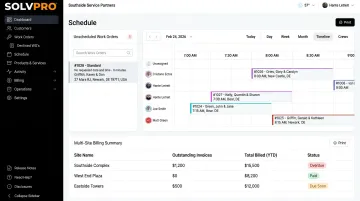
When your crews service several client properties, preparing an accurate invoice is only part of the job. You also need to know whether the labor and supplies required to deliver the work stayed within the original estimate. SolvPro connects field operations, job costs, and billing so you can review those differences while jobs are still open.
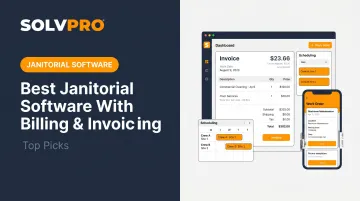
- Field invoicing and payments: Create invoices from the office or field, accept card and ACH payments, and track overdue balances.
- Estimates and approvals: Prepare digital proposals, collect customer signatures, and convert approved estimates into jobs.
- Work orders and additional services: Keep job details, photos, materials, notes, and documented changes on the job record for the office to review.
- Time tracking and job costing: Record hours manually or with live timers by job and crew member, and compare estimated and actual labor and material costs.
- Scheduling and crew coordination: Assign work across client properties and update job schedules as needed.
- Office, field, and accounting: Use the English or Spanish interface and iOS and Android apps, alongside QuickBooks Online sync. Confirm which accounting records transfer and in which direction.
For commercial cleaning businesses managing multiple crews, SolvPro helps connect what the crew does with what the office bills and what the job costs. That gives owners a clearer basis for reviewing approved extras, investigating cost overruns, and making informed decisions about future estimates and contract pricing.
SolvPro pricing is $179 per month for up to three users, plus $49 per month per additional user through 10 users. One core plan, month to month, with no long-term contract or implementation fee. A 14-day free trial is available without a credit card. Usage-based charges may apply for SMS, card and ACH processing, and AI features. Contact SolvPro for larger teams or unusual requirements.
Housecall Pro
If your cleaning business needs to coordinate appointments, keep customers informed, and collect payments, Housecall Pro combines field service scheduling with customer billing and communication tools.
- Job scheduling and recurring services: Coordinate repeat appointments, dispatch crews, and manage work details through the platform.
- Invoicing and payments: Prepare invoices from jobs and accept online card payments. Review the payment methods and fees that apply.
- Customer communication: Use supported reminders, review requests, and marketing tools, including email campaigns or postcards where available.
- Job costing and reporting: Review expected and actual job costs and profitability using the features available on the selected plan.
- QuickBooks Online integration: Available on Essentials and above. Confirm which records transfer, import options, and payment reconciliation requirements.
Housecall Pro is relevant for service businesses that want customer communication and billing tools alongside scheduling. Basic starts at $59 per month on annual billing for one user ($79 monthly). Essentials starts at $149 per month annually for up to five users ($189 monthly), and MAX at $299 annually for up to eight users ($329 monthly). Check add-ons and plan-specific features before selecting a subscription.
Janitorial Manager
When you manage commercial cleaning across several locations, clients may ask for records of service activity and supervisors need to review the quality of work. Janitorial Manager combines cleaning-specific field management with billing tools.
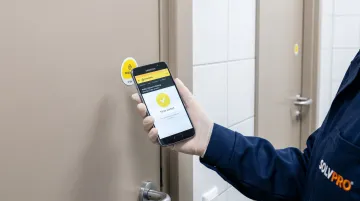
- Scan4Clean service documentation: QR codes and NFC tags help crews access cleaning instructions and record service activity; clients can also access supported service records and submit feedback.
- Crew time and site management: Use supported mobile, QR, NFC, or kiosk clock-ins, scheduling, geofencing, inspections, and supply records.
- Job costing and reports: Review client-level job costs and profitability information.
- Native invoicing and payments: Create and send invoices from Janitorial Manager with payment links, and use supported recurring invoicing and online payment workflows.
- Customer portal and accounting: Manage supply requests and work orders through supported portal features and connect with QuickBooks Online. Confirm which records are transferred and the package requirements.
Janitorial Manager is suited to commercial cleaning businesses that prioritize site-level documentation, quality control, and billing. A scan is a service record, not a guarantee of cleaning quality. The vendor publishes approximate starting pricing of $1,000 per month for smaller operations, with a customized quote based on requirements. Confirm the features and onboarding included in your proposal.
ZenMaid
For residential maid services, recurring appointments and schedule changes can create gaps in the day and extra billing work. ZenMaid is built around the scheduling and administration needs of these cleaning businesses.
- Recurring appointments: Manage repeat cleans through the scheduling tools and use Spot Finder on eligible plans to help fill gaps.
- Invoicing: Create, review, and send invoices through the web interface. The native mobile app does not currently support creating or sending invoices; field users can use a mobile browser.
- Payment collection and tips: Use supported Stripe or Square payment workflows and client tipping options.
- Cleaner time and payroll tools: Pro includes payroll tools and GPS clock-in and clock-out functionality. Availability varies by plan.
- Communication and automation: Use appointment reminders and evaluate supported Zapier workflows for invoice automation. Recurring appointments do not by themselves guarantee automatic recurring invoices.
ZenMaid is primarily suited to residential cleaning businesses that need recurring appointment scheduling and cleaner management. Published base monthly prices are $19 for Starter, $39 for Pro, and $49 for Pro Max, with actual cost depending on team size. Starter is limited to 40 appointments per month and does not include cleaner GPS tracking. Factor in separately billed SMS usage.
How Do You Know Your Janitorial Business Needs Dedicated Software?
As you add clients, crews, and locations, watch for signs that your current processes are making billing more difficult:
- Invoices take hours to prepare: The office reconstructs completed visits and charges from schedules, spreadsheets, and messages.
- Approved extras go unbilled: A deep clean or floor maintenance request is completed but the details never reach the office.
- Service disputes are hard to resolve: Supervisors cannot easily find the job notes, photos, or completion records they need.
- Costs are hard to explain: Payroll or supply spending rises, but you cannot identify which jobs account for the difference.
- Records require repeated reconciliation: The office and field use separate information, and invoices or accounting entries have to be checked manually.
Start by identifying where your current process breaks down. Then test the shortlisted platforms against one actual monthly cleaning contract, with customer information removed if necessary.
Test the Software Against a Real Cleaning Contract
Use a contract with multiple scheduled visits and an approved extra service. Have a crew leader record completed work, hours, supplies, and the additional service. Ask the office to review those records, compare actual costs with the estimate, prepare the invoice, and check the accounting handoff.
Test the billing frequency you actually use, including any recurring or batch steps and payment follow-ups. Check which tasks are automated, which need review, and what happens when a crew records more time or materials than expected. Compare plan costs at the number of users your business needs.
Conclusion
Choose software around the way your cleaning contracts are billed and the information your office needs from the field. A recurring invoice helps with the billing cycle, but it cannot tell you on its own whether the work made money.
For commercial cleaning businesses that want to understand job costs alongside billing, SolvPro connects estimates, schedules, work orders, crew time, materials, and invoicing. Owners can compare planned and actual job costs while work is still underway and investigate differences before they become recurring problems.
The goal is to run a profitable cleaning business, not just a busy one.
Frequently Asked Questions
What Is the Best Janitorial Software with Billing and Invoicing?
The best choice depends on your operation. Jobber and Housecall Pro support service scheduling and customer billing; Janitorial Manager combines commercial cleaning documentation with invoicing; and ZenMaid focuses on residential maid services. SolvPro is relevant for commercial cleaning teams that need to connect field invoicing with the labor and material costs of delivering jobs. Evaluate each against your own contracts.
What Features Should Janitorial Billing Software Include?
Look for software that supports your billing frequency, documented work and approved extras, payment collection, job costs, and the accounting system you use. For multi-site operations, check crew access and job records across properties. Recurring invoice automation and payment reminders can be useful where they fit your contracts and collection process; confirm availability by plan.
Can Janitorial Software Handle Recurring Invoices for Contract Clients?
Some platforms support scheduled recurring invoices, while others let the office batch completed jobs into invoices or review work before billing. Automatic payment collection is a separate capability that may require customer authorization and payment setup. Confirm the billing frequency, review steps, and plan requirements for the specific platform.
Does Janitorial Software Integrate with QuickBooks?
Several platforms, including SolvPro, Jobber, Housecall Pro, and Janitorial Manager, offer QuickBooks Online connectivity. Sync direction, supported records, integration versions, and plan requirements vary. Check which invoices, payments, and customer records transfer, what needs manual review, and how changes are handled.
How Much Does Janitorial Billing and Invoicing Software Cost?
Published US starting prices range from $19 per month for ZenMaid's base Starter plan to $29 per month on annual billing for Jobber Core, and $59 per month on annual billing for Housecall Pro Basic. SolvPro starts at $179 per month for up to three users, plus $49 per additional user through 10 users, with no long-term contract or implementation fee. Janitorial Manager offers customized pricing starting at approximately $1,000 per month for smaller operations. Compare seat counts, contract terms, plan features, and payment or messaging fees.
What Is the Difference Between Janitorial Software and a Generic Invoicing Tool?
Generic invoicing tools focus on creating bills and collecting payments. Janitorial and broader field service management software can also connect billing with scheduling, service records, work orders, and job costs. Whether completion triggers an invoice or the office prepares and reviews it depends on the platform and setup.
How Can Cleaning Businesses Tell Whether a Contract Is Still Profitable?
Compare the labor and supply costs you used to price the contract with actual costs recorded against the work. Check whether additional approved services have been billed and investigate recurring differences before renewal. SolvPro supports estimated-versus-actual job costing while jobs are still underway. For contracts covering multiple jobs, review those job costs together to understand the overall financial result.
Run the Job. Protect the Profit.