Field service management (FSM) software fixes that by connecting the office, the dispatcher, and the crew in one shared system. Scheduling gets tighter, crews stay accountable through GPS check-ins, and invoices go out the same day a job wraps up instead of getting lost in a truck.
The pressure to fix this is growing fast. The U.S. FSM software industry generated an estimated $3.1 billion in revenue in 2026, growing at roughly 7.5% this year alone, according to IBISWorld. Much of that growth is coming from small and mid-sized contractors, HVAC companies, plumbers, electricians, and cleaning crews finally moving off spreadsheets.
This guide breaks down the six best FSM platforms for growing U.S. service businesses in 2026, what each one does well, and where it falls short.
KEY TAKEAWAYS
- Field service management software connects scheduling, dispatch, work orders, and invoicing so the office and field work from the same record.
- The US FSM market continues to grow as contractors, plumbers, electricians, and cleaning businesses move off paper and spreadsheets.
- Mobile usability, scheduling strength, payment integrations, and pricing transparency are the practical points of difference between platforms.
- Options span SMB-friendly tools such as SolvPro through to enterprise-grade platforms such as ServiceTitan.
- Configurable enterprise systems take longer to implement, which matters when a crew needs to be working on the platform within days.
Overview of Field Service Management Software in the U.S. Service Industry
FSM software is the digital layer that connects office staff, dispatchers, and field crews in real time, replacing phone calls and paper trails with shared visibility into every job.
Adoption is accelerating, but plenty of businesses haven't made the jump yet. A Software Advice analysis of more than 6,000 calls from FSM software buyers between January 2025 and January 2026 found most callers had no real system in place:
- 36% were still using nonspecialized tools like spreadsheets
- 35% relied on manual methods entirely, such as paper and phone calls
- 26% had no system at all before they called
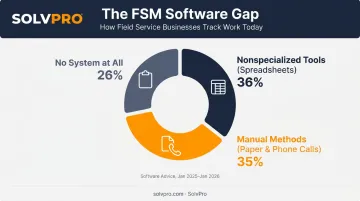
That gap is the opportunity. Businesses that switch typically report tighter schedules, fewer missed jobs, and faster payments, mostly because information stops getting lost between the truck and the office.
The leading FSM platforms for growing U.S. service businesses in 2026.
Best Field Service Management Software of 2026
What matters is how each platform performs where the work actually happens. Here's what we compared:
- Setup speed
- Mobile usability on a job site with weak signal
- Scheduling and dispatch strength
- How tightly invoicing ties to payment
- Whether pricing is transparent enough to budget around
| Platform | Best For |
|---|---|
| SolvPro | Multi-crew, bilingual trades teams |
| Jobber | Solo operators and small crews |
| Housecall Pro | Residential dispatch + reviews |
| ServiceTitan | Large enterprise trade companies |
| FieldPulse | Mobile job tracking & proof of work |
| Workiz | Straightforward dispatch & invoicing |
Here's how each one stacks up in detail.
SolvPro
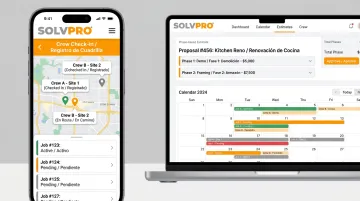
SolvPro is an all-in-one FSM platform built specifically for growing service businesses: general contractors, electricians, plumbers, landscapers, excavation crews, and commercial cleaning teams. These crews need scheduling, work orders, crew tracking, and payments in one system instead of five.
What sets it apart:
- Fully bilingual English/Spanish interface across the mobile app, web dashboard, and customer communications, not a translated menu bolted onto an English-only tool
- Job and crew time tracking that records time entries, photo uploads and activity logs against the job, so office staff know where and when work actually happened
- Digital estimates with itemised, customer-facing PDF proposals and digital signatures
- Setup in under 10 minutes, with live onboarding support, no long-term contracts, and cancel anytime
| Key Features | Scheduling, work orders, crew and job time tracking, digital estimates, QuickBooks Online sync, credit-card and ACH payments |
| Best For | Multi-crew field teams and trades businesses needing bilingual support and fast onboarding |
Jobber
Jobber built its name serving home service and construction businesses that need quoting, scheduling, and client communication without a steep learning curve.
Its differentiators include strong ease-of-use scores among small contractor teams, online booking that lets customers schedule jobs themselves, and a Client Hub where customers can approve quotes and pay online.
| Key Features | Scheduling, unlimited quotes and invoices, online booking, Client Hub |
| Best For | Solo operators and small crews needing simple scheduling and invoicing |
Housecall Pro
Housecall Pro positions itself as an all-in-one dispatch, invoicing, and payments platform for residential and light commercial service pros.
What stands out: GPS-enabled dispatch (though phone-based crew GPS tracking requires the Essentials tier or higher, not Basic), mobile work orders with customizable checklists, and payments built into every plan with card processing starting at 2.59%.
| Key Features | Mobile work orders, GPS-enabled dispatch, custom checklists, review generation, integrated payments |
| Best For | Residential service businesses needing dispatch plus reputation management |
ServiceTitan
ServiceTitan is an enterprise-grade FSM platform covering dispatch, sales, job costing, and payroll automation for larger trade businesses running dozens of trucks.
It offers deep job costing that tracks materials, labor burden, and profitability per job, plus centralized inventory management with mobile barcode scanning. The tradeoff is a steeper learning curve and setup investment than most SMB tools require.
| Key Features | Drag-and-drop dispatch, deep job costing, inventory management, payroll automation |
| Best For | Larger service companies needing full revenue-cycle automation |
FieldPulse
FieldPulse focuses on mobile-first job tracking, technician check-ins, and photo-based proof of work for crews who spend more time on-site than at a desk.
Route Optimization plots filtered jobs and auto-schedules crew stop order, while Custom Forms embed photos directly into generated PDFs as documented proof of work.
| Key Features | Mobile work orders, route-aware dispatch, photo-based proof of work, offline mode |
| Best For | Teams needing mobile job tracking and documented proof of work |
Workiz
Workiz is a dispatch-first platform connecting scheduling, jobs, and invoicing for service businesses that want repeatable processes without heavy customization.
Real-time technician status updates flow across the dispatch board, and its On My Way texts automatically send customers a live ETA and tracking link.
| Key Features | Dispatch, job management, time tracking, invoicing, automated customer texts |
| Best For | Service teams wanting straightforward dispatch and invoicing without heavy setup |
What to Look for in Field Service Management Software
Most business owners pick FSM software based on brand recognition or how many features fill the pricing page. That's the wrong starting point. A platform with 200 features you'll never open isn't more valuable than one with 20 features your crews use every day.
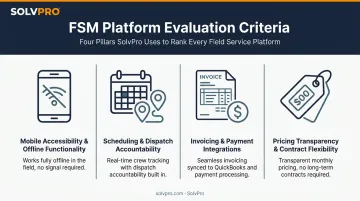
Here's what we weighted instead:
Mobile accessibility and offline functionality. Field crews often work in basements, rural sites, or buildings with dead zones. The stronger platforms let technicians log time, capture photos, and update job status offline, then sync once a signal returns.
Scheduling, dispatch, and geolocation accountability. A missed or double-booked job costs real money. What separates them is how easily dispatchers can drag jobs onto a calendar, reassign crews mid-day, and confirm crews are on-site through location-based check-ins.
Invoicing speed and payment integrations. Days-to-payment is one of the clearest signals of whether a platform helps or hurts cash flow. We favored tools that let crews invoice from the job site and sync directly with accounting software like QuickBooks.
Pricing transparency and contract flexibility. Surprise add-on fees rank among the top complaints from growing service businesses. We factored in whether features like GPS tracking or payment processing were included in the base price or gated behind a higher tier.
Conclusion
The right FSM partner fits how your crews actually work in the field, regardless of brand size or feature count. A landscaping crew running five trucks has different needs than an enterprise commercial cleaning company running fifty.
Before you commit, weigh ongoing scalability, how fast your team can get onboarded, and the total cost of ownership once add-ons and per-user fees are factored in. A platform that looks cheap at signup can get expensive fast if GPS tracking, payment processing, or extra crew seats all cost extra.
If you're managing multi-crew jobs and want scheduling, work orders, job-level time tracking, and payments in one bilingual system, SolvPro's free setup takes under 10 minutes. It comes with live onboarding support, not a knowledge base and a chatbot.
Field service software helps you manage the work. SolvPro helps you make sure the work makes money.
The right tool depends on your trade, crew size, job mix and the systems you already run. Test it on real jobs before you commit, and check that crews will actually enter what the office needs. When you want to see it on your kind of work, Book a Demo.
Run the Job. Protect the Profit.
Frequently Asked Questions
What Software Do Field Engineers Use?
Field engineers commonly use FSM platforms that combine scheduling, mobile work orders, and job documentation in one system. Options range from SMB-friendly tools like SolvPro and Jobber to enterprise platforms like ServiceTitan.
What Is the Difference Between FSM and CRM?
CRM software manages customer relationships and sales pipelines, tracking leads and deals. FSM software manages the operational side, scheduling, dispatch, crew tracking, and job completion once work is underway.
What Is an IT Field Engineer?
An IT field engineer installs, maintains, or repairs technology systems on-site, such as networking equipment or point-of-sale hardware. FSM software helps coordinate their schedules, work orders, and service history across client locations.
How Much Does Field Service Management Software Cost?
Entry-level FSM subscriptions typically start around $100/month, while premium or enterprise tools can run $450 or more per month, according to Capterra's 2026 benchmark. Prioritize transparent per-user pricing over platforms that gate core features behind add-ons.
Can Field Service Management Software Work Offline in the Field?
Most modern FSM platforms support offline data capture for job details, notes, and photos, which syncs automatically once connectivity returns. This matters most for crews working in rural areas or buildings with weak signal.
What Features Should Small Service Businesses Prioritize in FSM Software?
Small crews should prioritize scheduling, mobile access, invoicing and payment integrations, and fast onboarding over complex enterprise features they won't use. A platform that takes weeks to set up defeats the purpose of switching in the first place.