Cost depends on team size, feature depth, your industry's job complexity, and the pricing model a vendor uses (per-user, per-location, flat-rate, or custom quote). Two businesses with the same crew size can pay wildly different amounts depending on what's bundled versus billed separately.
This guide breaks down realistic 2026 pricing ranges, the factors that push cost up or down, the hidden fees that catch buyers off guard, and how a growing service business should budget for the right fit.
KEY TAKEAWAYS
- FSM software typically runs from under $100/month for small teams to $450+/month or custom enterprise quotes
- The number of users on your team is usually the single biggest cost driver
- The cheapest plan isn't always the most affordable once add-ons and manual workarounds pile up
- SMBs should prioritize transparent, all-in-one pricing over feature-heavy tiers they'll never fully use
- Per-user pricing scales with headcount, so the same plan can look cheap at three crew members and expensive at fifteen
How Much Does Field Service Management Software Cost in 2026? (Pricing Overview)
FSM software doesn't have one fixed price tag. Vendors bill per user/month, per location, or as a flat rate, and the number moves a lot depending on business size and feature needs.
According to Capterra's 2026 field service software benchmarks, entry-level plans generally start around $100/month, while premium or advanced subscriptions run $450+/month. Most published tiers include scheduling, dispatching, invoicing, and mobile access. What they typically exclude: implementation support, premium support tiers, and advanced automation.
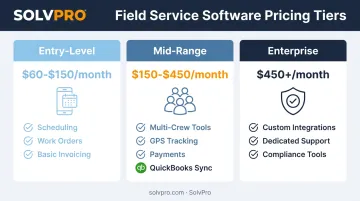
| Tier | Typical Monthly Range | Usually Included |
|---|---|---|
| Entry-level | $60-$150 | Scheduling, work orders, basic invoicing, mobile app |
| Mid-range | $150-$450 | Multi-crew tools, GPS tracking, payments, QuickBooks sync |
| Enterprise/custom | $450+ or quote-based | Custom integrations, dedicated support, compliance tools |
SolvPro takes a different approach, running a single core plan rather than tiers. It does not publish pricing, so confirm the current figure directly. Here's what the market tiers typically cover:
Entry-Level / Small Crew Plans
These plans cover basic scheduling, work orders, invoicing, and mobile access. They're built for solo operators or small crews (1-10 techs) in plumbing, excavation, landscaping, or cleaning who are digitizing away from paper and spreadsheets for the first time.
Mid-Range / Growing Business Plans
This tier adds multi-crew scheduling, GPS/technician tracking, QuickBooks sync, payment processing, and customer portals. It fits growing teams (10-40 techs) in electrical, plumbing, general contracting, and janitorial work that need accountability in the field and faster payments in the office.
Enterprise / Custom Plans
Custom integrations, dedicated account management, and advanced compliance or SLA tools show up here. These plans suit large national or multi-location operations that need ERP/CRM integration and complex reporting most SMBs never touch.
Key Factors That Affect FSM Software Pricing
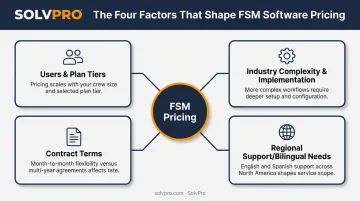
Pricing depends on team size, feature depth, industry complexity, and contract terms, not a single flat number. Here's what actually moves the needle.
Users, Features, and Plan Tiers
Per-user pricing scales directly with crew size. G2's category benchmarks show a common pattern: roughly $30-$50/month for the first user, then $20-$30/month for each additional seat. Some vendors charge office staff and field techs at different rates; others use one flat per-seat price no matter the role.
Plan tier matters just as much as headcount. Basic scheduling-only plans cost less than bundles that add invoicing, payment processing, job-level time tracking, and reporting. Watch for features locked behind a higher tier, including:
- GPS and job-level time tracking
- Payment processing integration
- Accounting or QuickBooks sync
- Advanced reporting and analytics
That "cheap" base price can jump fast once you add what you actually need.
Industry Complexity and Implementation
Trades with multi-stage or project-style work, like general contracting or excavation, often need estimating and proposal tools that simpler service trades don't. If your jobs involve blueprint takeoffs, progress billing, or multi-phase estimates, you'll need a plan tier built for that complexity, not just dispatch and invoicing.
That complexity carries into setup. Data migration and training needs add real cost on top of the subscription, with industry timelines ranging from a few weeks to several months. Some SMB-focused platforms, including SolvPro, include live onboarding support at no extra charge instead of billing it as a separate service.
Contract Terms and Regional Support
Long-term contracts and features locked behind paywalls, like payment processing or QuickBooks sync, can quietly inflate your real cost. Transparent, no-contract SMB pricing avoids this trap. SolvPro, for example, includes QuickBooks Online sync and card and ACH payments on the core plan with no upgrade required.
Regional needs affect cost too. If your field crews speak Spanish, check whether a bilingual interface is included or costs extra, since this directly affects adoption speed and data accuracy in the field. SolvPro runs a fully bilingual English/Spanish interface, including the mobile app, at no additional cost across every plan.
Cost Breakdown & Hidden Fees to Watch for
The advertised monthly price is rarely the full story. Both one-time and recurring fees factor into what you'll actually pay.
One-time costs to budget for:
- Setup or onboarding fees
- Data migration from your old system or spreadsheets
- Initial training time for office staff and crews
Recurring costs beyond the base subscription:
- Monthly or annual subscription fee
- Payment processing fees on invoices collected through the platform
- Per-location charges (for multi-site operations)
- Premium support tier upgrades
Software Advice's field service buyer research specifically flags feature add-ons, onboarding, integrations, and premium support as the most common places extra fees show up. Before signing, ask vendors directly about:
- Mandatory onboarding packages that get billed separately from the subscription
- Paid mobile app access on lower-tier plans
- Extra fees for additional dispatchers or office users beyond field techs
- Integration or API charges for connecting to QuickBooks, CRMs, or other tools
- Early cancellation penalties buried in long-term contract terms
Get a written total-cost breakdown before you commit. A $60/month base price with three hidden add-ons can easily cost more than a $150/month all-in-one plan. SolvPro, for example, publishes flat per-tier pricing that already includes QuickBooks sync and payment processing, so there's no add-on fee to discover later.
How to Choose the Right FSM Software for Your Budget
The right cost balances price with how your business actually operates, not just the lowest number on the pricing page.
Start with your real workflow, not the feature list. Count your crews. Ask whether slow invoicing is costing you cash flow. Look honestly at how much time your office spends on admin work that a system could automate.
Get specific answers before you sign anything. Request a live demo and ask vendors directly:
- What's the contract length, and what happens if I cancel?
- What's included in the base price versus billed as an add-on?
- Are there per-location or per-seat fees I should know about upfront?
Beyond contract terms, factor in setup time as a real cost. Weeks of downtime during implementation is expensive for a small crew that can't afford to pause jobs.
Platforms offering guided setup in under 10 minutes, with live onboarding support, cut the real cost of adoption substantially compared to enterprise systems that take weeks to configure.
Once setup is accounted for, run the ROI math before comparing sticker prices. Estimate time saved on admin work, faster invoicing and payment collection, and fewer missed or delayed jobs. Weigh that against the monthly software cost.
Weigh the monthly cost against how much manual reconstruction the office currently does before each invoice goes out.
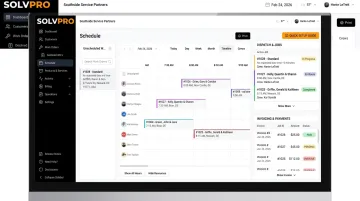
SMBs in electrical, plumbing, landscaping, and general contracting tend to benefit most from all-in-one, transparent pricing with no long-term contracts. It's the model that matches how these businesses actually grow: crew by crew, not in enterprise-sized leaps.
Conclusion
FSM software pricing in 2026 varies by team size, feature depth, and contract terms. There's no single "normal" price. Understanding what drives cost, and where hidden fees typically lurk, leads to smarter budgeting than chasing the lowest advertised number.
The right cost fits your crew's actual workflow today, with room to grow tomorrow, not just the smallest figure on a pricing page. Platforms with transparent, SMB-friendly pricing and no surprise add-ons, like SolvPro, make that calculation easier.
Your crews are busy. So why isn't there more money in the bank?
When the office can see labor, materials and documented changes against the job while the work is still open, the numbers at the end stop being a surprise. SolvPro keeps scheduling, work orders, time, job costing and invoicing on one record. When you want to see it on your kind of work, Book a Demo.
Run the Job. Protect the Profit.
Frequently Asked Questions
How Much Does Field Service Management Software Cost in 2026?
Pricing typically scales from under $100/month for small teams to $450+/month or custom quotes for enterprise operations. Your exact cost depends on team size, features needed, and pricing model.
What Factors Affect FSM Software Pricing the Most?
Number of users, feature tier, implementation and onboarding needs, and contract terms are the biggest cost drivers. Team size usually has the largest single impact on your total monthly bill.
Is Cheaper FSM Software Always the Better Choice?
Not always. Low-cost tools that lack mobile access, automation, or reporting often create hidden manual work, making them more expensive to operate long-term than a slightly pricier all-in-one platform.
What Hidden Costs Should I Watch for When Buying FSM Software?
Watch for setup fees, paid feature add-ons, per-location charges, and long-term contract lock-ins. SolvPro, for example, publishes transparent tiered pricing with no surprise fees—always ask any vendor for a written total-cost breakdown before signing.
How Long Does It Take to Set up Field Service Management Software?
Setup time varies by vendor complexity. SMB-focused platforms can often be configured in under 10 minutes to a few days, while enterprise systems can take weeks or months to fully implement.
Does Field Service Software Work Well for Small Businesses with Tight Budgets?
Yes. Platforms like SolvPro offer SMB-tailored pricing with no long-term contracts, making field service software accessible for small crews without enterprise-level spending or complexity.