It's 7 AM and the phone is already ringing. Two crews think they're headed to the same job.
A customer wants to know why their invoice from three weeks ago still hasn't shown up. Somewhere in a truck cab, a sticky note with a client's gate code is getting coffee spilled on it.
This is daily life for a lot of growing home service businesses. Spreadsheets, group texts, and paper work orders hold things together, until they don't.
Business management software for home service contractors replaces that patchwork with one connected system — scheduling, job tracking, estimating, invoicing, and payments in a single place.
This guide covers what these platforms actually do, the features worth insisting on, how to pick one for your trade, and where a purpose-built platform like SolvPro fits into the picture.
KEY TAKEAWAYS
- One connected system replaces five disconnected tools for scheduling, dispatch, invoicing, and payments.
- Match software complexity to your crew size today, not a hypothetical enterprise future.
- Prioritize platforms with real-time crew accountability, fast invoicing, and built-in QuickBooks sync before comparing price.
- Setup time matters too. Software your crew never opens is dead weight.
- Moving off separate tools removes the double entry between scheduling, invoicing, and accounting, which is where most errors start.
What Is Business Management Software for Home Service Contractors?
This category covers purpose-built software that manages a job's entire lifecycle: the first estimate, scheduling and dispatch, field execution, invoicing, and payment collection. It serves trades that send crews to job sites, not teams sitting at desks all day.
That's a meaningful distinction. Generic project management tools like ClickUp or Wrike weren't built with dispatch, mobile crews, or job-site check-ins in mind. Accounting-first ERP systems handle the books well but usually need heavy customization to fit field workflows like real-time job costing or crew scheduling.
Who Actually Uses This Software?
- General contractors juggling multi-phase projects
- Electricians and plumbers running service calls and installs
- Landscaping crews managing recurring routes
- Excavation and earthwork teams tracking equipment and job costs
- Commercial cleaning and janitorial companies coordinating multiple sites
Core Modules That Define These Platforms
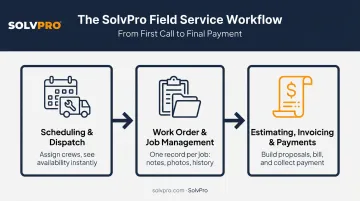
Most platforms in this category are built around three connected modules:
- Scheduling and dispatch: assign the right crew to the right job and see availability at a glance, without a round of phone tag first.
- Work order and job management: one record per job holding notes, photos, materials, status, and history instead of scattered texts and paper.
- Estimating, invoicing, and payments: build proposals, bill customers, and collect payment without re-entering the same information three times.
Field service technicians consistently name paperwork and administration as their least favorite part of the job, and industry research on field service engineers points to better tools as the fix. When one system handles the whole job lifecycle, crews spend more time working and less time chasing down information that should already be in front of them.
Why Spreadsheets and Sticky Notes Stop Working as You Grow
There is a tipping point that tends to arrive once you are running more than one or two crews. A single spreadsheet or a shared calendar stops being "good enough" almost overnight.
Manual tracking creates blind spots:
- Jobs get missed or double-booked because no one has a single source of truth.
- Invoices sit in a "to-do" pile for weeks after the job wraps.
- Nobody can say with confidence which jobs were actually profitable until the numbers are pulled together after the fact.
The ripple effect is worse than the missed appointment itself. When crews show up without accurate job info (wrong scope, missing notes, no material list), the result is callbacks and rework. That damages the thing most home service businesses depend on most: referrals.
There's real data behind this. Aberdeen Group research on field service organizations found that companies with a first-time-fix rate above 70% reported 86% customer retention and 4% annual service-revenue growth. Companies below that threshold saw only 76% retention and 0% revenue growth.
The higher-performing group was also far more likely to work from a central repository of service history and job data — 82% versus 48%. Shared, accurate job information isn't a nice-to-have; it's tied directly to whether customers come back.
Must-Have Features to Look for in Home Service Business Management Software
Think of this as a checklist, not a wish list. If a platform can't check these boxes, keep looking.
Scheduling, Dispatch, and Crew Accountability
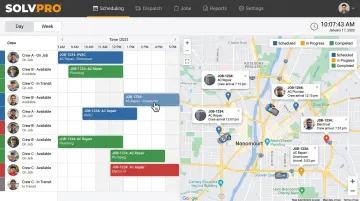
Office staff need to see crew availability instantly, not call around to figure out who's free. Look for:
- Real-time scheduling visibility with day, week, and crew views
- Drag-and-drop job assignment that prevents double-booking automatically
- Check-in/check-out or event-based location tracking that confirms work happened where and when it should — without turning into constant surveillance
SolvPro's approach here is event-based rather than always-on. Time entries, photo uploads, and job notes get job-linked the moment they're logged, giving owners proof of presence without a live tracking dashboard running all day. GPS-tracked dispatch and multi-crew route optimization are included standard: features some competitors, including Jobber, charge extra for.
Estimating, Invoicing, and Getting Paid Faster
This is where cash flow either improves or keeps bleeding out. Key features to demand:
- Multi-stage or itemized estimating with clean, customer-facing PDF proposals
- Invoicing triggered the moment a job is marked complete, not batched for end-of-week processing
- Integrated payment processing so customers can pay on the spot, by card or ACH
- QuickBooks Online sync to eliminate duplicate entry between field data and the books
SolvPro builds digital estimates and proposals, digital signatures and approval tracking directly into its proposal tool. This setup works well for multi-stage jobs like excavation or larger remodels, where billing a single lump sum doesn't reflect how the work actually happens. Once a customer approves and signs digitally, the estimate converts straight into a job record. No re-typing, no lost scope details.
Usability and Support Considerations
Feature lists mean nothing if your team won't open the app. Two considerations matter more than most buyers realize:
- Bilingual support (English/Spanish) for offices and crews with Spanish-speaking staff
- Fast onboarding that gets your whole team working in days, not weeks
Bilingual support matters more than ever. Hispanic workers made up 34.0% of the U.S. construction workforce in 2023, up from 16.5% in 2000, according to CPWR's construction workforce data. Among drywall installers specifically, that share reaches 75.2%. An English-only mobile app risks adoption problems from day one if your crew speaks Spanish.
Onboarding speed matters just as much. 34% of U.S. businesses reported buying software they later regretted specifically because of onboarding or training difficulty, according to Capterra's SMB software adoption research. Platforms that get a team running in minutes, not weeks, sidestep the "set it up later" trap that kills most software rollouts.
How to Choose the Right Platform for Your Trade and Team Size
Picking the right platform comes down to matching it to your crew size, trade, and budget.
Match complexity to your current crew size. A solo operator or a 2-3 person team doesn't need the same depth as a company running 10+ jobs a week across multiple crews. Enterprise-grade complexity you don't need yet just slows everyone down.
Consider your trade's specific demands:
| Trade | What matters most |
|---|---|
| Excavation & earthwork | Equipment utilization and cost tracking |
| Landscaping | Recurring scheduling, route efficiency |
| Electrical/plumbing | Job-level labor and material costing for one-off calls |
| Commercial cleaning | Labor-hour and productivity-based estimating |
Look past the sticker price. Once complexity and trade fit are settled, budget is the final filter — and advertised pricing rarely tells the whole story. According to G2's field service software category data, subscriptions often start around $30-$50 per user per month before add-ons stack on. Before signing up, ask:
- Are there per-user fees, and at what point do they kick in?
- Are core features like payment processing or GPS tracking included, or gated behind a higher tier?
- Can you cancel without being locked into an annual contract?
Where SolvPro Fits for Growing Service Businesses
SolvPro is a field service management platform built specifically for growing home service businesses: general contractors, electrical, plumbing, HVAC, landscaping, excavation, and commercial cleaning teams with crews in the field.
It wasn't designed in a boardroom. The team behind it includes people who've actually worked the jobs this software manages.
Kai Stanton, SolvPro's Technical Sales Specialist, spent 17 years in construction as a project manager, salesperson, estimator, and installer before joining the team. That real-world background is part of why the platform's workflows feel grounded in actual job sites rather than theoretical use cases.
What makes SolvPro a practical fit for growing crews:
- Transparent, SMB-friendly pricing on a single core plan; SolvPro does not publish figures, so confirm current pricing directly
- QuickBooks Online sync and credit-card and ACH payments built into the core plan, with no add-on fees
- A fully bilingual English/Spanish interface, including a dedicated Spanish-language mobile app
- No long-term contracts, cancel anytime
- Setup in under 10 minutes, with live onboarding support included, not reserved for higher-priced plans
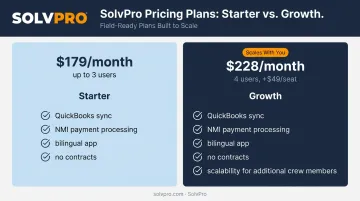
For a business that's outgrown spreadsheets but doesn't want enterprise-level bloat, that combination of real features, honest pricing, and fast setup tends to matter more than a longer feature checklist. You can book a demo or start a free trial to see how it fits your crew.
Conclusion
Field service software helps you manage the work. SolvPro helps you make sure the work makes money.
The right tool depends on your trade, crew size, job mix and the systems you already run. Test it on real jobs before you commit, and check that crews will actually enter what the office needs. When you want to see it on your kind of work, Book a Demo.
Run the Job. Protect the Profit.
Frequently Asked Questions
What Is the Best CRM for Home Service Contractors?
The "best" CRM depends on your crew size and trade, but strong options combine scheduling, invoicing, and payments in one system. Trade-specific platforms typically outperform generic CRMs since dispatch and crew tracking come built in.
What's the Difference Between a CRM and Full Business Management Software for Contractors?
A CRM focuses on tracking customers and leads. Full business management software adds scheduling, dispatch, crew accountability, and job costing on top of that customer data.
How Much Does Business Management Software Cost for a Small Home Service Business?
Pricing typically scales with crew size and feature depth. Watch for per-user fees and required add-ons — they can push your real monthly cost well above the advertised starting price.
How Long Does It Take to Set up Business Management Software?
Setup time varies widely by platform complexity. Simpler, trade-focused platforms can be running within minutes; heavier, enterprise-style systems can take weeks of implementation.
Can Business Management Software Actually Help Me Get Paid Faster?
Yes. Instant invoicing at job completion, paired with integrated online payments, shortens the gap between finishing a job and getting paid. Same-day payment collection becomes realistic rather than rare.
Do Different Trades (HVAC, Landscaping, Plumbing) Need Different Software?
Core needs overlap across trades, but job-costing depth, recurring scheduling, and estimating complexity vary. Confirm any platform you're considering actually supports your trade's specific workflow before signing up.