Most dispatchers assume emergency scheduling is purely reactive. The reality is that the outcome of an emergency call is largely determined by what's already set up: your triage protocol, crew visibility, dispatch workflow, and documentation habits. Get those right, and an emergency call becomes a manageable interruption. Get them wrong, and one urgent call can collapse an entire day's schedule.
This guide covers the exact steps to schedule emergency service calls, what you need to have ready before calls arrive, the variables that determine success, and the mistakes that slow most teams down.
Key Takeaways
- Build a tiered triage system before any call arrives — classify emergencies by severity, not just urgency
- Always prioritize skill match over proximity when assigning emergency calls
- Front-load routine jobs in the morning to protect afternoon capacity for emergencies
- Real-time crew visibility is non-negotiable — dispatching blind is guesswork
- Log time, parts, and job outcome immediately after every emergency call — delayed records cost you money
How to Schedule Emergency Service Calls
Step 1: Classify the Emergency Before You Dispatch
Not every urgent call is a true emergency. Treating them the same wastes crew availability on lower-priority situations while genuine emergencies sit in the queue.
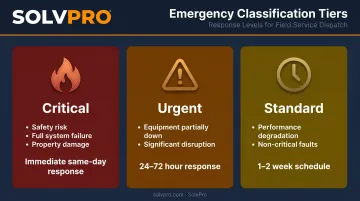
Build a three-tier classification system before calls start coming in:
| Tier | Definition | Target Response |
|---|---|---|
| Critical | Safety risk, full system failure, property damage in progress | Immediate — same day |
| Urgent | Equipment partially down, significant business disruption | Within 24–72 hours |
| Standard | Performance degradation, non-critical faults | Scheduled within 1–2 weeks |
When a call comes in, your dispatcher should collect four pieces of information to assign a tier:
- Nature of the problem — what exactly failed and what symptoms are present
- Safety risk — is anyone at risk, or is there potential for property damage?
- System status — fully down, partially operational, or just degraded?
- Customer type — commercial contract with SLA obligations vs. residential, or new customer vs. existing?
This classification step takes under two minutes and determines every decision that follows. Research from Aberdeen Group found that organizations routing all service calls through triage achieved an 86% first-time fix rate, compared to 62% for those with no triage — a 24-point gap.
Step 2: Assess Real-Time Crew Availability and Location
Once you've classified the call, you need an accurate picture of who's available. Without this, dispatch is guesswork.
Your dispatcher needs to see, right now:
- Which technicians are in the field vs. available
- Where each technician is geographically
- How far into their current job they are — 20 minutes from completion is very different from just starting a 3-hour job
One proven approach: front-load routine maintenance calls in the morning. HVACR Business recommends leaving afternoon slots open specifically so emergency calls, return-with-parts visits, or urgent jobs have somewhere to land without displacing other customers. This isn't overstaffing — it's building slack into the system intentionally.
That kind of visibility requires reliable data. SolvPro's scheduling dashboard gives dispatchers a live view of crew availability across day, week, and crew calendar views. Event-based geolocation tracking geo-stamps time entries and activity logs, so the office knows when and where work is happening — without constant phone calls.
Step 3: Match the Right Technician to the Job
Proximity is one factor. Competency is the factor that determines whether the job gets fixed.
HVACR Business is direct on this point: sending a technician who can't fix the specific equipment type is a waste — proximity doesn't override competency. Aberdeen Group data shows that 25% of repeat dispatches happen because the technician lacked the necessary experience for the job.
Use this three-step filter when scanning available technicians:
- Filter by skill and certification match first — can this technician actually complete this job?
- Narrow by proximity and schedule load — who is closest and least disrupted by the reassignment?
- Confirm parts availability — does the assigned technician have what the job likely requires on their truck?
Only after clearing all three filters should you confirm the dispatch. Skipping step one to save five minutes in dispatch costs far more when a second technician has to be sent out.
Step 4: Dispatch with Full Job Context
An incomplete dispatch is one of the leading causes of first-visit failures on emergency calls. A technician arriving with only an address and a vague problem description is set up to waste time, frustrate the customer, and likely need a second visit.
A complete emergency dispatch includes:
- Customer address and any access instructions (gate codes, contact on-site, parking)
- Clear description of the reported problem as the customer described it
- Customer contact details
- Any known equipment history or prior service notes
- Expected parts or tools likely needed
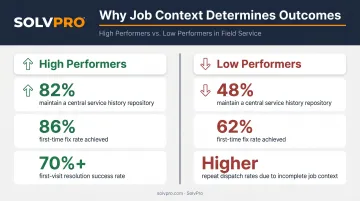
Aberdeen Group's research found that 82% of high-performing field service organizations (those with first-time fix rates above 70%) maintained a central repository for service history, compared to just 48% of lower performers. Job context isn't overhead — it's what separates a first-visit fix from a repeat dispatch.
That's exactly what SolvPro's digital work order system is built for. Dispatchers can push all of this context — notes, photos, site-specific instructions, and customer details — directly to the technician's mobile device in real time, before they leave for the job.
Step 5: Confirm, Track, and Close the Loop
Sending the technician out is the midpoint, not the finish line. The dispatcher's job continues until the job is documented and closed.
During the job:
- Monitor arrival and on-site status
- Track when the job starts and any scope changes
- Identify early if the job is running long — so you can proactively reassign other crew members or notify affected customers before they start calling
After the job:
- Log actual time on site
- Document parts used and any issues discovered
- Record job outcome and any follow-up required
The post-job step directly protects cash flow. BuildOps data shows that contractors who invoice within 10 days of job completion are paid in an average of 51.6 days — while those who wait 20+ days average 85.4 days to get paid. Emergency jobs, in particular, are frequently invoiced late because the documentation wasn't captured at the time of close-out.
SolvPro lets technicians log time, parts, and job outcome from their mobile device before leaving the site. Invoices generate immediately and sync directly to QuickBooks Online — so close-out happens while the job is still fresh.
What You Need Before an Emergency Call Hits
Most emergency scheduling failures trace back to gaps that existed before the call came in. The businesses that handle emergencies well aren't reacting — they've already done the work.
On-Call Policy and Rotation
Without a documented on-call policy, after-hours coverage is inconsistent and technicians feel unfairly burdened — two problems that compound quickly.
Your on-call policy should define:
- Which technicians are eligible for on-call rotation
- How rotations are structured (weekly, bi-weekly)
- What hours constitute on-call coverage
- Compensation structure — the U.S. Department of Labor's FLSA guidance distinguishes between "engaged to wait" (compensable) and "waiting to be engaged" (not compensable), and the line depends on how restricted the employee's time is
- What severity thresholds trigger deployment of an on-call technician
Technician Skill and Certification Map
Under pressure, dispatchers don't have time to make calls asking who's qualified for what. Keep an up-to-date record of each technician's certifications, skills, and equipment familiarity — somewhere accessible in seconds, not minutes.
For HVAC, plumbing, and electrical businesses, this means logging:
- Active trade licenses and certifications
- Equipment brands or systems each technician is qualified to work on
- Any restrictions (e.g., not certified for commercial gas lines)
Stocked and Organized Truck Inventory
Aberdeen Group data shows that 51% of repeat dispatches are caused by missing or incorrect parts. A technician who arrives at an emergency without the right parts can't complete the job — and the business absorbs a second truck roll at $200–$300 per visit.
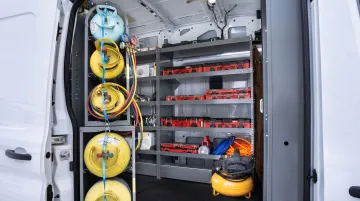
Establish a consistent restocking protocol after every job and a way to track what's on each vehicle. Make pre-dispatch parts verification a required step before confirming any emergency assignment.
A Single System for Scheduling Visibility
Running emergency dispatch from spreadsheets, text messages, or a whiteboard creates dangerous blind spots. You need one centralized view of all technicians, jobs, and schedules to make fast, confident decisions.
SolvPro's live scheduling dashboard gives dispatchers exactly that: drag-and-drop job assignment, real-time job status updates, and event-based geolocation tracking so you always know who's available, where crews are, and what stage each job is at.
Common Mistakes That Derail Emergency Service Call Scheduling
Even experienced dispatchers fall into these patterns under pressure:
- Skipping triage classification burns crew availability on the wrong calls — a minor inconvenience doesn't deserve the same urgency as a safety-critical failure
- Sending the nearest technician without confirming skill fit doubles travel costs and extends wait time when a second, qualified tech still has to be dispatched
- Dispatching with only an address and a vague problem description sends technicians in underprepared — the full context checklist from Step 4 is non-negotiable
- Skipping post-job documentation means no accurate cost tracking, no basis for improving future response, and invoices that go out late — all of which hit profitability directly
Troubleshooting Emergency Scheduling Breakdowns
Even well-run operations hit snags. Here's how to diagnose the most common emergency scheduling failures and fix them before they repeat.
No Available Technician for an Incoming Emergency
Back-to-back scheduled jobs or a gap in the on-call rotation are usually the culprit. When the call comes in and no one is free:
- Check whether the on-call policy covers the current time window
- Identify whether a nearby scheduled job can be briefly paused or rescheduled to free a technician
- Evaluate if a subcontractor or secondary crew member can be activated
- Flag the gap with your dispatch team so coverage holes get addressed before the next rotation
Technician Arrives On-Site Without the Right Parts
This typically happens when dispatch is confirmed before anyone checks truck inventory, or the vehicle wasn't restocked after a prior job.
- Make pre-dispatch parts verification a required step — not optional — before confirming any emergency assignment
- Implement inventory tracking at the vehicle level so parts confirmation takes seconds, not a phone call to the technician
- If a tech is already on-site and short on parts, dispatch a runner or redirect to the nearest supply house rather than pulling the crew off the job entirely
Emergency Call Collapses the Rest of the Day's Schedule
No buffer in the day, combined with a job that ran long — this is how one emergency becomes a full-day cascade.
- Notify affected scheduled customers immediately, before they call you
- Assess whether another technician can absorb displaced jobs
- Document the cascade and use it to justify building explicit buffer windows into future daily schedules — this is a structural fix, not a one-time recovery
Frequently Asked Questions
What is field service scheduling?
Field service scheduling is the process of assigning the right technician to the right job at the right time, accounting for skills, location, and availability. Emergency scheduling is the real-time, reactive layer of that process — handling unplanned urgent calls outside the normal scheduled workflow.
What is an emergency service call?
An emergency service call is an unplanned service request requiring faster-than-normal response due to safety risk, equipment failure, or business disruption. The definition of "emergency" should be standardized in a triage system — not left to individual interpretation on each call.
How do you prioritize when multiple emergency calls come in at once?
Prioritize by severity of impact: safety risks first, then full system failures, then partial disruptions. Customer contract obligations and technician skill match are secondary filters. A documented priority framework ensures these calls are handled consistently — not improvised under pressure.
What should an on-call policy include?
At minimum: which technicians are eligible, the rotation schedule, what hours constitute on-call, the compensation structure (accounting for FLSA compensability rules), and the specific conditions that trigger deployment of an on-call technician.
How can field service management software help with emergency scheduling?
Scheduling software gives dispatchers real-time visibility into technician location, job status, and availability — enabling accurate dispatch decisions instead of relying on phone calls and guesswork. SolvPro connects scheduling, crew tracking, work orders, and mobile invoicing in a single platform — giving dispatchers everything they need to move from triage to close-out without switching tools.
What is a reasonable response time target for emergency service calls?
Response time expectations vary by industry, contract type, and geography. Commercial contracts often define specific SLA windows; residential emergency calls typically target same-day or 2–4 hour response. A triage system and real-time dispatching capability are what make those targets consistently achievable — not just something to aim for.