That chaos isn't just stressful — it's costing you money. Missed jobs, late invoices, and poor crew visibility are the direct result of running a service business on tools that weren't built for it.
The problem is that most contractor software was designed for large construction firms with dedicated project managers and IT staff. Small businesses — a six-person HVAC crew, a landscaping operation, a commercial cleaning company — don't need a $20,000 platform that takes three months to configure. They need something that works on Monday morning.
This guide covers what actually matters when evaluating contractor software for a small service business: the features that move the needle, the mistakes that waste money, and how to find a tool your team will genuinely use.
Key Takeaways
- Look for software that handles scheduling, work orders, crew tracking, invoicing, and payments — no IT team required
- Mobile usability is non-negotiable; if field crews won't open it on-site, it has no value
- Total cost matters more than monthly price — watch for per-user fees, integration charges, and onboarding add-ons
- Real-time office-to-field visibility eliminates the phone tag that kills productivity
- Prioritize month-to-month flexibility over long-term contracts you'll outgrow or underuse
What Is Contractor Software for Small Businesses?
Contractor software is a digital platform that manages the complete job lifecycle in one place — from scheduling and dispatching crews, to tracking job progress, invoicing customers, and collecting payment. Instead of juggling spreadsheets, text threads, and three separate apps, everything lives in a single connected system.
Core Capabilities
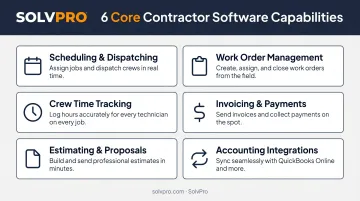
Dedicated contractor platforms typically cover:
- Scheduling and dispatching — assign jobs, prevent double-booking, adjust in real time
- Work order management — attach notes, photos, materials, and change orders to each job
- Crew time tracking — log hours by job, create geo-stamped records of field activity
- Invoicing and payment collection — bill immediately at job completion, accept card or ACH
- Estimating and proposals — build professional quotes that convert directly into jobs
- Accounting integrations — sync with QuickBooks so your books stay accurate
Not every tool covers all of these — and that's fine. Small businesses should match a platform's capabilities to their actual workflow gaps, not pay for a module they'll never touch.
This is also where contractor software separates itself from generic tools like Asana or Monday.com. Those platforms track tasks. They don't understand job costing, field crew logistics, or service industry billing. A drag-and-drop task board won't tell you whether a job was profitable or help a crew member update their status from a job site without calling the office.
Why Field Service Businesses Rely on It
HVAC, plumbing, electrical, landscaping, and janitorial businesses share a common challenge: their work is location-distributed, crew-dependent, and highly sensitive to job throughput. A delayed invoice or miscommunicated job detail has an immediate financial consequence.
According to Software Advice's 2026 field service buyer data, 52% of field service businesses cite inefficiency as the primary reason they seek new software — and 35% are still relying on spreadsheets or paper. For small contractors, that inefficiency isn't just frustrating — it's costing jobs, hours, and margin.
Key Factors to Consider When Choosing Contractor Software
Small businesses don't need the most feature-rich tool — they need the right fit. The following factors help you evaluate whether a platform will actually improve operations or just add another system to manage.
Ease of Use and Setup Time
A tool your crew won't use because it's too complicated is a waste of money. For small businesses with no dedicated IT or training staff, the learning curve must be minimal.
Ask vendors a direct question: how quickly can a new user complete a real task — not a demo, an actual job? Capterra's 2024 research found that 70% of users say new applications are rolled out without adequate training, and 34% of U.S. businesses regret software purchases specifically because of onboarding difficulty.
Track two numbers after launch: time-to-adoption and daily active usage. A platform that takes three weeks to configure will sit unused.
Job Scheduling and Work Order Management
Scheduling is the heartbeat of any service business. The software should let you create, assign, and update jobs in real time — and ensure crews know exactly where to be, what to bring, and what the job requires before they arrive.
Look for:
- Drag-and-drop visual scheduling with day, week, and crew views
- Double-booking prevention
- Recurring job support for contract-based clients
- Digital work orders that hold photos, notes, materials, and change orders
Inefficient scheduling directly drives missed appointments, double-booked crews, and lower jobs-per-day output — three of the most common sources of lost revenue in small service businesses.
Mobile Access and Field Crew Accountability
Your field crews are users too. The software must function on a phone, in real-world conditions. It should allow crews to check in, update job status, capture photos, and communicate without calling the office.
49% of field service professionals rank mobile access as their top feature priority — and separately, 92% of construction workers use smartphones daily for work, according to JBKnowledge's ConTech Report.
One often-overlooked factor: language accessibility. For businesses managing bilingual crews, a platform that only operates in English creates a daily friction point. Field crews need to read instructions, update job status, and communicate clearly — a Spanish-only interface restriction isn't a minor inconvenience, it's an accountability gap.
Every update your crew enters in the field is a phone call your office doesn't have to make — that time compounds fast across a week.
Invoicing, Payments, and Cash Flow
Slow invoicing is one of the biggest cash flow killers for small contractors. Software that lets you invoice the moment a job is completed — and accept payment on-site or digitally — reduces days-to-payment and eliminates the paperwork backlog.
Intuit's 2025 Small Business Late Payments Report found:
- 56% of U.S. small businesses are currently owed money from unpaid invoices
- Businesses with outstanding invoices are owed more than $17,000 each on average
- 47% report a portion of invoices overdue by more than 30 days
- Businesses with high volumes of overdue invoices are 1.4x more likely to face cash flow challenges
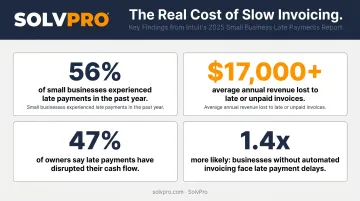
Every day between job completion and invoice delivery is a day your cash sits with the customer instead of in your account. Close that gap and your cash flow problems largely take care of themselves.
Accounting and Tool Integrations
Most small contractors already use QuickBooks or a similar accounting tool. The contractor software you choose must sync with your existing systems — otherwise you're doing double data entry, which defeats the entire purpose.
JBKnowledge's research puts the scope of this in sharp relief:
- 49% of firms manually transfer data between non-integrated apps
- 44% use spreadsheets for that transfer
- Only 5% report all their apps integrate cleanly
Before purchasing any platform, confirm: Does it sync with QuickBooks Online? What's included in that sync — invoices, job costs, labor, payments? Is the integration included in the base price or sold as an add-on?
Bookkeeping accuracy, manual reconciliation time, and per-job cost visibility all hinge on this one question — and per-job cost visibility is what tells you whether your business is actually profitable.
Pricing Transparency and Contract Flexibility
Many enterprise-grade platforms lock small businesses into annual contracts with per-user fees and surprise add-on charges. For a business doing under $5 million in revenue, a $20,000/year software commitment with a steep implementation cost can be genuinely damaging to cash flow.
Software Advice's 2026 FSM pricing guide identifies typical per-user costs ranging from $35/month at entry level to $80/month at the high end, with flat-rate plans running $108–$522/month depending on tier. Those figures exclude implementation, data migration, onboarding, training, integrations, and internal admin time — all of which are real costs that most vendors don't surface upfront.
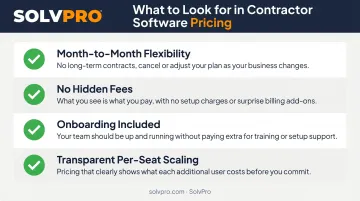
What to look for in a pricing structure:
- Month-to-month flexibility with no long-term contract required
- No hidden fees for additional users, integrations, or core features
- Onboarding support included in the base plan, not sold as an add-on
- Transparent per-seat pricing that scales predictably as your team grows
Common Mistakes Small Businesses Make When Choosing Contractor Software
Buying for Features, Not for Fit
Vendors showcase long feature lists, but a scheduling module built for a 50-person construction firm won't serve a 6-person HVAC crew the same way. Before evaluating features, define your actual workflow gaps. What breaks down today? Start there.
The principle is simple: find the simplest solution to the real problem. Adding complexity to a small operation rarely improves it.
Underestimating the True Cost
The monthly subscription is rarely the full cost. Hidden costs rarely disclosed upfront include:
- Data migration and setup fees
- API access charges
- Additional user licenses
- Onboarding fees
- Internal training time
These add up fast. Before committing, request a full cost scenario from each vendor based on your actual team size, usage patterns, and integration requirements. According to Capterra's 2025 Tech Trends research, 48% of SMBs say regretful software purchases resulted in increased costs.
Skipping the Mobile Experience Test
Many platforms are designed primarily for desktop office use. The mobile crew-facing version is often a stripped-down afterthought — clunky, WiFi-dependent, or missing the features field workers actually need.
During any trial, put the mobile app in a field crew member's hands at a real job site. Not the office manager's hands. If the crew won't use it, the software won't work regardless of how polished the web dashboard looks.
How SolvPro Can Help
SolvPro was built specifically for small service businesses with crews in the field — by people who have actually worked in construction, field service, estimating, and project management. Technical Sales Specialist Kai Stanton brings 17 years of hands-on construction experience to the platform, and the team's 50+ years of combined industry background directly shapes how the product works.
Unlike enterprise platforms that require weeks to configure, SolvPro is designed to be operational in under 10 minutes.
What the Platform Covers
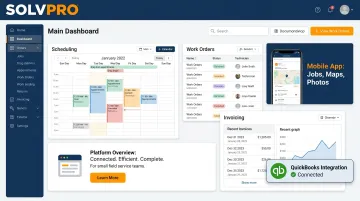
SolvPro addresses every factor covered in this guide within a single platform:
| Capability | What SolvPro Includes |
|---|---|
| Scheduling & Dispatching | Drag-and-drop calendar, double-booking prevention, GPS-tracked dispatch |
| Work Order Management | Photos, notes, materials, change orders — all geo-stamped |
| Crew Time Tracking | Mobile timers, job-level labor reporting, payroll preparation |
| Mobile App | Full functionality in English and Spanish on any device |
| Invoicing & Payments | On-site invoice generation, NMI payment processing (credit card, ACH) |
| Accounting Integration | QuickBooks Online sync included in all pricing tiers |
| Estimating | Phase-based estimating with customer-facing PDF proposals |
Pricing and What Sets It Apart
SolvPro's pricing is structured to be transparent and predictable:
- Starter Plan: $179/month for up to 3 users
- Growth Plan: $228/month for 4 users, with additional users at $49/user/month
- Scale Plan: Custom pricing for unlimited users
All core features — QuickBooks sync, GPS dispatch, bilingual interface, NMI payments, time tracking — are included at every tier. No upgrade-to-unlock surprises.
Other differentiators worth noting:
- Cancel anytime — no long-term contracts, no penalties
- Live onboarding support included in every subscription tier, not locked behind a premium plan
- Fully bilingual English/Spanish interface across the entire platform — a practical advantage for businesses managing diverse crews
Conclusion
The best contractor software for your small business isn't the one with the most features or the biggest brand name. It's the one your team will actually use, that fits your budget without hidden costs, and that solves your real operational pain points without creating new ones.
Software selection isn't a one-time decision. As your crew grows, job volume increases, and customers expect faster communication, your tools need to keep pace. Review your platform periodically against your actual business needs. If it's slowing you down, don't stay loyal to it out of habit. The right platform handles scheduling, field communication, and invoicing without you having to chase down information or patch together workarounds.
Frequently Asked Questions
Is there a free app for contractors?
Most contractor apps offer free trials rather than permanently free plans. Free tiers typically limit job volume, users, or features significantly. For a functional tool that handles real scheduling, invoicing, and crew management, expect to pay $79–$199/month depending on team size and features required.
What is the best contractor management software?
The right choice depends on team size, trade type, and your specific operational gaps. A platform built for 50-person commercial construction firms won't serve a 5-person HVAC team well. Prioritize fit over brand recognition.
How much does contractor software for small businesses typically cost?
Per-user plans typically run $35–$80/user/month; flat-rate plans range from roughly $108–$522/month depending on tier. These figures don't include implementation, onboarding, or integration costs — always request a total cost scenario before committing.
What features should I prioritize in contractor software for a small team?
Start with scheduling, mobile work order management, invoicing, and accounting integrations. Those four capabilities close the most common revenue and productivity gaps for small field service teams. Add features from there as your operation scales.
Can contractor software work for non-construction field service businesses like HVAC, plumbing, or landscaping?
Yes. The best contractor software is built around job and crew management workflows that apply equally across trades. HVAC, plumbing, electrical, landscaping, and janitorial businesses all share the same core operational structure — scheduling crews, managing jobs, and getting paid.
How long does it take to set up contractor software for a small business?
Enterprise tools can take weeks or months to configure. Purpose-built SMB platforms can be operational in under a day — SolvPro, for example, is designed for setup in under 10 minutes. If your team has no dedicated IT staff, onboarding speed should be one of your first evaluation criteria.