It's 6 a.m. and your crew just texted from the wrong building. Meanwhile, your office manager is toggling between a scheduling spreadsheet, a paper checklist binder, and a separate invoicing app just to figure out if last week's job at the medical plaza got billed.
This isn't a one-off bad morning. It's Tuesday.
Small-business owners lose 96 minutes of productivity every day, according to a 2024 Slack/Salesforce survey of 2,000 U.S. small-business owners. Much of that loss comes from searching for information across disconnected tools and waiting on updates from apps that don't talk to each other.
For janitorial and commercial cleaning businesses, that fragmentation shows up as missed sites, late invoices, and crews nobody can quite account for. This guide covers what janitorial software actually does, the features worth paying for, and how to choose based on your crew size and growth stage.
KEY TAKEAWAYS
- Centralizes scheduling, crew tracking, work orders, and billing in one system
- Mobile tracking, digital checklists, invoicing, and job costing matter most
- Best fit depends on crew size, site count, and your top operational gap
- Bilingual support and quick onboarding drive real crew adoption
- Recurring contracts need schedules that repeat reliably across fixed site rotations
What Is Janitorial Software?
Janitorial software (sometimes called cleaning business management software) is a digital platform that replaces paper checklists, shared spreadsheets, and a pile of disconnected apps with one system. It handles scheduling, work orders, crew accountability, and payments in a single place.
Who typically uses it:
- Janitorial contractors managing nightly or weekly recurring accounts
- Commercial cleaning companies servicing multiple client sites
- Multi-site custodial teams coordinating crews across properties
- Office and facility cleaning crews juggling recurring contracts alongside one-off jobs
Point Solutions vs. All-In-One Platforms
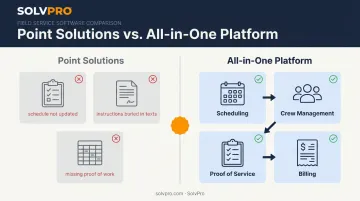
Plenty of tools solve one narrow problem. An inspection-only app helps you document a walkthrough but does nothing for scheduling or billing. A bidding-only app helps you win the contract but leaves your crew lead guessing what to clean once they're on-site.
The gap shows up fast:
- Schedules live on a spreadsheet no one updates in real time
- Job instructions get buried in a text thread
- Proof of work is a photo someone forgot to send
All-in-one platforms close that gap, connecting scheduling, crew management, proof of service, and billing into one workflow. That's the feature set we'll break down next.
Key Features Every Cleaning Business Should Look for
Not every feature carries equal weight. Here's what actually moves the needle for a cleaning operation running multiple recurring accounts:
- Scheduling and dispatch. Recurring, multi-site contracts break down fast when a crew calls off and nobody reassigns the job. Software with drag-and-drop scheduling and instant reassignment keeps sites covered without a scramble of phone calls.
- Mobile crew tracking with GPS/time stamps. Clock-ins verified at the correct site tighten payroll accuracy and give the office the ability to see who's where, eliminating the guesswork over whether a crew actually showed up.
- Digital work orders and inspection checklists. Photo-documented checklists replace paper reports and create a defensible record. When a client questions service quality, you have timestamped proof instead of a "he said, she said" conversation.
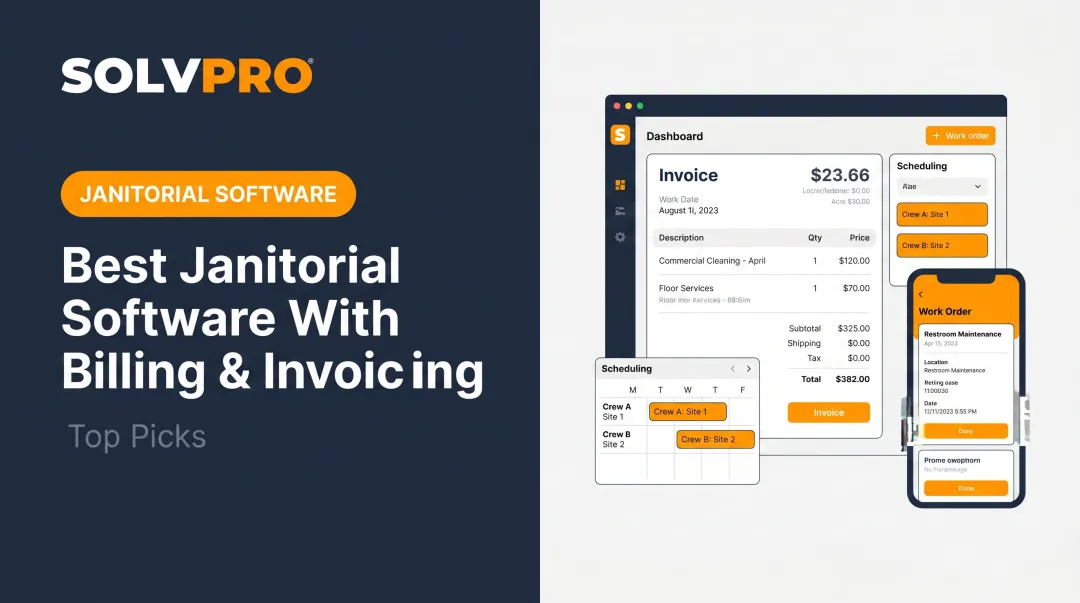
- Invoicing and payment processing. Tying invoicing to job completion shortens the billing cycle dramatically. Platforms with built-in QuickBooks Online sync and integrated payment processing (like SolvPro's built-in card and ACH payments) remove the manual re-entry that happens when scheduling, invoicing, and accounting live in separate systems.
- Job costing and profitability reporting. Tracking labor and supply costs against your original bid tells you which contracts are actually making money and which ones are quietly bleeding margin.
- Bilingual interface for office and field staff. This one matters more than most vendors admit. Janitorial crews in many U.S. markets are majority Hispanic or Latino: 35.6% of janitors and building cleaners nationally, per 2025 BLS data. A genuinely bilingual platform, not just a translated login screen, means field staff can actually use the tool without a supervisor translating every checklist.
The Real Business Impact: How Janitorial Software Boosts Profitability
Features are one thing. What they do to your bottom line is the real question.
Fewer Missed or Delayed Jobs
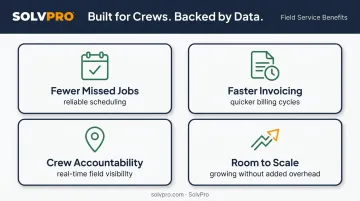
Automated schedule confirmations and crew notifications cut down on no-shows, the kind that put a contract renewal at risk. Commercial cleaning retention already runs tight: a 2024 BSCAI-sponsored market study found 91% of building service contractors reported under 20% client turnover, meaning most churn that does happen tends to concentrate around service consistency issues, missed visits included.
Faster Invoicing, Quicker Payments
Late payments are a documented drag on cash flow. Xero reports U.S. small-business invoices were paid 7.8 days late on average in Q4 2025. Automatically generating an invoice the moment a job is marked complete, instead of waiting for someone in the office to notice, shrinks that gap considerably.
Accountability, Admin Time, and Room to Grow
Beyond scheduling and invoicing, janitorial software pays off in a few other places that add up over time:
- Crew accountability: GPS time stamps and digital checklists build an audit trail without anyone hovering over the crew.
- Office admin time: Eliminating duplicate data entry across scheduling, invoicing, and payroll frees up hours for growing the business instead of re-typing the same job details.
- Scalability: A platform that grows with you, adding crews, sites, or services without the cost and disruption of switching systems mid-growth.
How to Choose the Right Janitorial Software for Your Business
The right platform depends less on feature count and more on where your business actually operates.
For Small and Growing Cleaning Crews
- Prioritize transparent, SMB-friendly pricing over enterprise complexity you won't touch for years
- Skip long-term contracts: month-to-month pricing keeps you flexible as you grow
- Look for a free trial or guided setup so your office and crews adopt the system in days, not months
For Multi-Site Commercial Cleaning Contractors
- Prioritize location-based scheduling and job costing broken out by property or account
- Confirm the platform can standardize checklists and work orders as you add branches and crews
- Look for reporting that shows profitability site by site, not just company-wide
For Bilingual or Diverse Field Teams
- Confirm the software offers a genuinely bilingual interface — for field crews and office staff both, not just a translated login screen
- Check that notifications and customer-facing documents are available in Spanish too
- Ask whether crew leads can toggle language settings independently
Whichever category fits your business, confirm cancellation terms and onboarding support before signing anything.
Why SolvPro Is Built for Growing Janitorial and Commercial Cleaning Businesses
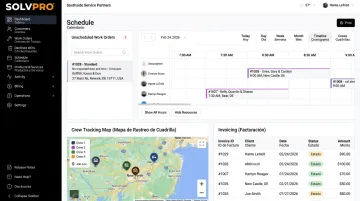
SolvPro is an all-in-one field service management platform bringing scheduling, work orders, crew tracking, and invoicing into a single system built for growing service businesses — janitorial and commercial cleaning teams included.
A few things set it apart for cleaning operations specifically:
- Fully bilingual English/Spanish interface covering both the field crew mobile app and the office admin dashboard, addressing a real gap in janitorial workforce software
- Built-in QuickBooks Online sync and credit-card and ACH payments as core platform features, not bolted-on add-ons requiring extra fees
- Transparent pricing, with no long-term contracts and no surprise add-on charges
- Same-day setup, with accounts created in under 2 minutes and guided onboarding support from a live team
The platform was built by a team with 50+ years of combined experience across construction, field service, estimating, and project management. That group includes Kai Stanton, who spent 17 years working as a project manager, estimator, and installer before joining SolvPro. This ground-level background shows up in the platform's design, which favors practical features over unnecessary complexity.
For a cleaning business trying to stop stitching together five different tools, booking a demo is a quick way to see how scheduling, invoicing, and crew tracking work together in one place.
Conclusion
Field service software helps you manage the work. SolvPro helps you make sure the work makes money.
The right tool depends on your trade, crew size, job mix and the systems you already run. Test it on real jobs before you commit, and check that crews will actually enter what the office needs. When you want to see it on your kind of work, Book a Demo.
Run the Job. Protect the Profit.
Frequently Asked Questions
What Is Janitorial Software and How Does It Work?
It's a digital platform combining scheduling, crew tracking, work orders, and invoicing into one system. It replaces paper checklists and spreadsheets with up-to-date job information for cleaning businesses.
What Features Should Janitorial Management Software Have?
Look for scheduling and dispatch, mobile GPS time tracking, digital inspection checklists, invoicing tied to job completion, and job costing that shows which contracts are actually profitable.
Is There Free Janitorial Software Available?
Some scheduling-only tools offer free tiers for very small crews, but most full-featured platforms run on paid plans with free trials. SolvPro offers a 14-day free trial with no credit card required, plus guided onboarding to help you get started fast.
How Much Does Janitorial Software Typically Cost?
Pricing ranges from per-user monthly fees for small crews to tiered plans for larger operations. SolvPro. Always weigh the cost against the admin hours it saves.
Can One Platform Handle Scheduling, Invoicing, and Crew Tracking Together?
Yes. All-in-one platforms like SolvPro are built specifically to unify these functions, so cleaning businesses aren't juggling multiple disconnected apps.
How Long Does It Take to Get Janitorial Software up and Running?
Timelines vary by platform complexity. SolvPro's guided onboarding lets businesses create an account in under 2 minutes and start scheduling and invoicing the same day.