Project cost tracking is the practice of monitoring labor, materials, equipment, and overhead against a budget while the work is still happening, not after the final invoice. Whether you're running one job or dispatching a dozen crews a week, it's the difference between guessing at profitability and knowing it.
This guide breaks down what cost tracking actually involves, why it matters for teams working job to job, the cost categories you need to watch, the tools available (including software built for field teams), and the habits that keep margins healthy.
KEY TAKEAWAYS
- Real-time tracking catches overruns before they erase your margins
- Track labor, materials, equipment, overhead, and contingency as separate costs
- Cost Variance and Cost Performance Index flag budget problems early
- Field-logged hours, not office guesswork, drive job costing accuracy
- Field service software connects cost tracking directly to getting paid
What Is Project Cost Tracking?
Project cost tracking is the ongoing process of monitoring, recording, and comparing actual expenses against your planned budget while a project is underway. It covers labor, materials, equipment, and overhead, and it doesn't stop until the final invoice goes out.
Budgeting and cost tracking aren't the same thing. Budgeting happens once, at the start, when you decide how much a job should cost. Cost tracking happens continuously, checking whether reality matches that plan.
Budgeting sets the plan. Cost tracking measures performance against it.
For service businesses, this typically plays out at the job or work-order level rather than across a massive enterprise portfolio. A plumbing company doesn't track cost variance across a $50 million infrastructure build. It tracks whether Tuesday's water heater install actually made money after labor, parts, and drive time.
That distinction changes what kind of data you need:
- Field-level accuracy over portfolio-level estimates
- Real-time entries over end-of-month reconciliation
- Job-by-knowing where each job stands over department-wide averages
Get the job-level number wrong on enough jobs, and the whole business feels it.
Why Project Cost Tracking Matters
Budget overruns rarely happen all at once. They creep in through a few unlogged hours here, a materials overage there, until the job that looked profitable on paper is actually a loss.
KPMG's global engineering and construction survey found that 37% of respondents missed budget and/or schedule performance targets. That's a reminder that cost control failures are common even among firms with dedicated project controls teams.
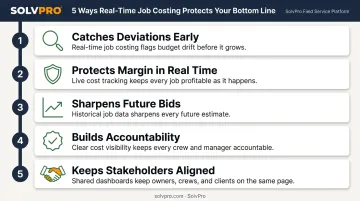
Tracking costs as work happens changes that outcome in five concrete ways:
- Catches deviations early. A labor overrun is easy to fix on day two. Discovered on day twelve, after more crews have logged hours the same way, it's much harder to unwind.
- Protects margin in real time. Managers see which jobs are making money and which are bleeding it, then adjust staffing, materials, or scope before the job wraps.
- Sharpens future bids. Comparing planned versus actual costs across past jobs shows where estimates run too optimistic, so the next quote for a similar job lands closer to reality.
- Builds accountability. When costs are tied to specific tasks, people, or job phases, it's clear who logged what and where the money went.
- Keeps stakeholders aligned. Clients, owners, and lenders trust numbers they can see. Transparent, data-backed reporting heads off disputes before they start.
To see this in practice, consider a landscaping crew quoting a seasonal maintenance contract. Without job-level cost history, the estimate is a guess dressed up as a number. With a few seasons of tracked labor and material data, that same estimate reflects what similar jobs actually cost, not what someone hoped they'd cost.
The Project Cost Tracking Process
Cost tracking follows a five-step sequence that starts before the first invoice and continues through the last one.
Step 1: Define the Scope and Break Down the Work
Before a single dollar gets tracked, break the project into a work breakdown structure (WBS), a detailed list of every task and deliverable. Every cost needs to tie back to specific work, or tracking becomes a guessing game about where the money went.
Step 2: Categorize Costs by Type
Organize expenses into clear categories using a cost breakdown structure (CBS): labor, materials, equipment, and overhead. This framework catches costs that get overlooked when everything sits in one general expense line.
Step 3: Set a Budget and Cost Baseline
A project budget and a cost baseline aren't interchangeable. The budget includes contingency and management reserves and can flex as conditions change. The baseline is the fixed, approved benchmark you measure actual performance against. Skip the baseline, and there's no clear way to say whether a job is on track.
Step 4: Track Actual Costs as Work Happens
Log costs as close to real time as possible: timesheets, material receipts, field-logged hours. Reconstructing costs after the fact, from memory or a stack of receipts on a Friday afternoon, produces a budget snapshot that's already out of date by the time anyone looks at it.
Step 5: Monitor Variance and Adjust Forecasts
Two formulas do most of the heavy lifting here, both defined in the GAO's Cost Estimating and Assessment Guide:
- Cost Variance (CV) = Earned Value − Actual Cost. A negative number means the job is spending more than the value of the work completed so far.
- Cost Performance Index (CPI) = Earned Value ÷ Actual Cost. Anything below 1.0 signals overspending relative to plan.
Updating the forecasted cost at completion regularly, not just at the end, lets managers reallocate resources or renegotiate scope before a small overrun becomes a loss nobody saw coming.
Types of Project Costs You Need to Track
Every project spends money in roughly the same five buckets, whether it's a single-day repair or a multi-phase build.
| Cost Category | What It Covers |
|---|---|
| Labor | Crew hours, overtime, payroll taxes, benefits |
| Materials | Supplies consumed, surplus, committed purchase orders |
| Equipment | Rentals, fuel, depreciation, repairs |
| Overhead | Insurance, admin, utilities, office costs |
| Contingency | Reserves for unknowns outside your direct control |
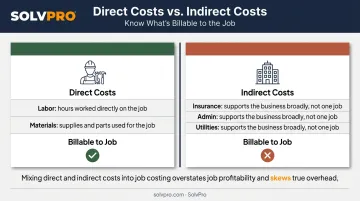
Direct costs (labor and materials tied straight to a job) need to stay separate from indirect costs (admin, insurance, utilities that support the business broadly but aren't billed to one job). Mixing the two makes job costing inaccurate, since overhead gets buried in numbers that should reflect only what a specific job consumed.
For service businesses, labor is usually where cost tracking breaks down first. Small gaps in field data compound quickly:
- A forgotten 45-minute drive-time entry
- Rounded hours from a paper timesheet filled out days later
- Missed job-site check-ins
Multiply these gaps across a five-person crew working four jobs a week, and the leakage adds up fast, even though nothing about it looks like fraud or negligence. It's just imprecise data.
That's why accurate time capture in the field matters as much as the estimate itself.
Top Tools for Project Cost Tracking
The right tool depends on job volume and crew size, not on chasing the most feature-rich option available.
Spreadsheets and free templates work fine for a handful of small jobs. A cost breakdown template can track one or two projects without much friction. Once job volume grows past a few jobs a week, spreadsheets become error-prone and slow, since someone has to remember to update them, and someone eventually forgets.
When job volume outpaces what a spreadsheet can track, timesheets and time-tracking tools matter because labor is typically one of the largest and most variable line items on most jobs. Whatever system a business uses overall, field time capture needs to be accurate at the source, not reconstructed later.
Beyond tracking hours, dashboards and reporting tools give the ability to see budgeted versus actual costs, flagging overruns while there's still time to act.
Full project and cost management platforms (Gantt-based PM tools, PSA software) combine scheduling, budgeting, and reporting in one system. These work well for larger, more complex projects, but they're often built with enterprise construction firms in mind, meaning more setup time and more features than a five-person crew actually needs.
Field Service Software Built for Crews, Not Enterprises
SolvPro was built to close that gap. Rather than adapting enterprise construction software for a smaller crew, SolvPro is built around how service businesses such as general contractors, electricians, plumbers, and landscapers actually cost and run jobs:
- Digital estimates with customer-facing proposals: Quotes break down by project phase instead of one lump sum. Once signed electronically, the proposal converts into an active job with no re-entry.
- Job and crew time tracking: Time entries, photos, and job updates are recorded against the job at the moment they happen, so labor hours tie to a verified location instead of a number typed in from memory.
- QuickBooks Online sync: Labor hours, material costs, and job profitability data flow into QuickBooks automatically, with one-click report export for invoicing and payroll.
- Job knowing what each job made: Managers see what each job cost and what it earned in one place, without a complicated setup or a steep learning curve.
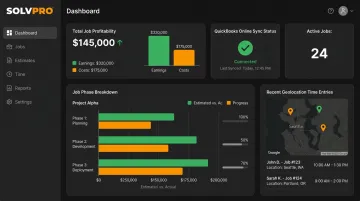
The platform can be running in under 10 minutes, with live onboarding support on every plan, even the core plan for crews of up to three. Book a Demo to see what each job made.
Best Practices for Project Cost Tracking
A few habits separate businesses that catch overruns early from those that find out too late.
- Start with a realistic baseline. A budget built on optimism instead of historical job data looks profitable until it isn't. Build in contingency from the start.
- Track continuously, not periodically. A labor overrun that's a $200 problem on Monday can be a $2,000 problem by Friday if nobody's watching.
- Log costs from the field, not just the office. Data entered at the job site in real time reflects what's actually happening, not what someone remembers later.
- Review actual versus estimated costs after every job. This is how patterns like underestimated drive time or material waste show up, sharpening future bids.
None of these practices require a large team or an expensive system. They require consistency, and the right tool, such as SolvPro's job costing feature, to make that consistency easy instead of a chore.
Conclusion
Your crews are busy. So why isn't there more money in the bank?
When the office can see labor, materials and documented changes against the job while the work is still open, the numbers at the end stop being a surprise. SolvPro keeps scheduling, work orders, time, job costing and invoicing on one record. When you want to see it on your kind of work, Book a Demo.
Run the Job. Protect the Profit.
Frequently Asked Questions
What Are the 5 Types of Project Costs?
Labor, materials, equipment, overhead, and contingency. Labor and materials are usually direct costs tied to specific jobs, while overhead covers indirect business expenses and contingency covers reserves for the unexpected.
What Is the App for Tracking Project Cost?
There's no single universal app. Options range from simple time-tracking tools for solo operators to full project management platforms for large firms, plus field service software like SolvPro built for job-level cost tracking.
How Much Does a Project Tracker Cost?
Pricing varies widely. Capterra's pricing guide lists typical per-user rates around $16 to $44 a month, and flat monthly plans from roughly $48 to $192, depending on features and tier.
Who Is Responsible for Tracking Project Costs?
The project manager or business owner typically owns cost tracking overall, but accuracy depends on crews and office staff entering data correctly. A perfect system still fails if field hours aren't logged.
How Often Should Project Costs Be Tracked?
Continuously, or at minimum weekly. Checking in only at major milestones lets small overruns compound before anyone notices, which is exactly what real-time tracking is meant to prevent.
What's the Difference Between a Project Budget and a Cost Baseline?
The budget includes contingency and management reserves and can flex as conditions change. The cost baseline is the fixed, approved benchmark used to measure whether actual spending is on track.