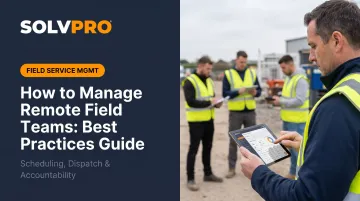
Picture this: it's 2 PM on a Tuesday, and you're running three crews across different job sites. One crew hasn't checked in since morning. A customer just called asking why nobody showed up. And somewhere in a truck, there's a completed work order that hasn't been invoiced — again.
This is the daily reality for thousands of service business owners. Not because they're bad managers, but because managing crews scattered across job sites is genuinely hard without the right systems in place.
"Remote field team management" doesn't mean employees working from home. It means managing plumbers, HVAC techs, landscaping crews, and electricians who are physically dispersed across job sites, client properties, and service routes all day — with no common office, no shared whiteboard, and no reliable way to stay connected unless you build one on purpose.
This guide covers the specific challenges of field team management and the practices that actually work. You'll learn how to build real accountability without hovering over your crews — and which tools close the gap between office and field.
KEY TAKEAWAYS
- Field crew management runs on systems: clear job assignments, documented expectations, and mobile tools your team can use on-site
- Communication must be structured and intentional; hallway conversations don't exist when your team is in a truck
- Accountability comes from tracking outcomes — jobs completed, work orders closed — not from monitoring hours or movements
- The right field service management software gives everyone a live view of where each job stands without adding administrative work
- Written job notes matter more with remote crews, because there is no chance to clarify a verbal instruction later in the day
Why Managing Remote Field Teams Is Different
Generic remote work advice — Zoom calls, Slack channels, async updates — was designed for knowledge workers sitting at a desk. It doesn't translate to a plumber crawling under a crawlspace or a landscaping crew rotating through six properties before 3 PM.
Field teams operate in a completely different environment:
- Their "office" changes every few hours
- Deliverables are physical and location-specific, not document-based
- Internet access on job sites is often unreliable
- Work happens in real time — delays compound immediately
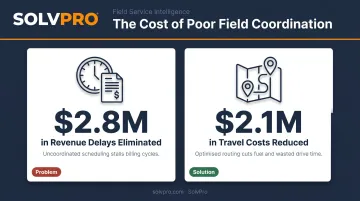
When field crew management breaks down, the consequences are immediate and tangible. A 2024 Forrester study on field service operations found that organizations modernizing their field service systems eliminated $2.8M in revenue delays caused by slow invoicing and $2.1M in travel costs from unnecessary repeat visits. Those aren't outliers from massive enterprises — they're the accumulated cost of poor coordination at the crew level.
The Stakes Are Different Too
The financial costs above trace back to specific operational failures. Unlike remote office workers, field crews have no "catch up on Slack" option when something gets missed. A miscommunicated job address sends a crew 45 minutes in the wrong direction. A missed scope change triggers a callback and an unhappy customer. An uninvoiced completed job delays cash flow — sometimes by weeks.
The rest of this guide covers the specific systems and habits that prevent these breakdowns before they cost you.
The Biggest Challenges of Managing Remote Field Crews
Communication Gaps
Field crews are rarely sitting still checking messages. Without a structured communication system, critical details get lost — scope changes don't reach the job site, the wrong instructions get followed, and the office has no way of knowing until a customer calls.
The bigger problem is one-way communication. Dispatchers push assignments out, but there's no reliable feedback loop back. According to the Service Council's Voice of the Field Service Engineer report, 99.5% of field service engineers use mobile devices for their work — but only 61% say their IT tools actually make their jobs easier. The gap between having a phone and having a system that works is significant.
Accountability Without Visibility
Poor communication is only part of the problem. Once information stops flowing, visibility disappears — and that's when accountability breaks down.
When you're not on the job site, knowing what's actually happening requires either constant phone calls or the right tools. Many owners — especially those transitioning from doing the work themselves to managing others — default to calling crew leads throughout the day. It works for a while, then the number of calls becomes the job.
The other extreme is continuous GPS surveillance, which creates a different problem: crews feel monitored rather than supported, and trust erodes. The goal is visibility into job status, not surveillance of movements.
Coordination and Scheduling Breakdowns
Dispatching by text, phone call, or whiteboard works well enough for a two-crew operation. Add a third or fourth crew and the informal system starts breaking. Software Advice's 2026 Field Service Buyer Insights Report found that 35% of field service businesses still use manual methods like spreadsheets or paper, 26% have no system at all, and 52% of buyers cited operational inefficiency as their primary pain point.
Informal scheduling creates:
- Double-bookings that waste crew time
- Jobs that fall through the cracks entirely
- Wasted drive time from poor route planning
- No audit trail when disputes arise
Best Practices for Managing Remote Field Teams
Set Clear Job Expectations before Crews Leave the Yard
Every crew member should start the day knowing exactly where they're going, what work needs to be done, what materials or tools they need, and what "done" looks like — before they leave. Vague verbal instructions lead to callbacks, do-overs, and customer complaints.
The solution is digital work orders that replace paper and text messages. A complete work order includes:
- Job address and site-specific instructions
- Scope of work and completion criteria
- Customer contact information
- Photos or notes from previous visits
- Any special requirements or access instructions
SolvPro's digital work orders support all of these fields, with photos and notes carried forward from previous visits so crews always have the context they need. When a crew member has everything they need before arriving on site, "I didn't know" stops being an excuse.
Build a Daily Communication Rhythm
A structured communication cadence doesn't require meetings. Three simple touchpoints cover most of what a field service business needs:
- Morning dispatch confirmation — jobs assigned and acknowledged before crews leave
- Mid-day status check — any issues, scope changes, or delays flagged in real time
- End-of-day completion update — jobs marked done, photos uploaded, customer sign-off captured
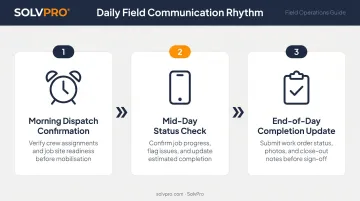
SolvPro's mobile app supports all three phases. Crews view their daily assignments on their phones, update job status as work progresses, and mark jobs complete from the field — triggering immediate office visibility and faster invoicing.
Pick one system and stick with it. If some crews text, some call, and some use an app, the office loses time piecing together job status — and things fall through the cracks.
That consistency matters even more for businesses with Spanish-speaking field crews. A tool that only works in English creates a communication gap no matter how good the system is otherwise. SolvPro's mobile app and office interface are fully bilingual in English and Spanish, included on the core plan at no extra cost.
Focus on Results, Not Hours
The right measure of field crew performance isn't whether they worked eight hours. It's whether the job was completed to standard, the work order was closed accurately, and the customer was satisfied.
Outcome-based metrics for field service teams include:
- Job completion rate
- Callback and revisit frequency
- Work order accuracy
- Customer satisfaction feedback
- Invoice accuracy and timeliness
SolvPro tracks crew performance and job-level profitability through its analytics dashboard — connecting time and materials logged in the field directly to job costing, so managers can see whether a job delivered the expected margin, not just whether hours were logged.
Crews evaluated on outcomes tend to take more ownership over their work. That accountability shows up in job quality, not just hours on a timesheet.
Schedule Regular Check-Ins — Not Just When Problems Arise
Reactive management — only calling when something goes wrong — trains crews to hide problems. Regular, structured check-ins at the crew or individual level keep communication open and catch issues before they compound.
Weekly check-ins don't need to be long. A 10-minute conversation about workload, equipment issues, or job site challenges covers most of what matters. Two statistics frame the stakes well:
- According to The Service Council, 85% of field service engineers feel their work is important — but only 43% receive private coaching on improvement areas
- McKinsey estimates high turnover in skilled trades costs companies more than $5.3 billion annually in hiring and training costs
That gap between how valued crews feel and how often they receive feedback is a direct retention risk. Regular check-ins are one of the cheapest tools available to close it — they signal that management sees the work and values the person doing it.
Build in a Feedback Loop from Field to Office
Check-ins handle the human side. But the operational data — what was done, what was used, what the customer confirmed — needs its own path back to the office. That means:
- Crew notes documenting what was done and any issues encountered
- Photos capturing work completion and site conditions
- Customer signatures confirming job delivery
- Materials logged against the specific job
When this feedback loop is missing, invoices go out late (or wrong), job costing is guesswork, and the same mistakes repeat because no one has a record of what actually happened.
SolvPro's digital work order system collects job-linked photos, customer sign-off, and logged materials in real time — feeding directly into invoicing the moment a job is marked complete, rather than waiting on paperwork at the end of the week.
How to Track Field Crew Performance Without Micromanaging
There's a meaningful difference between surveillance and accountability. Tracking a crew member's GPS location every 30 seconds creates resentment and erodes trust. Research on electronic performance monitoring consistently shows that outcomes depend heavily on how monitoring is designed — and whether crews understand its purpose.
SolvPro uses job and crew time tracking built on a different principle. Rather than continuous location monitoring, the system captures location data only when a crew member performs a job-related action — logging a time entry, uploading a photo, or updating job status. These actions are recorded against the job, creating a verified record of when and where work happened without tracking crew movements between events.
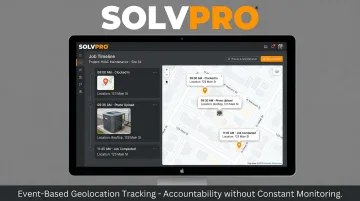
The practical result: business owners get the confirmation they need (the job was completed at the right location, at the right time), while crews retain their privacy and autonomy.
Defining Performance Standards That Work in the Field
Performance conversations in field service go sideways when they're vague. Set benchmarks that are specific and measurable:
- Job completion rate — tracks whether assigned jobs close on schedule
- Callback frequency — flags crews returning to redo or finish incomplete work
- Work order accuracy — confirms materials and time are logged correctly
- Documentation quality — shows whether photos and notes are submitted consistently
These benchmarks make performance reviews concrete rather than subjective. When a crew member is excelling, the documentation makes recognition easy. When there's a recurring problem, the data shows it early.
Address Performance Issues Quickly
A problem happens on Monday. It comes up in a formal review six weeks later. By then, the context is gone, the crew member doesn't remember the specifics, and the conversation accomplishes nothing — yet this is how most field service managers handle feedback.
Address performance issues soon after they occur, give the crew member the full context of what went wrong, and focus the conversation on what to do differently on the next job. Fast, specific, forward-looking feedback doesn't just correct the problem — it prevents the next one.
Tools That Make Remote Field Team Management Work
The most common mistake small service businesses make with software is using five separate tools that don't talk to each other. Scheduling in one app, invoicing in QuickBooks, crew communication via text, time tracking in a spreadsheet — each tool works in isolation, but the gaps between them create exactly the administrative work you were trying to eliminate.
According to ServiceTitan's 2024 commercial contractor survey, the average trade business uses 4–6 software providers. That tool sprawl is a management problem.
What to Look for in a Field Service Management Platform
The core categories you need in a single system:
- Job scheduling and dispatch — visual calendar, crew availability, double-booking prevention
- Digital work orders — scope, notes, photos, change orders, job history
- Real-time job status visibility — what's active, delayed, or complete at any moment
- Mobile access for crews — phone-first design, not a desktop app adapted for mobile
- Invoicing connected to completed jobs — no re-entering data, no paperwork chase
SolvPro brings all of these into one platform built for growing service businesses. Scheduling, work orders, crew tracking, time tracking, invoicing, and QuickBooks Online sync are connected by design — a job scheduled in the morning flows through dispatch, work order, and invoice without manual handoffs or duplicate data entry.
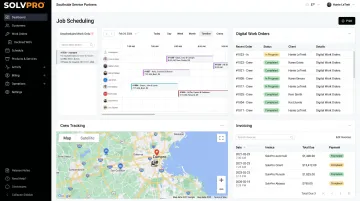
Setup takes under 10 minutes with no IT support required and no long-term contracts. For businesses with Spanish-speaking crews, the fully bilingual English/Spanish interface — including the mobile app — is included on the core plan, not sold as an add-on.
SolvPro does not publish pricing; confirm current pricing directly with SolvPro. SolvPro does not publish pricing; confirm current pricing directly with SolvPro.
Conclusion
You shouldn't have to wait until the job is over to find out whether you made money.
Keeping the estimate, work order, time entries and invoice on one record reduces how much the office has to reconstruct before it can bill. That is the difference between finding out now and finding out at closeout. When you want to see it on your kind of work, Book a Demo.
Run the Job. Protect the Profit.
Frequently Asked Questions
How Can I Manage Remote Teams Effectively?
Effective field team management comes down to four things: clear job assignments before crews leave, a structured daily check-in rhythm, outcome-based accountability rather than hour-tracking, and a digital platform that keeps both office and field aligned on job status in real time.
How Do Bosses Track Remote Workers?
Most field service managers use event-based location check-ins tied to job actions — arriving at a site, uploading a photo, marking a job complete — rather than continuous GPS monitoring. Combined with digital work orders and job status updates, this gives managers the visibility they need without treating crews like they're under constant surveillance.
What Are the Best Tools for Managing Remote Field Teams?
Purpose-built field service tools beat generic project management software every time. Look for mobile job scheduling, digital work orders, crew communication, and invoicing in a single platform — plus mobile-first design, QuickBooks integration, and bilingual support if you have Spanish-speaking crews.
How Do You Keep Field Crews Accountable Without Micromanaging?
Set outcome-based expectations — job completed to standard, work order closed, customer notified. Use check-in and check-out tracking tied to job events rather than continuous monitoring, and address performance through regular conversations rather than waiting on software alerts to flag problems.
How Do You Communicate Effectively with Field Crews Who Are Always on the Move?
Use a mobile-first tool and standardize on one communication channel so information isn't scattered across texts, calls, and apps. A simple daily structure — job confirmation at dispatch, a status check at midday, and a close-out update at end of day — keeps everyone aligned without pulling crews away from the work.