Many growing service businesses still juggle paper sign-off sheets, and it's costing them. Missed signatures delay invoicing. Lost forms mean re-billing headaches. And when a customer disputes work, "he said, she said" doesn't hold up well in a dispute.
You'll often hear "digital signature" and "electronic signature" used as if they're the same thing. They aren't quite — and knowing the difference matters more than you'd think.
This guide breaks down what signature capture actually is, why it matters for your bottom line, what features to demand from software, and how to roll it out across your crews without disrupting a single job.
KEY TAKEAWAYS
- Signature capture replaces paper sign-offs with secure, timestamped approvals on a tech's phone or tablet
- Signed work orders move straight into invoicing, cutting the wait between job completion and payment
- Offline capture, workflow integration, and ESIGN/UETA compliance set true field tools apart from generic apps
- Crews use it for job sign-off, estimate approval, change orders, and safety waivers
- Offline capture matters because crews often need a sign-off in a basement or on a site with no usable signal
What Is Digital Signature Capture in Field Service Software?
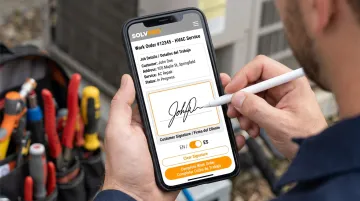
Digital signature capture is the process of collecting a customer's approval on a mobile device and attaching it directly to a work order, quote, or invoice. It's the mobile replacement for the paper clipboard.
Here's where the terminology gets muddy. "Electronic signature" is the broad legal category defined by the ESIGN Act as any "electronic sound, symbol, or process" attached to a record with the intent to sign.
"Digital signature" technically refers to a cryptographic, certificate-based method that authenticates identity and detects tampering, according to NIST's technical definition.
In plain terms: when a customer draws their name on a tablet after a plumbing repair, that's an electronic signature. Most field service platforms, SolvPro included, work in this category — not the certificate-based version.
How the Signature Capture Process Works Step by Step
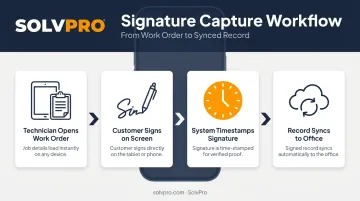
The flow is simple by design:
- Technician completes the job and pulls up the work order on their device
- Customer signs with a finger, stylus, or typed name directly on the screen
- The system timestamps the signature the instant it's captured
- The record syncs to the office, becoming part of that job's permanent history
No faxing. No scanning. No hoping the paper survives the drive back to the shop.
Where You'll See Signature Capture in Field Service Software
Signature capture shows up at several points in a typical job lifecycle:
- Job completion sign-off
- Estimate or proposal acceptance
- Change order approval
- Delivery confirmation
- Safety or liability waiver acknowledgment
Each touchpoint creates a record tied to that specific job, so nothing gets lost between the field and the office.
Why Digital Signature Capture Matters: Key Benefits for Service Businesses
Faster invoicing. When a signed work order can trigger invoice generation without waiting for paperwork to physically travel back to the office, the gap between "job done" and "invoice sent" shrinks dramatically. Slow, paper-dependent invoicing is a documented drag on cash flow across field service and construction operations.
A defensible audit trail. Pair a signature with a timestamp, and you've got evidence that holds up. Legal reviews of e-signature disputes show that detailed audit records establish who signed what and when, according to Fenwick's review of e-signature case law.
Weak or missing trails, by contrast, often fail to connect an electronic act to the person who supposedly signed it. That gap protects you when a customer claims they never approved the work.
Fewer lost forms, fewer return trips. A crumpled or missing paper sign-off means someone has to track down the customer again, delay billing, or eat the cost. Multiply that across a fleet of trucks, and it adds up fast.
A more professional customer experience. Handing someone a tablet for a quick digital sign-off simply feels more current than a clipboard and a pen that's running dry. This shift isn't a fringe trend, either:
74% of organizations reported using e-signatures even before the pandemic, and 58% said the pandemic accelerated adoption at their organization, according to a 2020 Forrester Consulting study commissioned by Adobe.
Stronger compliance for regulated trades. For businesses handling liability-heavy work, such as excavation or environmental services, a documented, timestamped signature strengthens your position in warranty claims and insurance disputes.
Must-Have Features When Choosing Digital Signature Capture Software
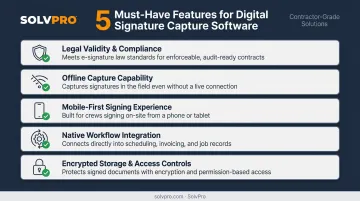
Not every e-signature tool is built for a technician standing in a customer's driveway. Look for these five things before you commit:
Legal validity and compliance. The platform should meet ESIGN Act and UETA standards, and ideally provide some form of audit trail for every signed document. Neither law requires a formal "certificate of completion," but a solid audit trail still strengthens your position if a signature is ever challenged.
Offline capture capability. Crews work in basements, rural properties, and dead zones. Your software must save signatures locally and sync automatically the moment a signal returns.
A mobile-first signing experience. Both the technician holding the device and the customer signing on it need an interface that works on any screen size, without pinching and zooming to find a signature box.
Native workflow integration. A signed job should move straight into invoicing or the next step automatically. If your team is still manually re-entering data after a signature is captured, the software isn't doing its job.
Encrypted storage and access controls. Signatures need to be protected from tampering after the fact, with clear restrictions on who inside your company can view or edit a signed record.
Common Use Cases Across Field Service Industries
Different trades lean on signature capture in different ways:
- HVAC, electrical, and plumbing: job completion sign-off after a repair or installation
- Landscaping and excavation: change order approval when scope shifts mid-project
- Commercial cleaning and janitorial: proof-of-service logging for recurring contracts
- Any trade with phased pricing: estimate and proposal approval, where customers sign off before work starts — reducing arguments over scope later
- Compliance-heavy trades: safety and liability waiver acknowledgment, documenting consent before crews step on-site
The common thread: every use case ties a signature to a specific moment, protecting both the business and the customer.
How to Roll Out Digital Signature Capture in Your Business
Switching from paper doesn't have to mean disruption. A few practical steps make the transition smoother:
- Choose software where signing lives inside your existing workflow. A standalone signing app just creates another system to manage — and another place for data to get stuck. Look for platforms like SolvPro that build signing into scheduling, work orders, and invoicing, so a completed job moves straight to billing.
- Train crews to pair the signature with a printed name and date. This small habit creates stronger evidence if a signature is ever disputed later.
- Pilot with one crew or route first. Let them work out the kinks, gather feedback, and only then roll it out company-wide.
Starting small also lets your office see how signed jobs flow into invoicing before you scale company-wide.
How SolvPro Makes Digital Signature Capture Simple for Growing Crews
SolvPro builds signature capture directly into the work order and estimate workflow instead of bolting it on as a separate app. Once a job or proposal is signed, it lives inside the same job record alongside job history, photos, and notes. From there, it connects directly to invoicing through SolvPro's built-in QuickBooks Online sync for faster payment.
Signature capture appears in two places crews rely on daily. During Estimates & Digital Contracts, customers approve multi-stage proposals electronically, with real-time tracking and instant conversion from estimate to active job. During on-site job completion, crews capture customer sign-off directly from the field, paired with on-site invoicing and payment collection.
A few things set SolvPro apart for teams moving off paper:
- Fully bilingual English/Spanish interface, so office staff and field crews can complete sign-offs in whichever language they're most comfortable using
- Setup in under 10 minutes, with a live onboarding team rather than a chatbot walking you through the process
- No long-term contracts: cancel anytime, which makes switching from paper low-risk
That same low-risk approach carries through pricing. Digital signature capture is included across every SolvPro pricing tier, from the core plan up through Scale, and no core feature is locked behind an upgrade.
Conclusion
Field service software helps you manage the work. SolvPro helps you make sure the work makes money.
The right tool depends on your trade, crew size, job mix and the systems you already run. Test it on real jobs before you commit, and check that crews will actually enter what the office needs. When you want to see it on your kind of work, Book a Demo.
Run the Job. Protect the Profit.
Frequently Asked Questions
What Services Does Digital Signature Software Provide?
Digital signature services typically capture identity and consent, apply an automatic timestamp, and often add GPS tagging. They also store the record securely and generate an audit trail, which can trigger downstream actions like invoicing.
Which Digital Signature Is Best?
It depends on your use case. Field service crews should prioritize offline mobile capture and workflow integration over general-purpose e-signature tools built for office contracts.
Is a Digital Signature Legally Binding?
Yes. Under the ESIGN Act and UETA, electronic signatures are legally binding in the US when intent to sign and a supporting audit trail can be shown.
What's the Difference Between an Electronic Signature and a Digital Signature?
"Electronic signature" is the broad legal term for any electronic mark of approval. "Digital signature" technically refers to a certificate-based cryptographic method. Most field service tools, including SolvPro, use electronic signatures.
Can Technicians Capture Signatures Without Internet Access?
Quality field service software supports offline signature capture, storing the record locally on the device and syncing automatically once connectivity returns.
How Much Does It Cost to Add Signature Capture to Field Service Software?
Signature capture is usually bundled into an all-in-one platform's core plan rather than sold separately. SolvPro includes it on the core plan with no add-on fees.