
If that sounds familiar, you're not alone. A recent survey of more than 1,000 U.S. homeowners found that 59% named late arrival as their top frustration with home service providers, according to Housecall Pro's 2025 Customer Service Report. That frustration usually traces back to one thing: scheduling that can't keep up with a growing crew.
Field service optimization is simply the process of tightening up scheduling, dispatch, and crew coordination so jobs run on time and profit doesn't leak out through wasted hours. This guide breaks down what that looks like for small and mid-sized service businesses, why it matters, and how to start fixing it without buying enterprise software you'll never fully use.
KEY TAKEAWAYS
- Manual scheduling breaks down once you're juggling three or more crews
- Connecting job completion to invoicing directly shortens your cash conversion cycle
- Geolocation-based check-ins reduce disputes over hours worked and job completion
- A handful of key metrics gives clearer insight than tracking dozens
- All-in-one software beats stitching together five disconnected tools
What Is Field Service Optimization?
At its simplest, field service optimization means using data and automation to schedule the right crew, with the right tools, at the right job, at the right time. It's about cutting the wasted travel and double-bookings that eat into your margins. How that plays out, though, depends heavily on the size of your operation.
Large enterprises often reach for platforms like Salesforce Field Service to manage sprawling mobile workforces across regions. That's a comprehensive tool built for complex operations.
For most SMB service businesses, though, optimization looks a lot more grounded: a single dashboard, fewer phone calls, real-time updates, and paperwork that doesn't disappear between the truck and the office. Platforms like SolvPro are built around exactly that kind of simplicity.
Here's the real dividing line: manual, spreadsheet-based scheduling works fine for one or two crews. Add a third or fourth crew, throw in a few urgent jobs, and that spreadsheet turns into a liability. Nobody can see it in real time, updates lag by hours, and the office ends up playing phone tag just to confirm who's where.
Core Components of Field Service Optimization
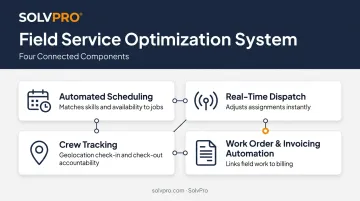
Four pieces typically make up a working system:
- Automated scheduling that matches technician skills, location, and availability to job requirements, cutting down on guesswork
- Real-time dispatch and rescheduling that lets office staff adjust crew assignments the moment a job runs long or an urgent request comes in
- Crew tracking and accountability using geolocation or event-based check-in/check-out data to confirm arrival, work time, and completion
- Work order and invoicing automation that links completed field work directly to billing, so paperwork doesn't sit for days
Key Benefits of Optimizing Your Field Service Operations
Once scheduling and dispatch actually talk to each other, the ripple effects show up across the whole business.
Fewer missed or delayed jobs. Smart scheduling with an up-to-date calendar prevents the classic double-booking problem. Two crews get sent to overlapping jobs, or a technician sits idle because nobody realized their afternoon slot was still open. Given that late arrival is already homeowners' single biggest complaint, tightening this up has a direct effect on customer retention.
Faster invoicing and quicker payments. When job completion data flows straight into billing, there's no gap where an invoice sits in someone's truck for a week.
Rabbet's 2024 Construction Payments Report found that 82% of contractors experienced payment delays longer than 30 days, up from 72% just a year earlier. Slow payments now cost the construction industry an estimated $280 billion, or 14% of total costs.
Clear the ability to see what each job made. Tracking labor hours, materials, and job costs as work happens, rather than reconstructing it later, shows owners which jobs and customers are actually profitable and which ones are quietly losing money.
Less admin time for the office. Every hour spent chasing paperwork, calling crews for updates, or manually building invoices is an hour not spent growing the business. Automating scheduling, dispatch, and documentation frees up that time for higher-value work.
More accountability in the field. Geolocation check-ins and digital work orders create a shared, verifiable record. Crews aren't just trusted on their word, and the office isn't just trusting a paper timesheet. That transparency cuts down disputes over hours worked or whether a job was actually finished.
Common Challenges That Hurt Scheduling and Efficiency
Most scheduling problems trace back to a handful of root causes.
- Double-booked or conflicting schedules. Without an up-to-date view across crews, it's easy to double-book jobs or leave a technician idle while another team scrambles to cover overflow.
- Disconnected communication between office and field. Crews calling in for an address or gate code means that information should already be on their device.
- Manual, paper-based processes. Paperwork gets lost in truck cabs, invoices sit for days before entry, and job documentation varies by crew.
Each of these is fixable, but they tend to compound. A missed job detail leads to a phone call, the phone call delays dispatch, and the delay pushes the next job's start time back too.
Best Practices to Optimize Scheduling and Field Efficiency
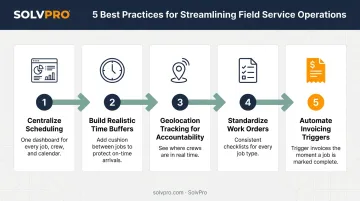
Fixing scheduling chaos doesn't require ripping out every process at once. These five steps address the most common breakdowns:
- Centralize scheduling in one system. Move off spreadsheets and whiteboards onto a single dashboard that both office staff and field crews can see, so everyone's working from the same information.
- Build in realistic job duration estimates and buffer time. Use historical job data to avoid packing the schedule so tight that one delay cascades through the rest of the day.
- Use geolocation or event-based tracking for accountability. Automatically confirm arrival, start, and completion times instead of relying on crews to self-report hours after the fact.
- Standardize work orders and digital documentation. Make sure every crew captures the same job details, photos, and sign-offs, so nothing falls through the cracks between different teams.
- Automate invoicing triggers from completed work orders. Connect job completion directly to billing so there's no gap between "job done" and "invoice sent."
Metrics to Track Your Progress
SolvPro and similar platforms build several of these practices directly into the software, including job-level time tracking and automated invoicing triggers. Once they're running, you don't need a dashboard full of KPIs. Three numbers tell you most of what matters:
- First-time fix rate: the percentage of jobs completed on the first visit without a costly follow-up trip
- Time from job completion to invoice sent: a direct measure of how much optimization is improving your cash flow
- Crew utilization rate: the share of paid hours spent on active, billable work versus idle time or excess travel
Track these consistently over a few months rather than comparing yourself to an industry average. Job mix, travel distances, and payment terms vary too much between businesses for a single benchmark to mean much.
How the Right Field Service Software Simplifies Optimization
Buying five separate tools for scheduling, work orders, crew tracking, and invoicing creates its own version of the chaos you're trying to fix. Purpose-built field service management software, like SolvPro, combines all of that into one platform instead.
A few features worth pointing out for growing crews:
- Job and crew time tracking logs a job-linked timestamp whenever a crew starts a job, uploads a photo, or completes work, creating a verifiable record without constant GPS battery drain
- Digital estimates with customer-facing PDF proposals breaks projects into milestones tied to payment schedules, then sends a proposal customers can sign digitally
- QuickBooks Online sync sends labor hours, materials, and job costs captured in the field straight into your accounting system, no re-typing required
For SMB service businesses, simplicity usually matters more than an enterprise feature list you'll never touch. That holds true whether you're running electrical crews, plumbing teams, landscaping routes, or a commercial cleaning operation.
SolvPro's bilingual English/Spanish interface covers both office staff and field crews at no extra cost. Setup typically takes under 10 minutes, from account creation to your first dispatched job.
Conclusion
Field service software helps you manage the work. SolvPro helps you make sure the work makes money.
The right tool depends on your trade, crew size, job mix and the systems you already run. Test it on real jobs before you commit, and check that crews will actually enter what the office needs. When you want to see it on your kind of work, Book a Demo.
Run the Job. Protect the Profit.
Frequently Asked Questions
What Is Field Service Optimization?
Field service optimization is the process of using scheduling, automation, and real-time data to match the right crew and resources to each job. The goal is reducing wasted time, travel, and administrative cost.
What Are the Benefits of Field Service Optimization?
The main benefits are fewer missed or delayed jobs, faster invoicing, clearer visibility into job profitability, and stronger accountability between the office and the field.
How Do You Optimize a Field Service Schedule?
Start by centralizing scheduling into one system everyone can see. Build in realistic time estimates with buffer room, and use real-time crew tracking instead of relying on self-reported hours.
What Software Is Used for Field Service Optimization?
All-in-one field service management platforms, like SolvPro, combine scheduling, dispatch, work orders, crew tracking, and invoicing into a single system. This replaces the need for separate spreadsheets, timesheets, and billing tools.
What KPIs Should Field Service Businesses Track?
Focus on first-time fix rate, time from job completion to invoice sent, and crew utilization rate. These three cover job quality, cash flow speed, and labor efficiency without overcomplicating your reporting.
How Much Does Inefficient Scheduling Cost a Service Business?
Costs vary by trade, but one idle hour for a three-person crew runs $51.81 to $90.81 in wages alone, based on May 2024 U.S. Bureau of Labor Statistics median wage data. That's before adding payroll burden, vehicle costs, and lost billable revenue.