Material list software fixes this by turning "what did we actually use on that job" from a guess into a tracked, billable record. The category ranges wide, from a simple checklist app that helps a solo plumber remember fittings, to full field service platforms that tie every part to an estimate, a work order, and an invoice.
This guide covers what material list software does, the features worth paying for, the top tools plumbing contractors are using, and how to match the right platform to your business size, whether that's a two-truck residential outfit or a commercial crew running multi-phase jobs.
KEY TAKEAWAYS
- Untracked materials cause unbilled parts, higher job costs, and unplanned supply runs.
- The best software links material lists directly to estimates, work orders, and invoices.
- Options range from checklist apps to full field service platforms like SolvPro.
- Crew size and job complexity should drive your choice, not the flashiest feature list.
- Materials recorded at the van or counter are what prevent parts being fitted but never billed.
What Is Material List Software for Plumbing Contractors?
Material list software is a digital tool that lets plumbing contractors build, organize, and cost out every part and supply a job needs. It works before the crew shows up, while they're working, and after the invoice goes out. Think fittings, valves, water heaters, PEX runs, and the dozens of small parts that make up a real plumbing job.
It's easy to confuse this with inventory management software, but the two solve different problems:
- Inventory software tracks stock levels, locations, and orders across a warehouse or fleet of trucks.
- Material list software is job-specific. It's tied to one quote, one work order, one customer.
A contractor can have plenty of stock on the truck and still lose money if nobody records what actually went into a specific job.
Manual tracking (a notepad in the truck, a mental tally, a shared spreadsheet) creates the same problems on repeat:
- Missed line items that never get billed
- Underbilled materials because the estimate didn't match what was actually used
- Job costing that's really just a guess, since nobody reconciled materials against the invoice
Who uses this software? It scales across the trade:
- Solo plumbers building a quick supply list before heading out
- Small crews prepping trucks each morning so nobody's missing a part mid-install
- Larger contractors tying materials to multi-phase commercial estimates, where a missed line item on a $40,000 job is a real problem
Why It Matters for Profitability
No trade association, PHCC, MCAA, CFMA, or NAHB, publishes a clean "materials are X% of a plumbing job" figure. Most industry benchmarks lump materials in with labor and equipment as combined direct costs. What is documented is what happens when tracking stays manual instead of getting systematized.
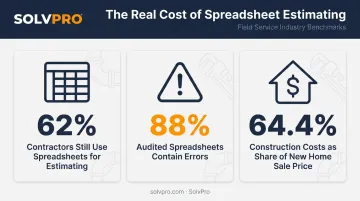
JBKnowledge's construction technology research found that 62% of contractors were still relying on spreadsheets for estimating. That same tool is prone to error: Ventana Research found errors in 88% of the spreadsheets it audited in enterprise reporting workflows.
Materials and labor together aren't small line items, either. NAHB reports construction costs made up 64.4% of a new home's sale price in 2024. On a job where costs make up that much of the price, a handful of missed fittings per week compounds into real money by year's end.
Key Features to Look for in Plumbing Material List Software
The gap between a basic checklist app and a job-costing platform comes down to a handful of features. Miss one, and you're back to double data entry or guessing at margins.
- Reusable templates: Save a "water heater install" or "repipe" template once, and future estimates start pre-loaded with the right parts instead of a blank page.
- Real-time quantity and cost tracking: See the running material total update as items get added, so nobody discovers a $600 overrun after the invoice is already out the door.
- Mobile access for field techs: Materials get logged from the job site on a phone, not recalled from memory at the end of a 10-hour day.
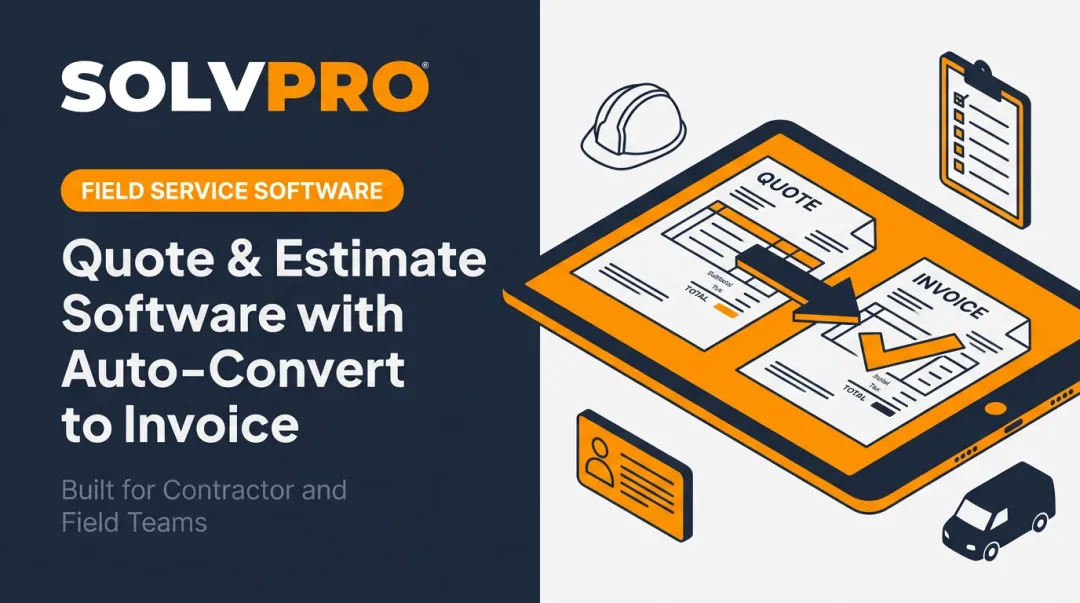
- Direct integration with estimates and invoicing: The list a customer approves should be the exact list the crew works from and the exact list that becomes the bill.
- Accounting software sync: A QuickBooks Online connection means material costs land in the books without anyone retyping numbers.
- Sharing and collaboration: Office staff, field crews, and customers should be able to view or sign off on the same list without a phone call to sort out what changed.
Not every plumbing business needs all six features on day one. The right starting point depends on how the business operates:
- Solo or one-truck service business: Templates and mobile access cover the basics.
- Growing team with multiple crews: Real-time tracking and estimate/invoice integration keep everyone working from the same numbers.
- $50,000+ commercial repipe contractor: The full set matters, especially accounting sync, since that's where money actually gets lost.
Top Material List Software Options for Plumbing Contractors
Material list tools split into two camps: dedicated inventory or material apps built for tracking parts, and full field service platforms that bake material lists into scheduling, estimating, and invoicing. Here's how the main options for plumbing contractors compare.
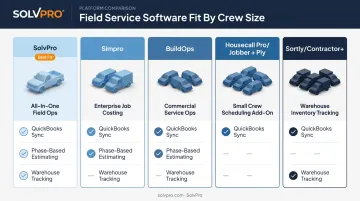
SolvPro
SolvPro takes the second approach. Its digital estimates turns material tracking into part of the quoting process rather than a separate app. Contractors build customer-facing PDF proposals with material and labor line items organized by job phase (rough-in, fixture installation, final inspection) instead of one long, undifferentiated list.
That same list carries through to the work order and, with QuickBooks Online sync, into the invoice without re-entry. It's a strong fit for residential and light-commercial plumbing businesses that want material tracking connected to the full job lifecycle. More on this below.
Simpro
Simpro is built for midsize to large plumbing operations juggling multiple trucks and warehouses. Its inventory and job-costing features give real-time stock visibility across storage locations, support warehouse-to-van transfers, and track material spend against a job's budget as work progresses.
That depth makes sense once a business has enough trucks and jobs running at once that "what's on the truck" becomes its own logistics problem. For a two- or three-tech outfit, it's likely more platform than needed.
BuildOps
BuildOps is purpose-built for commercial contractors, plumbing included, with large field teams. Material tracking here connects to work orders across warehouses, vehicles, and job sites. Purchase orders and receipts tie to individual jobs, so completed work orders feed straight into invoices, parts, labor, and notes together.
It's a fit for commercial plumbing operations running big crews and multiple concurrent projects, where losing track of a purchase order means losing track of real money.
Housecall Pro / Jobber (with Ply Integration)
Both Housecall Pro and Jobber are well-known platforms for scheduling, estimating, and invoicing, the day-to-day backbone for small residential plumbing crews. Neither, though, was built with deep material tracking as a native feature.
That's where the Ply integration comes in: it syncs jobs, estimates, and price books between either platform and Ply's inventory and purchasing layer, adding reorder workflows and field material capture. Contractors doing material-heavy work should treat Ply as an add-on that fills a real gap, not an optional extra.
Sortly / Contractor+
For a solo plumber or a two-person crew that just needs a simple, visual way to track what's on hand, Sortly and Contractor+ are lighter options. Sortly is a visual, photo-and-barcode inventory app, strong for tracking what leaves and returns from a job site, weaker on job costing.
Contractor+ goes a step further, with material lists that feed live job costs, estimates, and invoices, plus a genuinely free tier. Neither replaces a full field service platform once job complexity grows.
How to Choose the Right Fit for Your Plumbing Business
The right software depends less on features and more on how complex your jobs are and how big your crew is.
| Crew Size | What's Happening | What You Need |
|---|---|---|
| Solo & small crews (1-5 techs) | One truck, one person deciding what to grab | A checklist app or built-in material list feature |
| Growing residential (5-20 techs) | Disconnected tools start costing time | Material lists linked to estimates, scheduling, and invoicing |
| Larger or commercial operations | Multi-phase jobs, complex budgets | Material lists tied to project budgets and purchase orders |
As crews grow, disconnected tools start costing real time. Without a direct link between material lists and the office's estimates, scheduling, and invoicing, someone ends up re-entering the same data three times a day.
At the commercial level, a missed sync between material lists and the books isn't a minor annoyance—it's a job costing report that's wrong.
Platforms like SolvPro follow this same logic, with tiered plans that scale from a solo crew to multi-crew commercial operations without forcing you into features you don't need.
Rule of thumb: If your office spends more than an hour a day reconciling material costs against invoices, you've outgrown whatever you're using now.
How SolvPro Helps Plumbing Contractors Manage Materials from Quote to Payment
For plumbing contractors who want material tracking built into the estimate itself rather than bolted on afterward, SolvPro structures the whole quote-to-payment process around phases.
Digital Estimates That Double as a Field List
Instead of one flat list, SolvPro lets contractors split a plumbing job into phases, such as rough-in, fixture installation, and final inspection, each with its own material and labor line items.
The customer-facing PDF proposal shows the job broken down this way. Once it's approved, that same phase-organized list is what the crew works from in the field, so nothing gets retyped between the quote and the job site.
Built for Office and Field, in English or Spanish
That same field list needs to work regardless of who's reading it. SolvPro's mobile interface is fully bilingual, English and Spanish, on the core plan, for both office staff and field crews. A tech logging parts from a truck updates the same work order the office sees in real time, no matter which language they're working in.
Every digital work order includes material tracking, notes, and images, plus real-time job cost tracking. Nobody's guessing at material spend until the invoice goes out.
From Approved List to Paid Invoice
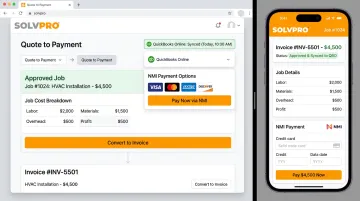
That knowing costs while the job is open carries through to invoicing. Once a proposal is signed, SolvPro supports instant conversion from estimate to job, with real-time approval tracking so the office always knows where things stand.
From there, getting paid follows the same no-duplicate-entry logic:
- QuickBooks Online sync and built-in credit-card and ACH payments come standard on the single core plan
- Material costs move straight from the job to the books and to payment without re-entering data
- Setup takes under 10 minutes, with no long-term contract to sign
That flexibility matters for a growing plumbing business still deciding if the platform's the right fit.
Conclusion
Field service software helps you manage the work. SolvPro helps you make sure the work makes money.
The right tool depends on your trade, crew size, job mix and the systems you already run. Test it on real jobs before you commit, and check that crews will actually enter what the office needs. When you want to see it on your kind of work, Book a Demo.
Run the Job. Protect the Profit.
Frequently Asked Questions
What Software Would a Plumber Use?
Most plumbers use a job management or field service platform for scheduling, estimating, and invoicing, sometimes paired with a dedicated material app. Growing businesses tend to consolidate into one all-in-one platform rather than juggling several tools.
Which Software Is Used for Plumbing Design?
Plumbing design tools, like CAD-based estimating software, focus on piping layouts and complex system bills of materials. Material list software is different. It tracks job-level costing and parts, not engineering drawings.
How Do I Create a Material List for a Plumbing Job?
Start from a template or a blank list, add parts with quantities and unit costs, then attach it to the estimate or work order so it flows through to the final invoice.
Is There Free Material List Software for Plumbers?
Yes. Tools like Sortly and Contractor+ offer permanent free tiers for basic list creation. Job costing and accounting integrations typically require a paid plan.
Can Material List Software Integrate with QuickBooks?
Most modern plumbing job management platforms, including SolvPro, offer direct QuickBooks Online sync so material costs post to accounting without manual re-entry.
Can I Just Use a Spreadsheet Instead of Dedicated Software?
Spreadsheets can work for a one-truck operation, but they don't sync with invoicing and make version control messy. Manual entry also invites costly errors, a real risk when a job's margin depends on getting the numbers right.