Picture a typical Tuesday for a service business owner: a stack of paper work orders on the passenger seat, three missed callbacks, and an invoice that still hasn't gone out from last Thursday's job. Multiply that by a crew of six, and the chaos compounds fast.
A mobile field service management app changes that picture entirely. Scheduling, work orders, crew tracking, and payments all run through one device, updating in real time between the office and the field.
That real-time coordination matters because mobile workers already lose 18% of their working time, roughly seven hours a week, to inefficient administrative tasks, according to Salesforce's 2025 Voices From the Field research. This guide breaks down what these apps actually do, the features worth paying for, the real business impact, how to choose one, and where SolvPro fits into that decision.
KEY TAKEAWAYS
- Mobile field service apps replace paper workflows with real-time scheduling, work orders, and invoicing
- GPS tracking and digital documentation improve crew accountability and cut disputes over job hours
- Core features to prioritize: scheduling, GPS tracking, offline access, digital work orders, and payments
- Ease of use and onboarding support matter more than a long feature list
- Offline access decides whether crews can finish a job in a basement or a rural site where signal drops
What Is a Mobile Field Service Management App?
A mobile field service management app is software that lets office staff and field crews handle scheduling, dispatching, job details, and payments from a phone or tablet, with everything syncing back to a central system in real time.
Gartner defines field service management more broadly as software that manages work and commercial interactions for any workforce that travels to a customer or job site. That includes scheduling, dispatch, work execution, and billing. The mobile app is where most of that work now happens.
From Clipboards to Live Sync
Service businesses used to run on paper tickets, whiteboards, and end-of-day phone calls. Now the mobile app is often a technician's primary tool, not a backup to office software.
- Dispatchers build schedules and reassign jobs from a web dashboard, seeing crew availability instantly
- Crew leads check routes, job notes, and material lists before heading to a site
- Technicians log completed work, capture photos, and collect payment without returning to the truck for paperwork
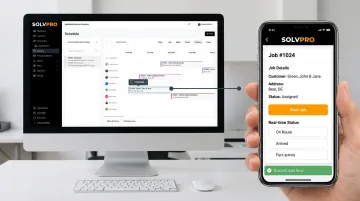
With SolvPro, for example, office teams manage recurring schedules on a drag-and-drop calendar and see which jobs are active, delayed, or complete. Meanwhile, crews view assignments, job scope, and special instructions on their own device the moment a job is assigned.
Must-Have Features in a Mobile Field Service App
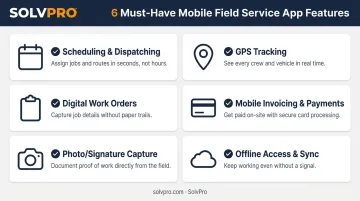
Not every field service app is built the same way. A single-crew landscaping company and a multi-crew excavation outfit need different depths of functionality, but a few features are non-negotiable regardless of size.
Verified-user research from Capterra found mobile access, scheduling, and service history were rated highly important or critical by 90%, 86%, and 84% of reviewers, respectively. These numbers confirm that mobile access, scheduling, and service history are baseline expectations for any field service app, not optional extras.
Scheduling and Dispatching
Office staff need to assign and reassign jobs on the fly. Crews should get the update instantly instead of waiting for a phone call that may not land until they're already halfway to the wrong address.
A good scheduling tool should let dispatchers:
- View crew availability at a glance before assigning work
- Avoid double-booking with day, week, and crew calendar views
- Reschedule jobs without confusing the field team
GPS Tracking and Crew Accountability
Real-time location visibility gives managers a clearer picture of where crews are throughout the day. According to Verizon Connect's 2026 Fleet Technology Trends Report, 80% of nearly 900 fleet professionals surveyed now use GPS tracking, and 44% of those users reported improved productivity as a result.
Platforms don't all track location the same way. Some rely on continuous GPS breadcrumbs, while others tie location to specific events, like a job-linked time entry or photo upload when a crew starts or finishes a job.
Either approach gives managers a verifiable record of when and where work happened, which matters when a customer disputes a completion time.
Digital Work Orders and Job Details
Digital work orders replace the clipboard. A technician should be able to open a job on their phone and immediately see job history, customer notes, and any special instructions, before knocking on the door.
A solid digital work order typically includes:
- Job-specific notes and site instructions
- Photos and material tracking from previous visits
- Real-time job cost tracking
- Complete customer and job history
This eliminates the awkward call back to the office asking "what did the customer say last time?"
Mobile Invoicing and Payment Processing
On-site invoicing lets crews close out a job and collect payment before they ever leave the driveway. That's a meaningful shift from the traditional multi-day billing delay, where paperwork sits until someone in the office has time to process it.
The strongest platforms support multiple payment types on the spot: credit card, ACH, and other digital methods, so the technician isn't stuck if a customer doesn't have a card handy.
Photo, Signature, and Document Capture
Native camera and e-signature tools let technicians document job conditions and capture customer approval without a separate app or paper form. Photos get job-linked and attached to the job record, creating a timestamped, location-verified account of the work performed. That documentation protects both the business and the customer if a question comes up later.
Offline Access and Automatic Sync
Crews working in basements, rural properties, or dense urban cores often lose signal mid-job. Industry guidance from Software Advice notes that quality field service apps typically offer offline access with delayed sync, meaning technicians can keep entering job data without a connection.
The app catches up once service returns, so skipping this feature risks lost data every time a crew steps into a dead zone.
Why Going Mobile Pays Off for Service Businesses
The value of a mobile field service app shows up in a few concrete ways, not just "efficiency" in the abstract.
It turns lost office time into billable field time. Every minute a technician spends dropping off paperwork or calling in for job details is a minute they're not working. Mobile workers already report losing seven hours a week to administrative friction; removing the office paperwork stop at the start and end of each day recovers real hours.
Faster invoicing improves cash flow. Jobs closed and billed on-site get paid days or weeks sooner than jobs billed later from the office. E-invoicing research consistently links faster processing to improved cash flow, and creating the invoice the moment a job wraps up removes an avoidable delay before the money hits your account.
Complete job history reduces repeat visits. When a technician can see everything the customer said last time and what was done, they're less likely to miss something and have to come back. That's why service history consistently ranks among the most-requested features in field service apps.
Up-to-date job information increases accountability. When managers can see which crews are active, delayed, or complete, scheduling conflicts and disputes over hours worked become far easier to resolve.
Automation frees up office staff. Automated follow-up reminders and real-time status updates mean fewer manual check-in calls and less time spent chasing paperwork, leaving the office free to focus on growth instead of admin.
How to Choose the Right Mobile Field Service App for Your Business
Feature checklists are easy to find. What actually determines success is whether your crew will use the thing daily.
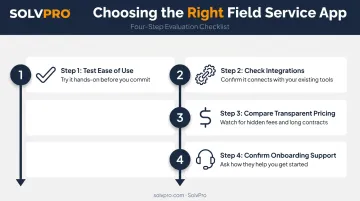
- Test ease of use first. An app your crews won't touch in the field provides zero value, no matter how many features it has. Have a technician try it on a real job before committing.
- Check integrations before you sign up. Look for direct syncing with tools like QuickBooks Online and built-in payment processing. Without it, someone ends up re-entering the same data twice, adding hours of unnecessary admin work each week.
- Prioritize transparent pricing over flashy tiers. Field service software pricing is typically a monthly subscription, either per-user or account-level, often ranging from $150 to $300 depending on crew size. Growing businesses need flexibility as crew size changes month to month, so watch for hidden add-on fees and long-term contract lock-in.
- Ask about onboarding support. A live person walking your team through setup beats a 40-page manual every time, especially in week one.
Why SolvPro Is Built for Growing Field Service Teams
SolvPro combines scheduling, work orders, crew tracking, and payments into one platform, so office staff and crews aren't bouncing between five disconnected systems just to finish one job.
A few things set it apart for growing contractors, landscaping crews, cleaning companies, and multi-crew field teams:
- Fully bilingual English/Spanish interface across the mobile app and office dashboard, addressing a real gap for businesses with mixed-language crews
- Built-in QuickBooks Online sync and credit-card and ACH payments as core features, not paid add-ons, supporting credit card and ACH collection right from the field
- **SolvPro does not publish pricing; confirm current pricing directly with SolvPro.
- Same-day go-live with a setup process under 10 minutes, backed by free, live onboarding support instead of a chatbot and a help center
None of this came from guesswork. SolvPro was built by a team with more than 50 years of combined experience in construction, estimating, and field service operations, not in a boardroom removed from the actual work. If you want to see how the reassignment workflow, mobile invoicing, or bilingual interface works in practice, you can book a demo and walk through it live.
Conclusion
Run a profitable shop, not just a busy one.
Seeing what a job is costing while it is still open gives you a chance to act on it. SolvPro connects scheduling, work orders, time, job costing and invoicing so that information is in one place. When you want to see it on your kind of work, Book a Demo.
Run the Job. Protect the Profit.
Frequently Asked Questions
How Does Field Service Work?
Field service work involves dispatching technicians or crews to customer locations to perform installations, repairs, or maintenance. Scheduling and communication happen through mobile apps that connect the field to the office in real time.
What Features Should I Look for in a Field Service Mobile App?
Prioritize scheduling and dispatching, GPS tracking, digital work orders, mobile invoicing, and offline access. These five cover the core daily operations most service businesses depend on.
Can Field Service Apps Work Without an Internet Connection?
Yes. Quality field service apps offer offline data entry with automatic sync once connectivity returns, which is essential for crews working in remote areas or buildings with poor signal.
How Much Does Mobile Field Service Management Software Cost?
Pricing varies by provider and crew size, usually running as a monthly subscription per user or per account. SolvPro, for example, with no long-term contracts and cancel-anytime terms.
Is Field Service Software Available in Spanish for Bilingual Crews?
Some platforms, including SolvPro, offer a fully bilingual English/Spanish interface for both office staff and field crews across the entire platform, not just select modules.
How Long Does It Take to Get a Mobile Field Service App up and Running?
With guided onboarding support, many platforms allow same-day go-live in under 10 minutes. Full crew adoption typically takes a few weeks of consistent day-to-day use.