It's 7:15 AM and the dispatcher already has three browser tabs open, a group text blowing up, and a sticky note that says "confirm Crew 3 has the trencher." Five crews, three job sites, and zero single source of truth.
This is how service businesses lose money before the first truck even leaves the yard. Double-booked crews, missed jobs, and a foreman calling the office because nobody told him the material delivery got pushed to Thursday.
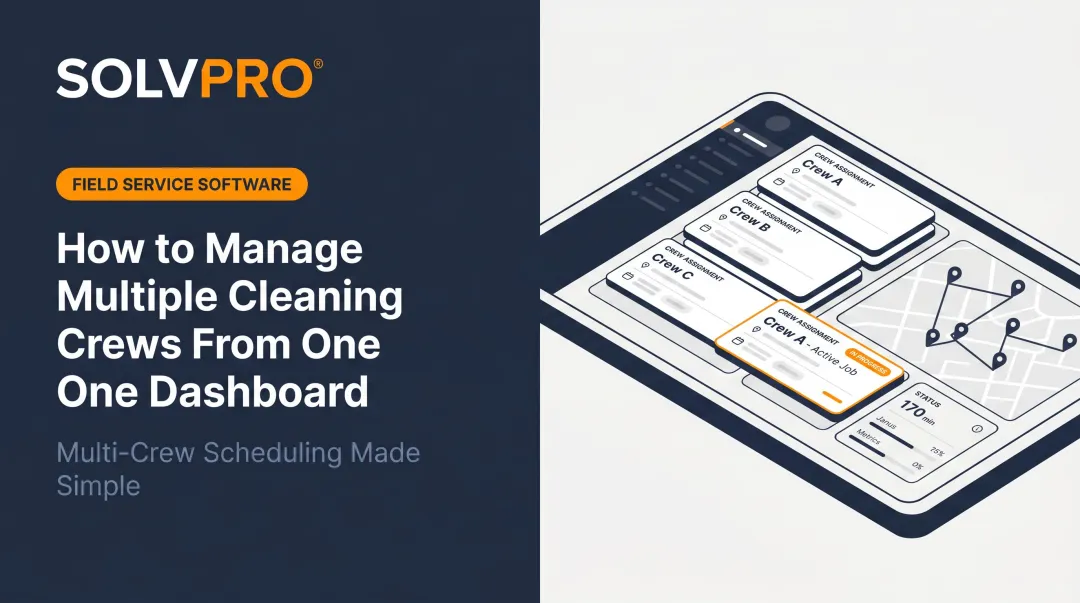
A single dashboard for managing multiple crews closes that gap. Office staff see where every crew is, what they're working on, and what's next — without ten phone calls.
This guide breaks down the top apps built for multi-knowing where crews are assigned. You'll learn what separates a good one from a bloated one, and how to pick the right fit for your business.
KEY TAKEAWAYS
- Multi-crew dashboards combine scheduling, GPS tracking, job costing, and crew communication in one screen
- The right tool depends on crew size and trade — enterprise GC platforms don't fit a 6-person crew
- Up-to-date job information, mobile usability, and QuickBooks/payment integrations matter more than raw feature count
- SolvPro, BuildOps, Housecall Pro, Connecteam, and ClockShark each serve a different crew size and use case
- One dashboard only helps if crews actually update it from the field, so mobile reliability matters more than desktop features
Overview of Multi-Crew Dashboard Software
A multi-crew dashboard app centralizes everything a dispatcher used to track across a whiteboard, a spreadsheet, and a phone. That includes who's on which job, where they clocked in, what the job status is, and what still needs to happen before invoicing.
Instead of five tools stitched together with texts filling the gaps, everything lives on one screen.
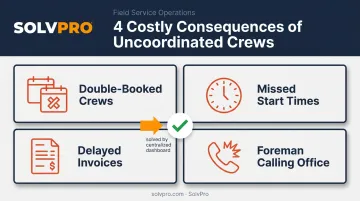
That single screen matters more as crews multiply, because coordination complexity compounds with each additional crew rather than scaling evenly. An electrical company running two crews might survive on spreadsheets. Add a third and fourth crew across separate job sites, and the same manual process starts producing:
- Double-booked crews on the same job
- Missed start times because a schedule change didn't reach the field
- Invoices delayed because nobody logged completed work
- Foremen calling the office for information that should already be visible
Multi-crew dashboard software fixes exactly this. The next section covers the top apps built to fix it, evaluated on up-to-date job information, field usability, and how well they connect scheduling to job costing and invoicing.
Top Apps for Managing Multiple Crews from One Dashboard
These picks were chosen for one reason: how well they give office staff live visibility into crews without drowning foremen in complexity. Feature lists matter less than whether a crew lead can actually use the app at 6 AM in a truck cab.
SolvPro
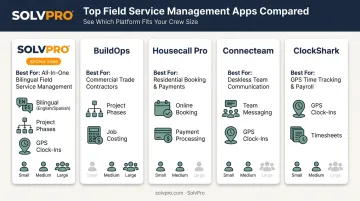
SolvPro was built by a team with 50+ years of combined experience in construction, field service, and project management. It combines scheduling, work orders, crew tracking, and payments into a single dashboard for growing multi-crew businesses.
What sets it apart:
- Job and crew time tracking that records time entries and job photos against the work order, so office staff can see what each crew logged and when
- Fully bilingual English/Spanish interface covering the platform UI, mobile app, and customer communications, built for mixed-language crews, not bolted on as an afterthought
- Digital estimates with customer-facing PDF proposals and e-signature approval
| Best For | Growing GCs, electrical, plumbing, landscaping, and cleaning businesses running multiple crews that need one system instead of five |
| Key Features | Job and crew time tracking, bilingual interface, QuickBooks Online sync, credit-card and ACH payments, digital estimates |
Setup runs under 10 minutes: account creation, adding your crew, and dispatching your first job, with live onboarding support included on every plan, not just top-tier ones. There are no long-term contracts and no surprise add-on fees.
BuildOps
BuildOps is a cloud platform built for commercial contractors managing multiple crews across active job sites, tying dispatch, scheduling, and job tracking into one system.
The standout feature is project phase tracking that records time, materials, and invoices by project stage, plus built-in invoicing that supports progress billing and retainage.
| Best For | Commercial contractors with large crew counts and multi-phase projects |
| Key Features | Live dispatch board, project phase tracking, built-in invoicing, job history storage |
The tradeoff: pricing isn't public, and the platform's depth may be more than a 5-crew landscaping business actually needs.
Housecall Pro
Housecall Pro brings mobile-friendly scheduling and dispatch to home service teams, ranging from solo operators to larger crews.
Fast setup, automated appointment reminders, and simple invoicing make it approachable, though the platform can feel thin for businesses coordinating complex dispatch across several active sites simultaneously.
| Best For | Home service teams with straightforward job workflows |
| Key Features | Customer reminders, invoicing and online payments, service status updates |
Connecteam
Connecteam is an all-in-one mobile-first app for deskless teams, bundling scheduling, GPS time tracking, task management, and team chat.
Its free plan covering up to 10 users makes it an easy entry point for smaller crews. Geofencing and team chat, however, sit in separate paid hubs rather than the base plan.
| Best For | Field teams needing combined scheduling, GPS attendance, and in-app communication |
| Key Features | Drag-and-drop scheduling, GPS time clock, task checklists, geofencing (higher tiers) |
ClockShark
ClockShark is a construction-focused time tracking and scheduling tool built primarily for verifying who was on which crew, where, and when.
GPS-verified clock-ins and crew timesheets are the core strength, including supervisor-managed clock-ins for an entire crew from one device. It leans harder into labor tracking than full job or document management.
| Best For | Businesses whose main pain point is labor tracking and attendance accuracy |
| Key Features | GPS-verified mobile clock-ins, crew timesheets, job costing support |
How to Choose the Right App for Your Crews
Start with your actual breakdown point, not a feature checklist.
- Buddy punching or attendance disputes? Prioritize GPS/geofencing verification.
- Labor drift across jobs? You need job-based time tracking tied to live knowing where crews are assigned.
- Missed jobs and scheduling chaos? Look for real-time dispatch and crew status updates.
More features rarely mean more control. An overly complex dashboard often gets abandoned by a foreman on a busy Monday morning who just needs to know where to send Crew 2. Field-test your shortlist with actual crew leads, not just office staff, before signing anything.
Once a tool survives that real-world test, the next filter is cost. Budget realistically. Field service software pricing generally falls into two models: per-user monthly fees or flat platform pricing with tiered feature access. Capterra's category benchmarks show entry-level plans often starting around $100/month, with premium tiers climbing well beyond $450/month depending on user count and features.
Before committing, confirm the app connects to what you already use:
- QuickBooks or your accounting system: Avoids duplicate data entry and reconciliation headaches.
- Payment processing: Lets field crews collect payment without a separate app.
- Payroll: Check this specifically, since not every platform includes direct payroll sync.
Switching tools shouldn't create a second data silo. If it does, you've just added a sixth system to the five you were trying to eliminate.
Conclusion
Feature lists don't determine the best app for managing multiple crews. What matters is whether your foremen will actually open it on a busy Tuesday without complaining.
Before committing, trial a shortlist with real crews on a live job day. Watch for speed, mobile usability, and whether the dashboard actually connects field data to office decisions in real time.
If you're running growing crews across trades like electrical, plumbing, landscaping, or commercial cleaning and want visibility without enterprise-level complexity, SolvPro is worth a look. It comes bilingual out of the box, with transparent pricing and setup in under 10 minutes.
Field service software helps you manage the work. SolvPro helps you make sure the work makes money.
The right tool depends on your trade, crew size, job mix and the systems you already run. Test it on real jobs before you commit, and check that crews will actually enter what the office needs. When you want to see it on your kind of work, Book a Demo.
Run the Job. Protect the Profit.
Frequently Asked Questions
What Is Crew Management Software?
Crew management software combines scheduling, time tracking, location visibility, and job data into one dashboard. Managers oversee multiple crews without relying on phone calls, texts, or paper timesheets.
What Is the Best App for Multiple Accounts?
For multi-crew businesses, this usually means a platform supporting multiple user roles (owner, dispatcher, crew lead) under one shared dashboard. Check for role-based access as the deciding feature.
What Features Should a Multi-Crew Dashboard App Have?
Look for real-time crew location, job/task assignment, mobile access for field leads, and integration with payroll or invoicing tools. Anything missing one of these creates a visibility gap.
How Much Does Crew Management Software Typically Cost?
Pricing ranges from per-user monthly fees to flat platform pricing with tiered plans. SMBs should look for transparent pricing without surprise add-on charges as they scale.
Can One App Really Manage Multiple Crews Across Different Job Sites?
Yes. Modern cloud and mobile-based platforms are built specifically for this, syncing data in real time so office staff see live crew status regardless of location.
Does Crew Management Software Work Without Reliable Internet on the Jobsite?
Many field-ready apps support offline data entry and sync automatically once connectivity returns. This varies by platform, so confirm offline capability directly with any vendor before committing to remote or low-signal job sites.