What Is Contractor Foreman?
Most small contractors juggle five or six tools to run a single job — and still lose track of things. Contractor Foreman is a cloud-based construction project management platform founded in 2017 in North Carolina, built to consolidate scheduling, financial tracking, document storage, and field communication into one system.
The platform currently holds a 4.5/5 rating on Capterra from over 825 reviews and a 4.5/5 on G2 from 345 reviews — strong numbers for any niche software. Those numbers are worth noting, but they don't capture where the platform excels or where it falls short for specific business types.
This review covers the features, pricing, demo experience, and cancellation policy — including the details that catch buyers off guard.
Key Takeaways
- Contractor Foreman is a feature-rich construction management platform built for small-to-mid-sized general contractors and subcontractors
- Pricing starts at $49/month (Basic) and reaches $332/month (Unlimited) on annual billing — with user caps that vary by plan
- Expect a real learning curve — setup takes time, but pays off for businesses that commit
- Cancellation and refund policy changed in February 2026 — read it carefully before signing up
- Businesses outside traditional construction may find a purpose-built alternative more practical
Contractor Foreman Core Features
Contractor Foreman organizes its tools across five categories: project management, financial management, field management, people management, and document management. Feature depth depends on your plan tier.
Project Management Tools
The scheduling suite includes Gantt chart views with task dependencies and milestones, calendar views for to-dos, and daily logs with fields for materials, equipment, photos, and time cards.
A few practical quirks stand out:
- Inconsistent terminology: "To-Dos" in the work tracking module and "tasks" in scheduling refer to similar concepts, which creates minor day-to-day confusion
- Navigation after closing a task and returning to the project list isn't immediate; experienced users have noted the extra clicks add friction when moving quickly between jobs
- Punchlists support open/closed item tracking, useful for closeout documentation
Financial Management Tools
The financial toolset covers most of what a small GC needs:
- Bid manager and estimates
- Invoicing dashboard with paid/unpaid visibility
- Purchase orders and change orders
- Subcontract tracking
- AIA G702 invoicing and retainage billing
QuickBooks Online integration is a genuine differentiator here. According to Intuit's own research, 92% of contractors using QuickBooks say it gives them better cost visibility to improve margins — and Contractor Foreman's two-way sync lets that financial data move between platforms without manual re-entry. One important update: QuickBooks Desktop support ended January 1, 2026, so if your office relies on the Desktop version, this is a meaningful constraint.
Stripe handles online payment processing, with a fee of 2.9% + $0.30 per transaction.
Field Management and Mobile App
The iOS app (4.3 stars, 522 ratings) and Android app (4.4 stars, 892 reviews) cover the essentials: task updates, document access, photo uploads, RFIs, and submittals. Field crews can log time cards with GPS geolocation stamps.
The mobile app has a few rough edges:
- Menu organization differs from the desktop, creating a learning curve specific to mobile users
- Camera functionality has shown inconsistencies on some Android devices, per user reviews
- The overall mobile experience "could be better" than desktop, as multiple Capterra reviewers have noted
The app does receive regular updates — the Android build was refreshed May 8, 2026, and iOS on May 11.
Document Management and Safety Tools
Cloud-based document storage includes PDF markup with measurement tools, file organization, and photo management. Safety tools cover OSHA 300 incident logging, prewritten safety topics, and toolbox talk management.
One honest note: document management in Contractor Foreman is spread across multiple sections of the platform rather than consolidated in one place. Users who expect a single document hub will need to adjust their mental model.
Contractor Foreman Pricing and Plans: 2026 Breakdown
Contractor Foreman uses a flat-rate, annual-billing model. The figures below reflect current annual plan pricing (monthly billing costs more). A free trial is available — and the platform states you are not charged until the trial ends, not upfront.
| Plan | Annual Monthly Rate | Users |
|---|---|---|
| Basic | $49/month | 1 |
| Standard | $105/month | 3 |
| Plus | $166/month | 8 |
| Pro | $221/month | 15 |
| Unlimited | $332/month | Unlimited |
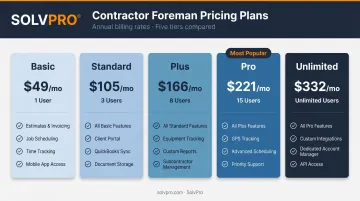
Note: All plans include "Unlimited Contractor Users" for external collaborators; the user caps above apply to employee/internal accounts.
Basic Plan ($49/month)
The entry tier covers core project management, estimates, invoicing, calendar, to-dos, and file management. It works for solo operators testing the platform, but it's limited: one internal user, no punchlists, no online payments, and support restricted to ticket system and group training.
Standard Plan ($105/month) and Plus Plan ($166/month)
The Standard plan adds punchlists, online payment via Stripe, Google/Outlook calendar integration, live chat support, and two hours of private training — a meaningful jump from Basic.
The Plus plan is where most operational tools come online: daily logs, change orders, RFIs, scheduling, bid management, and access to the 1build Material Database. If you're running multiple active projects with a small crew, this is likely the minimum viable tier for your operation.
Pro Plan ($221/month) and Unlimited Plan ($332/month)
The Pro plan — currently labeled "Most Popular" on Contractor Foreman's pricing page — adds a client portal, AIA invoicing, up to 15 internal users, and four hours of private training.
The Unlimited plan includes every feature, unlimited internal users, and a price-lock guarantee on future features. For larger teams, it often undercuts the per-seat costs of competing platforms by a significant margin.
The Cancellation Policy — What You Need to Know Before You Sign Up
The cancellation policy changed significantly on February 20, 2026. If you created a trial account after that date, the old tiered refund schedule (75%, 50%, 25%, 15%) no longer applies.
Under the current policy:
- Cards are charged at trial end and at renewal unless you cancel beforehand
- Refunds are generally not provided once payment is made
- The 100-day guarantee applies only to annual Plus, Pro, and Unlimited plans
- To qualify for the 100-day guarantee, you must meet all of the following within the first 45 days:
- Complete a 1:1 kickoff call within 7 days
- Attend at least one live training call
- Create one estimate, one project, one time card, and one daily log
- Log 10 days of meaningful platform activity in the 30 days before requesting a refund
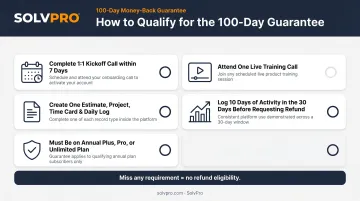
Many users miss these requirements and lose refund eligibility. Read the full refund policy before entering payment information.
Contractor Foreman Pros and Cons
Pros: Where Contractor Foreman Delivers
Value per dollar is strong. Capterra reviewers consistently describe it as doing what other software does for "a fraction of the price," with multiple reviews mentioning canceled subscriptions after switching.
For a small GC managing estimates, schedules, invoices, and project details in one platform, the cost-to-coverage ratio is hard to argue with.
Live support is responsive. Capterra themes highlight that live-agent support resolves issues "without delay" and connects users to "a real person fast." Support hours run Monday–Friday, 9 AM–9 PM ET, with channels including live chat, support form, and a knowledge base.
Active development. Contractor Foreman pushed over 90 platform changes in Q1 2026 alone — a clear sign the product team is listening.
Cons: Where Contractor Foreman Falls Short
The interface feels dated. One Capterra reviewer put it plainly: the UI "needs to update and not look like it's from Windows 2000." Compared to modern competitors like Procore or Autodesk Build, the desktop experience shows its age — Kanban columns run horizontally (unusual), and some interactions require multiple clicks that add up over time.
Setup is time-intensive. Every module requires individual configuration. The platform is highly customizable — but that flexibility comes at a cost upfront. Capterra reviewers consistently flag a "deep" learning curve and note it "takes time to learn and fully customize."
Offline capability is limited. Offline Time Cards were in preview mode as of Q1 2026, but a full offline mode isn't available. On job sites with poor connectivity, crews can't log time or update job status until they're back in range.
Who Is Contractor Foreman Best For?
Contractor Foreman is a strong fit for:
- Small-to-mid-sized general contractors managing multiple simultaneous projects
- Subcontractors who need financial visibility alongside field management
- Construction businesses already using QuickBooks Online who need a project and field management add-on
- Teams willing to invest in setup and onboarding to unlock the platform's depth
It's a weaker fit for:
- Larger firms with complex, data-heavy builds — reported performance issues with large cost-item databases and multi-phase project structures make it a risky fit at scale
- Teams that need workflow automation or custom reporting — the reporting tools work, but configuration options are limited
- Service businesses outside traditional construction — HVAC, landscaping, janitorial, and plumbing companies often find the construction-specific feature set adds complexity without adding value
Alternatives to Contractor Foreman Worth Considering
Contractor Foreman competes in a crowded space, and a few direct comparisons are worth making:
- Buildertrend suits residential builders who want a polished client-facing experience, though pricing is custom and can run significantly higher
- Procore handles large, complex construction projects with deep customization — but it's sized and priced for firms that need enterprise-level capability
- Contractor Foreman sits between those two: more affordable than Procore, more construction-specific than Buildertrend, and better suited to small-to-mid-sized operations than either
For field service businesses that don't primarily run construction projects — HVAC companies, plumbing contractors, landscaping crews, janitorial businesses — SolvPro is worth a serious look. It's built specifically for multi-crew field service operations, not large-scale construction project management.
Where it diverges from Contractor Foreman matters depending on your crew:
- Runs fully in English and Spanish — mobile app, crew scheduling, desktop dashboard, and customer communications — so mixed-language field crews don't have to work around a language barrier
- Geo-stamps time entries, photo uploads, and job activities at the moment they happen, giving managers real accountability without continuous GPS polling
- QuickBooks Online sync included on every plan, with NMI payment processing for in-field credit card and ACH collection
- No long-term contracts — cancel anytime, with a free trial that requires no credit card
- Sets up in under 10 minutes, compared to Contractor Foreman's module-by-module configuration process
SolvPro starts at $179/month for up to 3 users, with the Growth plan at $228/month for expanding teams.
It's built for businesses that need crew dispatch, work orders, job costing, and payments working together — without the added weight of a construction-specific platform.
Frequently Asked Questions
What type of software is Contractor Foreman?
Contractor Foreman is cloud-based construction project management software designed for small-to-mid-sized contractors. It covers project scheduling, financial tracking, document management, and field communication in one platform, accessible via web browser and mobile app on iOS and Android.
What software do construction foremen commonly use?
Construction foremen commonly use platforms like Contractor Foreman, Procore, Buildertrend, and Fieldwire, depending on company size and project type. Mobile-first tools are especially important at the field level, where foremen need fast access to schedules, daily logs, and task updates without going back to a desktop.
Does Contractor Foreman use AI?
As of mid-2026, Contractor Foreman does not feature native AI-driven tools as core functionality. The platform appears in third-party AI software roundups, but those are editorial inclusions — not evidence of built-in AI scheduling, predictive reporting, or automation features.
Does Contractor Foreman have a free trial or demo?
Yes. Contractor Foreman offers a 30-day free trial with no charge until the trial ends. Request a live demo alongside it — a guided walkthrough confirms whether the features you need are actually included on the plan you'd pay for.
Is Contractor Foreman worth it for small field service businesses outside construction?
Contractor Foreman is purpose-built for construction workflows, so businesses in HVAC, plumbing, landscaping, or janitorial services typically find it overly complex for their needs. A dedicated field service management platform like SolvPro — built specifically for those trades — is usually a more practical fit.