Introduction
Your crew shows up to a job site at 7 a.m., but the 811 locate ticket expired two days ago. The foreman is calling the office, the office is texting the dispatcher, and nobody can find the original dig authorization. Meanwhile, last week's completed job still hasn't been invoiced because the work order is buried in someone's text messages.
This is the reality for excavation companies managing tickets across whiteboards, group chats, and spreadsheets. It works until it doesn't — and when it breaks down, the costs are real: project shutdowns, utility strikes, cash flow gaps, and crews sitting idle.
This guide covers everything you need to know about excavation ticket management software: what it is, what it actually costs you to go without it, which features matter, and how to choose a solution that fits a working excavation business without enterprise-level pricing or complexity.
Key Takeaways
- Excavation ticket management software handles two distinct functions: 811 locate compliance and operational job ticket management — both matter.
- Without dedicated software, companies face missed deadlines, utility strikes, billing delays, and crew miscommunication.
- Mobile field access, real-time job tracking, photo documentation, and QuickBooks integration are non-negotiable features.
- Field simplicity and SMB-friendly pricing matter more than enterprise features your crew will never touch.
What Is Excavation Ticket Management Software?
Excavation ticket management software is a digital platform that helps excavation companies create, track, assign, update, and close tickets tied to dig work — covering both regulatory locate requests and internal job operations.
The Two Types of Excavation Tickets You Need to Manage
There are two distinct ticket types every excavation company deals with — and most software only handles one of them well.
811/One-Call locate tickets cover the regulatory side. Federal regulations under 49 CFR 198.37 require excavators to notify utilities through the 811 system before any digging begins. State timelines vary — Texas requires at least two working days' notice; Oregon requires two to ten business days.
Locate tickets also expire. CGA Best Practices put ticket life at 15 to 20 working days, though state law varies. Miss the renewal window, and you're digging without legal protection.
Operational job tickets are the internal side — work orders that assign crews, track job progress, log materials, and feed into invoicing. These don't involve regulators. They involve your dispatcher, your foreman, and your accounting software.
The problem most excavation companies face is managing these two ticket types in completely separate systems — or not managing one of them at all. The best solutions either handle both types directly or integrate cleanly with dedicated 811 platforms.
Who Uses Excavation Ticket Management Software?
Every role in an excavation company touches tickets differently:
- Owners need job profitability visibility and billing status
- Office managers need to dispatch crews, track status, and trigger invoices
- Foremen need job details, locate reference numbers, and the ability to update progress
- Crew members need simple mobile access to assignments, site notes, and photo upload
When software ignores any one of these roles — even crew members — the whole workflow breaks down somewhere between the field and the office.
The Real Cost of Managing Excavation Tickets Without Software
Managing excavation tickets manually has a measurable price — in compliance fines, wasted crew hours, and delayed cash flow.
Compliance Exposure
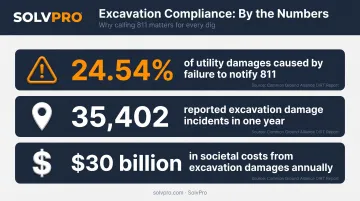
According to the CGA's 2024 DIRT Report, failure to notify 811 was the single largest root cause of underground utility damages, accounting for 24.54% of known damage incidents — that's 35,402 reported incidents in one year across North America. And the financial consequences extend far beyond a single job: CGA estimates excavation-related damages cost the U.S. approximately $30 billion in societal costs in 2019, spanning utility repair, service restoration, property damage, and business interruption.
When locate tickets live in someone's email or a paper folder, expiration dates slip. That's when the liability starts.
Scheduling and Crew Idle Time
Compliance failures are costly. So is the operational drag that happens before a single shovel hits the ground.
When job information lives in a dispatcher's head or a group text thread, gaps appear fast. Crews show up to the wrong address, without the right equipment, or without any information at all.
Salesforce research found that 47% of field service appointments fail to go as scheduled. Mobile workers also waste roughly 18% of their working hours on inefficient administrative tasks. For excavation companies with tight daily margins, that idle time is a direct hit to profitability.
The Billing Delay Problem
Completed work that doesn't get invoiced quickly creates a compounding cash flow problem. A 2025 QuickBooks survey found that 56% of small businesses were owed money from unpaid invoices, averaging $17,500 per business. Another 47% reported invoices overdue by more than 30 days.
When job tickets aren't connected to an invoicing workflow, the gap between job completion and payment widens with every active crew you're running.
The Accountability Gap
Cash flow problems don't exist in isolation — they compound when there's no paper trail to back up your team's work.
Without a digital record of ticket status, crew assignment, and on-site activity, disputes become guesswork. A client claims work wasn't done. A crew says they were on site for six hours. With no timestamped, geo-stamped record of either, there's no way to resolve it.
Must-Have Features in Excavation Ticket Management Software
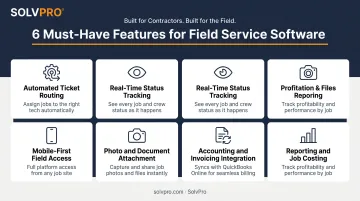
These six features separate software that actually works for excavation operations from tools that just add another system to manage:
Automated Ticket Creation and Routing
The system should generate work tickets from incoming jobs and route them to the right crew based on availability and location — without someone manually pushing information through phone calls or texts. A visual drag-and-drop dispatch calendar is the practical version of this for most SMB excavation companies.
Real-Time Ticket Status Tracking
Both office and field need live status visibility — dispatched, in progress, delayed, complete — without phone tag. The office should see every active ticket at a glance. The crew shouldn't have to call in to confirm they're on the right site.
Mobile-First Field Access
Field crews need to open, update, and close tickets from a phone — fast. Look for a native mobile app (not a browser workaround) that loads quickly, supports photo uploads, and syncs reliably. SolvPro's mobile app is available in both English and Spanish, which matters for excavation companies with bilingual crews.
Photo and Document Attachment
Crews should be able to attach:
- Pre-dig utility mark-up photos
- Job site progress photos
- Completed work documentation
- Change order notes
Every photo should be geo-stamped with location and timestamp — creating an audit trail that protects the company if a dispute arises later.
Integration with Accounting and Invoicing
A ticket that closes in the field should connect directly to an invoice workflow. Look for built-in QuickBooks Online sync so billing doesn't require a separate manual step. SolvPro includes QuickBooks sync at no additional cost across all pricing tiers — it's a core feature, not an upgrade.
Reporting and Job Costing
The software should show you:
- Job-level profitability (labor and material costs vs. revenue)
- Crew performance metrics
- Time to completion by job type
- Operational trends across your active ticket volume
Without this data, you're running blind on margins. With it, you can spot which job types are most profitable and where crew time is getting lost — before those patterns cost you.
How Excavation Ticket Management Software Works Day-to-Day
The Office Side
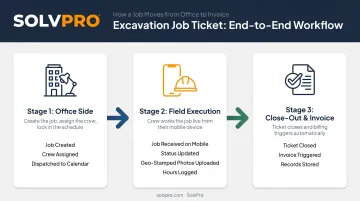
A job comes in — or a 811 locate request triggers a new project. The office creates a digital work order with job address, scope of work, any locate reference numbers, site notes, and crew assignment. The job appears on the dispatch calendar. The crew receives it on their phone.
The office dashboard shows every active ticket in real time: which crews are deployed, what stage each job is at, and which tickets are approaching completion or overdue.
What the Field Experience Looks Like
The crew opens their phone. They see:
- Job address and site access notes
- Scope of work and special instructions
- Any 811 locate reference information added by the office
- Photos from the site (if applicable)
As they work, they update status, upload site photos, log hours, and flag any issues. When the job is done, they mark it complete and capture customer sign-off — all without calling the office.
SolvPro's event-based geolocation tracking records when crews arrive, when work begins, and when jobs are marked complete — tied to location data. The office gets accountability without micromanaging.
The Close-Out Flow
When a ticket is closed in the field, it triggers the invoicing step. The completed job record is stored and searchable for future reference or dispute resolution. It includes:
- Site photos and geo-stamped timestamps
- Field notes and materials used
- Any change orders captured during the job
- Customer sign-off confirmation
That means invoices go out the same day the work is done — not at the end of the week when paperwork finally catches up.
How to Choose the Right Excavation Ticket Management Software
Prioritize Field Simplicity Over Feature Bloat
Enterprise-level ticket management platforms built for utility companies or telecoms are typically over-engineered and overpriced for growing excavation contractors. Your foreman doesn't need a 40-page knowledge base to figure out how to update a job status.
Look for software your crew can adopt without a week of training — ideally something operational in under 10 minutes. SolvPro uses a three-step onboarding process — create account, add crew and jobs, dispatch and track. Most companies are up and running in under 10 minutes, with live team support available instead of a chatbot.
Check for Industry Fit and Integration Depth
The software should be purpose-built for field service businesses, not repurposed from a generic help desk tool. Before committing, confirm it:
- Handles multi-crew scheduling across simultaneous job sites
- Integrates directly with QuickBooks Online (not as an add-on)
- Supports phase-based jobs with milestone billing
- Includes mobile time tracking tied to job records
SolvPro checks all four. The team includes a technical specialist with 17 years across construction project management, estimating, and installations. The bilingual English/Spanish interface — useful for excavation companies with diverse crews — comes standard at every pricing tier.
Evaluate Pricing and Contract Terms Honestly
SMB field service software varies widely in price — from Jobber's plans starting at $29/month to Service Fusion starting around $245/month. Understand what's included at each tier before committing.
SolvPro's pricing:
- Starter: $179/month for up to 3 users
- Growth: $228/month base (4 users), then $49/user for additional team members
- Scale: Custom pricing for unlimited users
All core features — QuickBooks sync, NMI payment processing, bilingual interface, geolocation tracking — are included at every tier. No long-term contracts. Cancel anytime.
Frequently Asked Questions
What is the best excavation ticket management software?
It depends on your role. Enterprise platforms like Irth are built for utility companies managing One-Call compliance at scale. For excavation contractors who need job ticketing, crew management, and invoicing in one place, field service tools like SolvPro handle that operational workflow without the enterprise overhead.
What is an ERP ticketing system and how does it integrate with excavation ticket management software?
ERP (Enterprise Resource Planning) covers finance, operations, HR, and more — built for large organizations. Most small to mid-sized excavation companies don't need one; dedicated ticket management software handles job costing, billing, and scheduling directly. API integration is possible if needed, but uncommon at that scale.
How does excavation ticket management software handle 811 compliance?
Some platforms manage 811 locate tickets directly, tracking expiration dates, utility responses, and documentation. Others focus on the job-side workflow and integrate with separate 811 systems. Regardless of platform, the excavation contractor is legally responsible for ensuring all locate requests are filed and current before digging begins.
Can excavation ticket management software integrate with QuickBooks?
Yes — most modern solutions offer QuickBooks Online sync. Completed job tickets flow directly into an invoicing workflow, eliminating double-entry between field operations and accounting. SolvPro includes this sync as a standard feature at no additional cost.
What is the difference between a work order and an excavation ticket?
A work order covers the full scope of a job — labor, materials, cost, and assignment. An excavation ticket is tied specifically to a dig authorization or 811 locate request, proving utilities were notified before work began. Good software links both as connected records within the same job workflow.