Manual processes like these create a hard ceiling on growth. You can only answer so many calls, write so many quotes by hand, and chase so many late payments before something breaks.
The good news: AI and automation aren't just for national franchises with IT departments anymore. Affordable tools now help crews of every size estimate faster, schedule smarter, and get paid sooner.
This article covers six practical ways to put these tools to work, what to think about before you adopt them, mistakes to avoid, and answers to the questions landscaping owners ask most.
Key Takeaways
- Automate admin tasks like scheduling and invoicing to maximize billable crew hours.
- Generate accurate quotes instantly using AI tools—no site visit required.
- Use chatbots and automated texts to capture and qualify leads 24/7.
- Boost crew accountability and reduce check-in calls with GPS tracking.
- Get paid faster by automating your invoicing and payment collection.
- Start by automating one process, prove its ROI, and then expand.
6 Ways to Use AI and Automation to Scale Your Landscaping Business
Here's where the rubber meets the road. Each of these six areas addresses a specific bottleneck that keeps landscaping businesses stuck at the same revenue ceiling year after year.
Way 1: Automate Estimates and Proposals with AI-Powered Measurement Tools
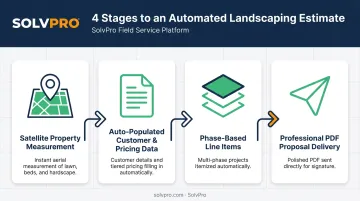
Driving to a property, walking the yard, and manually measuring beds and turf takes time you don't have. AI-powered measurement tools pull satellite imagery and property data to generate lawn and hardscape measurements without anyone stepping foot on site.
The payoff: no more rescheduling estimates around rain, no more windshield time between quotes.
One vendor case study offers a useful benchmark: pavement contractor Paved Assets used Attentive.ai's aerial property-measurement software and cut takeoff time by 90%, eliminating roughly 10 hours of field visits and manual measurement per property. That's not a landscaping-specific number, but the underlying math applies directly to yard and property estimating.
Once measurements are in hand, the real time savings come from what happens next:
- Customer data and pricing auto-populate into proposals, cutting manual entry
- Multi-phase projects like installs, hardscaping, and maintenance get broken into clean, itemized sections
- Customer-facing PDF proposals look professional and win more bids than a scribbled estimate on a clipboard
SolvPro's Estimates & Digital Contracts feature supports this exact workflow with phase-based line items. That lets you present a hardscaping install as Phase 1 site prep, Phase 2 structural work, and Phase 3 ongoing maintenance, each with its own scope and milestone payment schedule tied to it.
Way 2: Use AI Chatbots and Automated Communication to Qualify Leads 24/7
A homeowner filling out your contact form at 9 p.m. on a Sunday doesn't want to wait until Monday morning for a callback. Increasingly, they expect a response almost immediately.
According to Jobber's 2026 Home Service Trends Report, more than 70% of home-service customers expect a same-day response, and over half expect one within an hour. Yet only 60% of pros respond same-day, and just 20% respond within the hour. Competitors steal your leads in that gap.
AI chatbots close that gap by:
- Asking about property size, service needs, and budget the moment someone lands on your site
- Providing instant pricing ranges so your team can prioritize ready-to-buy prospects
- Flagging high-value leads automatically instead of making staff sort through every form submission
Automated follow-up texts and emails then keep those leads warm without anyone in the office lifting a finger. Homeowners have grown comfortable with this, too, since more than half now say they're fine with AI handling that first inquiry.
Way 3: Automate Scheduling, Dispatching, and Crew Accountability
Double-bookings, last-minute scrambling, and "wait, where's the crew supposed to be?" calls are symptoms of the same problem: scheduling that lives in someone's head or a spreadsheet instead of a real system.
Automated scheduling tools assign jobs based on crew location and availability, and a visual, drag-and-drop calendar shows office staff exactly who's free and who's already booked. This single view eliminates most of the guesswork behind scheduling conflicts.
Crew accountability gets easier too, without the awkward "checking in" phone calls. SolvPro's event-based geolocation tracking automatically geo-stamps time entries, photo uploads, and job status updates the moment a crew member starts or finishes a task. No constant polling, no micromanaging, just a verifiable record of when and where work happened.
Digital work orders round out the picture by replacing paper tickets entirely. Crews get:
- Job scope, site notes, and special instructions on their phone
- Real-time job cost tracking as labor and materials get logged
- The ability to capture photos, customer sign-off, and even payment on-site
Way 4: Optimize Crew Routes with AI-Powered Route Planning
Ask any owner running more than one crew: the difference between a tight route and a sloppy one is measured in gallons of fuel and hours of drive time, every single week.
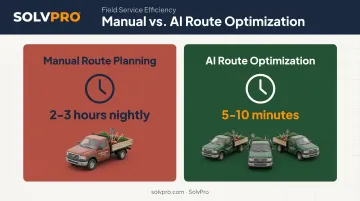
Dynamic routing software factors in traffic, service time per stop, and crew capabilities to sequence jobs efficiently. One lawn-care operator, Marvin Salcido of Salcido Lawn, reported that specialized software cut his nightly route-planning work from 2-3 hours down to just 5-10 minutes. That's planning time, not a fuel study, but it illustrates how much manual effort disappears once routing runs on its own.
Route optimization becomes non-negotiable as you scale:
- One crew, one truck? Routing chaos is annoying but manageable
- Three crews, multiple zones? Manual routing turns into a full-time job that automated tools eliminate before it starts
SolvPro's multi-crew route optimization factors in crew location automatically, which matters most the moment you add a second or third truck to your fleet.
Way 5: Automate Invoicing, Payments, and Job Costing
Here's an uncomfortable truth: a lot of landscaping businesses do great work and still struggle with cash flow, simply because invoices go out weeks after the job is finished.
Automated invoicing closes that gap by generating and sending invoices the moment a job is marked complete. According to Jobber's payment documentation, home-service businesses that accept card payments get paid roughly four times faster on average than businesses relying on checks.
SolvPro bakes this directly into the platform with built-in NMI payment processing and QuickBooks Online sync, both included at no extra cost across every pricing tier. In practice, that looks like:
- Crews creating and sending invoices from the job site, not from an office desk days later
- Customers paying online through a branded payment portal, with credit card, ACH, or digital options
- Payment data syncing to QuickBooks automatically, no manual re-entry required
Job costing analytics add a layer most manual systems miss entirely: real-time visibility into which jobs, crews, and services are actually profitable. Use that data to guide pricing and crew allocation decisions, not gut instinct.
Way 6: Use AI Writing Tools and Automated Marketing to Stay Competitive
Writing job postings, follow-up emails, and social posts eats into hours you'd rather spend on billable work. AI writing assistants like ChatGPT speed that up considerably, and landscaping-industry sources back this up.
NALP's own industry publication highlights uses for generative AI including blog titles, social copy, job descriptions, and proposals, though it cautions users to verify facts and edit AI output before sending it out. In Jobber's own survey, 52% of home-service business owners reported using AI, with 51% of those using it for writing or customer responses and 45% for marketing.
To get usable output, skip vague requests. Specific prompts work far better:
- Include your service area and the specific services offered
- Specify the tone you want, from casual to formal
- Ask for a draft, not a finished product, then edit for accuracy
- Feed it real details about the job or promotion, not generic placeholders
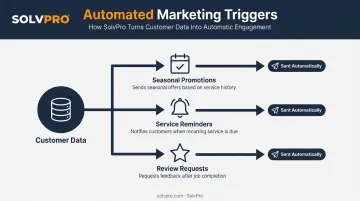
Automated marketing platforms layer on top of this by triggering seasonal promotions, service reminders, and review requests automatically based on customer data, no manual list-building required.
What to Consider Before Adopting AI in Your Landscaping Business
Before you sign up for anything, weigh a few practical realities.
Cost and learning curve matter. Software Advice's research on field-service buying trends found that 42% of buyers identified training as a highly impactful adoption challenge, and 64% experienced disruptions during rollout.
The same research pegs average ROI timelines around 9.2 months. Pick one high-impact area first, like estimating or scheduling, rather than overhauling everything at once.
Integration is non-negotiable. Standalone tools that don't talk to your CRM or accounting software just recreate the manual data entry problem you're trying to solve. Look for platforms where QuickBooks sync and payment processing are built in, not bolted on as pricey add-ons.
Data security deserves a real conversation. As more customer and payment data moves online, ask any vendor directly about:
- Encryption standards for stored payment information
- Data-use and retention policies
- Whether payment processing meets PCI compliance standards
Common Mistakes to Avoid When Automating Your Landscaping Business
Landscaping companies rolling out new technology tend to hit the same three mistakes, regardless of crew size or market.
- Trying to automate everything at once. Pick your single biggest bottleneck, whether that's scheduling, estimating, or invoicing, and prove the ROI there before expanding.
- Skipping crew and office training. New software fails when people don't understand it. Even a simple system needs a walkthrough, or adoption stalls and you're back to old habits within weeks.
- Choosing tools that don't integrate. A scheduling app that doesn't sync with your invoicing tool just moves the manual data entry problem somewhere else, rather than eliminating it. Look for platforms with built-in QuickBooks Online sync, like SolvPro, to keep scheduling, invoicing, and payments connected from day one.
Across all three, people and process must come before technology.
Frequently Asked Questions
How can I use AI-powered landscaping business software?
AI-powered software can handle scheduling, automated crew dispatch, geolocation-based accountability, estimating, invoicing, and customer communication, often from a single platform rather than five disconnected tools.
Can AI-powered landscaping software design my landscaping?
Some consumer-facing apps offer AI-generated design visualizations, but most business management platforms focus on operations like scheduling, estimating, and invoicing rather than design work.
What is the best AI-powered landscaping software?
The right choice depends on your crew size and needs. Growing operations should look for a platform combining scheduling, crew tracking, estimating, and payments in one system, such as SolvPro.
How much does AI and automation software cost for landscaping businesses?
Pricing varies widely, but many platforms offer affordable monthly plans for small to mid-sized crews. Look for transparent pricing with no surprise add-on fees for core features.
Can small landscaping businesses benefit from AI and automation, or is it only for large companies?
Small operators benefit just as much as larger crews. Even basic automation of scheduling, invoicing, and communication can save hours per week, regardless of how many trucks you run.
What is the best way to start automating my landscaping business?
Identify your single biggest daily bottleneck, whether that's scheduling, estimating, or invoicing, and automate that one area first before expanding to anything else.