That kind of interaction isn't luck. It's CRM software doing its job: pulling scattered customer data into one place so every conversation feels informed instead of generic.
Many service businesses still struggle with the opposite experience. Customer notes live in someone's inbox. Job history sits in a filing cabinet. Field crews show up blind because nobody synced the office calendar with what happened on-site last visit.
This article breaks down exactly how businesses use CRM to personalize service, what it takes to make it work, the mistakes that quietly sabotage the effort, and why field crews need the same customer visibility as the front desk.
TL;DR
- CRM personalization runs on one thing: centralized data—contact history, job records, and stated preferences
- Businesses personalize through segmentation, automated messaging, and proactive outreach
- Real ROI shows up when field crews get the same customer context as office staff
- Common failures trace back to over-automation, messy data, or crews left out of the loop
How Businesses Personalize Customer Service With CRM
Centralize Customer Data for a Complete View
A CRM works as a single source of truth. Contact details, job history, communication logs, and stated preferences all live in one record instead of six different systems.
Picture a service rep pulling up an account before a call. They see the customer's last three jobs, a note about a gate code, and a text thread from two weeks ago about pricing. That's a two-minute prep window most businesses don't get without it.
The payoff: reps stop asking questions the customer already answered last month, and the customer stops feeling like a stranger every time they call.
Segment Customers for Targeted, Relevant Interactions
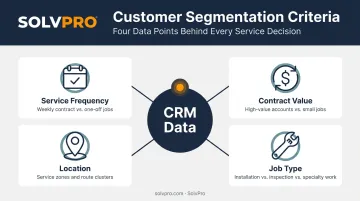
Not every customer needs the same message. Segmenting by job type, service frequency, contract value, or location lets a business treat a five-year commercial client differently than a one-time residential call.
Common segmentation angles include:
- Service frequency: weekly contract clients vs. one-off jobs
- Contract value: high-spend accounts that justify proactive check-ins
- Location: grouping by route or region for scheduling efficiency
- Job type: recurring maintenance vs. emergency repair customers
This isn't a nice-to-have. Mailchimp's analysis of over 9 million recipients across 11,000 segmented campaigns found segmented outreach produced 14.31% higher open rates and 100.95% higher click rates than non-segmented messages from the same senders.
Automate Communication Without Losing the Personal Touch
Appointment reminders, job status updates, and follow-ups can run on autopilot, but only if they still sound like they came from a human who knows the customer's history.
The engagement gap between personalized and generic messages is stark. OneSignal's 2024 engagement analysis covering 500,000+ apps reported 344% higher engagement for personalized messages compared to generic ones.
Automation done well references the actual job: "Your quarterly HVAC filter check is scheduled for Thursday" beats "You have an appointment."
Track Every Interaction Across Channels in Real Time
A customer shouldn't have to repeat their issue because the person who took the call didn't log it anywhere. Omnichannel tracking means calls, texts, emails, and site-visit notes all land in the same customer timeline.
That matters most during handoffs. Whoever picks up the phone next, whether it's the original rep or someone covering a shift, sees exactly where the conversation left off. No guesswork, no "let me check with my colleague and call you back."
Use Historical Data to Anticipate Needs Proactively
Job history isn't just a record. It's a forecasting tool. A CRM that tracks past service intervals can flag when a customer is due for maintenance before they call in with a problem.
This shifts the business from reactive to proactive:
- Predictive follow-ups after a job wraps
- Seasonal maintenance reminders tied to past service dates
- Outreach before a warranty or contract renewal date
Fewer surprises for the customer usually means fewer repeat complaints and fewer missed jobs for the business.
Extend Personalization to the Field, Not Just the Office
Here's where most personalization efforts fall apart: the office has all the context, and the technician in the truck has none of it.
True personalization means a crew member pulling into a driveway already knows the customer prefers text updates, has a dog that needs to stay inside, and had an issue with the last invoice. Platforms like SolvPro are built around this exact gap. Field crews get mobile access to job notes, customer preferences, and communication history from the same record the office uses, so a technician shows up already informed instead of starting cold.
That mobile access includes site-specific instructions, complete job history, and real-time status updates, whether the crew member is working in English or Spanish through SolvPro's fully bilingual interface.
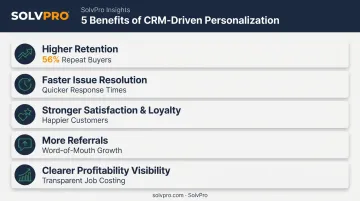
Why Personalization Matters: Key Benefits of CRM-Driven Customer Service
Personalization isn't a soft metric. It directly impacts revenue, customer retention, and word-of-mouth growth.
- Higher retention and repeat business. Twilio Segment's State of Personalization Report found 56% of consumers said they'd become repeat buyers after a personalized experience, a 7% jump from the prior year.
- Faster issue resolution. When reps and technicians see full history instead of starting from scratch, calls get shorter and fixes get more accurate on the first try.
- Stronger satisfaction and loyalty. Customers who feel recognized stick around longer and spend more per visit. Customers treated like a ticket number look elsewhere.
- More referrals. Word-of-mouth remains the backbone of local service businesses, and recognition-driven service is a common trigger for recommendations.
- Clearer profitability visibility. Job costing tied to customer records helps a business see which accounts actually deserve extra attention, and which ones are costing more than they're worth.
What Businesses Need Before Personalizing Customer Service With CRM
Personalization isn't a feature you flip on. It requires groundwork.
- Clean, deduplicated data. A CRM full of duplicate contacts and outdated addresses will personalize the wrong thing to the wrong person.
- Team-wide buy-in. Office staff and field crews both need to actually use the data during real interactions instead of defaulting to memory or a sticky note.
- Mobile and bilingual access. If crews can't view or update customer information from a job site, in whatever language they work in, personalization stops at the front door.
Businesses that skip these steps end up with a CRM that looks good in a demo but doesn't change how customers actually get treated.
Common Mistakes That Undermine CRM Personalization
Even well-intentioned CRM rollouts go sideways in predictable ways.
- Over-automating everything. Robotic automated messages defeat the purpose. Gartner's 2024 survey of 5,728 customers found 64% would rather skip AI in customer service, and 53% would switch companies over heavy AI use—the top complaint being no way to reach a human.
- Letting data go stale. Duplicate records and outdated contact info create contradictory interactions: one rep sees an old address, another sees the new one.
- Treating personalization as office-only. If field crews can't see the same customer notes and history as the office, the customer experience breaks the moment a technician walks through the door.
Conclusion
CRM-driven personalization works when three things line up: clean data, trained teams, and shared access between the office and the field. Miss any one of those, and the effort falls apart.
Most personalization failures stem from disconnected systems, where customer insight exists somewhere in the business but never reaches the person standing in front of the customer.
For growing service businesses, that's exactly the gap an all-in-one platform like SolvPro is built to close. It keeps customer data, scheduling, and field crew visibility in one place, without the complexity or price tag of enterprise software.
Frequently Asked Questions
How does CRM help with customer service?
CRM centralizes customer history, communication logs, and preferences into one record. Reps and technicians can then respond faster and more accurately instead of piecing together context from memory.
Why is personalization important in CRM strategy?
Personalization drives loyalty, retention, and satisfaction because it makes customers feel recognized rather than processed like a generic support ticket. That recognition is often what separates a one-time customer from a repeat one.
What are the 7 C's of CRM?
There's no single agreed-upon standard, but a commonly cited version includes customer, cost, convenience, communication, care, competence, and consistency. Together, they describe the pillars businesses aim for in customer relationship strategy.
What is an example of personalized customer service using CRM?
A technician arrives on-site already knowing the customer's past job history, a note about their preferred entry instructions, and how they like to be updated. This extra context transforms a routine visit into a service that feels tailored.
Can small or growing service businesses afford CRM-driven personalization?
Yes. Modern platforms offer SMB-friendly pricing with no long-term contracts, so personalization doesn't require enterprise budgets. SolvPro's plans start at $179/month with no add-on fees for core CRM features.
How do field service businesses personalize customer service beyond the office?
Mobile CRM access lets crews view job notes, customer preferences, and communication history directly from a job site. That means the person doing the work has the same context as the person who booked it.