Introduction
Picture a typical Friday for a contractor: job costs scattered across three spreadsheets, a notebook in the truck with handwritten hours, and QuickBooks that hasn't been updated since last Tuesday. Payroll is due. Nobody's sure which jobs actually made money this month.
Thousands of growing service businesses face this exact scenario every week.
The numbers back it up. Subcontractors waited an average of 56 days after submitting a pay application in 2025, according to Billd's National Subcontractor Market Report, which surveyed more than 800 construction professionals. General contractors, meanwhile, believed payment took closer to 30 days. That gap creates real financial strain.
This guide breaks down what contractor financial management software actually does, the features worth paying for, the different types of platforms on the market, and how to pick the right one for your crew size and budget.
Key Takeaways
- Connects job costing, invoicing, and payments so money doesn't get lost between tools
- Match software to your business size — small crews don't need ERP-level complexity
- Automated invoicing shortens the gap between finishing work and getting paid
- Prioritize QuickBooks Online integration, mobile access, and transparent pricing
What Is Contractor Financial Management Software?
Contractor financial management software is a specialized tool built to track money at the job level, not just the company level. It handles job costing, budgets, invoicing, payments, and project-specific financial reporting in one connected system.
This is different from generic bookkeeping software. General accounting tools record what came in and went out company-wide. They weren't built to answer questions like "did Job #4521 actually turn a profit?"
Why generic accounting tools fall short for contractors:
- No project-specific cost tracking by phase, labor type, or materials
- No connection between what happens in the field and what shows up in the office ledger
- Manual reconciliation between scheduling, time tracking, and billing systems
- Little visibility into whether a job is trending over budget until it's too late
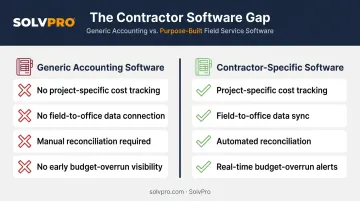
These gaps are exactly why contractor-specific tools exist, and the solutions available range widely — from lightweight invoicing add-ons to sprawling construction ERPs costing tens of thousands of dollars. Most contractors land somewhere in the middle, and that middle ground is where the real decision-making happens. We'll unpack those categories later in this guide.
Key Features to Look for in Contractor Financial Management Software
Not every feature matters equally. Here's what actually moves the needle for a growing service business.
Job Costing & Project-Specific Tracking
Job costing means tracking labor, materials, and subcontractor costs against a specific project or phase, not lumping everything into one general ledger. Construction Executive notes that this project-based comparison of estimated versus actual spending is what separates construction accounting from standard bookkeeping.
Without it, you find out a job lost money weeks after it's finished. With it, you catch the problem while there's still time to adjust.
Invoicing & Payment Processing
Slow invoicing is often self-inflicted. If your billing depends on someone remembering to draft an invoice after a job wraps, you're bleeding days you don't need to lose.
Automated reminders make a measurable difference. Intuit reported that AI-drafted overdue-invoice reminders helped small business users get paid 45% faster than standard reminders sent to the same customers, an average of 5 days sooner.
Built-in payment collection matters just as much:
- ACH and card processing tied directly to the invoice
- Digital signatures so approvals happen on the spot
- Same-day close-out instead of waiting on a mailed check
Budgeting, Estimating & Change Order Management
Phase-based estimating breaks a bid into stages instead of one lump number. That structure makes it far easier to spot scope creep before it eats your margin.
Change orders need documentation, not a verbal agreement in the driveway. A system that tracks change orders in writing, tied to updated cost and payment schedules, protects your bottom line and your relationship with the client.
Reporting & Real-Time Analytics
A dashboard that shows job profitability, overdue invoices, and cash position in real time beats waiting for a month-end report. You want to know today whether a job is running hot, not after it's closed out.
Integration Capabilities
Syncing with your accounting software eliminates duplicate entry, and duplicate entry is where errors creep in. QuickBooks Online integration should be non-negotiable on your shortlist.
Ease of Use, Mobility & Scalability
Field crews won't use software that feels like homework. Look for:
- A mobile app crews will actually open on the job site
- An interface simple enough that office staff aren't retrained from scratch
- Room to add crews and jobs without hitting a pricing or feature wall
Core Benefits of Using Financial Management Software for Contractors
Faster Invoicing and Quicker Payments
Tying invoices directly to completed work, rather than treating invoicing as a separate manual step, shortens your billing cycle immediately. Crews mark a job done, and the invoice goes out the same day instead of the same week.
Clear Visibility Into Job Profitability
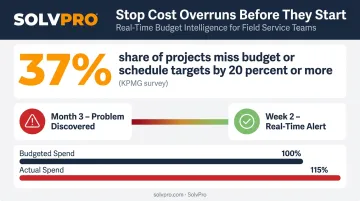
KPMG's 2023 Global Construction Survey found that 37% of respondents had at least one capital project miss its budget and/or schedule target by 20% or more in the prior 12 months, largely due to ineffective risk management.
Real-time cost tracking against budget flags a problem job in week two, not month three. That's the difference between a course correction and a write-off.
Fewer Missed or Delayed Jobs
When scheduling and financial data live in separate systems, double-bookings happen. Connecting the two gives dispatchers the full picture before they book a crew:
- Crew availability and current job assignments
- Job value and priority level
- Payment status and outstanding balances
Less Admin Time, More Field Accountability
Automated reminders, expense categorization, and digital approvals cut hours out of the office team's week. On the field side, geolocation and event tracking (geo-stamped time entries, photos, and notes) create a transparent record of when and where work actually happened.
Reduced Errors and Compliance Risk
Fewer manual entries mean fewer mistakes. Digital contracts with e-signatures and documented change orders reduce disputes. Paper trails that live in a filing cabinet or a truck glovebox don't hold up nearly as well as a searchable digital record.
Types of Contractor Financial Management Software Solutions
Not all platforms serve the same business. Here's how the three main categories break down.
| Category | Best For | Trade-Off |
|---|---|---|
| Standalone accounting (QuickBooks Online) | Basic bookkeeping, invoicing, payroll | Limited project-level job costing depth |
| Full construction ERP (Sage, Procore, Viewpoint) | Large, complex, multi-entity operations | Custom pricing, steep learning curve |
| All-in-one field service platforms (SolvPro) | Growing crews needing job costing + scheduling + payments | Less enterprise configuration than an ERP |
Standalone Accounting Platforms
QuickBooks Online is a solid foundation for general bookkeeping, invoicing, and payroll. Some plans do offer basic project profitability tracking. But it wasn't purpose-built for tracking a job through phases, crews, and change orders.
Full Construction ERPs
Platforms like Viewpoint (which Trimble describes as a fully integrated construction ERP) cover financial management, HR, and resource planning at an enterprise scale. Procore is a broad construction management platform that TechRepublic notes comes with custom pricing and a real learning curve.
These tools make sense for large, complex operations, not for a 6-person crew trying to get invoices out faster.
All-in-One Field Service Management Platforms
This is the middle ground: built-in invoicing, payments, and job costing combined with scheduling and crew management, without ERP-level complexity. SolvPro fits here, with QuickBooks Online sync and NMI payment processing built into the core platform rather than bolted on as a paid add-on.
That means labor hours, material costs, and job profitability sync directly to your books, with no double entry and no extra module fee.
How to Choose the Right Software for Your Business
Start With Your Business Size and Complexity
Match software to the business you have today, not the one you hope to have in three years. A 3-person crew doesn't need multi-entity financial consolidation. Buying for scale you haven't reached yet just means paying for features nobody touches.
Map Your Must-Have Features
Rank your pain points. If invoicing delays are costing you cash flow, prioritize payment processing. If you're guessing at job profitability, job costing moves to the top of the list. Don't buy a platform for features you'll never open.
Evaluate Integration and Onboarding Support
DIY setup with a generic tool can eat days of admin time. Live onboarding support, with a real person walking you through setup, gets you running fast.
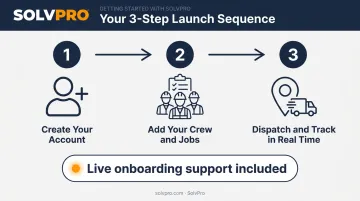
SolvPro's onboarding follows a three-step launch, with live support included at no extra cost regardless of plan tier:
- Create your account
- Add your crew and jobs
- Dispatch and track in real time
Check Pricing Transparency and Contract Flexibility
Watch for:
- Long-term contracts that lock you in before you know if the tool fits
- Features gated behind higher tiers
- Add-on fees that inflate the advertised price
A cancel-anytime policy and flat, predictable pricing matter most when cash is tight, a common reality for growing contractors.
Consider Bilingual and Multi-Crew Needs
If your field crews communicate primarily in Spanish, a bilingual interface is an operational necessity, not an optional add-on. SolvPro offers a fully bilingual English/Spanish experience across its mobile app, web dashboard, and crew scheduling, with setup completed in under 10 minutes. For multi-crew teams juggling language differences between office and field, that removes a friction point most platforms never address.
Frequently Asked Questions
What is the best financial software for contractors?
It depends on your size. Small to mid-sized crews typically do best with an all-in-one field service platform that combines invoicing, payments, and job costing. Large, multi-entity firms usually need a full ERP.
How much does contractor financial management software typically cost?
Pricing varies widely, from affordable monthly SMB plans (often under $250/month) to enterprise ERP implementations that can run into five or six figures with setup and training. Always calculate total cost, not just the sticker price.
Can contractor financial management software integrate with QuickBooks?
Most modern platforms offer native QuickBooks Online sync. SolvPro includes this as a core feature across every pricing tier, with no add-on fees, supporting job costing and one-click report exports.
What is job costing and why does it matter for contractors?
Job costing tracks all costs tied to a specific job, including labor, materials, and overhead, so you can compare estimated versus actual spending. Without it, you're guessing at which jobs are actually profitable.
How do I switch from spreadsheets to financial management software?
Start with your core workflows first: invoicing and job tracking. Migrate historical data carefully, then train your team in phases rather than flipping every process at once.
Is contractor financial software different from general accounting software?
Yes. Financial management software adds project-level tracking, field mobility, and job costing: capabilities generic accounting tools typically don't offer out of the box.