Trade contractors deal with a specific set of headaches: crews showing up to the wrong address, invoices sitting untouched for weeks, and zero visibility into which jobs actually made money. A 2022 Dodge Data & Analytics survey of 537 specialty contractors found average annual profit margins around 21%, with roughly 5% eroded during construction itself.
This guide breaks down the features trade contractors should actually prioritize — not the generic project management checklist built for a general contractor running one massive job at a time.
Key Takeaways
- 32% of project revenue vanishes into unbilled or unpaid change orders for specialty contractors
- Real-time scheduling and geolocation tracking cut down on double-bookings and no-shows
- Automated invoicing and integrated payments speed up payment after job completion
- Mobile-first tools matter more than desktop dashboards since field work happens away from a desk
- Bilingual support reduces training friction on mixed-language crews
Why Trade Contractors Need Purpose-Built Software
Most construction management platforms were built with large general contractors in mind — companies running one enormous project with dozens of subcontractors, RFIs, and submittal chains. That's a different world from a five-person plumbing crew running six service calls a day.
Trade contractors face a different operational reality:
- Mobile crews working multiple job sites in a single shift, not one crew on one site for months
- Tighter margins that don't leave room for wasted admin hours
- Smaller administrative teams, often just one office person managing scheduling, invoicing, and customer calls
- Constant schedule changes as jobs get added, canceled, or rescheduled same-day
Software built for enterprise general contractors tends to bring enterprise problems: multi-week implementation timelines, IT-dependent setup, and features nobody on a ten-person crew will ever touch.
SolvPro's founders built the platform after living this firsthand: double-booked jobs, crews calling in for information that should've already been there, paperwork lost in the shuffle between the truck and the office.
For trade businesses, a simple system is the one crews actually use on the job.
Scheduling, Dispatching & Crew Accountability Features
When a crew is bouncing between four job sites in one day, a shared spreadsheet or a string of text messages puts the whole day at risk. Digital scheduling tools reduce the double-bookings and missed appointments that come from juggling paper calendars and phone calls between multiple people.
Crew Accountability Without Micromanaging
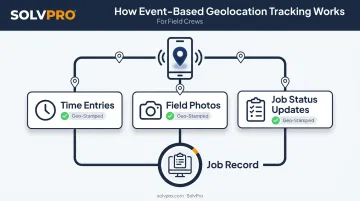
Knowing a crew is scheduled somewhere and knowing they actually showed up are two different problems. That's where event-based geolocation tracking comes in.
SolvPro's approach geo-stamps activity as it happens:
- Stamps time entries with location data the moment a crew member clocks in
- Tags field photos with location data confirming where and when they were taken
- Anchors job status updates (started, in progress, finished) to location automatically
This creates a transparent record between office and field without requiring a supervisor to call and check. The system documents crew activity on its own, so no one needs to watch over anyone's shoulder.
Automated Notifications Cut Down on No-Shows
Manual reminders fall through the cracks. Automated notifications sent to both crews and customers reduce the "did anyone tell them we're coming?" scramble that eats up office time. When crews get real-time job assignments and status updates pushed directly to their devices, and customers get automatic confirmations, fewer calls come in asking where the technician is.
Job Costing, Invoicing & Payment Processing Features
Ask most trade contractors which jobs made money last quarter, and you'll get a guess, not an answer. Without job-level cost tracking, profitable work and money-losing work look identical on paper.
Accurate job costing means tracking labor and material costs at the job level, not just at the company level. SolvPro's time tracking captures hours by job and by crew member in real time, while material tracking lives inside the same digital work order. Office staff can see exactly what a job cost, not just what it billed.
Getting Paid Faster
Payment delays are one of the biggest cash flow killers in construction. A 2022 Levelset survey of 519 U.S. construction companies found fewer than 40% were usually paid within 30 days, and only 12% said they always got paid on time. Average days sales outstanding sat around 90 days.
Automated invoicing shortens that gap by sending invoices the moment a job closes, not whenever someone gets back to the office. Integrated payment processing closes the loop further:
- Card and ACH payments accepted directly through the platform (SolvPro's NMI integration supports both, with no extra processing tier)
- QuickBooks Online sync that pushes job costs, invoices, and labor hours into accounting automatically, so nothing gets entered twice
- Job profitability visibility, showing which crews, job types, or clients generate the strongest margins over time
Field-to-Office Communication & Mobile Access Features
Decision-critical work happens at the job site, not behind a desk. A 2021 Service Council survey of more than 725 field technicians found that 99.5% used mobile devices for field work. Software that treats mobile as an afterthought is solving the wrong problem.
Centralized Messaging Replaces the Text Message Pile-Up
Scattered texts, missed calls, and paper work orders all lead to the same outcome: someone loses information. Centralized digital work orders fix that by keeping notes, photos, change orders, and status updates in one place both crews and office staff can see. Crew leads and office staff see the same job history, cutting down duplicate calls and missed handoffs.
Photo and Document Capture From the Field
Before/after photos and signed work orders reduce disputes and protect both the crew and the customer. Field teams can:
- Capture photos and notes on-site
- Collect digital sign-off from customers
- Attach everything directly to the job record, geo-stamped for accuracy
Bilingual Interfaces Reduce Training Friction
Many field crews communicate primarily in Spanish, and software built English-only creates a training gap from day one. SolvPro's platform, including the mobile app, scheduling tools, and customer communications, runs fully in English and Spanish, so language never slows down adoption.

Estimating, Documentation & Profitability Reporting Features
Winning the bid is only half the job. How that bid is built, presented, and stored afterward matters just as much.
Phase-based estimating lets contractors break a complex job into stages (site prep, installation, finishing work) rather than one lump-sum number. Each phase can carry its own labor and material costs, giving both the contractor and the customer a clearer picture of how the project is structured.
Customer-facing PDF proposals turn that phased estimate into something polished enough to close the deal faster. Once approved, features like SolvPro's digital signature and instant estimate-to-job conversion mean there's no re-entering data once the customer says yes.
Documentation doesn't stop at the bid. Centralized storage for change orders, notes, images, and job history keeps records:
- Organized by job, not scattered across email threads
- Available instantly if a dispute or audit comes up
- Tied directly to the original estimate and work order
That same job history feeds directly into profitability reporting, turning stored records into real-time financial insight. Job costing tools compare estimated labor, material, and subcontractor costs against actual spend as the work happens, flagging which phase is cutting into margin before the final invoice goes out.
For each job, contractors can see:
- Budgeted cost versus actual cost by phase
- Profit margin as a percentage while work is still in progress
- Which crews or phases are running over budget
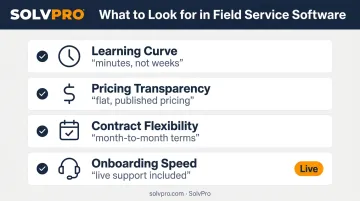
How to Choose the Right Software for Your Trade Business
Not every platform built for construction fits a trade contractor's day-to-day. A few evaluation criteria matter more than a long feature list.
- Check the learning curve. If your crew needs a week of training to log a time entry, that's a red flag. Look for setup that takes minutes, not weeks.
- Demand pricing transparency. Look for flat, published pricing rather than "contact sales" for every tier. SolvPro's Starter plan runs $179/month for up to 3 users, with Growth starting at $228/month for 4 users.
- Avoid long-term contracts. Month-to-month terms let you walk away if the software doesn't deliver.
- Test onboarding speed. Live onboarding assistance — not a 40-page help doc — tells you how fast your team will actually start using it.
Capterra's 2024 Tech Trends Report found 58% of software buyers regretted at least one purchase in the prior 12–18 months. A short trial period and a real conversation with the support team before signing up go a long way toward avoiding that outcome.
Frequently Asked Questions
What are the basic features provided in project management software?
Most platforms include scheduling, job or task tracking, document management, mobile access, and reporting. The depth of each feature varies significantly by platform and target industry.
What is construction management software for trade contractors?
It's software designed for trade-specific businesses to manage scheduling, crews, job costing, and invoicing across multiple concurrent jobs, rather than one large project at a time.
Is construction management software different for trade contractors than for general contractors?
Yes. Trade contractors typically need stronger crew scheduling, job costing, and mobile field tools, while GC-focused software often emphasizes document control, RFIs, and submittals for large single projects.
How much does construction management software cost for small trade businesses?
Pricing varies widely by platform and feature tier. Transparent, published pricing without long-term contracts is worth prioritizing. SolvPro's Starter plan, for example, starts at $179/month for up to 3 users.
Can construction management software integrate with accounting tools like QuickBooks?
Many platforms offer this, including SolvPro, which includes a built-in QuickBooks Online sync across all pricing tiers to eliminate duplicate data entry between job and accounting records.
How long does it take to set up construction management software?
Modern platforms are built for fast onboarding. SolvPro, for example, allows businesses to create an account and start dispatching jobs in under 10 minutes, with live onboarding support included.