
Introduction
A crew shows up at 7:15 AM. The owner's rep says they were told to expect work starting at 7:00. Two weeks later, a delay claim lands on your desk, and nobody can prove who was right.
This is exactly what daily reports exist to prevent.
Most contractors still treat daily reporting as a checkbox exercise. Entries get skipped on busy days, filled in from memory a week later, or reduced to one-word notes like "worked on framing." When a dispute, missed delivery, or safety incident happens, those thin records offer little protection.
This guide covers what belongs in a construction daily report, the mistakes that undermine their credibility, and the best practices that keep crews consistent. We'll also look at how digital tools are changing daily reporting for growing general contracting, electrical, plumbing, and landscaping businesses.
Key Takeaways
- Daily reports double as legal records and real-time job visibility tools
- A complete report covers project details, labor, equipment, materials, safety, and photos
- Vague entries and skipped days make a report useless in a dispute
- Digital tools cut reporting time and tie logs directly to scheduling and invoicing
What Is a Construction Daily Report (and Why It Matters)
A construction daily report is a written, dated record of everything that happened on a jobsite that day. It captures who showed up, what got done, the weather conditions, and any issues that came up along the way.
It does two jobs at once:
- Legal record: a contemporaneous account that holds up when disputes or claims arise
- Operational tool: real-time visibility for office staff managing multiple crews across multiple jobs
The financial stakes are real. Arcadis' 2025 disputes report found the average construction dispute value in North America climbed to $60.1 million in 2024, a 40% jump from the year before. Errors and omissions in contract documents remain the leading cause of disputes in the region.

Weak documentation doesn't cause every dispute. But when one lands, a thin paper trail leaves you defending your position with memory instead of evidence.
For general contractors juggling subs, and for electrical, plumbing, or landscaping crews running multiple job sites in a day, consistent reports catch problems early:
- A no-show sub before it delays the next trade
- Missing materials before they stall a whole crew
- Scheduling conflicts before two crews show up to the same site
What to Include in a Construction Daily Report: The Complete Checklist
Trade and project size aside, every solid daily report follows the same core structure. Here's the field-tested version.
Project & Report Information
Every report needs basic identifiers before anything else matters:
- Project name and number
- Date and report number
- Author's name
- Site location
Skip the date or leave authorship unclear, and you've already weakened the report's credibility. If it ever gets pulled into a dispute, the first question is "who wrote this, and when?"
Weather Conditions
A vague "rainy" note doesn't hold up. Record temperature, precipitation, wind, and how conditions affected specific work, checked at more than one point in the day.
This level of detail matters because weather alone doesn't win a delay claim. According to ENR's analysis of weather-related delay disputes, a contractor has to show conditions were unusually severe for that location and season, plus a direct link between the weather and critical work.
Historical NOAA data is often used to prove that severity. Generic weather notes won't hold up next to that standard.
Crew & Labor Activity
Log every worker and subcontractor on site:
- Trade and headcount
- Arrival and departure times
- Total hours worked
This data feeds job costing directly. Comparing budgeted labor hours against actual hours flags overruns while there's still time to fix them, not after the job's already over budget.
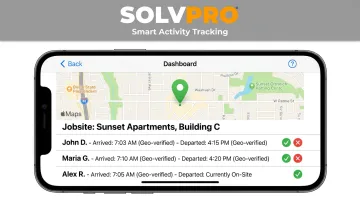
Manually tracking arrival and departure times across multiple crews eats up office hours fast. Tools with event-based geolocation, like SolvPro's Smart Activity Tracking, timestamp crew arrivals and departures automatically. That cuts manual entry and gives office staff a clearer accountability picture without chasing anyone for a start time.
Equipment on Site
Track equipment status (active, idle, down), the rental company if applicable, and hours used. This supports utilization tracking and back-charges when equipment sits idle on someone else's schedule.
Log mechanical issues and repair requests with timestamps too. A machine going down at 10 AM versus 3 PM can matter a lot when you're explaining a delay later.
Materials & Deliveries
Record what arrived, in what quantity, what condition it was in, and who signed for it. Flag anything expected that didn't show up.
Late or damaged deliveries need documentation, not just a mention. That paper trail is often the difference between proving a delay was caused by a supplier versus absorbing the blame yourself.
Work Completed
This is where vague reporting does the most damage. Compare:
- Bad entry: "Worked on framing."
- Good entry: "Framed east wall, units 4–6, second floor. 80% complete."
The second entry answers who did what, where, and with what measurable result. That's the level of specificity that actually holds up months later.
Safety Observations & Incidents
Log toolbox talks, PPE compliance, hazards, near misses, and incidents daily — including days when nothing happened. OSHA's recommended safety program practices call for documenting inspections so employers can verify hazards actually got corrected.
Consistent safety documentation isn't just a compliance box. It builds the loss history that factors into your experience modification rate, which directly affects workers' comp premiums over time.
Visitors, Inspections & Delays
Log every visitor: owner, architect, inspector, whoever walks the site. Note time in, time out, and any verbal directives they gave.
Then document delays and disruptions:
- Cause
- Duration
- Trades affected
This section is often the single most valuable part of a report in a dispute. A verbal instruction from an architect that never got written down anywhere else can turn into a contested change order fast.
Photos & Documentation
Take timestamped photos of progress, deliveries, and problem areas every day. Photos are the hardest piece of evidence to argue with.
Attach them directly to the report instead of letting them scatter across someone's personal phone. SolvPro geo-stamps photo uploads with the time and location they were taken, so each image ties directly to a specific job and moment, not just a folder of loose files.
Common Mistakes That Make Daily Reports Useless
Even teams that fill out reports every day can undercut their own documentation. Watch for these:
- Being too vague. "Worked on framing" doesn't say who did what, where, or with what result.
- Skipping days or batch-completing from memory. A report written a week later loses its value as a real-time record, and the timeline alone can undermine credibility if challenged.
- Leaving out "boring" days. A rain-out or permit delay still needs a reason logged; an empty day looks worse than one marked "no work, permit pending."
- Not recording verbal directives. A comment from an owner or inspector that's never written down often becomes a disputed change order months later.
Best Practices for Effective Daily Reporting
Getting crews to actually complete reports, and complete them well, comes down to habit and friction, not effort.
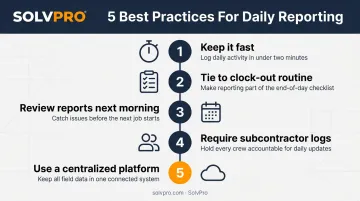
- Keep it fast. Reports should take 10-15 minutes with pre-filled project fields, dropdowns, and photo uploads instead of long written descriptions. The longer it takes, the more likely it gets skipped.
- Tie it to an existing routine. Link report submission to clock-out so it becomes automatic rather than an afterthought at the end of a long day.
- Review reports the next morning. Respond to flagged issues quickly. Reports that sit unread stop getting filled out with any care.
- Require subcontractors to submit their own logs. Independent documentation protects every trade's hours, work, and issues without relying on someone else's memory.
- Use a centralized platform. Disconnected PDFs get lost between the field and the office, and fragmented information already costs crews real time. FMI's survey of nearly 600 construction leaders found respondents lose 14.1 hours per week to non-optimal activities searching for project info and resolving data conflicts.
SolvPro connects daily job logs, crew tracking, and photos in one system, so office staff see real-time job status without calling the field for an update every afternoon.
Paper vs. Digital: Choosing the Right Daily Reporting Tool
Paper reports have obvious limits. They get lost in a truck cab, they're not searchable when you need to find one entry from three weeks ago, and they don't reach the office until someone physically hands them over or scans them in.
Digital reporting fixes most of that:
| Feature | Paper Reports | Digital Reports |
|---|---|---|
| Storage | Physical, easy to lose | Cloud-based, backed up |
| Searchability | None | Searchable by date, job, keyword |
| Office visibility | Delayed by days | Real-time sync |
| Photo attachment | Separate camera roll | Attached directly to report |
| Weather/time logging | Manual, often skipped | Logged automatically or in-app |
SolvPro is one example: built for growing service businesses, including general contractors, electrical, plumbing, and landscaping crews, that need simple, mobile daily reporting connected to scheduling and invoicing, without the complexity of enterprise construction software.
The platform includes:
- A fully bilingual English and Spanish experience across the mobile app, job instructions, and crew scheduling
- Setup in under 10 minutes for most businesses
Frequently Asked Questions
What should be in a construction daily report?
A complete report covers project info, weather, crew and labor activity, equipment, materials and deliveries, work completed, safety observations, visitors and inspections, delays, and photos. See the full checklist above for details on each category.
Who is responsible for filling out the daily report?
Typically the site supervisor or foreman handles the main report. Many companies also require each crew and subcontractor to submit their own independent log for their scope of work.
How long should a daily report take to complete?
With a good template or app, 10-15 minutes is the target. Anything longer, and crews start skipping it or filling it in from memory later.
Should subcontractors submit their own daily reports?
Yes. Independent sub reports protect both the general contractor and the subcontractor if a dispute over hours, work, or delays comes up later.
Can daily reports be used as evidence in disputes?
Courts treat same-day reports as credible business records in claims and litigation, provided someone with firsthand knowledge made them as part of regular practice.
What's the difference between a daily report and a daily log?
Most contractors use the two terms interchangeably to describe the same thing: a daily, dated record of jobsite activity. There's no meaningful distinction in standard industry usage.