Many firms struggle with the same root problem: they pick software built for someone else's workflow. A tool designed for design documentation won't help a foreman track crew hours in the field, and a jobsite app won't handle fee-based billing for a five-person architecture studio. In a 2025 Dodge Construction Network study of more than 1,100 construction owners and contractors, 77% of highly skilled, optimized software users reported increased profit margins and stronger leadership productivity—but that benefit only shows up when the tool actually fits how the team works.
This guide breaks down the best options for both sides of the AEC world, so you can match the software to your actual job, not just the category.
Key Takeaways
- Architects need time tracking and billing tools; contractors need scheduling and job costing
- Platform fit depends on firm size, workflow phase, and integrations like QuickBooks or CAD/BIM
- SolvPro fits contractor crews, Procore fits large GCs, and Monograph or Paymo fit architects
- Test free trials first: feature lists rarely show how software feels day to day
Overview of Project Management Software for Architects & Contractors
At its most basic, this software centralizes tasks, schedules, documents, budgets, and communication so office and field (or studio) teams stop working from five disconnected systems. That's the theory, anyway.
Adoption has picked up fast. The construction and design software market was valued at $11.0 billion in 2024 and is projected to hit $19.1 billion by 2030, a 10.4% compound annual growth rate.
Firms are buying in because the alternative—spreadsheets, texts, and paper work orders—stops scaling the moment a team adds a second crew or a second project.
Architects and contractors both want organization and accountability, but their daily friction points differ:
- Architects typically struggle with fee tracking and client approvals
- Contractors typically struggle with crew visibility and confirming job completion
That difference drives everything below.
Top Project Management Software for Architects & Contractors
The list below splits into two camps: tools built for design-phase work (architects tracking time, fees, and documentation) and tools built for field-phase work (contractors managing crews, schedules, and job costing). Match the category to your role first, then compare within it.
SolvPro
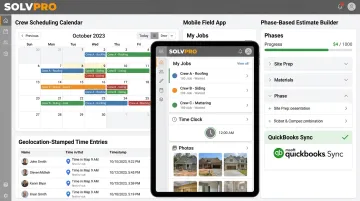
SolvPro is an all-in-one field service and project management platform built specifically for growing contractor businesses (general contractors, electrical, plumbing, landscaping, excavation, and multi-crew teams) rather than enterprise-scale operations with an IT department to manage rollout.
What sets it apart:
- Bilingual English/Spanish interface across the office dashboard, mobile app, and crew scheduling tools
- Event-based geolocation tracking that geo-stamps time entries, photos, and job status updates so office staff can verify work actually happened on-site
- Phase-based estimating with customer-facing PDF proposals, milestone payment schedules, and digital signatures
- Built-in QuickBooks Online sync and NMI payment processing, included in every tier with no add-on fees
- Setup in under 10 minutes, with live onboarding support and no long-term contracts
| Best For | Growing contractor teams needing scheduling, work orders, crew tracking, and faster invoicing in one platform |
| Key Features | Crew scheduling, geolocation-based accountability, phase-based estimating, QuickBooks sync, bilingual support |
| Pricing | Starter plan at $179/month (up to 3 users), Growth at $228/month (4+ users), Scale at custom pricing, with no surprise add-ons and cancel anytime |
Procore
Procore is an end-to-end construction management platform. Its official positioning covers owners, general contractors, and specialty contractors across project sizes, including commercial, civil, healthcare, and residential builds, not just the largest firms in the room.
Its strength is depth: document control, RFIs and submittals, and cost tracking that ties directly to the schedule. That same breadth comes at a cost: smaller teams often find the learning curve steep and the cost harder to justify against a smaller project volume.
| Best For | GCs managing complex, multi-phase commercial builds |
| Key Features | Document management, RFIs/submittals, budgeting, scheduling, reporting |
| Pricing | Custom annual pricing based on company size and Annual Construction Volume |
Buildertrend
Buildertrend targets residential builders and remodelers, combining scheduling, budgeting, and a client communication portal into one system. It's built around the idea that homeowners want visibility—selections, approvals, payments, and messages all live in a portal clients can check without calling the office.
That client-facing transparency is the differentiator. Large-scale commercial coordination isn't the focus, and pricing now requires a consultation rather than a published flat rate.
| Best For | Residential contractors and remodelers needing strong client communication |
| Key Features | Scheduling, budgeting, client portal, change order management |
| Pricing | Custom quote based on company size and goals |
Paymo
Paymo builds around time tracking, project planning, and invoicing—popular with small teams and agencies that bill by the hour, including some smaller architecture practices.
Automated time tracking converts logged hours directly into invoices, which shortens the billing cycle for long design phases. The tradeoff: Paymo organizes collaboration around task comments rather than a dedicated team chat feature.
| Best For | Small teams needing integrated time tracking and client invoicing |
| Key Features | Automated time tracking, project planning/estimation, direct invoicing from timesheets |
| Pricing | Free tier available; paid plans from $9.90 to $23.90 per user/month |
Monograph
Monograph is purpose-built for architecture and engineering firms, merging time tracking, budgeting, and invoicing into project phases: Schematic Design, Design Development, Construction Documents, and Construction Administration.
The payoff is real-time profitability insight: tracked time links directly to phase budgets, so a firm can see it's burning through the CD phase budget before the invoice goes out. The current mobile app supports timers and photo uploads but doesn't allow in-app deletion of entries or sync active timers across devices.
| Best For | AEC firms wanting phase-based budget-to-time tracking visibility |
| Key Features | Phase-based time tracking, budget tracking, invoicing tied to project phases |
| Pricing | Employee-count-based calculator, roughly $25–$490/month billed annually across Track and Grow plans |
Fieldwire
Fieldwire is a jobsite management platform that connects field and office teams through plan viewing, task tracking, and inspections. It's a favorite for contractors coordinating multiple crews on active sites, largely because it works offline and syncs once the connection returns.
The limitation shows up earlier in the project: preconstruction and scheduling depth are lighter than what you'd get from a full construction management suite.
| Best For | Contractors needing jobsite task coordination and punch lists |
| Key Features | Plan viewing, task tracking, inspections, custom forms/reports |
| Pricing | Free plan for up to 5 users; paid plans from $39/user/month (Pro) up to $89/user/month (Business Plus), billed annually |
How We Chose the Best Project Management Software
The most common mistake in this category is choosing based on brand popularity or generic feature lists instead of asking one question first: is the daily workflow design-phase or field-phase? Those two answers point to completely different tools.
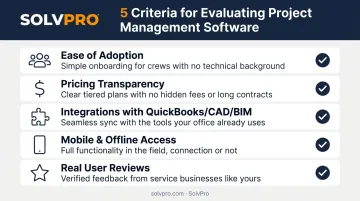
We weighed:
- Ease of adoption in the studio or on the jobsite: can a crew lead or project architect actually use it without weeks of training?
- Pricing transparency: published tiers versus custom quotes that require a sales call
- Integrations with accounting platforms (QuickBooks) and design tools (CAD/BIM)
- Mobile and offline access, since field crews can't wait for a signal to log an update
- Real user reviews, not just vendor marketing pages
Every factor ties back to two outcomes that actually matter: less admin time and faster payments. In 2023, Dodge found that 53% of surveyed general contractors still weren't using technology for most of their project management processes, a gap that's shrinking, but slowly. The firms closing it fastest are the ones matching software to workflow, not just buying whatever's popular.
Conclusion
The best project management software depends on your firm's biggest bottleneck, not a single universal winner. For design precision and fee billing, look at Monograph or Paymo. For crew accountability and faster invoicing, look at SolvPro or Fieldwire.
Before committing, run the free trial and confirm pricing stays predictable as you scale. Also check that integrations you already rely on (QuickBooks, CAD, payment processing) work out of the box.
If scheduling, crew tracking, and invoicing are the daily headache, SolvPro's free setup takes under 10 minutes. Live onboarding support comes standard, with no credit card and no long-term contract needed.
Frequently Asked Questions
What software do architects and contractors use for project management?
Architects commonly use tools focused on time tracking, billing, and design collaboration, such as Paymo or Monograph. Contractors typically favor field-first platforms like SolvPro, Procore, or Fieldwire for scheduling and crew management.
What's the difference between project management software for architects and for contractors?
Architect-focused tools emphasize design phases, fee tracking, and client approvals. Contractor tools prioritize field scheduling, crew accountability, and job costing tied to actual work performed on-site.
Can one platform work for both architecture and construction teams?
Some platforms, like Procore, bridge both worlds by connecting field and office workflows. Most firms still get better results pairing a design-focused tool with a field-focused one like SolvPro.
What features should contractors look for in project management software?
Look for crew scheduling, geolocation-based accountability, fast invoicing, QuickBooks integration, and mobile access. These directly reduce admin time and speed up payment collection.
How much does project management software for architects or contractors typically cost?
Based on publicly listed vendor pricing pages, tiers commonly range from about $9 to $65 per user/month, with buyer budgets often landing between $20 and $40 per user/month. Enterprise tools like Procore require custom, volume-based quotes.
Is field service management software suitable for general contractors and specialty trades?
Yes. Platforms like SolvPro are built specifically for GCs, electrical, plumbing, landscaping, and excavation crews that need scheduling, dispatch, and payment tools in one place—without enterprise-level complexity.