Labor costs aren't making this easier. Construction industry compensation rose 3.2% and wages climbed 3.1% in the 12 months ending March 2026, according to Bureau of Labor Statistics data. Every hour of unverified labor costs more than it did last year.
GPS field service tracking often gets pitched as a nice-to-have, a dot on a map. But its real value shows up in daily decisions: who gets paid for what, which crew gets dispatched next, and whether a job actually made money. This article breaks down why that matters in practice, not just in theory.
Key Takeaways
- Real-time GPS data replaces guesswork with a timestamped, verified work record
- GPS tracking strengthens accountability, scheduling efficiency, and payroll accuracy
- Skipping it means inflated labor costs, disputed hours, and reactive scheduling
- Value depends on consistent use paired with scheduling and invoicing tools
What Is GPS Field Service Tracking
GPS field service tracking uses location data from smartphones or vehicle devices to record where crews are and when, tied to specific job assignments. This tracking activates at specific moments: clock-in and clock-out at a job site, travel between stops, and confirmation of arrival or departure on a work order, rather than running as a passive map all day.
Trades like HVAC, electrical, plumbing, and landscaping use it the same way, regardless of what's on the truck. A crew clocks in at a job address, the system logs the location and timestamp, and that record attaches to the work order.
That record keeps the focus on three things office staff already care about, not surveillance for its own sake:
- Accurate scheduling — knowing which crews are actually available, not just which ones are supposed to be
- Clean payroll — hours worked matching hours paid
- Reliable job costing — labor time tied to the job it was spent on
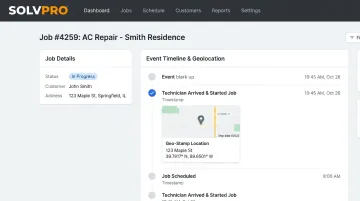
SolvPro's platform, for example, uses event-based geolocation tracking, meaning the platform captures location data at specific triggers like time entries, photo uploads, and job status changes rather than running continuously in the background. That distinction matters both for privacy and for keeping the data relevant to actual work.
Key Advantages of GPS Field Service Tracking for Workforce Management
These advantages aren't abstract productivity claims. They tie to metrics your office already tracks: labor cost, payroll disputes, and crew utilization. Each one maps to a decision someone on your team makes every single day.
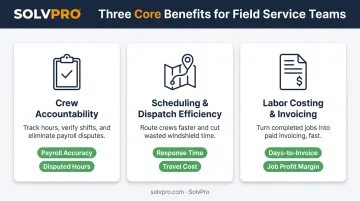
Stronger Crew Accountability & Fewer Disputes
GPS tracking creates an objective, timestamped record of when and where each crew member clocked in, arrived, and departed a job site. Instead of relying on memory or a handwritten timesheet, office staff have a verified log.
Event-based tracking, tied to specific work orders rather than continuous monitoring, gives businesses proof of work without making crews feel like they're being watched around the clock. A time entry gets geo-stamped. A photo upload gets geo-stamped. That's it.
Why this matters: An objective record cuts down on "he said/she said" disputes over hours worked or whether a job wrapped up on time. The U.S. Department of Labor requires employers to keep complete and accurate records of hours worked (Fact Sheet #21), and location-verified timestamps make that recordkeeping far less prone to argument.
KPIs impacted:
- Payroll accuracy
- Disputed hours
- On-time arrival rate
- Customer complaint rate
This advantage carries the most weight for multi-crew operations, subcontractor-heavy teams, or any business billing hourly, where trust gaps get expensive fast.
Improved Scheduling & Dispatch Efficiency
Location data lets office staff see which crew is closest or available for a same-day job or an emergency call. Instead of guessing who's "probably near there," dispatch decisions get made off real information.
Real-time location feeds directly into dispatch, cutting windshield time and enabling smarter route assignment across multiple job sites at once. Fewer wasted miles, fewer missed windows.
Why this matters: A McKinsey case study on service productivity documented a coverage-area optimization model that cut average drive time by 30% for a field service operation. That's not a universal benchmark, but it shows what's possible when location data actually informs dispatch instead of sitting unused.
KPIs impacted:
- Jobs completed per day
- Response time
- Travel and fuel cost
- First-time fix rate
This matters most for businesses running multiple simultaneous job sites, offering emergency or on-call service, or scaling crews faster than their scheduling process can keep up.
Accurate Labor Costing & Faster Invoicing
Location-verified time data ties directly to job costing. Billed hours match hours actually worked on-site, not an estimate reconstructed after the fact.
Connecting GPS data to work orders and invoicing removes manual timesheet reconciliation from the office workload. In SolvPro, time entries are geo-stamped and tracked by job and crew member, which feeds directly into job costing and analytics, then syncs with QuickBooks Online without re-entering a single number.
Why this matters: This gives clearer visibility into job profitability and shortens the gap between job completion and invoice delivery. When paperwork doesn't have to travel back to the office before billing starts, invoices go out the same day a job wraps.
KPIs impacted:
- Days-to-invoice
- Job profit margin visibility
- Admin hours per week
The payoff is biggest for businesses scaling past a handful of crews, or anyone protecting margins on time-and-materials work where a missed hour is a missed dollar.
What Happens When GPS Tracking Is Missing or Ignored
Without location data tied to jobs, the problems don't stay hidden for long. They show up in the numbers office staff already watch closely.
- Disputed records: Inconsistent accounts of hours worked and whether jobs finished on time
- Payroll errors and time theft: Going unnoticed without a verified check against the clock
- Reactive scheduling: Last-minute assignments instead of proactive planning
- Rising costs: Labor and fuel spend climbing from undocumented, inefficient routing
- Scaling problems: Losing field visibility the moment you add crews beyond what one person can track by memory
None of these show up overnight. They accumulate. A missed job here, a disputed timesheet there. Eventually the office is spending more time chasing information than acting on it.
How to Get the Most Value from GPS Field Service Tracking
Tracking only pays off when it's applied consistently. Turning it on for some jobs and skipping others means payroll and costing data stays unreliable, which defeats the purpose.
A few practices make the difference:
- Apply tracking to every job or work order, not just the ones that seem worth the effort
- Review outcomes regularly, comparing job duration against estimates and tracking attendance trends before a dispute forces you to look
- Act on the insights, not just store them
That third point is where most businesses fall short: location data sitting in a log doesn't help anyone. It has to connect to scheduling and invoicing to actually change decisions.
SolvPro connects event-based geolocation tracking with job scheduling and QuickBooks-synced billing so that a geo-stamped time entry doesn't just sit in a report. It flows into the schedule, the job cost, and the invoice. Location data turns into a faster decision instead of a stored log nobody opens until something goes wrong.
Conclusion
GPS tracking's real value for workforce management comes down to two things: control and consistency across scheduling, payroll, and job costing. The value shows up in the record that holds up when hours get questioned or a job runs long.
These advantages compound as crews grow, particularly when tracking is built into one platform rather than bolted onto three different tools that don't talk to each other.
If your office is still reconciling timesheets by hand or dispatching based on who answered the phone first, now is the time to evaluate where your visibility gaps actually are.
SolvPro combines geolocation tracking with scheduling and invoicing in one platform. It sets up in under 10 minutes and comes with no long-term contract, so testing it out doesn't require a leap of faith.
Frequently Asked Questions
Do workforce management systems use GPS field service tracking?
Most modern workforce management platforms include GPS tracking as a core feature. It's usually tied to clock-in and clock-out events and job assignments rather than continuous surveillance.
What is the primary benefit of GPS field service tracking for workforce management?
The primary benefit is verified visibility into crew location and time worked. That directly improves accountability, payroll accuracy, and scheduling decisions.
Is GPS tracking legal for tracking field employees?
GPS tracking is generally legal when limited to work hours, disclosed to employees, and used for legitimate business purposes. State and local rules vary, so confirm requirements where your crews operate.
Does GPS tracking monitor employees outside of work hours?
Well-designed systems, especially event-based tracking, only capture location during active work events like clock-in or a job status change. Personal time outside those events isn't tracked.
How does GPS tracking improve payroll accuracy?
Location-verified timestamps remove guesswork from hours worked. That reduces disputes and ensures pay matches actual time spent on-site.
Will GPS tracking hurt employee trust or morale?
It can, if it feels like surveillance. Employees often view monitoring as intrusive when it feels hidden or excessive. Transparency about what's tracked, and limiting it to job-related events, helps maintain trust while still improving accountability.