The CRM you choose affects more than convenience. It determines how fast you get paid on a claim, whether your crews stay accountable on-site, and whether that 2 a.m. emergency call actually reaches someone.
This guide breaks down the top CRM options for restoration contractors, from insurance-heavy specialized platforms to simpler, all-in-one alternatives, and helps you match the right one to your business size and workflow.
Key Takeaways
- Restoration CRMs range from insurance-focused platforms (DASH) to enterprise systems (ServiceTitan) to simpler field service tools (SolvPro)
- Your best fit depends on insurance-claims vs. cash-pay revenue and how many crews you coordinate
- Prioritize scheduling, crew tracking, job costing, and fast invoicing as baseline needs
- Bilingual support matters more than most buyers expect, especially with mixed-language field crews
- Pricing structures vary widely, from published monthly plans to custom enterprise quotes
Overview of CRM Software in the Restoration Industry
A CRM for restoration contractors centralizes customer data, job details, crew schedules, and communication so mitigation and reconstruction work stays organized from the first call to the final invoice. Instead of juggling spreadsheets, texts, and paper work orders, everything lives in one system that both the office and the field can access.
That kind of organization matters more every year, since restoration is a substantial and growing slice of the home services economy. The U.S. damage restoration services market reached $7.2 billion in 2025, growing 1.9% that year with a 4.0% compound annual growth rate since 2020, according to IBISWorld's market size analysis. That growth means more competition, and more pressure to run a tighter operation.
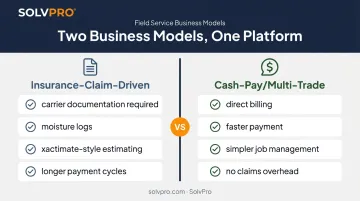
Restoration companies generally split into two camps: insurance-claim-driven businesses that need carrier documentation, moisture logs, and Xactimate-style estimating support, and multi-trade or cash-pay contractors who need straightforward job management without the claims overhead. This distinction drives everything else.
A company writing detailed scope-of-loss reports for adjusters has different software needs than a crew doing direct-pay mold remediation for homeowners. Below, we compare specialized restoration platforms alongside simpler, more cost-effective alternatives built for growing crews.
Top CRMs for Restoration Contractors
We evaluated each platform on five factors: how easily field crews adopt it, depth of scheduling and job tracking, insurance documentation capability where relevant, pricing transparency, and support for growing multi-crew operations.
SolvPro
SolvPro is an all-in-one field service management platform built for growing service businesses with crews in the field. It combines scheduling, work orders, crew tracking, and payments into one system, without the enterprise-level complexity that comes with platforms designed for national franchise operations.
What makes it stand out for restoration and multi-trade contractors:
- Fully bilingual English/Spanish interface for office admin tools and the field crew mobile app, not just translated menus
- Event-based geolocation tracking that geo-stamps crew actions (time entries, photo uploads, job updates) for verifiable accountability
- Phase-based estimating with customer-facing PDF proposals and milestone payment schedules for staged jobs
- QuickBooks Online sync built into the core platform, covering labor hours, job costing, and financial data
- Setup in under 10 minutes, backed by live onboarding support rather than a chatbot
| Pricing | Starter: $179/mo (up to 3 users) • Growth: $228/mo base (4 users, +$49/additional user) • Scale: custom pricing (unlimited users). No long-term contracts, cancel anytime. |
| Key Features | Scheduling, work orders, crew geolocation tracking, phase-based estimating, QuickBooks sync, NMI payment processing (card and ACH) |
| Best For | Growing restoration and multi-trade contractors who want simplicity and bilingual support without insurance-claim-heavy overhead |
DASH (by Next Gear Solutions)
DASH is a restoration-industry-specific platform built around mitigation-to-reconstruction workflows. It's widely used by insurance-claim-driven companies that need to produce detailed documentation for carriers.
DASH centralizes water-loss records through its MICA and Mitigate tools, tracking moisture-content readings, daily drying updates, and equipment run times. Field crews can assign or scan equipment by location using MICA Mobile, syncing changes back to the office in real time. DASH also maintains an active data connection to XactAnalysis, letting claim assignments and information flow between systems.
That kind of record-keeping matters because the IICRC S500 standard requires documentation like drying logs, moisture-migration boundaries, and equipment placement, exactly the fields DASH is built to capture.
| Pricing | Custom quote; public per-user pricing is not disclosed |
| Key Features | Moisture and water-loss logs, equipment tracking, XactAnalysis integration, job-stage tracking from first notice to closeout |
| Best For | Insurance-heavy restoration companies with dedicated admin staff to manage documentation workflows |
ServiceTitan
ServiceTitan is an enterprise field service platform with restoration-specific features layered onto its core dispatching and marketing analytics tools. It's built for scale, which means more configuration and a longer ramp-up than simpler platforms.
Its Marketing Pro module tracks impressions, booked jobs, and marketing ROI down to the campaign level. Dispatch Pro matches technicians to jobs based on skill and profit potential, while Map 2.0 handles route optimization and real-time GPS tracking.
A Xactimate integration exists but remains in private preview with a waitlist, so it's not yet generally available. ServiceTitan implementation typically runs 12 to 16 weeks, covering discovery, configuration, training, and go-live support.
| Pricing | Custom, per-technician quote (Starter, Essentials, and The Works tiers); no public numeric rate disclosed |
| Key Features | Marketing Pro analytics, GPS dispatching, restoration modules, general forms and job history tracking |
| Best For | Large, multi-location restoration companies ($5M+ revenue) or multi-trade operations with dedicated implementation resources |
Xcelerate
Xcelerate is a restoration-first job management platform focused on end-to-end job visibility, from first call through final invoice. It's purpose-built for restoration workflows rather than retrofitted from a general field service tool.
The platform covers job intake, assessment, scheduling, production tracking, estimating, and closeout in one flow. Field users can capture photos, videos, and moisture logs, even offline, and dashboards show real-time job progress alongside projected-versus-actual margins. Xcelerate launched an active XactAnalysis integration in March 2026, automating claim flow and syncing notes, documents, and photos between systems.
| Pricing | Custom quote; monthly price and setup fee not publicly disclosed |
| Key Features | End-to-end job tracking, mobile documentation capture, live job status dashboards, XactAnalysis integration |
| Best For | Restoration-only companies scaling past disorganized, spreadsheet-based operations |
Jobber
Jobber is a general-purpose field service CRM popular with small restoration and home service teams that want fast setup without a steep learning curve.
Its restoration page covers quoting with line items, automated follow-ups, online approvals and deposits, scheduling, invoicing, and customer communication. It integrates with QuickBooks Online, CompanyCam, and Zapier. Notably, Jobber's official pages don't list native moisture logging, Xactimate, or XactAnalysis integration, so claim-heavy companies would need a workaround.
| Pricing | Core: $29/mo (annual) or $49/mo (month-to-month) • Connect: $99–$139/mo • Grow: $149–$199/mo • Plus: $399–$499/mo (5 users), per Jobber's published pricing |
| Key Features | Scheduling, quoting, invoicing, client communication, 20+ built-in reports |
| Best For | Small, cash-pay-focused restoration companies without heavy insurance claim volume |
How to Choose the Right CRM for Your Restoration Business
The most common mistake contractors make? Picking a CRM based on brand recognition or a long feature list, rather than matching it to how their business actually gets paid.
A platform loaded with moisture logs and carrier integrations is wasted overhead if 80% of your jobs are cash-pay direct work. The reverse is just as costly.
Run through these factors before you commit:
- Crew size and growth stage: A 3-person crew doesn't need the same system as a 40-tech, multi-location operation. Match the platform to where you are now, plus where you'll be in 12 months.
- Insurance documentation needs: If claims drive most of your revenue, native Xactimate or XactAnalysis connectivity isn't optional.
- Mobile usability for field techs: Clunky apps slow down field documentation, which delays invoicing and delays payment.
- Integration with accounting and payment tools: QuickBooks sync and built-in payment processing cut out double data entry and speed up cash flow.
- Onboarding support: Live setup help matters more than a knowledge base article. On mixed-language teams, bilingual support directly affects adoption, since crew members who can't navigate the app in their preferred language won't use it consistently.
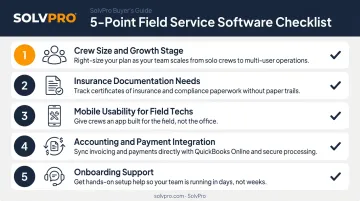
Weigh these five against your actual revenue mix and crew makeup, not against what a competitor down the street uses.
Conclusion
There's no single best CRM for restoration contractors. The right answer depends on whether your business runs on insurance claims or direct-pay, multi-trade work. Insurance-heavy operations need DASH or Xcelerate's documentation depth. Large, multi-location companies with dedicated IT support may justify ServiceTitan's cost and implementation timeline.
Before you sign anything, weigh ongoing costs, scalability, and how easily your crew will actually adopt the platform. Features you'll never use don't add value, no matter how impressive they look on a sales call.
For growing restoration and multi-trade contractors who want scheduling, crew accountability, and faster invoicing without enterprise complexity, SolvPro offers a bilingual, easy-to-adopt platform. You can set it up in under 10 minutes, with real onboarding support included from day one.
Frequently Asked Questions
What is a CRM for restoration contractors?
It's software that centralizes customer data, job scheduling, crew tracking, and communication across the mitigation-and-reconstruction workflow restoration work requires. It keeps the office and field aligned on every job.
What estimating software do most restoration contractors use?
Xactimate is the insurance-industry standard for restoration estimating. Some CRMs, like DASH and Xcelerate, integrate directly with Xactware's XactAnalysis, while others require manual data transfer between systems.
What is the best CRM for a restoration company?
It depends on your business model. DASH or Xcelerate suit insurance-claim-heavy companies, ServiceTitan fits large multi-trade enterprises, and SolvPro or Jobber work well for smaller, growing teams wanting simplicity and affordability.
Does ServiceTitan work for restoration companies?
ServiceTitan offers restoration-specific modules, but its cost structure and 12-16 week implementation timeline make it best suited for large operations, typically $5 million or more in annual revenue.
How much does a restoration CRM cost?
Jobber publishes plans starting at $29/month with annual billing. DASH, ServiceTitan, and Xcelerate require custom quotes, and ServiceTitan prices per technician rather than per company.
What restoration-specific CRM features are most important?
Prioritize moisture and drying documentation, plus crew scheduling with accountability tracking. Insurance carrier integration matters if claims drive your revenue, and mobile-first usability ensures field techs actually use the tool daily.