Introduction
Government agencies and their contractors are drowning in disconnected systems. Citizen records live in one database, contract milestones sit in a spreadsheet, and compliance documentation gets emailed as PDF attachments nobody can find later.
That patchwork approach doesn't scale. U.S. government IT spending is projected to climb 43% over the four-year period following July 2024, according to Gartner's analysis of federal IT spending trends. That's a clear signal: agencies and vendors alike are investing heavily in modernized systems.
The right CRM changes how agencies deliver services and how contractors manage payments, crews, and compliance. This guide ranks the top platforms for 2026, whether you're running a federal case management team or a janitorial crew servicing municipal buildings.
Key Takeaways
- Agencies, prime contractors, and field vendors each require a different CRM approach
- FISMA, FedRAMP, and CMMC compliance are the first filter for agency-facing software
- This guide reviews 6 top government CRM platforms, plus one pick for field service vendors
- Fit your workflow and total cost of ownership first, then worry about brand reputation
What Is a CRM for Government Agencies and Contractors?
A government CRM centralizes relationship data, but what that data represents shifts depending on who's using it:
- Agencies track citizen records, service requests, and case histories
- Prime contractors track opportunity pipelines, proposal status, and post-award contract tracking
This distinction matters more in the public sector than almost anywhere else. Public sector CRM adoption has accelerated alongside digital government mandates and rising contract volume. Federal small business contracting alone reached $273 billion in FY2025, spanning primes and subcontractors working across every agency.
Below, we break down the six platforms best suited to different government-facing roles. A dedicated section follows for the field vendors who actually show up and do the work once a contract is signed.
Key Features to Look for in a Government-Ready CRM
Not every CRM with "government" in its marketing copy is actually built for it. Start with compliance, then move to workflow fit.
Compliance and security requirements:
- FISMA compliance: required for any system handling federal information, with guidance updated as recently as July 2026
- FedRAMP authorization level: Low, Moderate, or High, depending on data sensitivity (Moderate accounts for nearly 80% of authorized cloud services)
- CMMC Level 1: covers Federal Contract Information and requires 15 basic safeguards
- CMMC Level 2: covers Controlled Unclassified Information and requires meeting 110 NIST SP 800-171 requirements
- Data residency: confirmation that data stays within U.S.-based, government-community datacenters
This isn't a formality. A June 2026 GAO report found that 15 of 24 federal agencies reported difficulty obtaining authorized cloud solutions. Certification gaps create real procurement delays, and clearing them is only half the battle — workflow fit determines whether the system actually gets used day to day.
Workflow and integration fit:
- Case management automation that routes and classifies requests without manual triage
- Legacy system integration, particularly with existing accounting or records platforms
- Low-code customization so IT teams aren't rebuilding workflows from scratch every time a regulation changes
Top 6 Best CRM Solutions for Government Agencies in 2026
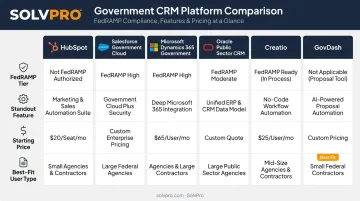
We shortlisted these platforms on four criteria: compliance readiness, workflow fit for citizen or contract data, integration depth, and pricing transparency.
HubSpot
HubSpot works well for smaller agencies and multi-department teams that need contact management and citizen engagement tools without enterprise complexity. It offers a genuinely usable free tier, which matters for budget-constrained departments.
Its differentiator is accessibility: scalable contact management, built-in workflow automation, and SOC 2 Type II security controls, all without requiring a dedicated implementation team. HubSpot doesn't claim FedRAMP authorization, so it's a fit for lower-sensitivity data only.
| Key Features | Pricing | Best For |
|---|---|---|
| Contact/deal pipelines, workflow automation, SOC 2 Type II security | Free tier available; Starter from $15/user/mo; Professional $90/user/mo (annual) | Budget-conscious agencies without high-sensitivity data |
Salesforce Government Cloud
This is the enterprise heavyweight. Salesforce Government Cloud Plus holds FedRAMP High Provisional Authority to Operate, and the Defense variant is authorized for DoD Impact Level 5, meaning physical isolation for unclassified national security systems.
Einstein AI sets it apart, handling automated case classification, AI-generated agent guidance, and bot-driven task automation for routine work. It's built for agencies that need both scale and serious security posture.
| Key Features | Pricing | Best For |
|---|---|---|
| Einstein AI case classification, FedRAMP High, IL5 (Defense variant) | Advanced Enterprise $275/user/mo; Advanced Unlimited $500/user/mo; plus 15-25% government cloud surcharge | Large federal agencies with high-security case management needs |
Microsoft Dynamics 365 Government
If your agency already runs on Microsoft 365, Dynamics 365 Government slots in naturally. It received FedRAMP JAB High P-ATO back in 2018, and its GCC High environment aligns with DISA Impact Level 4, with a DoD-specific tier reaching IL5.
The standout feature is Power Automate, which lets non-developers build custom workflows without waiting on IT. One state agency reportedly cut call center code volume by 90% after migrating case workflows onto the platform.
| Key Features | Pricing | Best For |
|---|---|---|
| Power Automate low-code workflows, GCC/GCC High/DoD environments | Commercial Sales Enterprise from $95/user/mo; government pricing is quote-based and typically higher | Agencies embedded in the Microsoft ecosystem |
Oracle Public Sector CRM
Oracle targets large government bodies managing high case volumes across multiple service touchpoints. It carries FedRAMP High JAB authorization and Impact Level 4 clearance.
Its real-time constituent view pulls case history, service requests, and prior interactions into a single record, paired with audit-ready compliance tracking, useful when your agency faces regular oversight reviews.
| Key Features | Pricing | Best For |
|---|---|---|
| Real-time constituent view, audit-ready compliance tracking, FedRAMP High/IL4 | Oracle Sales ranges from $65 to $300/user/mo | Large agencies with complex, high-volume constituent case management |
Creatio
Creatio serves a different audience entirely: government contractors managing procurement, RFPs, and contract lifecycle work rather than agencies managing citizens. Its no-code design lets non-technical teams build and adjust workflows on their own.
What sets it apart is AI-assisted proposal management combined with contract lifecycle automation, built for compliance-heavy bidding environments where documentation errors are costly.
| Key Features | Pricing | Best For |
|---|---|---|
| No-code workflow builder, AI-assisted proposals, contract lifecycle automation | Freedom $20/user/mo; Enterprise $120/user/mo; Unlimited $500/user/mo | Contractors managing procurement and RFP-heavy bidding |
GovDash
GovDash focuses exclusively on the federal capture-to-contract lifecycle. It automates opportunity discovery straight from SAM.gov and PIEE, then carries that opportunity through proposal development and into post-award tracking via its Contract Cloud module.
Native bi-directional Salesforce sync and SharePoint integration mean it layers onto infrastructure teams already have. Over 300 contractor teams have used it to win billions in combined contract value.
| Key Features | Pricing | Best For |
|---|---|---|
| SAM.gov/PIEE opportunity discovery, native Salesforce/SharePoint sync, CPARS tracking | Custom, quote-based | Federal prime contractors managing capture through post-award |
CRM Considerations for Government Contractors and Field Service Vendors
Here's what the platforms above don't solve for: the vast majority of government facility work isn't done by large primes. It's done by small subcontractors — janitorial crews, electricians, landscapers, and excavation teams — servicing schools, courthouses, and municipal buildings every day.
Federal small business contracting, including subcontracts, hit $273 billion in FY2025, according to the SBA's FY25 small business contracting scorecard. That's a massive volume of work flowing to companies that will never touch a capture management platform.
These vendors don't need proposal automation or opportunity pipelines. They need:
- Simple job scheduling that doesn't require a training manual
- Crew accountability crews can actually use from a phone
- Fast, documented invoicing that meets government payment terms
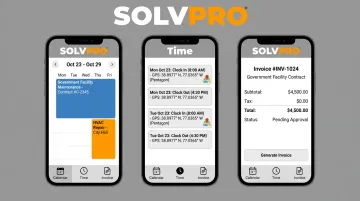
This is where SolvPro fits. Rather than functioning as a GovCon capture tool or competing with Salesforce and GovDash, it's built for the operational side of a service contract once it's already won:
- Event-based geolocation tracking geo-stamps time entries and photos, creating a location-verified record useful for facilities requiring proof of service
- Phase-based estimating with client-facing PDF proposals breaks costs into project phases with milestone payments, matching how institutional maintenance contracts get structured
- QuickBooks Online sync built into every plan moves field-generated invoices and job costs into accounting automatically, speeding up municipal payment cycles
- Bilingual English/Spanish support spans the full platform, not just field screens, matching multilingual janitorial and landscaping crews
- Under 10-minute deployment, with no long-term contracts and cancel-anytime terms — a sharp contrast to multi-year enterprise GovCon implementation cycles
SolvPro doesn't hold or claim FedRAMP, FISMA, or CMMC certifications, and it isn't positioned to replace compliance-heavy capture tools. If you're bidding on federal opportunities directly, you still need GovDash or a comparable platform.
But if you're a subcontractor who's already won the job and needs to run crews, document work, and invoice fast, that's a different problem entirely.
How to Choose the Right Government CRM
Match your choice to your actual role first; everything else comes second.
- Identify your workflow category — agency (citizen/case management), prime contractor (capture and compliance), or field vendor (job/crew execution); mixing these up wastes budget and tanks adoption rates.
- Confirm compliance certifications before you evaluate features: if your data touches CUI, you need CMMC Level 2 at minimum, no exceptions.
- Weigh integration and total cost of ownership against your team size. A $500/user/mo enterprise platform makes no sense for a five-person crew, and a free CRM won't hold up under DoD-level data sensitivity.
Conclusion
The best government CRM matches how your team actually works, whether that's managing citizen cases, chasing federal opportunities, or keeping a five-person cleaning crew on schedule at three school buildings. Fit beats brand name every time.
Before signing anything:
- Check compliance certifications.
- Confirm integration fit.
- Calculate real total cost of ownership.
If you're a field service vendor working under a government contract and you don't need capture software, take a look at SolvPro. It's built for the crew and job side of the work: bilingual, fast to set up, and priced for teams that need results without enterprise-level complexity.
Frequently Asked Questions
What is CRM in government contracting?
In government contracting, CRM refers to software contractors use to manage the federal business development lifecycle, from tracking opportunities through proposal development and post-award contract management.
What CRM does the government use?
Agencies commonly use Salesforce Government Cloud, Microsoft Dynamics 365 Government, or HubSpot, depending on department size, budget, and required compliance level.
What are the 4 types of CRM?
The four types are operational (day-to-day processes), analytical (data insights), collaborative (cross-team communication), and strategic (long-term relationship planning). Most government platforms blend operational and analytical functions.
Do small government subcontractors need a specialized CRM?
No. Small vendors like janitorial or landscaping crews typically need simple field service management software, such as SolvPro, for scheduling, crew tracking, and invoicing rather than enterprise GovCon platforms built for capture and compliance.
What security certifications should a government CRM have?
Look for FISMA compliance and an appropriate FedRAMP authorization level (Low, Moderate, or High). You'll also need CMMC Level 1 or 2, depending on whether you handle Federal Contract Information or Controlled Unclassified Information.
How much does CRM software cost for government agencies?
Costs range from free or low-cost tiers (HubSpot) to $65-$500 per user monthly for enterprise platforms like Salesforce, Oracle, or Dynamics 365, plus potential government cloud surcharges.