Introduction
Most construction crews with 2-10 people don't have a project manager. They don't have a superintendent, either.
Instead, one person, usually the owner or a lead foreman, runs the schedule, checks in on the crew, tracks materials, and still finds time to swing a hammer. That's a lot of hats for one head.
The result? Missed jobs, paperwork that vanishes into a truck console, and invoices that go out two weeks late because nobody had a spare hour to write them. Crew members end up at the wrong site because a text message got buried instead of delivered.
This guide skips the enterprise playbook. No talk of dedicated PMOs or six-figure software rollouts. Just practical, field-tested practices sized for small crews who need systems that work without slowing anyone down.
Key Takeaways
- Small crews often merge PM, superintendent, and office duties into one role
- Poor communication and inaccessible data drive costly, avoidable rework
- Centralized scheduling and mobile work orders end double-booking phone-tag
- Invoicing right after job completion, not at week's end, speeds cash flow
- Bilingual instructions cut costly misunderstandings with Spanish-speaking crews
What Is Construction Field Management (and Why It Looks Different for Small Crews)
Construction field management is the day-to-day coordination of everything happening on a jobsite: workforce, materials, schedules, safety, and quality. On a large commercial project, this work gets split across a project manager, a superintendent, and office administrators, each with a defined lane.
Small crews don't have that luxury. The owner or foreman typically handles all of it, often from a truck cab between job stops.
That means field management for a small crew works fundamentally differently than enterprise construction management: fewer layers, less time, and zero tolerance for complicated systems that require training or a dedicated admin.
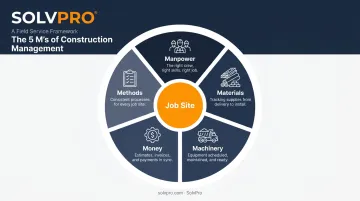
The 5 M's of Construction Management
Every job, regardless of crew size, comes down to managing five resources:
- Manpower: Who's working, where, and for how long
- Materials: What gets ordered, delivered, and used on-site
- Machinery: Trucks, tools, and equipment needed to do the work
- Money: Labor costs, material spend, and job profitability
- Methods: The processes and steps used to complete the work consistently
On a 200-person commercial job, Machinery might mean an entire equipment fleet with a dedicated tracking system. For a 4-person crew, it might mean one truck, a trailer, and a handful of power tools that need to be at the right site on the right morning. The category doesn't change. The scale does.
Typical Field Construction Management Activities
Day to day, small crews are juggling:
- Crew scheduling and dispatch
- Material tracking and job costing
- Daily or job-completion reporting
- Safety checks and quality inspections
- Client updates and communication
None of this is optional. Skip the reporting and you lose visibility into profitability. Skip client updates and you risk losing repeat business. The real challenge is finding time to do it all without a dedicated admin person.
Common Field Management Challenges Small Crews Face
Without office staff, the owner or foreman is scheduling jobs, tracking hours, answering calls, and still doing physical labor, often all in the same afternoon. That workload adds up fast, and it shows up as burnout, missed details, and small errors that snowball into bigger problems.
Communication gaps are the biggest hidden cost. Small crews absorb these breakdowns daily:
- Texts get missed during busy stretches
- Voicemails go unanswered until lunch
- Paper tickets get left in a truck
Research from FMI and PlanGrid found that poor communication and inaccessible project data cost the U.S. construction industry $31.3 billion in rework in 2018 alone. Poor communication alone accounted for 26% of that rework.
Small crews feel this acutely because there's no backup layer to catch the mistake before it becomes a redo.
Manual invoicing creates a second problem: cash flow. When invoices sit in a stack until Friday, the payment clock doesn't start until Friday, either.
Levelset's construction payment research reveals a gap between stated terms and actual practice:
- 90% of companies offer 30-day payment terms
- Fewer than 40% of companies actually get paid within 30 days
- Only 12% say they're always paid on time
For a crew relying on that cash to make payroll or buy next week's materials, a two-week invoicing delay puts real money on the line: missed payroll, delayed material orders, stalled jobs.
Best Practices for Scheduling and Task Management on Small Crews
Scheduling breaks down fastest when the office is working off one version of the calendar and the crew is working off another (usually a memory of a phone call from three days ago).
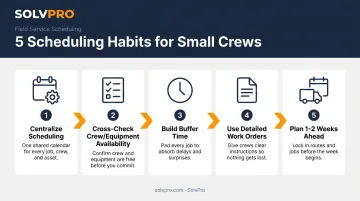
Fix it with these five habits:
- Centralize scheduling in one shared tool that both office and field can view in real time. If a job moves, everyone sees it instantly, not after the next check-in call.
- Cross-check crew and equipment availability before confirming any new job. Double-booking a two-person crew usually cancels the job outright.
- Build buffer time between jobs. Large companies can shift labor from another crew when something runs long. Small crews usually can't, so pad the schedule instead of hoping everything runs on time.
- Use detailed work orders with a clear scope of work. When crews know exactly what's expected before they arrive, they stop calling the office for clarification mid-job.
- Plan 1-2 weeks ahead, factoring in material delivery windows and weather. Same-day scheduling leaves no room for a supplier delay or a rained-out morning.
A shared, mobile-accessible calendar—like the one built into SolvPro—solves most of this on its own. When a crew member marks a job complete from their phone, the office sees it the moment it happens, no end-of-day phone call required.
Best Practices for Communication and Crew Accountability
Paper timesheets and end-of-day phone calls create a lag between what's happening on the jobsite and what the office actually knows. That lag is where mistakes hide.
Close the gap with these practices:
- Replace paper timesheets with quick digital check-ins so the office has current job status throughout the day, not just at 5 p.m.
- Use event-based geolocation and time tracking to see arrival times and job progress without calling crews to ask "where are you?"
- Write instructions and safety protocols in both English and Spanish for crews with Spanish-speaking workers.
- Build simple SOPs so crews can work independently and consistently, even without a supervisor on-site every day.
That third point matters more than most owners realize. CPWR research found that among Hispanic construction workers, 37% do not speak English very well or not at all, and Hispanic workers now make up roughly a third of the U.S. construction workforce.
A safety instruction or job scope note that only exists in English isn't reaching a meaningful chunk of the crew. That gap gets expensive fast, showing up as rework, delays, or a preventable injury.
This gap is exactly what SolvPro was built to close. It's a field service platform with event-based geolocation tracking and a fully bilingual English/Spanish interface, available to both office staff and field crews, not just one side.
Owners get visibility into job progress without micromanaging, and crews get instructions in the language they actually work in. Setup runs under 10 minutes, with live onboarding support instead of a static help center.
Best Practices for Job Costing, Invoicing, and Getting Paid Faster
Most small crews find out whether a job made money after it's already finished, which is a little like checking your fuel gauge after you've already stalled on the highway.
Better approach:
- Track costs by job or phase in real time, not at completion. If labor is running over budget on day two of a five-day job, you want to know on day two.
- Invoice immediately after job completion using mobile tools instead of batching paperwork for the end of the week. Xero notes that delaying invoice issuance delays the start of the customer's payment period.
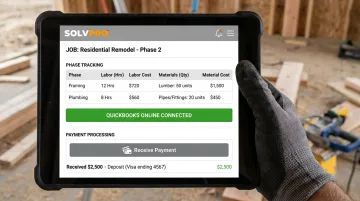
- Sync job data directly with accounting software, like QuickBooks Online, and use built-in payment processing to avoid entering the same numbers twice.
This is another spot where the right tooling removes friction rather than adding it. SolvPro's job costing tracks labor and materials by job or phase as work happens, and it syncs natively with QuickBooks Online at no extra cost. Built-in NMI payment processing lets crews invoice and collect payment from the jobsite the same day work wraps up, with no re-entering data into a separate accounting system afterward.
Safety and Quality Best Practices for Small Crews
Safety programs don't need to be elaborate to work. They need to happen consistently, which is the part small crews often skip when the day gets busy.
Three habits worth keeping:
- Run brief toolbox talks daily, even with a 2-3 person crew. OSHA recommends regular toolbox talks specifically because they catch hazards before they become incidents, not after.
- Use phase-based checklists to catch quality issues before moving to the next task. A five-minute check before drywall goes up beats a costly teardown after it's painted.
- Set reminders for license, insurance, and certification renewals, since small crews rarely have anyone dedicated to tracking these dates. A lapsed certification can shut down a job faster than a missed delivery.
None of these require a formal safety officer, just five minutes and a daily habit of actually doing them. Software like SolvPro can nudge your crew with automated reminders for renewals and standardized checklists, but the follow-through still comes down to your team.
Frequently Asked Questions
What are the 5 M's of construction management?
Manpower, Materials, Machinery, Money, and Methods are the core resources every construction manager coordinates on a job. They apply at any scale, from a two-person crew to a large commercial contractor.
What are typical field construction management activities?
Daily activities include crew scheduling, material tracking, job reporting, safety checks, quality inspections, and client communication. Small crews handle all of these without dedicated staff for each function.
How is field management different for a small crew versus a large company?
Small crews combine roles that larger companies split across a PM, superintendent, and office staff. They need simpler, faster tools built for one or two decision-makers, not enterprise systems.
What software helps small construction crews manage jobs more efficiently?
All-in-one field service platforms that combine scheduling, tracking, and invoicing cut down on admin time. Tools like SolvPro consolidate these functions instead of requiring separate apps for each task.
How can small crews reduce paperwork and administrative time?
Digital daily reports, mobile time tracking, and automated invoicing replace manual data entry and paper tickets. This keeps the office and field working from the same real-time information.
How far in advance should small crews plan their job schedule?
Plan at least 1-2 weeks ahead, accounting for material delivery timelines and potential weather delays. Same-day or next-day scheduling leaves no room to absorb common disruptions.