Service businesses in 2026 are juggling more moving parts than ever: hourly wages, overtime, travel time, benefits deductions, and job costing that all need to land in the right place. Miss one piece, and margins take the hit before you even notice.
The right payroll software closes those blind spots. It keeps benefits compliant, tags labor costs to the correct job, and protects your bottom line on every project. Mercer forecasts employer health-benefit costs will climb 6.7% in 2026, pushing average per-employee costs above $18,500. This guide ranks the five best platforms for handling both benefits and labor cost tracking.
Key Takeaways
- Gusto, QuickBooks Payroll, ADP RUN, Paychex Flex, and Rippling lead the 2026 field for benefits and labor cost tracking.
- Crews need clean, job-tagged hours flowing in before payroll runs — a gap SolvPro closes at the source.
Overview of Payroll Software for Benefits & Labor Cost Tracking
This category of software does three jobs at once: calculates wages and taxes, administers benefits deductions, and reports labor costs by job, department, or crew. For a service business, that third piece is often the one that gets bolted on as an afterthought rather than built in properly.
Labor costs eat a significant chunk of revenue for these businesses. According to Rippling's industry benchmarking, payroll typically runs 15% to 30% of gross revenue for small businesses, with construction landing around 20% and professional services often reaching 40-60%. Add rising benefits costs on top, and the margin for error shrinks fast.
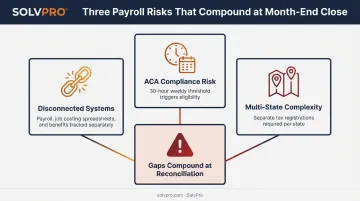
Here's the problem most generic payroll tools create: benefits administration and labor cost tracking get built as separate modules, poorly connected. A multi-crew business ends up:
- Running payroll in one system
- Tracking job costs in a spreadsheet
- Managing benefits eligibility manually
- Reconciling all three at month-end, usually incorrectly
Compliance adds another layer. The IRS defines full-time status for ACA purposes as 30 hours per week or 130 hours per month, and that threshold is easy to miss for crews with variable schedules unless accurate time data feeds payroll automatically.
Multi-state operations complicate things further. A crew working across state lines can trigger:
- Separate tax registrations in each state
- State-specific withholding rules
- Individual unemployment insurance accounts
The platforms below are ranked on how well they solve both problems together, not just one.
Top 5 Best Payroll Software for Benefits & Labor Cost Tracking in 2026
Each platform was evaluated on five factors: benefits administration depth, labor cost/job costing reporting, integration ecosystem, pricing transparency, and verified customer feedback (not marketing copy).
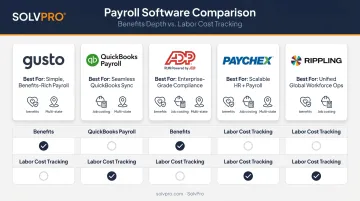
Gusto – Best for Small Service Businesses & Simple Benefits Administration
Gusto built its reputation as an SMB-focused payroll and HR platform, and its benefits and labor costing tools reflect that focus. Setup is fast, benefits enrollment is genuinely simple, and labor cost reports break down cleanly by department or project, though project-level grouping requires the Plus tier or higher.
| Category | Details |
|---|---|
| Pricing | $49/month base + $6/employee (Simple); $80 base + $12/employee (Plus, adds multi-state); $180 base + $22/employee (Premium, adds custom reports) |
| Key Features | Benefits administration, department/job/project labor cost reports, employee self-service, multi-state support on Plus and above |
| Best For | Small service businesses under 50 employees wanting simple benefits with light labor cost visibility |
QuickBooks Payroll – Best for Job Costing & Labor Cost Integration
If your accounting already runs through QuickBooks Online, QuickBooks Payroll (now branded QuickBooks Workforce) closes the loop between paychecks and job costs. Premium and Elite tiers let you tag payroll expenses to classes and projects, and those numbers flow straight into your profit-and-loss reports.
| Category | Details |
|---|---|
| Pricing | $50/month base + $6.50/employee (Payroll); $134 base + $12/employee (Elite, same-day deposit) |
| Key Features | Automated tax filing, class/project-based labor cost tagging, benefits marketplace (Allstate, Vestwell), direct QuickBooks Online sync |
| Best For | Service businesses that need labor costs tied directly to job-level accounting reports |
ADP RUN – Best Overall for Comprehensive Benefits & Compliance
ADP has decades of payroll history behind it, and RUN (built for businesses with 1-49 employees) leans on that experience heavily. It offers one of the broadest benefits and insurance marketplaces in this list, plus AI-driven error flagging before payroll submits.
| Category | Details |
|---|---|
| Pricing | Custom quote-based; optional multi-state tax registration starts at $195; promotional periods common |
| Key Features | Benefits and insurance marketplace, AI error detection, multi-state tax registration, project/job labor cost calculation, time & attendance add-ons |
| Best For | Businesses wanting an established provider with deep benefits and compliance support |
Paychex Flex – Best for Time & Attendance Paired with Benefits
Paychex Flex bundles payroll, HR, and workforce management across three tiers: Select, Pro, and Enterprise. Its strength lies in native time and attendance tools (including mobile geolocation and biometric clocks) synced directly to payroll, plus dedicated workers' compensation administration.
| Category | Details |
|---|---|
| Pricing | Custom quote based on headcount and tier |
| Key Features | Native time & attendance tracking, benefits management (medical, dental, vision, 401(k)), workers' comp administration, analytics dashboards |
| Best For | Businesses needing tight time-tracking-to-labor-cost linkage alongside benefits |
Rippling – Best for Scaling Multi-Crew, Multi-State Operations
Rippling treats employee data as a single source of truth. Every hire, benefit election, and hour worked flows automatically through the system, which means labor cost analytics update without manual re-entry, even as headcount and locations multiply.
| Category | Details |
|---|---|
| Pricing | Per-user, per-month base; full platform requires a custom quote |
| Key Features | Automated multi-state compliance, benefits administration with real-time deduction sync, job codes and split-cost payroll, no-code custom reports |
| Best For | Growing multi-crew or multi-state service businesses needing scalable labor cost visibility |
Why Labor Cost Tracking Matters More Than Ever for Service Businesses
For crews in the field, "labor cost" includes regular hours, overtime, travel time, and benefits accrual — all of which need to map back to a specific job to know if that job actually made money.
Benefits eligibility adds pressure here too. Since ACA full-time status kicks in at 30 hours a week, inaccurate field time tracking creates compliance risk before payroll even processes a check. Getting the hours wrong means under-offering benefits or overpaying for coverage that wasn't needed.
The Manual Re-Entry Problem
Here's where most businesses lose money and time: office staff re-typing crew hours from paper timesheets or disconnected apps into payroll software. This creates three compounding issues:
- Delayed pay runs while admin staff chase down missing timesheets
- Distorted job costing because hours get logged to the wrong project or day
- No real-time visibility into which jobs are bleeding labor cost until it's too late
This is the gap most payroll-only platforms don't solve. They're built to calculate and distribute pay accurately, not to capture accurate field data in the first place.
Closing the Gap Before Payroll Runs
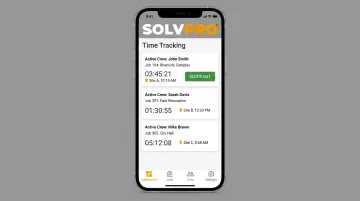
SolvPro addresses this upstream. Its mobile time tracking lets crews log hours by job and by individual worker, either through manual entries or live timers, with every entry geo-stamped for accountability. That means:
- Labor costs update in real time as work happens, not after the fact
- Job-level labor reports show estimated versus actual costs per project
- QuickBooks Online sync carries labor hours and job costing data straight into accounting, no manual transfer required
This kind of connection between field data and back-office systems cuts admin time and gives owners a clear answer to the question that matters most: which jobs are actually profitable? Payroll-only platforms can calculate paychecks accurately, but they can't tell you that.
How We Chose the Best Payroll Software
Selection came down to five weighted factors, verified against official vendor documentation and independent testing rather than marketing pages alone:
- Benefits administration depth: how much is included natively versus requiring a third-party broker fee
- Labor cost/job costing reporting: whether job or project allocation is a built-in feature or a paid add-on
- Integration ecosystem: compatibility with existing accounting or time-tracking tools
- Pricing transparency: published rates versus quote-only pricing
- Verified user reviews: aggregate sentiment from Capterra and G2, filtered to exclude unrelated product lines
Common buyer mistakes worth avoiding:
- Choosing a platform on brand recognition alone, without checking per-employee cost scaling as headcount grows
- Assuming labor cost reporting by job is included, when it often requires an upgraded tier
- Skipping a trial run of the reporting dashboard before committing to annual pricing
Getting these wrong shows up later: in compliance penalties, in payroll runs that take longer than they should, or in job profitability numbers nobody trusts.
Conclusion
There's no single "best" payroll platform for every service business. The right fit depends on your crew size, how complex your benefits offerings are, and how tightly you need job costing tied to every paycheck.
Pilot a platform's reporting and support before signing an annual contract, and revisit the decision as your employee count or multi-state footprint grows. What works for a 10-person crew rarely still fits at 50.
Whatever payroll software you choose, the labor data behind every check and benefits calculation has to start accurate in the field. SolvPro's job-based time tracking feeds clean, verified crew hours into your accounting workflow before payroll ever touches them.
Frequently Asked Questions
Which payroll software is best for handling payroll, benefits, and labor cost tracking?
ADP RUN and Paychex Flex lead for comprehensive benefits administration. QuickBooks Payroll leads for labor cost and job costing integration. The right pick depends on your crew size and existing accounting stack.
How does payroll software help with labor cost tracking?
It tags wages, overtime, and benefits costs to specific jobs, departments, or crews. This gives owners a real-time view of job profitability instead of relying on manual spreadsheets after the fact.
What features should service businesses look for in payroll software?
Look for job or class-based labor cost reporting, native benefits administration, multi-state tax handling, and integration with time tracking or field service tools you already use.
Can payroll software integrate with job costing or field service tools?
Yes. QuickBooks Payroll syncs directly with job costing data through classes and projects. Tools like SolvPro can feed accurate, job-tagged crew hours into that same accounting workflow.
How much does payroll software with benefits administration cost in 2026?
Most small businesses pay a base monthly fee plus a per-employee charge, with benefits administration adding to that cost. Check current provider pricing pages, since promotions and rates shift frequently.
Is QuickBooks Payroll good for small service businesses?
It works well for businesses already using QuickBooks Online for accounting. Labor costs tag directly to jobs, which simplifies reconciling job costs against payroll each month.