The right software fixes this by giving you per-client visibility into overdue balances, automating the follow-up nobody has time for, and connecting invoicing to job profitability. That's the difference between chasing payments manually and letting the system chase them for you.
Late payments aren't a minor annoyance in the trades. Rabbet's 2024 Construction Payments Report found that 82% of contractors experienced payment delays longer than 30 days, contributing to an estimated $280 billion in slow-payment costs across US construction. This guide breaks down the best tools built to solve exactly that problem.
TL;DR
- Overdue invoice software shows per-client balances, aging, and automates follow-ups
- Field service and trade businesses need job-based billing and mobile access, not generic AR tools
- Top picks: SolvPro, Jobber, Housecall Pro, QuickBooks Online, and Chaser
- Prioritize per-client aging visibility, accounting/payment integrations, easy setup, and clear pricing
- SolvPro combines invoicing, payments, and job tracking for field crews
Overview of Invoice Tracking Software for Service & Trade Businesses
Overdue invoice tracking software typically:
- Groups outstanding balances by customer
- Flags how many days past due each invoice is
- Triggers reminder emails or texts automatically
For trades, per-client visibility matters more than it does for solo freelancers. You're juggling multiple crews, job phases, and billing cycles at once, so a generic invoicing app built for one-person shops won't cut it.
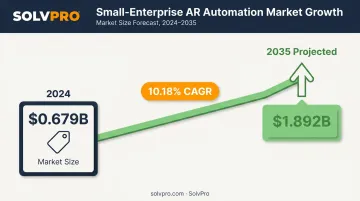
The AR-automation market backs up why this category is growing. Market Research Future values the small-enterprise segment of accounts receivable automation at $0.679 billion in 2024, projected to reach $1.892 billion by 2035 — a 10.18% compound annual growth rate. Small businesses are investing more in tools that keep cash moving.
Below, we cover the top platforms serving general contractors, electricians, plumbers, excavation crews, landscapers, and cleaning businesses that need to know exactly who owes them what.
Best Software to Track Overdue Invoices by Client in 2026
We evaluated each tool on per-client aging views, automation depth, accounting and payment integrations, ease of use for non-office-based crews, and pricing transparency.
SolvPro
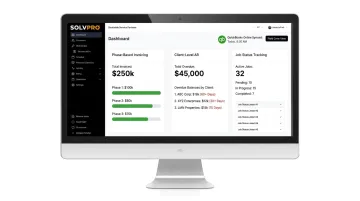
SolvPro is an all-in-one field service management platform built for growing service businesses with crews in the field. It combines invoicing, payment tracking, and job profitability visibility by client into one system, so office staff aren't jumping between five different tools to see who's paid and who hasn't.
What makes it stand out:
- Phase-based invoicing to bill incrementally as work progresses instead of waiting until the whole job wraps
- Client-level AR visibility tied to job phases, so overdue tracking updates in real time as crews mark jobs active, delayed, or complete
- QuickBooks Online sync built natively into the platform, not bolted on
- NMI payment processing for credit card and ACH payments, collected on-site or through a branded payment portal
- Bilingual English/Spanish interface for office staff and field crews
- Setup in under 10 minutes, with live onboarding support included at every tier
| Details | |
|---|---|
| Pricing | Starter: $179/month (up to 3 users). Growth: $228/month (4 users, +$49/user after). Scale: custom pricing for unlimited users. No long-term contracts. |
| Key Features | Phase-based invoicing, client-level AR visibility, QuickBooks sync, automated payment reminders, mobile access for field crews |
| Best For | Contractors, electricians, plumbers, excavation crews, landscaping, and cleaning businesses managing multiple clients and crews |
Jobber
Jobber is field service management software widely used by home service businesses for scheduling, invoicing, and client communication. Its Client Hub lets customers approve quotes, view appointments, and pay invoices from one portal, while its quote-to-job-to-invoice workflow carries line items forward automatically to cut down on re-entry.
Invoice follow-ups can send automatic reminders for past-due payments by email or text on select plans, and route optimization on higher tiers ties scheduling efficiency into faster invoicing turnaround.
| Details | |
|---|---|
| Pricing | Core: $49/month ($29 billed annually). Connect: $139/month ($99 annually). Grow: $199/month ($149 annually). Plus: $499/month ($399 annually, 5 users included). |
| Key Features | Client management, invoicing, online payments, automated reminders |
| Best For | Solo operators and small home service teams |
Housecall Pro
Housecall Pro is built for trades like plumbing, cleaning, and general repair, with invoicing and payment tools layered into its scheduling core. Its Invoices report tracks open, paid, unpaid, and past-due statuses, and a dedicated Aging Report sorts overdue receivables by date, customer, or status. That's closer to a true AR dashboard than most competitors offer.
Its Wisetack-powered consumer financing integration is a real differentiator: jobs from $500 to $65,000 can be financed over terms up to 120 months, letting you get paid in full upfront while the customer pays over time.
| Details | |
|---|---|
| Pricing | Basic: $79/month ($59 annually, 1 user). Essentials: $189/month ($149 annually, 5 users). Max: $329/month ($299 annually, 8 users). |
| Key Features | Invoicing, payment processing, customer database, follow-up automation |
| Best For | Mid-sized trade businesses wanting consumer financing options |
QuickBooks Online
QuickBooks Online is the accounting software most bookkeepers already know, and its native AR Aging Detail report breaks down overdue balances by customer across Current, 1-30, 31-60, 61-90, and 91+ day buckets. That familiarity is exactly why it's a default choice for businesses that want basic invoice tracking bundled with their books.
You can schedule up to three automated reminders, timed anywhere from 90 days before to 90 days after the due date, with customizable subject lines and messages.
| Details | |
|---|---|
| Pricing | Simple Start: $38/month. Essentials: $75/month. Plus: $115/month. Advanced: $275/month. |
| Key Features | Invoice aging reports by customer, automated reminders, bank reconciliation |
| Best For | Businesses that need accounting plus basic invoice tracking in one tool |
Chaser
Chaser is a dedicated invoice-chasing add-on that layers on top of accounting platforms like QuickBooks or Xero. Rather than replacing your books, it specializes in one job: getting overdue invoices paid.
Its segmented reminder sequences let you set different escalation schedules for different customer groups. A slow-paying repeat client gets a different cadence than a first-time account. A built-in payment portal and credit-monitoring feature round out the toolkit for businesses managing a high volume of overdue accounts.
| Details | |
|---|---|
| Pricing | Compact: $259/month ($233 annually, under $5M revenue). Core: $779/month ($700 annually, under $13M revenue). Complete: $1,169/month ($1,050 annually, under $120M revenue). |
| Key Features | Automated reminder sequences, payment portal, credit checks |
| Best For | Service businesses with high invoice volume needing dedicated chasing on top of existing accounting software |
Key Features to Look for When Tracking Overdue Invoices by Client
Not every AR (accounts receivable) tool is built for job-based service work. Here's what actually moves the needle:
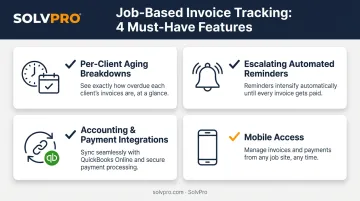
- Per-client aging breakdowns: office staff should see instantly who's overdue and by how many days, not just a total unpaid figure
- Escalating automated reminders: reduces awkward manual follow-up calls while keeping the tone appropriate as an invoice ages
- Accounting and payment integrations: a QuickBooks sync avoids duplicate data entry and reconciles payments without manual matching
- Mobile access: field crews and office staff both need to check invoice status and job profitability from a phone, not just a desktop
If a platform is missing any of these, you're likely trading convenience now for admin headaches later.
How We Chose the Best Invoice Tracking Software
A common mistake is picking a generic freelancer invoicing app or an enterprise AR system that was never designed for job-based, multi-crew billing. Neither fits how trade businesses actually operate.
We weighed four factors, each tied to a real business outcome:
- Per-client visibility — determines how fast office staff can spot a slow payer
- Integration depth — QuickBooks and payment processor connections cut down duplicate entry
- Mobile usability — crews in the field need the same visibility as the office
- Pricing transparency — no surprise add-ons that inflate your actual monthly cost
Conclusion
The best invoice tracking software matches how your business actually bills and follows up with clients. Brand recognition doesn't guarantee the right fit. Before committing, weigh setup time, how pricing scales as you add crews, and whether the platform fits job-based billing.
If you're managing multiple clients and crews and want client-level invoice visibility, built-in QuickBooks sync, and setup in under 10 minutes, SolvPro is built to handle exactly that. Book a demo or start a free trial to see how it fits your billing workflow.
Frequently Asked Questions
What are the best software options to track overdue invoices by client in 2026?
Top categories include all-in-one field service platforms like SolvPro, accounting tools like QuickBooks Online, and dedicated chasing tools like Chaser. The right pick depends on your business size and how many clients you're billing.
How can I track unpaid invoices by client?
Use a client-level AR aging report or dashboard that groups outstanding invoices by customer and due date. Most modern invoicing and field service platforms build this in as a standard report.
How do I chase up overdue invoices by client?
Set up automated reminder sequences that escalate in tone the longer an invoice sits unpaid. Software that tracks response and payment status per client removes the guesswork of manual follow-up.
Can invoice tracking software integrate with QuickBooks?
Yes, most modern platforms, including SolvPro, sync with QuickBooks Online to avoid duplicate entry and keep your books reconciled without manual data transfer.
How much does invoice tracking software cost for a small service business?
Entry-level AR tools typically start around $10 to $32 per month, while full field service platforms with invoicing built in run higher. SolvPro's Starter plan is $179/month with no surprise add-ons.
Is there free software to track overdue invoices by client?
Limited free tiers exist, but they usually cap invoice volume or restrict features like automated reminders and aging reports. Most growing service businesses find paid plans more practical long-term.