Introduction
Most service businesses now juggle four, five, sometimes six SaaS tools at once — scheduling, invoicing, payments, a CRM, maybe a dedicated payroll app. Each one arrives with a contract nobody reads past the pricing page.
That's a problem. Vendors count on it.
Small business owners routinely sign SaaS agreements without a legal team. The fine print often hides auto-renewal clauses, notice windows as long as 90 days, and liability caps that leave a business exposed if something goes wrong.
A 2025 SaaS legal guide notes that 30-90 days is the standard non-renewal notice range. Miss that window, and you're locked in for another year.
This article breaks down all 23 things to check before signing, organized into five practical categories, so you can review any SaaS contract confidently without hiring a lawyer.
Key Takeaways
- Check timing, pricing, data, liability, and operational terms before signing anything
- Auto-renewal clauses and vague SLAs cause the most costly surprises for small businesses
- A focused 15-20 minute review catches most red flags before renewal
- Transparent pricing and short commitments signal a trustworthy software partner
What You Need Before Reviewing a SaaS Agreement
Reviewing a SaaS contract doesn't require a law degree. It requires the right documents and a bit of discipline.
Documents and Information to Gather
Skip the sales deck. You need:
- The full contract or order form — not marketing pages, not a screenshot from the sales call
- Linked policies referenced by URL, such as Terms of Service, Privacy Policy, and SLA. These live outside the main document and can change without notice
- Your own usage numbers, including crew size, office and field user counts, and expected job or data volume, to compare against what the contract promises
Who Should Be Involved
For everyday tools like scheduling or invoicing software, the owner or office manager can usually handle the review solo. For anything touching customer payments or sensitive data, get a quick legal read before signing.
Block out uninterrupted time for this. Rushed reviews are exactly how auto-renewal clauses and liability caps slip through unnoticed.
The SaaS Agreement Checklist: 23 Things to Review in Every Contract
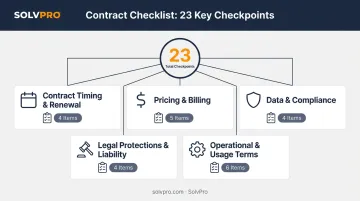
Whether you're evaluating a scheduling app, a payment platform, or a full field service management system, the same 23 checkpoints apply. Grouping them into five categories keeps the review manageable instead of overwhelming.
Contract Timing and Renewal Terms
- Start date: Confirm it matches when your team actually begins using the tool, not an earlier date that quietly burns paid time.
- End date: Log it on a renewal calendar tied to your review process, not just your memory.
- Notification period for renewal: Check how many days' notice you must give to avoid an unwanted auto-renewal.
- Auto-renewal clause: Verify whether pricing or terms change automatically once the contract rolls over.
Pricing, Billing, and Contract Value
- Total contract value (TCV): Calculate the full cost across the entire term, not just the advertised monthly rate.
- Number and type of licenses/users: Confirm the seat count actually matches your crew and office staff size.
- **Billing frequency and payment terms**: Check invoice due dates, accepted payment methods, and any late fees.
- Consumption-based metrics: Identify whether pricing scales with usage, like jobs completed or storage, and what triggers overage charges. Stripe's pricing guide notes that fixed-fee-plus-overage plans can push your final bill well past the base subscription.
- Variable or extra charges: Watch for fees tied to add-ons, premium support tiers, or feature upgrades.
Data, Privacy, and Compliance
- Data handling and security: Confirm commitments around encryption, backups, and access controls.
- Regulatory compliance: Check for relevant standards like SOC 2, GDPR, or CCPA if the tool touches customer payment or personal data.
- Intellectual property and data ownership: Confirm your business retains ownership of everything you put into the platform.
- Key legal policies: Check whether the Terms of Service and Privacy Policy are written into the contract itself or just linked, since linked policies can change anytime without warning.
Legal Protections and Liability
- Warranties: Look for specific, measurable performance commitments instead of vague "as described" language.
- Limitation of liability: Understand the dollar cap on what the vendor owes if something breaks.
- Indemnification: Confirm the vendor covers claims tied to their software, and note what your business is on the hook for.
- Vendor insurance requirements: For tools handling payments or sensitive data, check whether the vendor carries cyber liability coverage.
Operational and Usage Terms
- Access rights and user management: Confirm you can add or remove users as your crew changes, without penalty fees.
- Customer support commitments: Check response times and support hours against your actual business hours, not the vendor's.
- License scope: Confirm the software supports how your business actually operates: multi-location, field use, mobile access.
- Termination and exit terms: Check notice requirements, early-exit penalties, and what happens to your data afterward.
- Line-item details: Request an itemized fee breakdown rather than accepting a single lump-sum quote.
- Publicity rights: Confirm whether the vendor can use your business name or logo in marketing without your approval.
How to Interpret What You Find: Green, Yellow, and Red Flags
Spotting a term is only half the job. Knowing whether it's fine, worth negotiating, or a dealbreaker is what actually protects your business.
Green flags (sign with confidence):
- Clear renewal notice periods stated in plain language
- Itemized, transparent pricing
- Defined support response times
- Explicit data export and ownership rights
Yellow flags (negotiate before signing):
- Notification windows of 90+ days
- Vague or unmeasurable support response commitments
- No stated right to reallocate user licenses as your staff changes
Red flags (reconsider or walk away):
- No liability cap tied to data breaches
- No data return or export terms after cancellation
- One-sided indemnification that only protects the vendor
- Legal policies that exist only as external links, changeable without notice
A single yellow flag isn't a dealbreaker. A stack of them is a pattern worth pushing back on.
Common Mistakes to Avoid When Reviewing SaaS Agreements
Even careful business owners fall into the same traps:
- Sales pitch vs. written contract. What the rep said on the call and what's in the order form aren't always the same thing.
- Auto-renewal notification window. Missing this deadline is the single most common way small businesses get locked into another term at a higher price.
- "Unlimited users" claims. If a sales call promise isn't in the signed document, it's just an informal promise, not a binding term.
Best Practices for Reviewing and Negotiating SaaS Contracts
A few habits separate businesses that get burned from those that don't:
- Build a renewal calendar for every SaaS tool you use, flagging notice periods 30-60 days ahead of each deadline.
- Ask vendors for clarification in writing. Reputable providers will confirm unclear terms rather than leaving them open to interpretation.
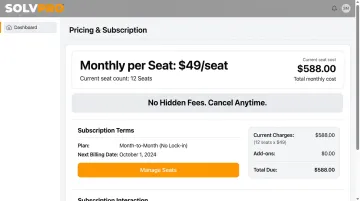
- Prioritize SMB-friendly terms when evaluating field service or business management software: transparent pricing, no long-term lock-in, and cancel-anytime flexibility. SolvPro follows this same approach, offering published per-seat pricing, no add-on fees for core tools, and no contract to break if the fit isn't right.
- Track every active contract in a shared folder or spreadsheet, noting key dates and renewal terms so nothing slips through as your business grows.
None of this requires a legal department. It requires fifteen minutes and a checklist you actually follow.
Frequently Asked Questions
What should be in a SaaS agreement?
A solid SaaS agreement covers subscription terms, pricing, data ownership, security and compliance commitments, SLAs, and termination rights. These are the core components every agreement should address, regardless of how small the deal is.
What counts as software as a service?
SaaS is cloud-hosted software accessed by subscription rather than installed locally. The vendor manages hosting, maintenance, and updates, so you're paying for access, not ownership of infrastructure.
What is the standard SLA for SaaS?
Most SaaS SLAs commit to 99.5-99.9% uptime. Google Workspace, for example, contractually promises 99.9% monthly uptime with service-day credits when it falls short — check the exact formula and claim window in your own contract.
Can a small business negotiate a SaaS agreement?
Yes. Most terms are negotiable, especially pricing, contract length, and auto-renewal clauses, even for small businesses without dedicated legal teams. Vendors expect some pushback on the terms that matter most.
What happens to my data if I cancel a SaaS agreement?
Data handling varies by vendor. Confirm export format, timelines, and deletion policies before signing, rather than finding out after you've already cancelled.
How often should I review my SaaS contracts?
Review at signing, then again 60-90 days before each renewal date. That timeline gives you enough room to catch changes and negotiate before the deadline passes.