That scenario plays out constantly in service businesses. The job wasn't lost because of price or quality. It was lost because the agreement wasn't ready when the customer was.
Contract generation is the process of turning a job request into a signed, legally binding document — fast. For most service businesses, that doesn't mean dense legal contracts. It means proposals, estimates, service agreements, and work orders that need to move quickly between office and field.
This guide breaks down what contract generation actually means, how the process works step by step, the digital tools driving it, and how to pick a solution sized right for your crew.
Key Takeaways
- Contract generation uses templates and digital tools to turn job requests into signed agreements, skipping manual drafting.
- For service businesses, "contracts" typically mean proposals, service agreements, work orders, and change orders, not enterprise legal paperwork.
- E-signatures and smart-fill templates cut turnaround time and reduce costly missed details.
- Match your tool to your business size, since enterprise contract lifecycle management (CLM) software solves a different problem.
What Is Contract Generation?
Contract generation is the process of assembling a legally binding agreement from a pre-approved template, job-specific data, and automated logic, rather than starting from a blank page every time. Instead of retyping terms and re-checking clauses for each new job, the system pulls in the details that matter (scope, pricing, timeline) and produces a ready-to-sign document.
Three terms get used interchangeably, though they mean different things:
- Drafting: writing or editing the actual clauses, obligations, and terms.
- Generation: producing a finished document from templates, data, and rules.
- Creation: a broad umbrella term covering the whole process, not a distinct technical stage.
For service businesses, "contracts" typically show up as:
- Customer-facing proposals and estimates
- Standard service agreements
- Work orders
- Change orders for scope adjustments mid-job
- Subcontractor agreements
Why Manual Contract Creation Puts Small Crews at Risk
When a service agreement lives in an email thread, a paper folder, or someone's memory, small details get missed. A change order never makes it back to the office. A signature never gets collected. The job starts anyway, and the disagreement about scope shows up later, usually at invoicing time.
This isn't a hypothetical risk. In a 2018 survey of more than 500 construction executives and managers, 65% reported that work orders or changes were missed some to all of the time, directly contributing to longer project completion times.
That statistic reflects a construction-heavy sample, but the underlying problem translates across trades: when documentation depends on manual handoffs between office and field, things fall through the cracks. Contract generation for a five-person crew looks nothing like enterprise contract lifecycle management built for legal departments. This guide focuses on the SMB-relevant end of that spectrum.
How Contract Generation Works: From Job Request to Signed Agreement
The process follows a predictable path, whether you're quoting a landscaping job or a commercial cleaning contract. Here's the typical flow:
- Request & scope. A customer inquiry or job lead defines what needs to go into the agreement: services, site conditions, timeline expectations.
- Template selection. The right pre-built template (service agreement, work order, change order) gets pulled so nothing important gets left out.
- Data population. Client details, pricing, and timelines auto-fill from a CRM or estimating tool instead of getting typed in twice.
- Customer review & approval. The client receives a clean, professional proposal or agreement they can actually read and understand.
- E-signature & execution. The client signs digitally. No printing, no scanning, no mailing. The agreement is binding the moment it's signed.
- Storage & job kickoff. The signed document is stored automatically, and the job moves straight into scheduling.
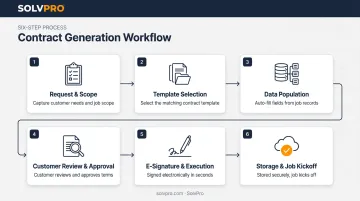
Step 3 deserves a closer look, because manual data entry is where a lot of documents fall apart. Research on construction jobsite workflows found that nearly half of managers still captured quality and job data manually, with about a third relying on pen and paper. That pattern is strongly linked to the missed work orders mentioned earlier.
Platforms built around this workflow, SolvPro included, connect estimating directly to contract generation. Pricing and scope built during the estimate carry through automatically into the customer-facing proposal instead of being re-typed.
Digital Tools & Technology Behind Modern Contract Generation
Several technologies work together to make contract generation faster and more reliable than a Word document and an email.
Template Libraries and Smart-Fill Integrations
Reusable, pre-approved clause libraries keep language consistent across every job and every crew member sending proposals. Paired with smart-fill integrations, contract data syncs with your CRM, estimating tool, and accounting software (QuickBooks Online, for example) so client names, pricing, and job details never need to be entered twice.
E-Signatures: The Legal Backbone
Once the paperwork populates automatically, the next step is getting it signed, and electronic signatures aren't a gray area. The federal ESIGN Act established that a contract, signature, or record cannot be denied legal effect solely because it's electronic.
State-level UETA rules add a practical checklist:
- Both parties agree to transact electronically
- The signer shows clear intent to sign
- The signature is attributable to the actual signer
- A retained, accessible copy of the final document exists
In plain terms: a digitally signed service agreement holds up, provided you keep proof of consent, signer identity, and the final record.
AI Drafting and Mobile Field Access
Generative AI can produce a first-draft proposal or agreement from a handful of inputs, but it shouldn't be the last step. Legal ethics guidance for AI-assisted drafting is consistent on this point: AI output requires human review before it goes out, especially for anything involving pricing, liability, or compliance language.
Field access matters just as much as the drafting technology itself. Crews and office staff need to generate, review, and send agreements from the job site — not just from a desktop. Bilingual support (English and Spanish) matters here too, since a lot of crews communicate primarily in Spanish while office paperwork defaults to English.
Benefits of Switching to Digital Contract Generation
Moving away from paper and email-based proposals pays off in three concrete ways:
- Faster turnaround, faster payment. Same-day proposals that clients sign on the spot mean jobs start sooner and invoices go out faster, instead of sitting in a "waiting on approval" pile.
- Fewer missed details, fewer disputes. Structured templates catch fields a rushed quote might skip, meaning fewer disputes over scope once the crew arrives.
- A more professional bid. A polished, phase-based PDF proposal looks more credible than a handwritten quote or text estimate, helping you win jobs against competitors still working off paper.
Choosing the Right Contract Generation Solution for Your Service Business
Not every contract tool is built for a five-truck crew. Here's what actually matters when you're evaluating options.
Features That Matter for Service Businesses
- Trade-specific templates, not generic legal boilerplate
- Phase-based estimating for multi-stage jobs
- Built-in e-signature, no separate app required
- Mobile access for crews in the field
- Native integration with scheduling and invoicing
Why Enterprise CLM Is Overkill
Enterprise contract lifecycle management platforms are designed for legal departments managing negotiation, governance, and cross-department approvals. That's a fundamentally different problem than getting a service agreement signed before a crew shows up.
As Forrester's 2024 CLM landscape research notes, one size does not fit all in this market. Buying that level of complexity for a proposal and a signature means paying for capability you'll never touch.
This is where SolvPro's phase-based estimating comes in. It builds customer-facing PDF proposals with milestone payment schedules baked in, syncs with QuickBooks Online, works in English and Spanish, and doesn't hide pricing behind a sales call. Setup typically takes under 10 minutes, a far different experience from onboarding an enterprise CLM platform.
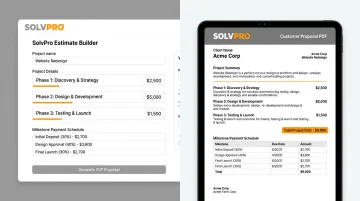
If you're starting from scratch, don't roll out five contract types across every crew at once. Pick one to start: a standard service agreement is a good starting point. Get the template right, then expand from there.
Frequently Asked Questions
Can AI generate a contract for me?
AI can draft a first version of a proposal or agreement from basic inputs like scope and pricing. It should always be reviewed by a knowledgeable person for accuracy and compliance before it's sent to a customer.
Are digital contracts legal?
Yes. Digitally signed contracts are legally binding under the ESIGN Act and state UETA laws, as long as both parties consent to sign electronically and the signed record is retained.
Can I legally write my own contract?
Yes, business owners can write their own contracts for basic situations. Using vetted templates instead of a blank page reduces the risk of missing key protections like payment terms or liability language.
What's the difference between a contract and an estimate or proposal?
An estimate or proposal outlines scope and pricing for the customer to consider. A signed contract or service agreement makes those terms legally binding once both parties agree.
Do small service businesses really need contract generation software?
Even a small crew benefits from faster approvals and quicker payments with a lightweight digital tool. Fewer details slip through the cracks, and no enterprise-level complexity is required.
How long does it take to set up a digital contract generation tool?
SMB-focused platforms like SolvPro can be set up in under 10 minutes. Enterprise CLM systems, by comparison, often require lengthy, multi-week implementation projects.