This is the daily reality for a lot of growing service businesses. Information gets typed into one app, then re-typed into another, then forgotten in a third. Jobs slip through the cracks. Invoices go out late. And nobody can say for certain which jobs actually made money.
This guide breaks down what an all-in-one business management platform actually is, the features worth prioritizing, the real benefits of consolidating your tech stack, and how to pick the right one for a business running crews in the field.
Key Takeaways
- Fragmented software stacks cost SMBs 25 hours per week in manual data entry
- All-in-one platforms centralize scheduling, invoicing, CRM, and job costing into one database
- Industry-specific platforms fit field service businesses better than generic suites or ERP systems
- Faster invoicing shortens the gap between job completion and getting paid
- Modern SMB platforms set up in minutes, not the months typical of enterprise ERP rollouts
What Is an All-in-One Business Management Platform?
An all-in-one business management platform is a unified software system that consolidates core operations, scheduling, CRM, invoicing, work order management, HR, and reporting, into a single tool with one login and one shared database.
Instead of five apps that each hold a fragment of the truth, you get one system where every department works off the same information.
The Single Source of Truth Problem
Picture a plumbing company juggling a scheduling app, a separate invoicing platform, and a spreadsheet for tracking crew hours. Every job requires updating three places by hand. Miss one, and the invoice doesn't match the schedule, or payroll doesn't match the job.
With a unified platform, that same job gets updated once. The change automatically reflects across scheduling, invoicing, and reporting.
This is what data architects call a single source of truth: a system where every department sees the same version of reality, regardless of which screen they're looking at.
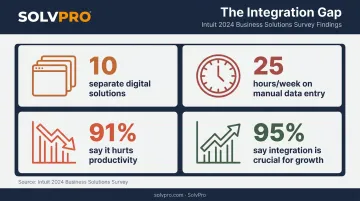
The cost of not having that is measurable. Intuit's 2024 Business Solutions Survey polled 630 US business owners and executives at companies with 10-99 employees, and the findings are stark:
- The average business runs 10 separate digital solutions
- Teams spend 25 hours per week on manual data entry and reconciliation
- 91% say this manual wrangling directly hurts productivity
- 95% agree integrated systems are crucial for growth
Generic vs. Industry-Specific Platforms
Not all all-in-one platforms are built the same way:
- Generic/enterprise suites work across any industry but usually require custom configuration to fit field service workflows
- Industry-specific platforms come pre-built with dispatch, job costing, and crew tracking already configured for trades like plumbing, HVAC, or landscaping
For a growing service business, a niche platform often wins simply because you're not paying someone to configure workflows that already exist out of the box. And unlike a decade ago, these platforms aren't reserved for enterprise budgets anymore. Small crews with no dedicated IT staff can now run the same caliber of software as a much larger operation.
Key Features to Look for in an All-in-One Platform
Not every "all-in-one" platform delivers on the promise. Here's what actually matters for a business with crews in the field.
Three features keep the office and crews working from the same information:
- Scheduling and dispatching: Calendar-based job assignment with automatic crew notifications eliminates the double-bookings and missed appointments that happen when scheduling lives in someone's head or a text thread.
- Work order and job management: Centralized job details, checklists, and status tracking keep office staff and field crews aligned. When a crew updates a job from a phone, the office sees it instantly, no phone call required.
- CRM and customer management: A built-in CRM tracks customer history, contact details, and communication logs in one place, backed by automated follow-up reminders and a client-facing portal.
Three more protect cash flow and prove what happened on-site:
- Invoicing and integrated payments: Built-in invoicing that syncs with accounting software, QuickBooks Online being the most common, shortens the gap between job completion and getting paid.
- **Mobile access and field accountability**: Event-based geolocation tracking confirms when crews arrive, start, and finish jobs. Geo-stamped time entries and photo uploads create a record that holds up when a client questions the work.
- Reporting and job profitability dashboards: Real-time visibility into labor costs, material costs, and job revenue shows owners which jobs, and which crews, are actually making money.
Benefits of Switching to an All-in-One System
Consolidation changes how the business actually runs, from the office to the field.
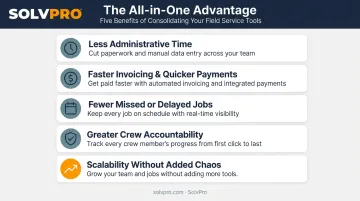
- Less administrative time: Automated data flow between scheduling, invoicing, and reporting frees office staff from re-entering the same job details three or four times
- Faster invoicing, quicker payments: FreshBooks reports that invoices with an online payment option get paid an average of 18 days faster than those without, a meaningful gap when cash flow is tight
- Fewer missed or delayed jobs: Centralized, real-time scheduling closes the communication gap between dispatch and the field
- Greater crew accountability: Real-time location and job status visibility reduces disputes over hours worked or whether a job was actually finished
- Scalability without added chaos: Adding a crew, truck, or new service line means adding users, not overhauling the whole system.
The accountability piece deserves a closer look. With SolvPro's event-based geolocation tracking, time entries, photos, and activity logs are all geo-stamped, creating an objective record of when and where work happened. That record settles arguments before they start, whether it's a crew member disputing hours or a customer questioning whether the crew actually showed up.
Types of All-in-One Platforms (Which One Fits Your Business?)
Not every "all-in-one" solution is designed for the same size or type of business. Here's how the three main categories stack up.
| Platform Type | Best Fit | Setup Time | Trade-off |
|---|---|---|---|
| Generic/enterprise suites | Businesses needing deep customization | Weeks | Steep learning curve |
| Traditional ERP systems | Manufacturing, distribution | Months | Often overkill for service businesses |
| Industry-specific/field service | Trades with crews in the field | Days or less | Fewer general-purpose features |
Traditional ERP systems, built by companies like SAP and Oracle, integrate finance, HR, manufacturing, and supply chain into one enterprise-scale system. Oracle itself describes ERP implementation as a months-long process involving software installation, data migration, and workforce training.
That's a reasonable investment for a manufacturer. For a 12-person plumbing outfit, it's usually far more system than the business needs.
Industry-specific platforms skip that overhead entirely. Dispatch, job costing, and mobile crew management come pre-configured for how trades actually operate, so there's no months-long build-out before the software becomes useful. SolvPro, for example, gets crews scheduling jobs and tracking costs within minutes, not months, because it's built specifically for field service teams.
How to Choose the Right All-in-One Platform for Your Business
Before comparing feature lists side by side, get clear on your own operation first.
- Map your current pain points. Where do jobs actually get lost? Where does invoicing stall out? Fix the specific problem, not a generic checklist.
- Prioritize fast onboarding. If a platform needs weeks of IT involvement to set up, that's a red flag for a small team without dedicated technical staff.
- Confirm integrations you already depend on. Accounting software and payment processors should sync natively, not through a workaround. Common must-haves include:
- Native QuickBooks Online sync for bookkeeping
- Built-in payment processing (like NMI) for cards and ACH
- Check the pricing structure. Transparent monthly pricing beats long-term contracts with hidden add-on fees every time. No-contract, cancel-anytime plans put the risk on the vendor, not you.
A platform that checks these four boxes will almost always outperform one with more features but a rougher setup process.
Why Service Businesses Choose SolvPro as Their All-in-One Platform
SolvPro was built specifically for growing service businesses running crews in the field, such as electrical, plumbing, HVAC, landscaping, cleaning, and excavation companies, not retrofitted from a generic business suite.
What sets it apart:
- Fully bilingual English/Spanish interface lets office staff and field crews work in whichever language fits them best, across both the mobile app and web dashboard
- Event-based geolocation tracking geo-stamps time entries and photo uploads for verifiable job records, included in every pricing tier
- QuickBooks Online sync comes standard as a core platform feature, not a paid add-on, across Starter, Growth, and Scale plans
- NMI payment processing enables on-site invoicing and same-day payment closure, built directly into the platform
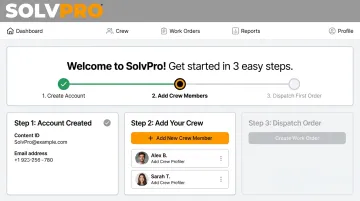
On the practical side, SolvPro gets a business up and running in under 10 minutes: create an account, add your crew and jobs, and dispatch your first work order. Every plan includes live onboarding support at no extra cost, not just the top tier, and pricing stays transparent with no surprise add-ons.
Plans start at $179/month for up to 3 users on the Starter tier, with Growth starting at $228/month for 4 users. There are no long-term contracts. Cancel anytime.
Frequently Asked Questions
What are the 5 stages of BPM?
The five stages are design, model, execute, monitor, and optimize. An all-in-one platform supports each stage by centralizing workflow design, execution, and performance tracking in one system rather than scattering them across tools.
Which BPM tool is the best?
There's no single best tool. The right choice depends on business size and industry, and purpose-built platforms for service businesses with field crews typically outperform generic BPM tools for that specific use case.
How much does an all-in-one business management platform cost?
Pricing varies widely by platform type and scale. SMB-focused platforms like SolvPro typically offer transparent monthly pricing starting at $179/month for small teams, without the enterprise-level add-on fees common in larger suites.
Do I need technical skills to set up an all-in-one platform?
Most modern SMB-focused platforms are built for non-technical users. Some, including SolvPro, offer setup in under 10 minutes plus live onboarding support included on every plan.
How long does it take to implement an all-in-one platform?
Traditional ERP implementations often take months, according to Oracle's own implementation guidance. Modern SMB platforms are dramatically faster, often taking days or even minutes to get a crew scheduling and dispatching jobs.
Does an all-in-one platform integrate with accounting software like QuickBooks?
Most modern platforms offer QuickBooks Online sync or similar integrations. SolvPro includes this as a core feature across all pricing tiers, keeping financial data consistent without double entry.