
"Green software" often gets discussed in abstract terms: data centers, algorithms, carbon-aware computing. For a landscaping crew or an electrical contractor, that framing misses the point entirely. The real value shows up in fewer wasted trips, less paperwork clogging your office, and less energy burned by systems that don't need to exist.
This article breaks down exactly how green software principles translate into measurable carbon and cost reductions for growing service businesses. No abstract theory, just practical numbers.
Key Takeaways
- Efficient routing and scheduling software cuts fuel-burning trips and idle windshield time
- Digital workflows eliminate paper waste and speed up invoicing turnaround
- Consolidated platforms reduce redundant server use and IT overhead
- Ignoring efficient software design compounds costs across fuel, paper, and staff time
- SMBs can start reducing their footprint without overhauling daily operations
What Is Green Software Development
Green software development is the practice of building tools that minimize energy and resource consumption while accomplishing just as much (or more) work. It's not about slapping an eco-label on an app.
For service businesses like the ones SolvPro serves, this shows up in four specific places:
- Scheduling and dispatch systems that reduce unnecessary driving
- Mobile field apps that replace paper forms and clipboards
- Invoicing tools that eliminate printing and mailing
- Cloud infrastructure that hosts everything efficiently instead of running on scattered, redundant servers
The Green Software Foundation frames this around a simple idea: build software that does more work with less fuel, paper, time, and energy waste. That's a business outcome, not a marketing checkbox.
Key Advantages of Green Software Development
The advantages below focus on measurable, operational impact, not vague sustainability claims. Each one ties directly to numbers your business already tracks: cost, efficiency, and job profitability.
Optimized Scheduling & Routing Cuts Fuel Emissions
Inefficient dispatch is one of the most overlooked sources of wasted fuel in field service. Double-booked jobs, backtracking between sites, and guesswork routing all add up to unnecessary miles.
Real-time visibility changes that equation. When dispatchers can see crew locations and job status as they happen, they assign the closest available crew instead of guessing which truck is free. SolvPro builds this in through event-based geolocation tracking and GPS-tracked crew dispatch, both standard features rather than paid add-ons.
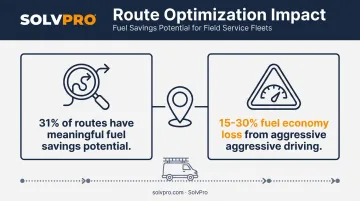
The numbers back up why this matters. A National Renewable Energy Laboratory analysis of over 111,000 miles of driving found that 31% of routes had meaningful fuel savings potential through better route selection alone. Aggressive, inefficient driving patterns can reduce fuel economy by 15-30% on top of that.
For a multi-crew operation running five trucks a day, that's not a rounding error. It's real fuel spend and real emissions.
KPIs impacted:
- Fuel cost per job
- Miles driven per crew
- Missed or delayed jobs
- On-time completion rate
When this matters most: Businesses with multiple crews covering large or dispersed service areas see the biggest gains here, especially when daily job volume is high enough that small routing errors compound fast.
Digital Workflows Eliminate Paper & Physical Waste
Every printed estimate, every clipboard work order, and every mailed invoice carries a hidden resource cost. Paper production, printing, and disposal all consume energy long before a customer ever signs anything.
Digital workflows remove that entirely. SolvPro's phase-based estimating tool generates customer-facing PDF proposals with digital signature capability, replacing the paper quote process from start to finish.
In the field, mobile work orders let crews log photos, materials, and change orders on a phone instead of a clipboard that might not survive the drive back to the office.
The financial case is just as strong as the environmental one. Industry data on e-invoicing adoption shows electronic invoicing saves $4 to $8 per unit compared to paper processing, with median internal processing costs running around $6.00 per invoice. Businesses that switch report faster payments, not just lower printing costs.
KPIs impacted:
- Invoicing turnaround time
- Printing and paper costs
- Document error and re-entry rate
When this matters most: High-volume operations handling frequent quotes, change orders, or invoices across multiple job sites see the fastest payback.
Consolidated Platforms Reduce Energy Waste from Redundant Systems
Running five disconnected tools, each with its own servers, logins, and syncing requirements, uses more collective energy than one well-built, unified platform. This is easy to overlook because the waste is invisible.
Nobody sees the extra data center draw behind a spreadsheet, a separate invoicing app, and a standalone payment processor all running in parallel.
Consolidation solves this at the infrastructure level. SolvPro brings scheduling, work orders, crew tracking, invoicing, payments, and estimates into one platform, with QuickBooks Online sync and NMI payment processing built in rather than bolted on. That means no separate accounting bridge, no third-party payment tool, and no duplicate data entry between systems.
Cloud infrastructure efficiency matters at scale, too. U.S. data centers consumed 4.4% of total U.S. electricity in 2023, according to a Lawrence Berkeley National Laboratory report, and that share is climbing. Shared, optimized cloud platforms spread that energy draw more efficiently than a patchwork of standalone tools each maintaining their own infrastructure.
KPIs impacted:
- Software licensing costs
- IT and admin overhead hours
- System downtime
- Data reconciliation errors
When this matters most: Growing businesses scaling up from spreadsheets, or juggling multiple disconnected apps across crews, see the biggest reduction in overhead here.
What Happens When Green Software Practices Are Missing
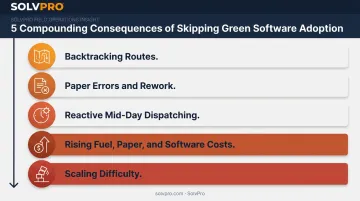
Skipping efficient, consolidated tools doesn't just mean missing out on a "nice to have." It creates compounding costs that get worse as a business grows.
Common consequences include:
- Inconsistent scheduling and backtracking that inflates fuel spend month over month
- Higher error rates in paper-based estimates and invoices, leading to rework and wasted materials
- Reactive dispatching, where crews get manually re-routed mid-day, increasing idle drive time
- Rising costs over time as fuel, paper, and redundant software subscriptions stack up
- Growing difficulty scaling, since every new crew or job multiplies existing inefficiencies rather than solving them
Instead of a single dramatic expense, these issues create a slow erosion of margin that's hard to spot until you compare fuel receipts, paper orders, and software invoices side by side.
How to Get the Most Value from Green Software Practices
Efficient software only reduces your footprint when it's used consistently across the whole team, not partially adopted by half the office.
A few practical habits make the difference:
- Review reporting regularly. Fuel usage, paper costs, and admin hours should show up in dashboards you actually check, not numbers buried in a spreadsheet nobody opens.
- Act on the data. Adjust routes when patterns show inefficiency. Digitize whatever paper touchpoints remain.
- Retire redundant tools. If a spreadsheet or standalone app is still running parallel to your main platform, it's adding overhead, not reducing it.
SolvPro's Job Costing & Analytics and Real-Time Profit Insights give business owners a consolidated view of crew performance and job profitability without digging through multiple systems. This makes ongoing review realistic instead of another chore.
Conclusion
A service business's real carbon footprint reduction comes from consistent digital habits: fewer wasted trips, less paper, and fewer redundant tools running in the background. No single software purchase delivers that on its own.
These advantages compound. A business running five crews today and fifteen next year multiplies its savings right alongside its growth, provided the systems stay consolidated instead of sprawling.
Green software adoption works best as an ongoing operational habit, not a one-time fix. Platforms like SolvPro make that habit easier to maintain by keeping scheduling, work orders, invoicing, and payments in one place from day one.
Frequently Asked Questions
What is environmental software?
Environmental software refers to tools designed to monitor, manage, or reduce environmental impact. This ranges from dedicated emissions-tracking platforms to everyday business software built with resource-efficient design in mind.
What is green software development?
It's the practice of building software that minimizes energy and resource consumption while maintaining performance. This covers everything from code efficiency to the cloud infrastructure choices behind an app.
How does using efficient business software reduce carbon emissions?
Efficient scheduling and digital paperwork cut unnecessary driving and printing, while consolidated platforms reduce redundant server use. Each of those directly lowers emissions tied to your day-to-day operations.
Can switching from paper-based processes to digital tools make a measurable environmental difference?
Yes. Eliminating printed estimates, work orders, and invoices reduces paper waste and the resources tied to producing and disposing of them, especially at scale across dozens or hundreds of jobs.
Is adopting green software practices expensive for small service businesses?
Not typically. Many all-in-one platforms, including SolvPro's Starter plan at $179/month, are affordable and set up in under 10 minutes, so businesses don't need a large IT investment to start reducing waste.
How do I know if my current software tools are wasting resources?
Look for disconnected tools, manual paperwork, frequent mid-day rerouting, and duplicate data entry between systems. These are common indicators of inefficiency worth addressing.