Choosing the wrong SLA management tool doesn't just create admin headaches. It affects contract penalties, client retention, and how much of your team's day gets eaten by manual tracking instead of actual work.
The stakes are real. PwC's 2025 Customer Experience Survey found that 52% of US consumers stopped buying from a brand after just one bad product or service experience. Missed SLAs are exactly the kind of bad experience that drives clients away.
This guide breaks down what SLA management tools actually do, the criteria that separate a good fit from a bad one, and how to match a tool to your contract complexity — not the vendor with the longest feature list.
Key Takeaways
An SLA management tool tracks whether you're keeping the commitments made to clients, flagging problems before they become breaches.
- Real-time tracking and customizable rules matter more than flashy extras
- Integrations with scheduling and accounting systems prevent duplicate work
- Consistent SLA performance directly supports client retention and renewal negotiations
- Match the tool to your contract complexity, not feature count
What Is an SLA Management Tool?
At its simplest, an SLA management tool is software that helps you monitor and report on whether you're meeting the service commitments promised to clients: response times, resolution windows, arrival windows, whatever the contract specifies.
Three types show up in most buying decisions:
- Enterprise ITSM platforms (ServiceNow, Freshservice) built around ticket-based service desks
- Standalone vendor/compliance software focused on tracking supplier or vendor performance obligations
- Field-service and business management platforms with SLA tracking built into scheduling and dispatch, rather than sold as a separate module
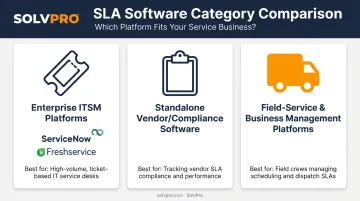
None of these categories is universally "better." The right fit depends on whether you're managing IT tickets, vendor contracts, or crews in trucks.
Real-Time Monitoring and Alerting
This is the timer function. It tracks response and resolution clocks against contract thresholds and flags jobs or tickets at risk of breaching before the deadline hits, not after. Freshservice, for example, documents deadline rules based on ticket priority and source, with automatic breach notifications built in.
Automated Reporting and Dashboards
Once data is captured, it needs to be visible. Good SLA tools generate historical compliance reports for internal reviews and as proof of performance you can hand a client during a renewal conversation. Zendesk's reporting documentation, for instance, tracks "SLA target achievement rate" as a monthly metric.
Escalation Workflows
When a job or ticket is at risk, someone needs to know immediately. Escalation workflows automatically reassign the task or notify the right person (a supervisor, dispatcher, or account manager) so accountability doesn't depend on someone noticing a problem manually.
Benefits of SLA Management Tools
Why do service businesses bother tracking this stuff instead of just doing the work? Because consistent performance is what keeps clients around.
Key benefits include:
- Fewer missed deadlines and penalties: automated tracking catches at-risk jobs before they breach, not after a client complains
- Stronger client trust and retention: Zendesk's benchmark data shows over half of consumers leave after one bad experience, and 73% leave after several
- Cuts manual admin tracking: no more spreadsheets tracking response windows across dozens of active jobs
- Clarifies crew and team accountability: everyone knows who owns which commitment and when it's due
- **Strengthens your position for contract renegotiation**: historical compliance reports give you proof when pricing the next contract
Good service still comes from the crew doing solid work, day after day. What SLA tools add is visibility: turning that consistent performance into proof you can show during a contract review.
What to Consider When Choosing the Best SLA Management Tool
Requirements look different for an IT help desk managing hundreds of tickets than for a landscaping crew juggling twelve properties a day. There's no single "best" SLA tool, only the best fit for your contracts, team size, and industry.
The following factors connect technical capability to outcomes you can actually measure: retention, compliance rate, and profitability.
Real-Time Tracking and Automated Alerts
Manual tracking (sticky notes, shared spreadsheets, memory) causes missed breach windows because nobody notices a clock running out until it's too late.
This factor directly influences your response time compliance rate and mean time to resolution. If you can't measure these today, you likely don't have real-time tracking.
Customizable SLA Rules and Multi-Tier Support
Not every request deserves the same urgency. An emergency repair and a routine maintenance visit shouldn't share a deadline. Tools need priority-based rules that separate urgent work from routine work automatically.
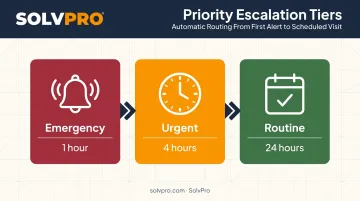
This shapes SLA compliance by priority tier and escalation accuracy, or how often the right issue gets flagged at the right urgency level.
Reporting and Analytics Depth
Dashboards and historical trend data matter for two audiences: your internal team reviewing performance, and clients who want proof you're delivering. A tool that only shows current status, with no history, can't support either conversation.
Watch SLA breach frequency and average resolution time trend over months, not just single snapshots.
Integration With Existing Systems
An SLA tool that doesn't talk to your scheduling, CRM, or accounting software (QuickBooks, for example) creates duplicate data entry and reporting delays. Every manual re-entry point is a place for errors to creep in.
This affects admin hours saved and data accuracy across systems, metrics that erode profitability if ignored.
Ease of Use and Implementation Time
A tool with a steep learning curve doesn't get adopted, and a tool nobody uses can't track anything accurately. Simplicity determines whether the tracking actually happens.
Track time-to-value and team adoption rate during rollout, not just at the sales demo.
Scalability and Transparent Pricing
Growing businesses need pricing that scales predictably. Per-agent fees, tiered feature gates, seat minimums, and surprise add-ons can turn a modest monthly tool into a far pricier one once you add a few team members.
This directly shapes cost per contract managed and total cost of ownership over multi-year use.
How SolvPro Can Help
Not every service business needs a full enterprise ITSM platform to keep its commitments straight. SolvPro was built for growing contractors, cleaning crews, and field service teams who need clear accountability without a complex rollout.
Here's what sets SolvPro apart for SMB service businesses:
- Event-based geolocation tracking: Smart Activity Tracking geo-stamps time entries, photo uploads, and activity logs, creating a verifiable record of when and where work happened
- **Real-time scheduling and work order visibility**: office staff see active, delayed, and completed jobs without calling the field, while crews see assignments and job details without calling the office
- QuickBooks Online sync: job costing, labor hours, and invoices flow into your accounting automatically once a job is marked complete
- Bilingual English/Spanish interface: the entire platform, from scheduling to invoicing to the mobile app, works in both languages for office staff and field crews
- Transparent, SMB-friendly pricing: Starter plans start at $179/month for up to 3 users, Growth at $228/month for 4 users plus $49 per additional seat, with no long-term contracts
- Setup in under 10 minutes: create an account, add your crew and jobs, and dispatch your first work order the same day, with live onboarding support included
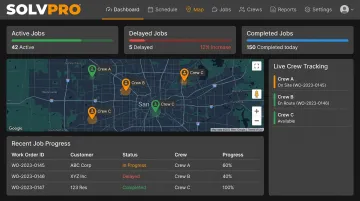
SolvPro delivers the same accountability without the extra layers: no dedicated IT admin, no multi-week implementation, just a clear, verifiable record that you're meeting the commitments you made.
Conclusion
The best SLA management tool is the one that matches your contract complexity, your team size, and the commitments you've actually made to clients, not the one with the longest feature list.
A five-person cleaning crew doesn't need vendor-performance software built for enterprise procurement teams. A 200-agent IT help desk doesn't need a field-service app. Match the tool to the job, not the other way around.
Revisit that fit periodically. As your team grows, your client base shifts, or contract terms get renegotiated, the tool that worked at 5 employees might not work at 25. Build a habit of checking whether your SLA tracking still matches your operations, not just once, but as a recurring part of running the business.
Frequently Asked Questions
What should we consider when selecting metrics for our SLA?
Choose metrics that motivate the right behavior, reflect factors your team actually controls, and are easy to collect consistently. Avoid metrics that look impressive but don't connect to what clients care about.
What are the key elements of a service level agreement with clients?
A solid SLA covers the service description, performance metrics, roles and responsibilities, remedies for breaches, and a process for reviewing and updating terms. Skipping any of these leaves room for disputes later.
What is the difference between an SLA and a KPI?
A KPI is an ongoing performance metric you track over time. An SLA is the contractual commitment built around specific KPIs, with defined remedies if targets aren't met.
How much does SLA management software typically cost?
Costs vary widely. Enterprise ITSM tools like Freshservice price per agent per month, roughly $19 to $99. All-in-one field service platforms like SolvPro bundle accountability features into flat, transparent pricing starting at $179/month.
Can small service businesses benefit from SLA management tools?
Yes. Even simple job and response tracking helps small businesses avoid missed commitments and build client trust, without the complexity or cost of enterprise-level software.
How often should an SLA management tool or process be reviewed?
Most companies review SLAs annually or biannually, according to TechTarget's service level agreement guidance, and sooner after major shifts in team size, contract terms, or client expectations.