This is the reality for a lot of growing service businesses. Scheduling lives in a group text. Job costs live in someone's head until invoicing day. And QuickBooks, while great at tracking money, was never built to track the work that generates it.
This guide breaks down why QuickBooks integration matters for crew-based businesses, the features worth prioritizing, and how to choose (and actually set up) a platform that connects the field to the office instead of adding another disconnected tool.
Key Takeaways
- Sync data two-way with QuickBooks to eliminate duplicate entry between office staff and field crews.
- The strongest integrations connect scheduling, crew time, job costing, and invoicing so everyone works from live data.
- Setup time, contract terms, and onboarding support matter just as much as the QuickBooks integration itself.
- SolvPro builds QuickBooks Online sync and payments into its core platform, not as a premium add-on.
What Is Construction Field Management Software?
Construction field management software is the operational layer that handles the day-to-day work QuickBooks was never designed for: scheduling, work orders, crew dispatch, time tracking, and job-level communication.
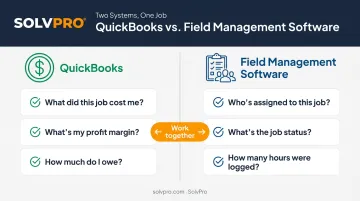
QuickBooks tracks the money. Field management software tracks the work that generates the money, meaning who's on which job, what's been completed, and what materials got used along the way.
The distinction matters:
- QuickBooks answers: What did this job cost? What's the profit margin? What's owed?
- Field management software answers: Who's assigned to this job today? Is it running late? Did the crew log their hours?
This split becomes critical as a business grows. Most electrical, plumbing, HVAC, landscaping, and general contracting businesses start out fine with spreadsheets, group texts, and standalone accounting — until a second or third crew gets added and jobs start overlapping.
That's when the cracks show up fast: missed dispatches, timesheets that don't match invoices, and job costs nobody can pin down until weeks after the work wrapped. That's usually the point where a dedicated field platform stops being optional.
Why QuickBooks Integration Matters for Construction Field Teams
The Double-Entry Problem
Without integration, office staff manually retype job details, hours, and costs from field notes into QuickBooks. It's tedious, and it adds up fast.
Intuit's 2024 survey of 630 US businesses with 10 to 99 employees found companies spend an average of 25 hours per week on manual data entry or reconciling data across apps. That's more than three full workdays lost every week, just moving information from one system to another.
Real-Time Job Costing
Two-way sync changes the timeline entirely. Labor hours and material costs logged in the field flow into QuickBooks as the job progresses, not after it closes.
That means an owner can check whether a job is still profitable while it's still running — and adjust crew size, materials, or scope before margins disappear. A $50,000 remodel running 15% over on materials shows up immediately, not during month-end reconciliation.
Faster Invoicing and Payment
When field-verified work generates an invoice without re-keying line items, the gap between job completion and invoice shrinks dramatically.
Recent QuickBooks research found 56% of US small businesses are owed money from unpaid invoices, averaging $17,500 outstanding per business. Slow invoicing at the start of the cycle only makes that problem worse.
Fewer Errors, One Source of Truth
Manual re-entry is where mismatched job costs, missed billable hours, and invoicing mistakes tend to originate. Integration keeps one version of the truth across field and office.
For accountants and bookkeepers, this setup works in their favor too. Platforms like SolvPro sync directly with QuickBooks Online, so financials stay clean for tax time and lending, without forcing anyone on the finance side to learn a new field platform.
Must-Have Features in Construction Field Management Software with QuickBooks Sync
"QuickBooks integration" isn't one feature. It's a category, and the depth of what actually syncs varies a lot between providers. Here's what to check for.
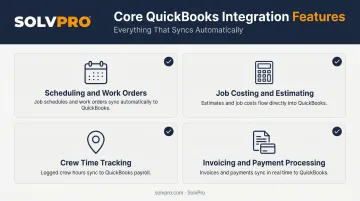
Scheduling and Work Order Management
Office staff need drag-and-drop scheduling and dispatch to assign jobs without double-booking crews or missing appointments entirely. Beyond that:
- Work orders should sync job and customer details with QuickBooks automatically.
- Invoices shouldn't require a manual customer lookup every time a job wraps.
- Customer records created in the field should sync back automatically, without creating duplicate entries in QuickBooks.
Job Costing and Estimating
Phase-based estimating lets customer-facing proposals flow directly into job records — no re-entry required. Job costing reports should then pull labor and material costs in real time. This shows profitability by job or phase while work is still happening, not just at closeout.
Crew Time Tracking and Field Accountability
GPS or event-based location tracking verifies job start and stop times, which builds accountability without turning into micromanagement. Time entries should then sync automatically to QuickBooks payroll or job costing categories, cutting out manual timesheet entry entirely.
Invoicing and Payment Processing
The best platforms let field-verified work trigger an invoice in QuickBooks, shrinking the time between job completion and invoice. Built-in payment processing, not just invoicing, matters too.
Capterra notes that accounting, ERP, and CRM integrations rank among the most common connections field service businesses look for. Payment collection is often the piece that shortens the cash flow cycle the most.
How SolvPro Brings Field Management and QuickBooks Together
A team with 50-plus years of combined experience across construction, estimating, and field service built SolvPro, so the QuickBooks sync reflects real workflows instead of feeling like a feature someone bolted on afterward.
QuickBooks Online sync is a core platform feature, included on every pricing tier, from the Starter plan at $179/month up through Growth and Scale. There's no premium add-on fee to unlock it. The integration supports:
- Labor hour and job costing data flowing into QuickBooks for payroll and profitability tracking
- One-click report exports
- Financial data staying aligned between field activity and the books
Built-in NMI payment processing pairs directly with that sync, supporting credit card, ACH, and digital payments. A crew can close out a job on-site, collect a signature, and take payment without opening a second piece of software.
A few other pieces set SolvPro apart:
- Phase-based estimating with customer-facing PDF proposals and milestone payment schedules, feeding directly into job costing accuracy.
- Event-based geolocation tracking that geo-stamps time entries and activity logs for crew accountability, without babysitting anyone's day.
- Fully bilingual English/Spanish interface across the mobile app, office dashboard, and scheduling tools, useful for teams where office staff and field crews prefer different languages.
Choosing the Right Software and Getting Started
Match software to the biggest operational gap first. Scheduling chaos, slow invoicing, and zero visibility into job costs are different problems, and chasing every feature at once usually backfires.
Before signing up, confirm:
- What syncs with QuickBooks: customers, invoices, time entries, and job costs, plus whether that sync runs one-way or two-way.
- Pricing and contract terms. Many construction platforms require custom quotes or multi-year contracts. SolvPro offers transparent SMB-friendly pricing with no long-term contract, and you can cancel anytime.
- Setup time. SolvPro is designed to be set up in under 10 minutes with live onboarding support, so a business can go from sign-up to scheduling jobs the same day.
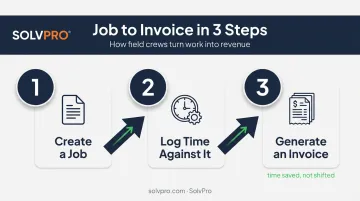
During a trial, test the full workflow end to end:
- Create a job.
- Log time against it.
- Generate an invoice.
If the integration is doing its job, that process should save time, not just move manual work from one screen to another.
Frequently Asked Questions
Is there a free trial for construction field management software that integrates with QuickBooks?
Trial length varies by provider, with some offering 14- to 30-day trials. SolvPro can be set up in under 10 minutes with no long-term contract, so you can test it with minimal risk.
What project management tool integrates with QuickBooks?
Several categories work, including all-in-one construction platforms, CRM-style tools, and dedicated field management software like SolvPro. The right choice depends on whether your priority is documentation, crew management, or estimating.
Does QuickBooks have its own field service management features?
QuickBooks offers basic job costing and QuickBooks Time for time tracking, but it lacks dedicated scheduling, dispatch, and crew accountability tools. That's why most growing businesses pair it with dedicated field management software.
How does QuickBooks Online sync with field management software actually work?
Most integrations use QuickBooks' API to sync specific data types, like customers, invoices, time entries, and job costs, either automatically or on a scheduled basis. How deep that sync goes still differs from one provider to the next.
What's the difference between construction accounting software and field management software?
Accounting software like QuickBooks manages financial records and reporting. Field management software manages day-to-day operations, from job scheduling and dispatch to crew tracking and job costing. The two are meant to work together, not replace each other.
Can construction field management software work with both QuickBooks Desktop and QuickBooks Online?
It depends on the provider. Many modern platforms, including SolvPro, are built specifically around QuickBooks Online sync, so confirm compatibility with your specific QuickBooks plan before you buy.