
By 6 p.m., someone's overtime is wrong. By Monday, a crew member is asking why their check is short.
This is the reality for thousands of construction and trade businesses still running scheduling, time tracking, and payroll as three disconnected systems. Manual entry alone can eat two full administrative days a month for a 100-worker crew, based on an average of seven minutes spent processing each timecard, according to Rhumbix's analysis of construction payroll workflows.
This guide breaks down what crew management software with payroll integration actually does, the features worth paying for, and how to pick (or avoid) the wrong platform for your crew size.
Key Takeaways
- Disconnected scheduling and payroll tools cause duplicate entries, wage errors, and slow pay cycles.
- Look for native payroll/accounting sync, not CSV exports that still require manual cleanup.
- GPS-based time tracking and job costing give real-time accountability and profit visibility.
- SMB-friendly platforms like SolvPro skip enterprise bloat while keeping payroll sync built in.
What Is Construction Crew Management Software With Payroll Integration?
This category of software combines three functions that used to live in separate tools: crew scheduling, job-site time capture, and payroll processing. Instead of exporting timesheets from one system and importing them into another, hours move automatically from the field into payroll.
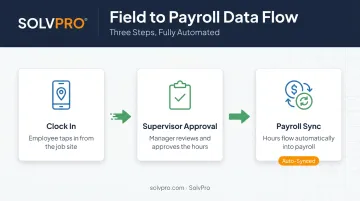
The typical data flow looks like this:
- A crew member clocks in from the job site using a mobile app.
- A supervisor reviews and approves the logged hours.
- Approved hours sync directly to payroll and accounting, no re-entry required.
How This Differs From Standard Payroll Software
Platforms like ADP or Gusto handle payroll calculations well, but they weren't built for construction field data. According to ADP's payroll guide for RUN Powered by ADP, an external time system must first generate a formatted CSV file. A user then imports that file and reviews it manually before running payroll.
That's still manual reconciliation, just moved one step downstream.
Crew management software with true payroll integration removes that step entirely. Hours captured in the field flow into payroll without a spreadsheet in between. That distinction matters more as the crew count climbs.
Why It Matters More as Crews Grow
A two-person plumbing outfit can survive on paper timesheets. A 15-crew electrical contractor working five job sites can't. As headcount and job sites multiply, manual reconciliation stops being an inconvenience and starts becoming a bottleneck that delays every paycheck and every invoice behind it.
Must-Have Features for Payroll-Integrated Crew Management Software
Not every tool marketed as "crew management" actually integrates with payroll. Many simply export a CSV file, leaving your office to clean up formatting errors before payroll can run. That's not integration. That's an extra step.
Here's what separates a real payroll-integrated platform from a glorified spreadsheet exporter.
Scheduling & Crew Dispatch
Drag-and-drop scheduling with real-time crew assignment prevents the classic double-booking problem, where two supervisors both think they've got the same crew covered. A visual calendar with day, week, and crew views lets dispatchers see availability instantly instead of calling around to confirm who's free.
Time Tracking & GPS-Based Accountability
Event-based geolocation, meaning location data captured at clock-in, clock-out, and other key moments, verifies that a crew member was physically on-site when they logged hours. The system logs a location stamp at each action instead of tracking crews continuously. It builds trust between office and field without turning time tracking into surveillance.
Payroll & Accounting Sync
This is the feature that separates real integration from busywork. A platform that natively syncs with QuickBooks Online eliminates the double entry that comes from exporting and re-importing files. SolvPro, for example, builds QuickBooks Online sync and NMI payment processing directly into the core platform, included at every pricing tier with no add-on fee.
Job Costing & Profitability Visibility
Tying labor hours to specific jobs or phases lets owners see whether a job is profitable before it wraps, not after the invoice goes out. This matters more than most owners realize.
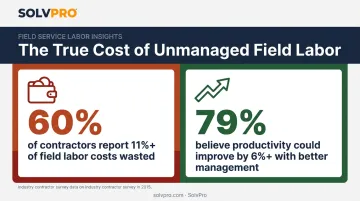
FMI research found that 60% of contractors report 11% or more of field labor costs are wasted, according to FMI's Construction Labor Productivity report. The same report found that 79% of contractors believe they could improve labor productivity by 6% or more with better management. Real-time job costing catches that waste while there's still time to act.
Mobile Access & Bilingual Support
Field crews need something simple enough to use with gloves on and one hand free. For many construction teams, that also means a genuinely bilingual interface. English/Spanish support, covering the mobile app, scheduling, and customer communications, isn't a nice-to-have. It's often the difference between a crew adopting the software and quietly going back to paper.
Key Benefits of Combining Crew Management and Payroll
When scheduling, time tracking, and payroll live in one connected system, the benefits show up across the entire operation, not just in the back office.
- Faster invoicing and quicker payments: Approved hours and job data flow directly into invoicing without the usual lag of paperwork reaching the office, so jobs get billed the same day they're completed instead of days or weeks later.
- Fewer missed or delayed jobs: Real-time scheduling visibility means dispatchers can see who's available before assigning work, cutting down on no-shows and last-minute scrambling to cover a job.
- More field accountability: Geolocation-tagged time entries and digital timesheets create a clear record of who worked where and when, so there's no "he said, she said" when it comes to hours worked.
- Less admin time for the office: Archer Mechanical, a Salt Lake City mechanical and plumbing contractor, cut payroll processing from 16 hours to 4 hours after digitizing time tracking, a 75% reduction that saved an estimated $11,856 annually, according to ForConstructionPros' coverage of construction digitization.
- Clear job profitability visibility: Real-time labor cost tracking against budget lets owners catch overruns mid-job, when there's still room to adjust staffing or scope, rather than discovering the loss after the final invoice.
How to Choose the Right Payroll-Integrated Platform for Your Crew
Not every platform that claims payroll integration delivers it the same way. Before signing up, run through this checklist.
- Assess integration depth. Confirm the platform natively syncs with your accounting and payment systems. A CSV export doesn't fix the manual entry problem; it just relocates it.
- Evaluate onboarding support. Look for live, human onboarding, not just a knowledge base or chatbot. Crews with varying tech comfort need real guidance, not a 40-page PDF.
- Check pricing transparency. Favor SMB-friendly pricing with no long-term contracts or hidden fees. Enterprise platforms often require custom quotes and implementation timelines up to six months, according to Software Advice's guide to field service pricing models.
Why Growing Service Businesses Choose SolvPro
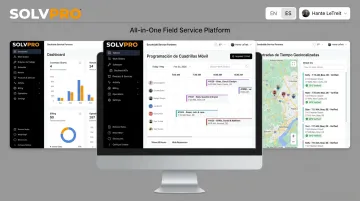
SolvPro is an all-in-one field service platform built specifically for growing crews, not enterprise construction firms with dedicated IT departments. Scheduling, work orders, crew tracking, and payments all live in one system, with QuickBooks Online sync and NMI payment processing built into the core platform at every tier.
A few things set it apart in practice:
- Fully bilingual English/Spanish interface covering the office dashboard, the mobile app, crew scheduling, and customer communications, not just a translated login screen.
- Phase-based estimating that breaks quotes into project stages with customer-facing PDF proposals, digital signatures, and milestone payment schedules.
- Event-based geolocation tracking that geo-stamps time entries, photos, and activity logs for a verifiable record of when and where work happened.
SolvPro was built by a team with more than 50 years of combined experience. That includes Technical Sales Specialist Kai Stanton, who spent 17 years as a project manager, estimator, and installer in construction before joining the platform.
That background shows up in the details: setup takes under 10 minutes, live onboarding support is included at every tier, and there are no long-term contracts.
Curious how it fits your crew? You can book a free demo and discovery consultation to see the workflow firsthand.
Common Mistakes to Avoid When Switching Systems
Switching platforms is your chance to fix the manual entry problem for good. Avoid these common traps to make the switch pay off.
- Choosing a scheduling-only tool without real payroll integration just relocates the reconciliation headache instead of solving it. Ask specifically how hours move from field to payroll before you buy.
- Ignoring field usability and language accessibility causes crews to abandon the tool immediately. If your team is bilingual, your software needs to be too.
- Enterprise-level overkill works against you. Platforms built for general contractors running $10 million-plus in annual volume often carry complexity your crew will never touch, plus a price tag to match. A simpler, SMB-priced platform usually covers the actual workflow better.
Frequently Asked Questions
What is construction crew management software with payroll integration?
It's a platform combining scheduling, time tracking, and job management with payroll processing or syncing. Approved field hours flow directly into pay runs without manual re-entry.
How does payroll integration benefit construction crews specifically?
It reduces errors from manual timesheet entry, speeds up pay cycles, and gives supervisors real-time labor cost data tied to specific jobs as work happens.
Can construction crew management software integrate with QuickBooks Online?
Yes. Many modern platforms, including SolvPro, offer native QuickBooks Online syncing so invoicing and job costing stay accurate without duplicate entry.
Is payroll-integrated crew management software expensive for small construction businesses?
Pricing varies widely. Small business-focused platforms like SolvPro offer transparent, no-contract pricing starting around $179 a month, while enterprise systems often require custom quotes and lengthy implementations.
How long does it take to set up a payroll-integrated crew management system?
It depends on the platform's complexity. Small business-built tools like SolvPro can be operational in under 10 minutes with guided, live onboarding support.
Does crew management software support bilingual crews?
Not all of it does. Bilingual English/Spanish support, like SolvPro's full interface and mobile app translation, improves accuracy and adoption across mixed-language field crews.