Introduction
Your electrician left the shop at 7 a.m. Did she arrive at the Thompson job by 8? Is she still there, or already headed to the next call?
For growing service businesses, that blind spot creates real costs: missed jobs, payroll disputes over unverified hours, and invoices that go out days late because nobody in the office knows a job wrapped up.
Field crews don't sit at desks where a manager can glance over and check progress. They're spread across job sites, driving between calls, often working solo. GPS tracking apps close that gap, giving office staff a real-time view of where crews are and what they've finished, without a single check-in call.
The pressure to get this right keeps building. Electrician employment is projected to grow 9% from 2024 to 2034, with roughly 81,000 openings a year, according to the Bureau of Labor Statistics. More field workers means more crews to keep visible.
This guide breaks down six leading GPS tracking apps and when a standalone app stops being enough.
TL;DR
- GPS tracking apps show crew location, hours, and job status in real time.
- Top options pair live tracking with geofencing, offline caching, and payroll sync.
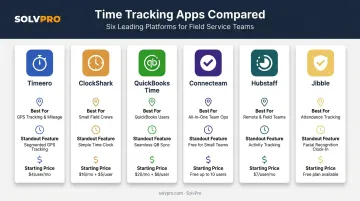
- Timeero, ClockShark, QuickBooks Time, Connecteam, Hubstaff, and Jibble each target a different priority.
- Businesses managing full crews and job costs may need a broader platform like SolvPro.
Overview of GPS Tracking Apps in Mobile Workforce Management
A GPS tracking app runs on a worker's smartphone, capturing location through the device's own GPS chip rather than a dedicated hardware unit. That's the key difference from a personal GPS device or a fleet tracker: no unit to install, no vehicle wiring, just an app the crew already carries.
For industries built on distributed crews — construction, HVAC, electrical, plumbing, landscaping, janitorial, excavation — that distinction matters. There's no central location to clock in at. The job site changes daily, sometimes hourly.
Software Advice's 2026 field service buyer report, based on nearly 7,800 advisor interviews over a 12-month span, found that 49% of current field service software users rank mobile access among their top features. Mobile access and location visibility increasingly travel together for crews who rarely see an office.
The list below ranks six apps built for exactly this use case, based on tracking accuracy, geofencing flexibility, offline reliability, and pricing transparency. A long feature list means little if the app drains a phone's battery by noon or logs nothing once cell service drops.
Top GPS Tracking Apps for Mobile Workforce Management
Selection came down to five factors:
- Location accuracy and update frequency
- Geofencing flexibility for job site boundaries
- Offline functionality when signal drops
- Ease of use for non-technical crews
- Transparent pricing without hidden add-ons
Timeero
Timeero is built for field and mobile teams that need more than a pin on a map, with route history, mileage logs, and offline capture that doesn't drop data in a dead zone.
What sets it apart:
- Breadcrumb route replay shows exactly where a worker traveled, not just start and end points
- Auto clock-in/out triggers when a crew member crosses a job site geofence, cutting manual timesheet entry
- Offline tracking stores location, time, and mileage locally, then syncs automatically once the device reconnects
| Category | Details |
|---|---|
| Best For | Field and mobile crews needing detailed route history and mileage tracking |
| Key Features | Route replay, geofencing, auto clock-in/out, offline tracking, mileage logging |
| Starting Price | $5/user/month billed annually ($6 monthly); 14-day free trial |
ClockShark
ClockShark leans into construction and trade crews who need GPS tied directly to job costs, not just attendance.
Differentiators:
- Require GPS to Clock In blocks time entries from workers who've disabled location services
- The "Who's Working Now" map shows every clocked-in crew member and their recorded location in real time
- Job costing and timesheet approval tools connect location data straight to project budgets
- Offline entries cache locally, though crews need to manually tap sync once signal returns
| Category | Details |
|---|---|
| Best For | Construction and trade businesses tying GPS to job costing |
| Key Features | GPS + geofencing, location-services enforcement, job costing, timesheet approvals |
| Starting Price | $40/month base + $9/user/month; 14-day free trial |
QuickBooks Time (QuickBooks Workforce)
QuickBooks Time makes sense for businesses already running payroll or invoicing through QuickBooks Online that want GPS data flowing straight into it.
Differentiators:
- Native sync with QuickBooks Online payroll converts tracked hours into pay runs with no re-entry
- Geofence radius is customizable per job site, and mileage tracking is included — though both sit on the Elite tier, not the entry plan
- The real-time map shows who's clocked in and where, updating continuously through the shift
| Category | Details |
|---|---|
| Best For | Businesses already using QuickBooks for payroll or invoicing |
| Key Features | Real-time GPS map, geofencing (Elite), mileage tracking (Elite), payroll sync |
| Starting Price | Premium: $20/month base + $10/user/month; requires a QuickBooks Online subscription |
Connecteam
Connecteam positions itself as an all-in-one workforce app, and its real-time tracking holds up well against dedicated GPS tools.
Differentiators:
- Live GPS breadcrumbs track movement continuously while a worker is clocked in
- NFC tags verify physical presence at a location, beyond what GPS alone confirms
- Scheduling, team chat, and attendance reporting live in the same app, so location data isn't siloed
| Category | Details |
|---|---|
| Best For | Businesses wanting reliable location tracking bundled with scheduling and team chat |
| Key Features | Real-time GPS breadcrumbs, geofencing, NFC verification, attendance reporting |
| Starting Price | Free for up to 10 users; paid plans start at $29/month for the first 30 users, billed annually |
Hubstaff
Hubstaff was built for remote and hybrid teams, but it works for field crews who need location data paired with activity insight rather than just a dot on a map.
Differentiators:
- Geofenced auto clock-in starts and stops timers automatically at job site boundaries
- Desktop activity monitoring tracks app and URL use, idle time, and optional blurred screenshots for office staff
- Location tracking runs as the Locations add-on, not a default feature on every plan
| Category | Details |
|---|---|
| Best For | Remote/hybrid teams needing both location and productivity insights |
| Key Features | Geofenced clock-in, activity monitoring, flexible time tracking |
| Starting Price | $4.99/user/month annually ($7 monthly); Locations add-on starts at $3.33/seat/month |
Jibble
Jibble is the budget play here — a free-forever plan with unlimited users, plus GPS and attendance controls most competitors charge extra for.
Differentiators:
- Facial recognition verifies identity at clock-in, on a personal phone or a shared kiosk
- Geofencing and live location tracking are both included on the free tier
- Kiosk mode supports NFC tags and PINs for crews sharing a single device
| Category | Details |
|---|---|
| Best For | Small teams or startups needing basic GPS tracking on a budget |
| Key Features | Facial recognition, geofencing, live location tab, kiosk NFC clock-ins |
| Starting Price | Free forever for unlimited users; paid tier pricing varies by region |
How We Chose the Best GPS Tracking Apps
Most comparison lists rank GPS apps by feature count alone. That misses what actually breaks in the field.
Battery life drains from constant location pinging, coverage gaps make apps go silent, and clunky interfaces make crew leads quit using them by week two.
We weighted five factors instead:
- Tracking accuracy and frequency: how often the app records location, and how precise those points are
- Geofencing flexibility: whether radius size and job-site boundaries are easy to customize
- Offline capability: whether the app captures data with no signal and syncs cleanly once reconnected
- Integrations: payroll and accounting sync, since location data means little if it doesn't connect to hours paid
- Pricing transparency: base fees, per-user costs, and whether GPS itself is a paid add-on or baked in
An app that nails the feature checklist but fails on any of these five tends to get abandoned by field crews within a month.
Beyond GPS Tracking: Why Growing Service Businesses Need More Than Location Data
Standalone GPS apps answer one question well: where is my crew? They don't answer what happens next. Scheduling lives in one tool, work orders in another, invoicing in a third, and job profitability gets calculated after the fact, if at all.
That disconnect is what SolvPro was built to close. It's an all-in-one field service management platform for growing crews in construction, HVAC, electrical, plumbing, landscaping, and cleaning. It treats location data as one piece of a bigger operational picture rather than the whole product.
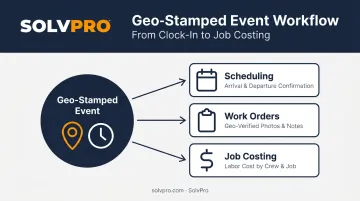
SolvPro's approach to geolocation is event-based rather than a constant location stream. Every time a crew member clocks in, uploads a job site photo, or logs an activity note, that action gets geo-stamped automatically. The stamp captures where and when the work happened, tied directly to that job. That data feeds three connected modules:
- Scheduling: GPS-tracked crew dispatch confirms arrival and departure at job sites in real time, included on every plan
- Work orders: geo-verified photos, notes, and status updates build a complete record of job execution from dispatch to completion
- Job costing: geo-stamped time entries calculate labor costs by crew member and job, feeding directly into profitability reports
A few differentiators worth flagging for anyone comparing options:
- QuickBooks Online sync is built into every tier, converting tracked hours into payroll-ready data with no manual re-entry
- A fully bilingual English/Spanish interface spans the office dashboard and field crew app, key for teams where crew leads and office staff don't share a language
- Setup takes under 10 minutes, with no long-term contract and no credit card required to start a free trial
For a business already juggling separate tools just to track where a crew went and what a job cost, that consolidation tends to matter more than any single GPS feature.
Conclusion
The right GPS tracking app is the one that matches how your crew actually works, not the one with the longest feature list. A crew running solo electrical service calls across a spread-out territory needs different offline reliability than a landscaping team working fixed routes with steady signal.
Before committing, run the free trial. Test how the app behaves when a crew member's phone drops signal mid-shift. Check whether geofencing setup takes five minutes or fifty. Confirm the pricing page matches what actually lands on the invoice.
If location tracking is the only gap in your operation, one of the six apps above will likely solve it. If scheduling, work orders, and invoicing are still scattered across separate tools, a platform built to handle all of it together makes more sense.
SolvPro combines crew tracking with scheduling, work orders, and invoicing in one platform. Start a free trial and see what it looks like without the chaos.
Frequently Asked Questions
What real-time location tracking apps do employers use to monitor a mobile workforce?
Most employers use smartphone-based apps like Timeero, ClockShark, and Connecteam rather than dedicated hardware. These apps rely on the phone's built-in GPS chip and typically track only during clocked-in hours.
Which tracking devices provide real-time location for mobile workers?
Dedicated GPS beacons and trackers still exist, but they're usually reserved for vehicles, trailers, and high-value equipment rather than individual workers. For tracking people, most companies rely on the smartphone apps covered above instead of standalone hardware.
Is it legal to track employees' GPS location during work hours?
Generally yes, when tracking serves a legitimate business purpose and employees get clear advance notice, according to SHRM. Rules vary by state, so check local requirements before rolling out a tracking policy.
How much do GPS tracking apps for mobile workforce management typically cost?
Most apps charge a per-user monthly fee, sometimes with a flat base fee added on top. Entry pricing across major apps ranges from roughly $5 to $10 per user monthly, with some GPS features gated behind higher tiers.
Do GPS tracking apps work without an internet connection?
It depends on the app. Timeero, QuickBooks Time, and Jibble all cache location data locally and sync automatically once reconnected, while ClockShark requires a manual sync tap after signal returns.
What's the difference between a standalone GPS tracking app and an all-in-one platform like SolvPro?
Standalone apps focus purely on location and time data. Platforms like SolvPro combine that tracking with scheduling, work orders, and invoicing, so location data feeds directly into job costing and profitability.