Labor sits at the top of the cost list for most small businesses. Forbes Advisor's 2026 small-business roundup found labor represents roughly 70% of typical business spending — a scope that spans industries beyond field service, but the message lands the same way for shop owners: this is the cost you can't afford to guess at.
Plenty of shops already run time-tracking software daily without fully understanding what it's doing behind the scenes. This guide walks through exactly how that software tracks labor costs, stage by stage, not just a list of buttons.
Key Takeaways
- Labor cost tracking follows four stages: time capture, job allocation, monitoring, and reporting.
- Software ties hours to jobs and pay rates, not just attendance, revealing true profitability.
- Geolocation clock-ins cut the guesswork and disputes common with paper timesheets.
- Accurate tracking affects pricing accuracy, payroll speed, and invoice timing.
What Is Labor Cost Tracking in Shop Management Software?
Labor cost tracking is the process software uses to record hours worked, connect those hours to a specific job or crew, and calculate what that labor actually cost the business. It's a different job than a basic time clock.
A time clock answers one question: who worked, and for how long? Labor cost tracking goes further. It answers whether the job made money.
Manual timesheets and spreadsheets create three recurring problems:
- Buddy-punching and inflated hours: nobody's confirming where the work actually happened
- Delayed data: office staff often don't see hours until days after the job wraps
- No job-level detail: hours land on a generic weekly total instead of a specific job
Why It Still Matters in 2026
AI-driven scheduling tools get a lot of attention, but they don't replace this function. Payroll runs on hours worked. Job costing runs on hours allocated to a job. No amount of scheduling automation fixes bad time data feeding into either one.
Hourly vs. Flat-Rate Logic
Tracking logic shifts depending on pay structure:
- Hourly wage crews (common in HVAC, electrical, plumbing, landscaping): software multiplies captured hours by a stored pay rate
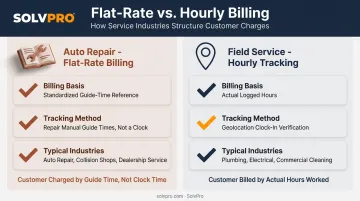
- Flat-rate or piece-rate models (common in auto repair): the job is billed against a standard guide time rather than actual clock hours
Field service platforms like SolvPro are built around the hourly, job-based model most trade businesses use day to day.
How Does Shop Management Software Track Labor Costs?
The process isn't one feature — it's a sequence. Time gets captured, allocated to a job, monitored while work is in progress, then rolled into reports. Miss a step, and the whole chain produces bad numbers.
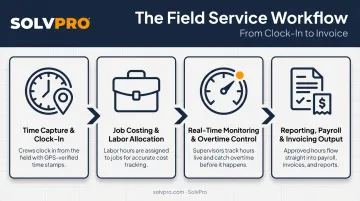
Time Capture & Clock-In
Everything starts the moment a crew member clocks in. Depending on the platform, that can happen a few ways:
- Manual tap-in through a mobile app
- Live timers that run in real time while work is active
- Event-based geolocation tracking, where a location stamp attaches automatically to the time entry
The common failure point here is the forgotten clock-in: someone starts work but doesn't log it for twenty minutes, or forgets to clock out at all. This is exactly why geo-stamped tracking matters.
SolvPro's Smart Activity Tracking attaches GPS coordinates to time entries, photos, and job actions the moment they happen, creating a location-verified record without asking the crew to do anything extra. It's accountability built into the action itself, not a separate step someone has to remember.
Job Costing & Labor Allocation
Once hours are captured, they need a home. Rather than dumping time into one general weekly total, the software assigns those hours to a specific job, and in more advanced setups, to a specific phase or task within that job.
Here's what happens next, in plain terms:
- Hours get logged against the job record, tied to the crew member who worked it
- Pay rate gets applied: an hourly wage for most trades, or a flat-rate/labor matrix calculation for trades like electrical and plumbing that bill by standardized job time rather than clock time
- Real-time labor cost per job appears, updating as more hours come in
This is the step that turns a timesheet into job costing. A contractor using phase-based estimating, for example, can see labor stacking up against a specific phase of a project, not just the job as a whole, which matters when a job runs across multiple crews or weeks.
The payoff: a manager can see mid-job whether labor is tracking under or over budget, instead of finding out after the invoice goes out.
Real-Time Monitoring & Overtime Control
Jobs rarely go exactly as estimated. A crew hits an unexpected repair, weather pushes the timeline, or someone's approaching 40 hours for the week. Real-time monitoring is how the software keeps pace with that.
Typical monitoring mechanisms include:
- Budget-vs-actual dashboards comparing estimated hours to hours actually logged
- Overtime proximity flags as an employee's weekly hours climb toward the threshold
- Live cost tracking that updates as new time entries come in
Catching a labor overrun while the job is still running is the difference between adjusting staffing on the spot and discovering an unprofitable job three weeks later. That gap between mid-job visibility and after-the-fact discovery is where a lot of margin disappears.
Reporting, Payroll & Invoicing Output
Every stage above feeds into the final output: reports that turn raw hours into something payroll and accounting can actually use.
What typically comes out the other end:
- Labor cost reports broken down by job, crew, or individual employee
- Total hours formatted and ready for payroll processing
- Labor costs pulled directly into customer invoices, no re-entry required
SolvPro's setup illustrates the pattern well. Because time entries, photos, and job costs live inside the same digital work order, labor hours captured in the field flow straight into a customizable invoice, with no reconciling two separate systems.
The platform's QuickBooks Online sync then carries labor hours and job costs into accounting without double data entry. NMI payment processing lets customers pay that invoice on the spot, by card or ACH, through a branded payment portal.
The upside of this kind of automation isn't theoretical. Analog Devices, after automating parts of its payroll process, reported saving more than 2,700 hours annually while hitting 99.98% payroll accuracy across its operations. That's a corporate case study, not a field-service benchmark, but it shows what happens when manual re-entry gets removed from the payroll chain.
Why Accurate Labor Cost Tracking Matters for Shop Profitability
Labor is the single largest controllable expense most service shops carry. Small tracking errors don't stay small — they compound across every job on the schedule, every week.
There's risk on both sides of this:
- Undercharging — labor time gets missed or underlogged, and the invoice doesn't reflect what the job actually cost
- Overpaying — hours go unverified, and crews get paid for time that was never confirmed against a job
Neither mistake shows up immediately. They show up in the margin, months later, when someone finally asks why a "profitable" job type keeps underperforming.
A telling data point here: Software Advice's analysis of field-service software buyers found 36% of small-to-midsize shops were still relying on phone calls, spreadsheets, or paper forms to manage their work. Of those, 52% cited slow work as the direct consequence. Manual tracking isn't just old-fashioned. It's measurably slower.
Shops running integrated time tracking and job costing (instead of spreadsheets bolted onto a time clock) typically get two things spreadsheets can't offer:
- Faster invoicing, since labor data is already sitting inside the job record
- Clear visibility into which specific jobs and crews are actually making money
SolvPro's time tracking and job costing tools are built to close that exact gap for growing multi-crew operations.
Where Shop Management Software Labor Tracking Is Used
Labor cost tracking earns its keep fastest in businesses juggling multiple crews, multiple job sites, or complex billing structures. A one-person operation with a single daily job doesn't need much. A five-crew electrical contractor running three job sites at once does.
It performs best in conditions like:
- Multi-crew operations where several teams are logging hours simultaneously
- Phase-billed or milestone-based jobs, where labor needs to map to a specific stage of work
- Businesses juggling several active job sites on the same day
Industries where this shows up most:
- Field service trades: HVAC, plumbing, electrical, landscaping
- General contracting and excavation: project-based work with phases and milestones
- Commercial cleaning and janitorial: recurring jobs, shift-based scheduling, proof-of-completion needs
Auto repair sits slightly apart. Rather than tracking clock hours against a job, many shops bill against a flat-rate manual, a standardized guide listing average industry hours for a given repair.
AAA notes that customer labor rates nationally range from under $100 to over $200 per hour, with the guide time, not the technician's actual clock time, driving the customer charge.
Field service crews, by contrast, lean on geolocation-based hourly tracking tied directly to the job site, which is the model most trade businesses actually run on.
Conclusion
Labor cost tracking works as a workflow, not a single dashboard feature: hours get captured, allocated to a job, watched in real time, then turned into a report someone can actually act on. Skip a stage, and the numbers coming out the other end aren't trustworthy.
Shops that understand this sequence make better calls. They price jobs closer to reality, catch overruns while there's still time to fix them, and get invoices out the door faster instead of chasing down hours after the fact. SolvPro builds this workflow directly into its job costing tools.
Frequently Asked Questions
How much does shop management software cost?
Pricing typically ranges from low monthly per-user fees for small crews to higher tiered plans as teams grow. SolvPro, for example, starts at $179/month for up to 3 users with no long-term contract required.
How much do most service businesses charge for labor?
erase a month's profit margin, regardless of company size.